
@beastjs/use-sound
v6.0.0
Published
An Octane hook for playing sound effects
Downloads
110

Maintainers
 re-up-hq
Readme
useSound
An Octane Hook for Sound Effects
The web needs more (tasteful) sounds!
- 👂 Lets your website communicate using 2 human senses instead of 1
- 🔥 Declarative Hooks API
- ⚡️ Tiny — the hook is a few hundred bytes; Howler (~10kb gzip) loads async
- ✨ Built with TypeScript
- 🦴 Authored in BTSX-friendly TypeScript source, compiled by your app's Octane compiler
- 🗣 Uses a powerful, battle-tested audio utility: Howler.js



This is the Octane port of Josh Comeau's use-sound. The API is unchanged; only the framework underneath it is. For React, use the original package.
Status
The hook itself is a direct port: same options, same return tuple, same Howler
escape hatches. What changed is the packaging — @beastjs/use-sound now ships its
TypeScript source and expects the Octane compiler in your build, the way
@octanejs/* packages do.
Coming from the React version
| | React use-sound | this package |
| --- | --- | --- |
| Peer dependency | react >= 16.8 | octane ^0.2.0 \|\| ^0.3.0 |
| Entry point | dist/use-sound.esm.js | src/index.ts, compiled by your app |
| Build requirement | any bundler | a bundler running the Octane compiler |
| Hook API | — | unchanged |
Call sites do not change:
const [play, { stop, pause, sound, duration }] = useSound(src, options);Only the hooks you write around it do — useState and friends now come from
octane instead of react.
Installation
bun add @beastjs/use-sound octaneoctane is a peer dependency (^0.2.0 || ^0.3.0). howler and @types/howler
come along as direct dependencies — nothing extra to install for TypeScript.
The package ships source, not a bundle
@beastjs/use-sound has no dist/. Its entry point is src/index.ts, and your app's
Octane compiler integration compiles it along with your own modules. That is how
Octane assigns stable hook slots and infers dependencies across package
boundaries, and it is why the package declares octane as a peer dependency:
the compiler treats such packages as Octane source and excludes them from Vite's
dependency pre-bundling automatically.
In practice this means your build already needs one of the Octane integrations:
// vite.config.ts
import { defineConfig } from 'vite';
import { beastOctane } from 'beast-tsrx/vite';

export default defineConfig({
  plugins: [beastOctane()],
});beast-tsrx/rspack, beast-tsrx/rsbuild, or Octane's own plugin work the same
way. A bundler with no Octane compiler in the pipeline will not run this package
correctly.
Demo
The playground in this repository has a demo per feature — click, hover, rising pitch, sprites, multiple sources, and Howler events:
bun install
bun run dev
The original React tutorial is still the best place to read about finding and preparing sound effects.
Examples
Play sound on click
import useSound from "@beastjs/use-sound"

setup const [play] = useSound("/sounds/boop.mp3")

button(type="button" onClick={() => play()}) Boop!
Playing on hover
This demo only plays the sound while hovering over an element. The sound stops when the mouse leaves the element:
NOTE: Many browsers disable sounds until the user has clicked somewhere on the page. If you're not hearing anything with this example, try clicking anywhere and trying again.
import useSound from "@beastjs/use-sound"

setup const [play, { stop }] = useSound("/sounds/fanfare.mp3")

button(type="button" onMouseEnter={() => play()} onMouseLeave={() => stop()})
  span(role="img" aria-label="trumpet") 🎺
Increase pitch on every click
With the playbackRate option, you can change the speed/pitch of the sample.
This example plays a sound and makes it 10% faster each time:
import { useState } from "octane"
import useSound from "@beastjs/use-sound"

setup
  const [playbackRate, setPlaybackRate] = useState(0.75)

  const [play] = useSound("/sounds/glug.mp3", {
    playbackRate,
    // `interrupt` ensures that if the sound starts again before it's
    // ended, it will truncate it. Otherwise, the sound can overlap.
    interrupt: true,
  })

  const handleClick = () => {
    setPlaybackRate(playbackRate + 0.1)
    play()
  }

button(type="button" onClick={handleClick})
  span(role="img" aria-label="Person with lines near mouth") 🗣
The hook is ordinary TypeScript, so it works the same in a .tsrx component or
in a custom hook of your own — BTSX is just the authoring layer.
NOTE: This example won’t work if you’re using sprites (defined below). The
playbackRateoption is only reactive when using a single sound.
Usage Notes
Importing/sourcing audio files
useSound requires a path to an audio file. With Vite there are two ways to get
one:
Drop the file in public/ and use a root-relative string path:
const [play] = useSound('/sounds/boop.mp3');Or import it from your source tree, which gives you a hashed, bundled URL:
import boopSfx from './sounds/boop.mp3';

const [play] = useSound(boopSfx);
The playground in this repository uses the first approach; both work.
⚠️ Async sound paths? ⚠️ If the URL to your audio file is loaded asynchronously, you might run into some problems. This probably isn't the right package for that usecase.
No sounds immediately after load
For the user's sake, browsers don't allow websites to produce sound until the user has interacted with them (eg. by clicking on something). No sound will be produced until the user clicks, taps, or triggers something.
useSound takes advantage of this: because we know that sounds won't be needed
immediately on-load, we can lazy-load a third-party dependency.
useSound adds very little to your bundle, and asynchronously fetches Howler
after load, which clocks in around 9kb gzip.
If the user does happen to click with something that makes noise before this dependency has been loaded and fetched, it will be a no-op (everything will still work, but no sound effect will play). In my experience this is exceedingly rare.
Reactive configuration
Consider the following snippet of code:
const [playbackRate, setPlaybackRate] = useState(0.75);

const [play] = useSound('/path/to/sound', { playbackRate });
playbackRate doesn't just serve as an initial value for the sound effect. If
playbackRate changes, the sound will immediately begin playing at a new rate.
This is true for all options passed to the useSound hook.
Server rendering
Nothing audio-related happens on the server. The Howl instance is created
inside an effect, and Octane does not run effects while server rendering, so
sound and duration are null in server output and Howler is only fetched
after hydration. No browser-only guard is needed around the hook.
API Documentation
The useSound hook takes two arguments:
- A URL to the sound that it will load
- A config object (
HookOptions)
It produces an array with two values:
- A function you can call to trigger the sound
- An object with additional data and controls (
ExposedData)
When calling the function to play the sound, you can pass it a set of options
(PlayOptions).
Let's go through each of these in turn.
HookOptions
When calling useSound, you can pass it a variety of options:
| Name | Value | | ------------ | --------- | | volume | number | | playbackRate | number | | interrupt | boolean | | soundEnabled | boolean | | sprite | SpriteMap | | [delegated] | — |
volumeis a number from0to1, where1is full volume and0is comletely muted.playbackRateis a number from0.5to4. It can be used to slow down or speed up the sample. Like a turntable, changes to speed also affect pitch.interruptspecifies whether or not the sound should be able to "overlap" if theplayfunction is called again before the sound has ended.soundEnabledallows you to pass a value (typically from context or a store) to mute all sounds. Note that this can be overridden in thePlayOptions, see belowspriteallows you to use a singleuseSoundhook for multiple sound effects. See “Sprites” below.
[delegated] refers to the fact that any additional argument you pass in HookOptions will be forwarded to the Howl constructor. See "Escape hatches" below for more information.
NOTE: If a
spriteis passed,playbackRatewill not be reactive. This means that only the initial value forplaybackRatewill be used.
The play function
When calling the hook, you get back a play function as the first item in the tuple:
const [play] = useSound('/meow.mp3');
//      ^ What we're talking about
You can call this function without any arguments when you want to trigger the sound. You can also call it with a PlayOptions object:
| Name | Value | | ----------------- | ------- | | id | string | | forceSoundEnabled | boolean | | playbackRate | number |
idis used for sprite identification. See “Sprites” below.forceSoundEnabledallows you to override thesoundEnabledboolean passed toHookOptions. You generally never want to do this. The only exception I've found: triggering a sound on the "Mute" button.playbackRateis another way you can set a new playback rate, same as inHookOptions. In general you should prefer to do it throughHookOptions, this is an escape hatch.
ExposedData
The hook produces a tuple with 2 options, the play function and an ExposedData object:
const [play, exposedData] = useSound('/meow.mp3');
//                ^ What we're talking about
| Name | Value | | -------- | -------------------------------- | | stop | function ((id?: string) => void) | | pause | function ((id?: string) => void) | | duration | number (or null) | | sound | Howl (or null) |
stopis a function you can use to pre-emptively halt the sound. Called with no argument it stops every sound on the instance; anidstops one playing sound.pauseis likestop, except it can be resumed from the same point. Unless you know you'll want to resume, you should usestop;pausehogs resources, since it expects to be resumed at some point.durationis the length of the sample, in milliseconds. It will benulluntil the sample has been loaded. Note that for sprites, it's the length of the entire file.soundis an escape hatch. It grants you access to the underlyingHowlinstance. See the Howler documentation to learn more about how to use it. Note that this will benullfor the first few moments after the component mounts.
Advanced
Sprites
An audio sprite is a single audio file that holds multiple samples. Instead of loading many individual sounds, you can load a single file and slice it up into multiple sections which can be triggered independently.
There can be a performance benefit to this, since it's less parallel network requests, but it can also be worth doing this if a single component needs multiple samples. See the drum machine demo for an example.
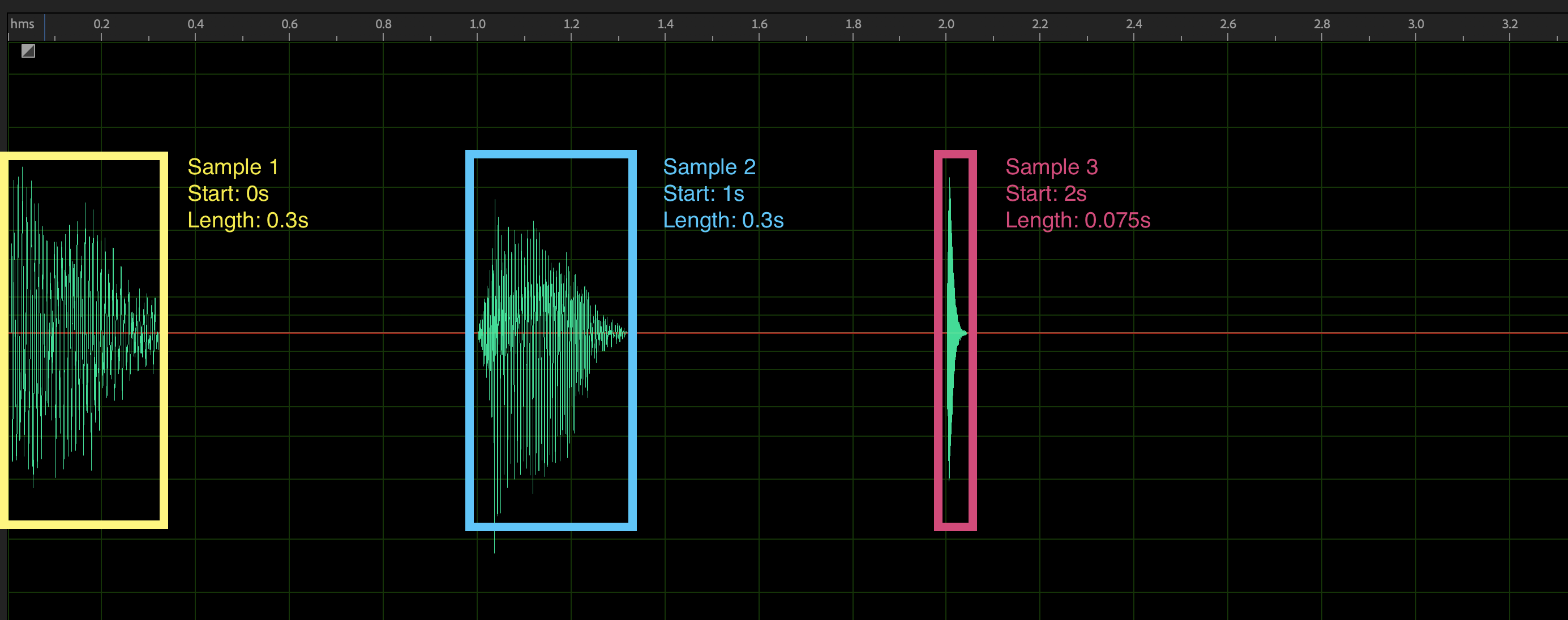
For sprites, we'll need to define a SpriteMap. It looks like this:
const spriteMap = {
  laser: [0, 300],
  explosion: [1000, 300],
  meow: [2000, 75],
};
SpriteMap is an object. The keys are the ids for individual sounds. The value is a tuple (array of fixed length) with 2 items:
- The starting time of the sample, in milliseconds, counted from the very beginning of the sample
- The length of the sample, in milliseconds.
This visualization might make it clearer:
We can pass our SpriteMap as one of our HookOptions:
const [play] = useSound('/path/to/sprite.mp3', {
  sprite: {
    laser: [0, 300],
    explosion: [1000, 300],
    meow: [2000, 75],
  },
});
To play a specific sprite, we'll pass its id when calling the play function:
button(type="button" onClick={() => play({ id: "laser" })}) PewNOTE: When using sprites, the
playbackRateparameter will not be reactive. This means that only the initial value forplaybackRatewill be used.
Escape hatches
Howler is a very powerful library, and we've only exposed a tiny slice of what it can do in useSound. We expose two escape hatches to give you more control.
First, any unrecognized option you pass to HookOptions will be delegated to Howl. You can see the full list of options in the Howler docs. Here's an example of how we can use onend to fire a function when our sound stops playing:
const [play] = useSound('/thing.mp3', {
  onend: () => {
    console.info('Sound ended!');
  },
});
If you need more control, you should be able to use the sound object directly, which is an instance of Howler.
For example: Howler exposes a fade method, which lets you fade a sound in or out. You can call this method directly on the sound object:
import useSound from "@beastjs/use-sound"

setup const [play, { sound }] = useSound("/win-theme.mp3")

// You win! Fade in the victory theme
button(type="button" onClick={() => sound?.fade(0, 1, 1000)}) Click to win
Development
bun install        # install dependencies
bun run dev        # start the playground
bun run typecheck  # tsrx-tsc --noEmit
bun run test       # bun test
bun run build      # production build of the playground
bun run check      # typecheck + test + build
The tests compile src/ with Octane's own compiler (the same slot assignment a
consuming app performs), mount the hook in a probe component under happy-dom,
and assert against a fake Howler. Anything that changes how the hook talks to
Howler should show up there.
The library lives in src/ and is plain TypeScript. The
playground in playground/ is a Beast/BTSX app that consumes it, and is the
fastest way to exercise a change by hand.