
@bensitu/image-editor
v3.0.0
Published
TypeScript-first Fabric.js v7 image editor with masks, annotations, crop, mosaic, history, and export APIs

Maintainers
 bensitu
Readme
@bensitu/image-editor


A TypeScript-first Core Framework and public Plugin SDK built on Fabric.js v7. The modular architecture separates canvas lifecycle from typed Feature Plugins for transforms, history, redaction, annotations, persistence, optional canvas interactions, and optional DOM controls. Applications moving from the Facade API should follow the migration guide.
Fabric >=7.4.0 <8 is a peer dependency and is never bundled. Core composition
is DOM-independent and safe to import in SSR/headless code; canvas initialization
and browser image operations still require a compatible Fabric/DOM environment.
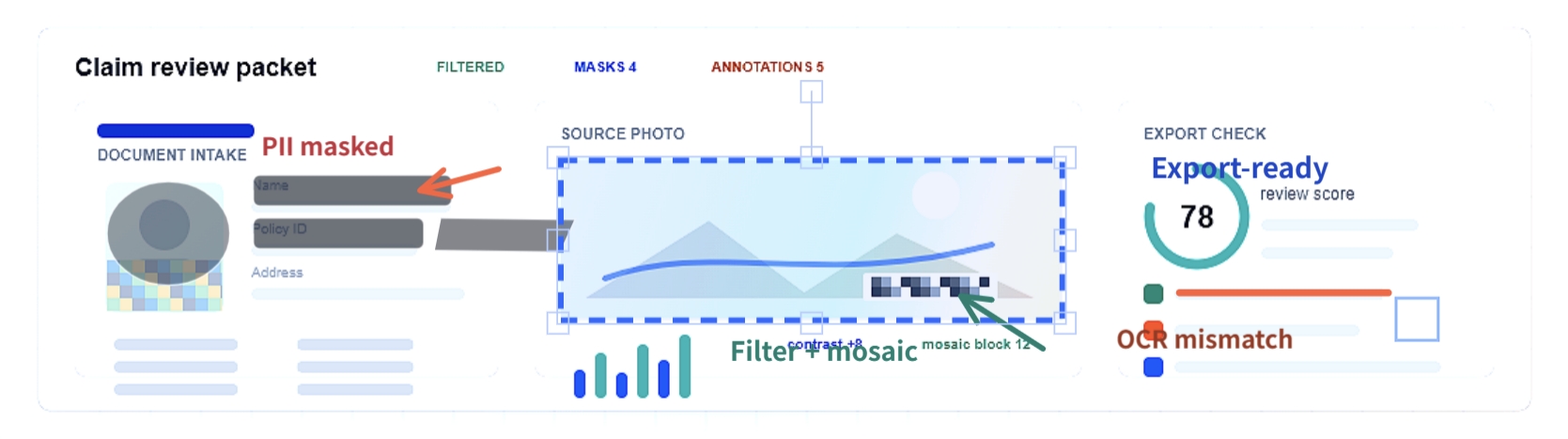
Click the screenshot to open the live demo.
Contents
- Preset Quick Start
- Core + Plugins
- Plugin Authoring
- Features
- Demo and Examples
- Documentation
- Framework Integration
- API Overview
- Configuration
- Requirements
- Module Formats
- Runtime Guarantees
- Migration and Maintenance
- Development
- License
Preset Quick Start
Install
npm install @bensitu/image-editor fabric
# or
pnpm add @bensitu/image-editor fabric
# or
yarn add @bensitu/image-editor fabric
fabric@>=7.4.0 <8 is a peer dependency. Install it explicitly so the editor
uses the same Fabric version as your application.
Add Markup
<div id="editorContainer" style="width: 100%; height: 600px">
    <canvas id="canvas"></canvas>
</div>

<input id="imageInput" type="file" accept="image/*" />
Initialize
import * as fabric from 'fabric';
import { createRedactionPreset } from '@bensitu/image-editor/presets/redaction';

const preset = createRedactionPreset(fabric, {
    core: {
        canvasWidth: 800,
        canvasHeight: 600,
        defaultLayoutMode: 'fit',
    },
    transform: { animationDuration: 0 },
    masks: { label: false },
});

await preset.editor.init({
    canvas: 'canvas',
    canvasContainer: 'editorContainer',
});

await preset.editor.loadImage('data:image/jpeg;base64,...');
await preset.masks.create({ left: 120, top: 80, width: 160, height: 96 });
await preset.transform.rotate(90);

if (preset.history.canUndo()) await preset.history.undo();

const dataUrl = await preset.editor.exportImageBase64({ format: 'png', area: 'image' });
await preset.editor.disposeAsync();
Preset factories install Plugins but do not initialize the editor. Their result
keeps lifecycle operations on editor and exposes each Feature through its own
typed Plugin API. See Presets for the four compositions and
DOM Controls when an imperative DOM binding layer is
useful.
Core + Plugins
Use direct composition when the application needs a smaller or custom Feature
set. Install every Plugin before init(); Core does not forward Feature methods.
import * as fabric from 'fabric';
import { ImageEditorCore } from '@bensitu/image-editor/core';
import { historyPlugin } from '@bensitu/image-editor/plugins/history';
import { transformPlugin } from '@bensitu/image-editor/plugins/transform';

const editor = new ImageEditorCore(fabric, { defaultLayoutMode: 'fit' });
const [transform, history] = editor.install([
    transformPlugin({ animationDuration: 0 }),
    historyPlugin({ maxSize: 50 }),
]);

await editor.init({ canvas: 'canvas', canvasContainer: 'editorContainer' });
await editor.loadImage(source);
await transform.rotate(90);
await history.undo();
await editor.disposeAsync();
Core owns lifecycle, image/layout state, Snapshot loading, and export. Plugins receive narrowly scoped Capabilities and own their transactions, state slices, tools, overlays, and cleanup.
Plugin Authoring
Third-party Plugins use only @bensitu/image-editor/sdk, documented Core types,
and public Feature contracts. PluginRef<TApi> preserves method-level inference;
manifests declare engine/API versions, dependencies, Capabilities, and privileged
permissions. Setup is transactional and every owned registration belongs in the
Plugin disposable scope.
Start with the Plugin Author Guide, then inspect the independently packable reference Plugins and run the public Conformance Kit.
Features
Image and Layout
- Load PNG, JPEG, and WebP data URLs or files.
- Normalize supported JPEG EXIF orientation during file-input loading.
- Choose
fit,cover, orexpandlayout strategies. - Resize to explicit dimensions, hidden-container fallbacks, or current container size.
- Downsample large images and guard input size before browser decode.
Editing Tools
- Scale, rotate, flip, and reset the base image with undoable history.
- Apply Fabric-backed brightness, contrast, saturation, blur, sharpen, grayscale, sepia, and vintage filters.
- Create editable rectangle, circle, ellipse, polygon, and custom masks.
- Add Text, Shape, and Draw annotations with update, delete, lock, hide, and layer-order APIs.
- Crop with fixed or custom aspect ratios and optional mask preservation.
- Use Mosaic mode to commit circular pixelation strokes into the base image.
State, Export, and Persistence
- Bounded undo/redo history with serialized transform and history operations.
- Export Base64, browser
File, or direct downloads as PNG, JPEG, or WebP. - Choose image-bounds or full-canvas export areas.
- Render masks and annotations independently during export without mutating editor state.
- Save/load editor snapshots with
saveState()andloadFromState(). - Store editable overlays separately from image pixels with overlay-state JSON.
Integration
ImageEditorCoreowns canvas, image, lifecycle, export, and Plugin installation.- Formal Plugin subpaths expose typed Feature APIs without method forwarding.
- Minimal, Redaction, Annotation, and Full Presets provide typed compositions.
- Fabric.js v7 is a peer dependency; the package does not bundle Fabric.
- Core, Plugin, and Preset entries publish ESM, CommonJS, and TypeScript declarations.
- Optional DOM Controls accept selectors or element instances in section-based options.
- Optional Canvas Interactions adapt Fabric pointer input to the public Text, Shape, Draw, and Mosaic APIs without moving session or History ownership.
disposeAsync()is the authoritative framework cleanup path. The deprecateddispose()method only starts best-effort cleanup and may return before asynchronous resources are released.
Demo and Examples
- Demo landing page
- Integrated editor demo
- Vanilla Core + Plugins
- Vanilla DOM Controls
- React basic example
- Vue basic example
- Svelte basic example
- Next.js client-only example
- Third-party Plugin template
- Watermark, Metadata, Grid/Guide, and Blur Region reference Plugins
- Pure Fabric versus Framework redaction comparison
Documentation
- Reference: API, options, typed Presets, and Modular UMD loading.
- Plugins: History, Filters, Crop, Mosaic, Annotation Foundation, Text, Shape, Draw/Eraser, Canvas Interactions, Overlay State, transform binding, and DOM Controls.
- Guides: Plugin authoring and migration from 2.x.
- Development: contributing and local checks, comment rules, and naming rules.
- Release history: Changelog.
Framework Integration
The Core editor is framework-agnostic and accepts string targets or element instances for its canvas and container. React, Vue, Svelte, Next.js, Nuxt, and other frameworks should create one Preset or Plugin composition inside a client-side lifecycle hook, retain its Plugin APIs, and dispose its editor during cleanup. Framework handlers call Plugin APIs directly; DOM Controls is not required.
Runtime Fabric imports, editor creation, init(), image loading, canvas resizing,
and export belong in client code. Public type imports are safe in server code.
API Overview
Core owns lifecycle, image/layout state, Plugin installation, and image export. Feature behavior is provided by typed Plugin APIs:
| Entry | API responsibility |
| ------------------------------------- | ---------------------------------------------------------- |
| ./core | Canvas lifecycle, image loading, layout, state, and export |
| ./plugins/transform | Scale, rotate, flip, and reset operations |
| ./plugins/history | Undo/redo state and recording control |
| ./plugins/mask, ./plugins/filters | Redaction overlays and raster filters |
| ./plugins/crop, ./plugins/mosaic | Crop and mosaic sessions |
| ./plugins/annotation-* | Text, Shape, and Draw/Eraser annotations |
| ./plugins/canvas-interactions | Optional canvas pointer-to-Feature adapter |
| ./plugins/overlay-state | Renderer-independent overlay persistence |
| ./plugins/dom-controls | Optional DOM event and status binding |
| ./presets/* | Typed Plugin compositions |
The focused Plugin documents linked above describe Feature behavior and options.
Configuration
Preset options are namespaced by owner:
const preset = createRedactionPreset(fabric, {
    core: { canvasWidth: 960, canvasHeight: 640, defaultLayoutMode: 'fit' },
    transform: { animationDuration: 0 },
    history: { maxSize: 25 },
    masks: { label: false },
    crop: { paddingPx: 0 },
});
Direct composition passes the same option objects to each Plugin factory. See the linked Feature documents and declaration files for their complete contracts.
Requirements
- Recommended local/release Node: 24.
- Minimum supported Node: 22.12.0 (
engines.noderemains>=22.12.0). - Fabric.js: peer dependency
>=7.4.0 <8. - Browsers: Chrome 100+, Firefox 100+, Safari 15+, Edge 100+.
- JavaScript target: distributed files target ES2019 and browser DOM APIs.
- TypeScript: strict consumers that compile dependencies with
skipLibCheck: falseshould include the ES2019 and DOM libraries intsconfig.json. Fabric v7.4 declarations also referencejsdomtypes, so install@types/jsdomwhen your project type-checks Fabric's declaration files.
Older runtime targets must be transpiled by the consumer.
Module Formats
Every exported Core, SDK, Plugin, Testing, and Preset subpath resolves to ESM, CommonJS, ESM declarations, and CommonJS declarations. NodeNext and strict TypeScript consumers resolve the same public subpaths. Fabric remains external.
The Core constructor accepts Fabric explicitly in bundled applications:
import * as fabric from 'fabric';
import { ImageEditorCore } from '@bensitu/image-editor/core';

const editor = new ImageEditorCore(fabric, options);
Script-tag consumers choose one of two mutually exclusive modes:
- Full UMD exposes
ImageEditorFulland remains the CDN default for pages that need the complete Feature set. - Modular UMD exposes the shared
ImageEditorCore/SDK global plus selectedImageEditorPlugins.*globals for on-demand composition.
Do not load Full UMD together with Core or Plugin UMD files on one page. Fabric remains a separate script in both modes. The Full Preset does not install DOM Controls or Canvas Interactions unless the corresponding factory is supplied.
Replace VERSION in the CDN examples with one exact published package version.
<script src="https://cdn.jsdelivr.net/npm/fabric@7/dist/index.min.js"></script>
<script src="https://cdn.jsdelivr.net/npm/@bensitu/image-editor@VERSION/dist/umd/image-editor.full.umd.min.js"></script>
<script>
    (async () => {
        const kit = ImageEditorFull.createFullPreset(fabric, {
            core: { canvasWidth: 800, canvasHeight: 600 },
        });
        await kit.editor.init({ canvas: 'canvas', canvasContainer: 'editorContainer' });
    })().catch(console.error);
</script>
For explicit DOM bindings, pass a factory such as
domControls: () => ImageEditorFull.domControlsPlugin(options).
Modular files must all use the same exact package version and load in dependency order. This example downloads Core and Transform only:
<script src="https://cdn.jsdelivr.net/npm/fabric@7/dist/index.min.js"></script>
<script src="https://cdn.jsdelivr.net/npm/@bensitu/image-editor@VERSION/dist/umd/image-editor.core.umd.min.js"></script>
<script src="https://cdn.jsdelivr.net/npm/@bensitu/image-editor@VERSION/dist/umd/plugins/image-editor.plugin.transform.umd.min.js"></script>
<script>
    const editor = new ImageEditor.ImageEditorCore(fabric);
    const plugins = editor.install(
        ImageEditor.composePlugins({
            transform: ImageEditorPlugins.Transform.transformPlugin({
                animationDuration: 0,
            }),
        }),
    );
</script>
See Modular UMD loading for every module, dependency order, Mask and Annotation examples, version rules, and size tradeoffs.
CommonJS require() returns a namespace object for the requested public entry.
Runtime Guarantees
- The editor owns the Fabric objects it creates and tags them as base image, mask, annotation, or session objects.
- Session objects such as crop rectangles, mask labels, previews, selections, and transform handles are excluded from persistence and export.
- Public read methods return safe snapshots where possible. Methods that expose
Fabric objects, such as
getMasks(),getAnnotations(), selection callbacks, and lifecycle callbacks, expose live editor-owned objects. Treat those objects as read-only from integration code. loadImage(), crop, merge, and overlay import are transactional: failures restore the previous canvas state where applicable.- Lifecycle callback exceptions are caught and logged so host callback failures do not replace the editor operation.
Migration and maintenance
The optional @bensitu/image-editor/migrate-v2 entry detects and converts
supported frozen maintenance Snapshots. Core never migrates implicitly. The
separate @bensitu/image-editor-codemod CLI rewrites common integrations and
reports ambiguous patterns without changing them.
The maintained Facade baseline lives on the published legacy/v2 branch.
Maintenance is limited to security and critical correctness fixes, with a
separate release process and no automatic merges from develop.
Development
npm ci
npm run build
npm test
See Development and contributing for browser tests, visual tests, release checks, and CI-equivalent commands.
Buy Me A Coffee
License
MIT © Ben Situ.
Fabric.js is distributed under its own MIT license.