
@benvargas/tokdash
v0.2.2
Published
Multi-host ccusage dashboard — aggregate AI coding-agent usage and cost across machines over SSH

Maintainers
 benvargas
Readme
TokDash
A local dashboard that aggregates ccusage v20 coding-agent
usage and cost across all of your machines — with first-class dark and light themes. Instead of manually running
bunx ccusage@latest on each host and combining the numbers in your head, TokDash runs one unified
ccusage --json fetch per host (locally or over SSH), normalizes the output, merges every host into a
single model, and renders combined and per-host statistics with instant date-range / host / harness
filtering. It is a single-user, localhost-only tool — no auth, no database, no deploy.
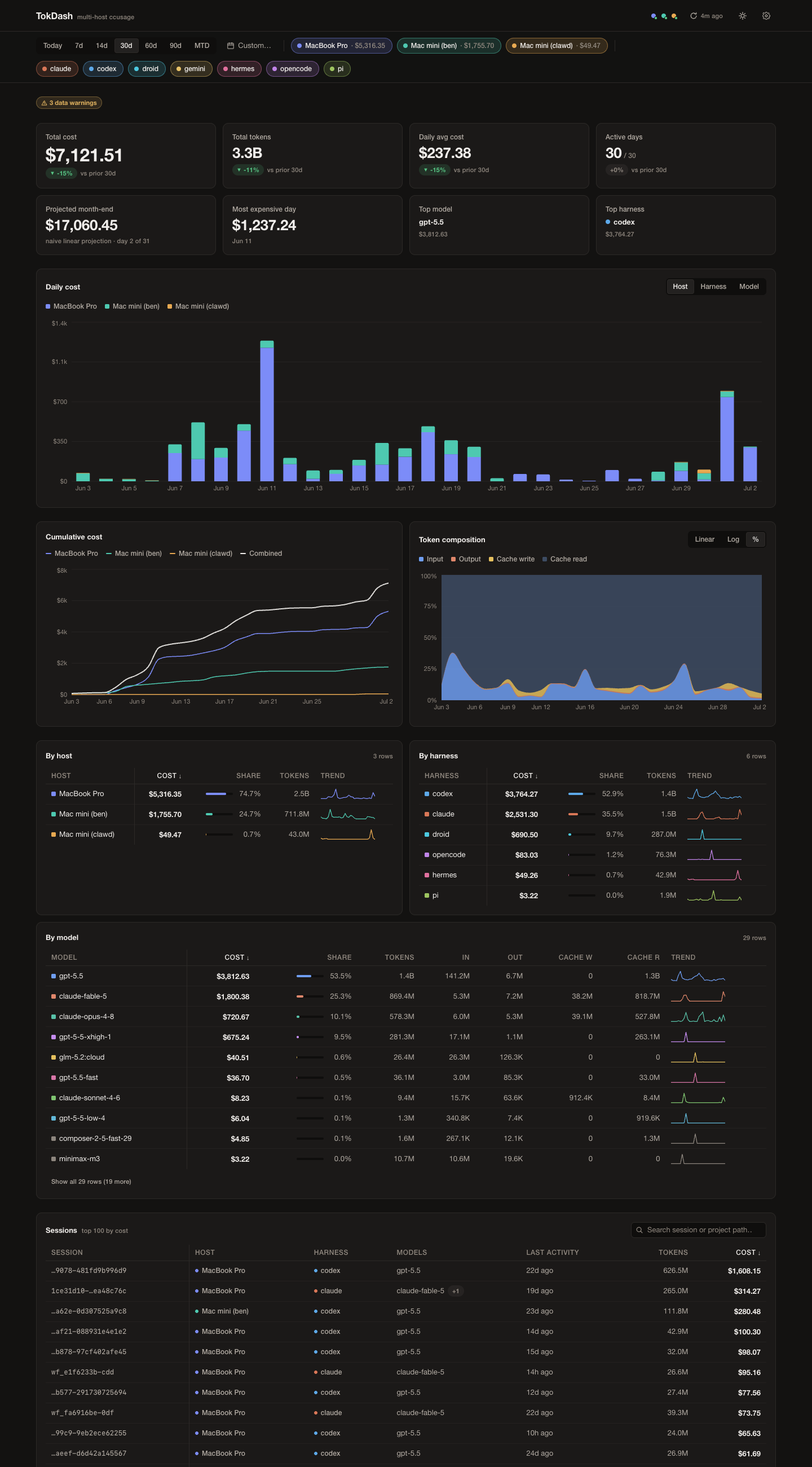
Cost is the hero everywhere; tokens are the supporting act. Each host and harness keeps one consistent color across every chart, chip, table, and status dot.
Features
- Multi-host aggregation. One dashboard for as many machines as you like — local and remote — with cross-host totals and per-host breakdowns.
- One fetch per host. A single
ccusage daily --json --sections daily,monthly,session --by-agentinvocation per refresh yields totals, monthly history, sessions, and exact per-harness/per-model slices in one round trip. - Runs anywhere ccusage runs. Point each host at
bunx, a full-pathbunx, or nvm-managednpx— whatever that machine has. Remote hosts are reached over plain SSH. - Stale-while-revalidate. Cached snapshots render instantly on startup; refreshes happen in the background, on demand or on an interval, and a failing host degrades to its last good snapshot instead of blanking the page.
- Instant filtering. Date range, host, and harness filters re-aggregate server-side from cache — no SSH round trip per filter change.
- In-app configuration. Add and edit hosts, test connections, and change settings from the UI; the config file is also plain JSON you can hand-edit.
- Extra sources. Fold a pi-format harness's session store (e.g. oh-my-pi) into a host's report alongside its native agents.
- Themed and responsive. Dark and light themes, and a layout that collapses cleanly down to phone widths.
Requirements
- Bun (the app runs on Bun; no separate Node install is needed for TokDash itself).
ccusagereachable on each host — viabunx/npx, so nothing to pre-install globally.- For remote hosts: SSH with key-based auth configured as an alias in
~/.ssh/config. - macOS or Linux hosts. (Windows hosts are a non-goal.)
Quick start
Install
The installed CLI keeps its config in ~/.config/tokdash/config.json and snapshots in
~/.cache/tokdash/snapshots. The config is created by onboarding when you first save from the
settings dialog or API.
bunx @benvargas/tokdashOr install it globally with npm:
npm install -g @benvargas/tokdash
tokdash
Bun must be installed for either method. The npm package includes a small Node-compatible shim that
spawns the Bun server. MOCK demo mode requires a full git clone because its dev-only fixtures/
directory is not included in the published npm package.
From source
git clone <repo-url> tokdash
cd tokdash
bun install

cp tokdash.config.example.json tokdash.config.json
# edit tokdash.config.json — set your timezone and hosts (see Configuration below)

bun run dev
bun run dev starts Vite on http://localhost:5173 (proxying /api to the API server) and the API
server on http://127.0.0.1:4114, in one command.
Zero-config start. You do not actually need a config file to begin. Start the app with no
tokdash.config.json at all and add your first host entirely through the settings UI (gear icon →
Add host), testing the connection before you save. Copying the example is just a faster way to get
a couple of hosts in place.
# Production: build the frontend, then serve it + the API from one Bun server
bun run build
bun start                 # http://127.0.0.1:4114

# Demo / offline mode: replay committed fixtures — no config of your own, no SSH, near-zero latency
MOCK=1 TOKDASH_CONFIG=tokdash.config.example.json bun start

# Tests
bun test
bun start serves the built dist/ and the API together at http://127.0.0.1:4114. The server
binds to 127.0.0.1 only.
On first start the server serves whatever is in the snapshot cache immediately, then kicks a background refresh if any enabled host has no snapshot or a stale one (stale-while-revalidate). It never blocks startup on the network.
Screenshots
| | |
|---|---|
|  |
|  |
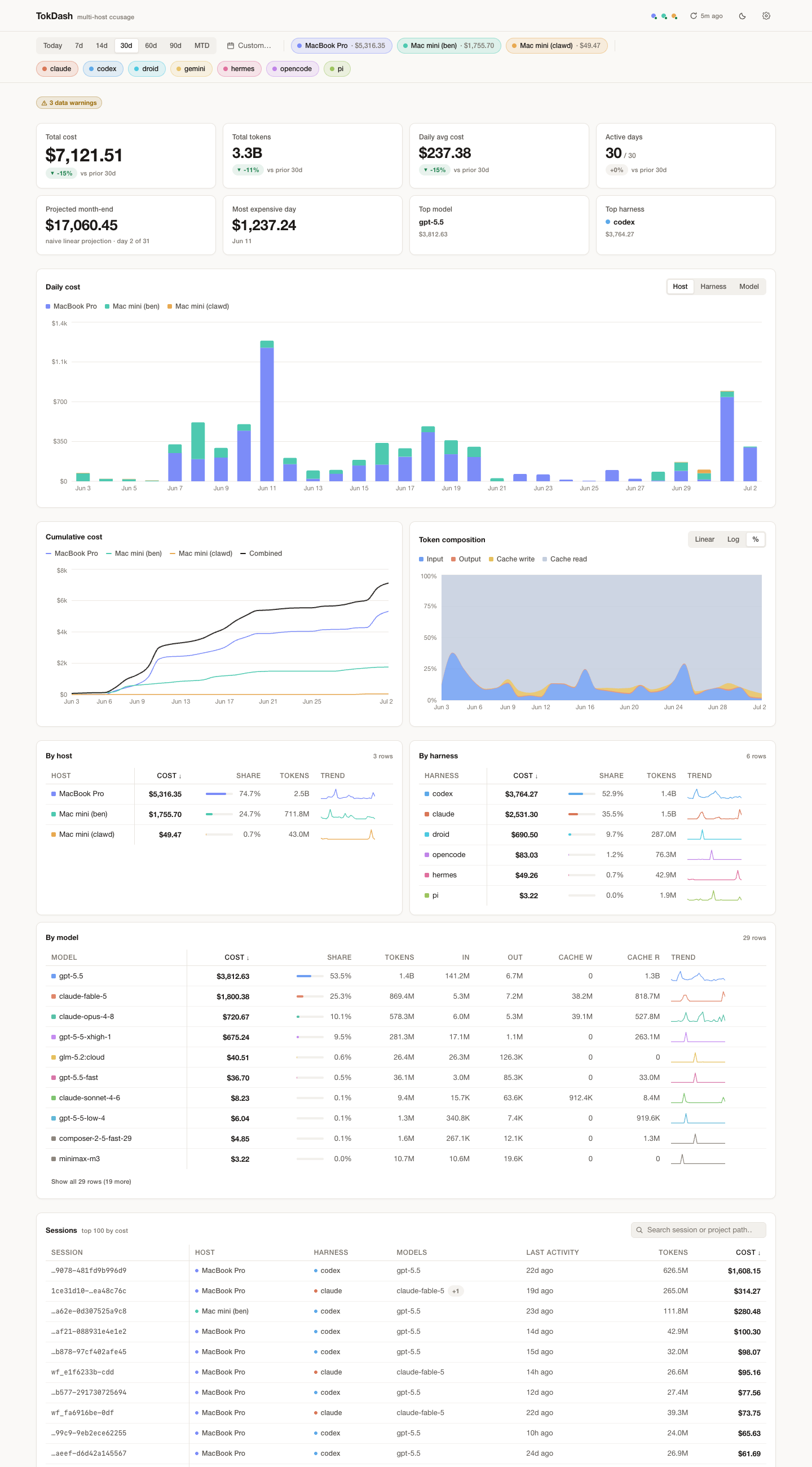
| Light theme (warm paper, same tokens) | Responsive collapse at 390px |
|
| Light theme (warm paper, same tokens) | Responsive collapse at 390px |
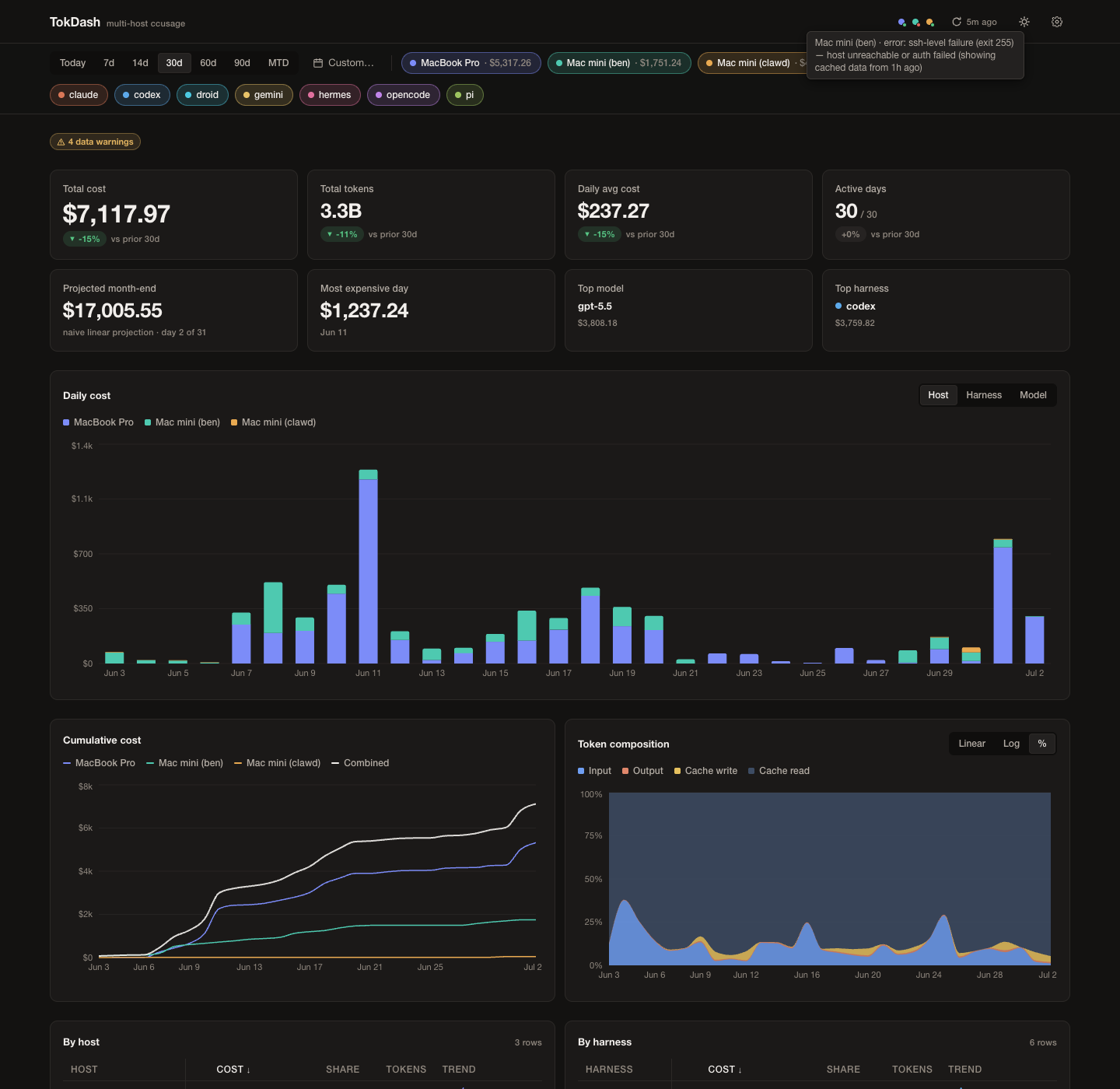
A host that fails to refresh (here an unreachable SSH alias) degrades to its last cached snapshot with a visible error dot and a tooltip carrying the real reason and exit code — the rest of the dashboard renders normally.
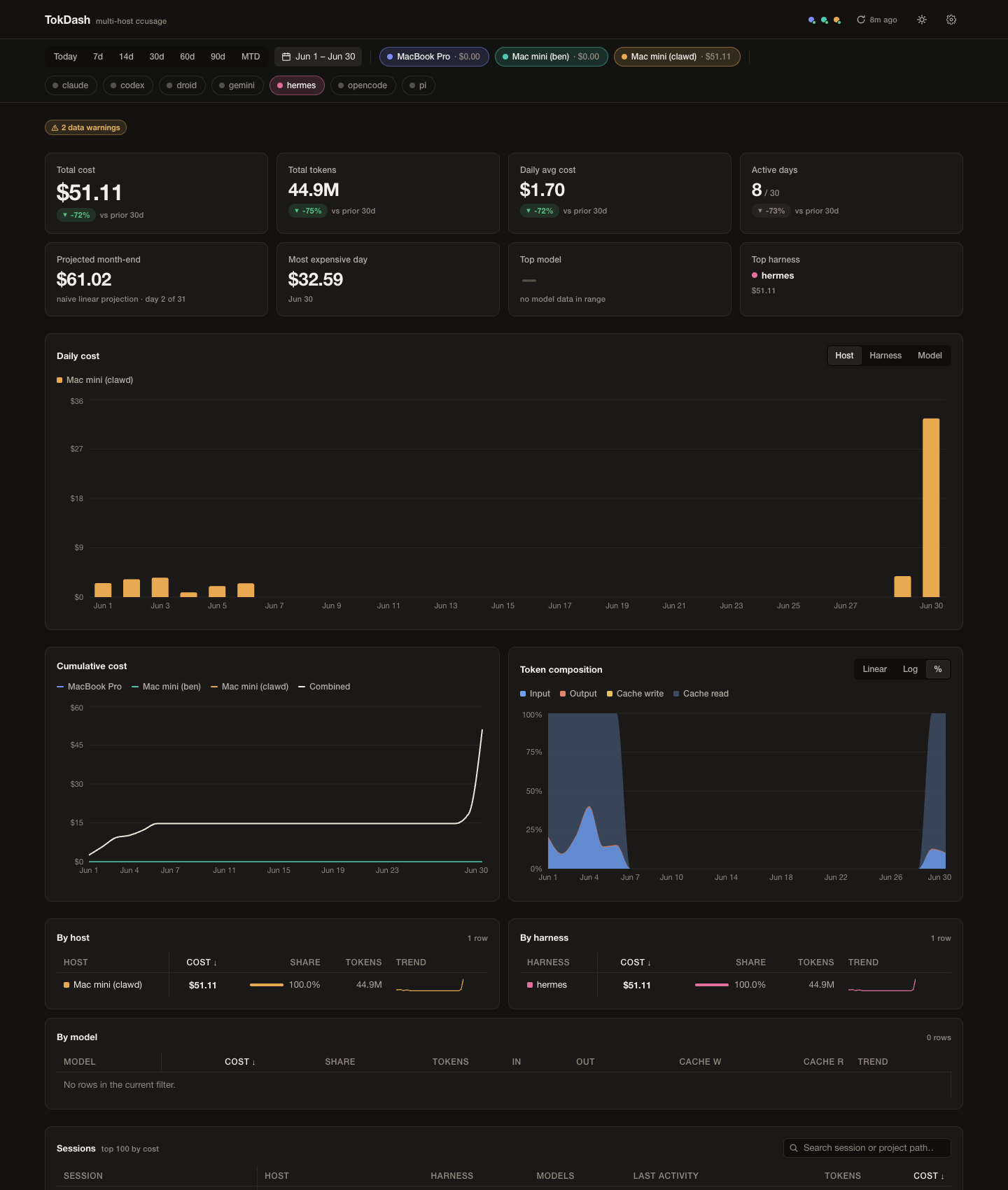
Filtering to a single harness over a custom range: a harness that lives on only one host shows $0.00
for the others; unified agent slices provide its real per-model costs.
Configuration
The config path resolves in order from TOKDASH_CONFIG, then ./tokdash.config.json when that file
exists, then $XDG_CONFIG_HOME/tokdash/config.json (~/.config/tokdash/config.json when
XDG_CONFIG_HOME is unset). Config is validated with zod. Everything below is also editable from the
settings UI (gear icon) — the file and the UI are two views of the same document. Start from
tokdash.config.example.json, which demonstrates the three common host shapes:
{
  "timezone": "America/New_York",
  "fetchWindowDays": 90,
  "refreshIntervalMinutes": 5,
  "hosts": [
    {
      "id": "laptop",
      "label": "Laptop (local)",
      "color": "#7c8cf8",
      "enabled": true,
      "ssh": null,
      "ccusageCmd": "bunx ccusage@latest",
      "extraSources": [
        {
          "type": "pi-jsonl",
          "agent": "omp",
          "path": "~/.omp/agent/sessions"
        }
      ]
    },
    {
      "id": "workstation",
      "label": "Workstation (bun, via SSH)",
      "color": "#4ec9b0",
      "enabled": true,
      "ssh": "workstation",
      "ccusageCmd": "~/.bun/bin/bunx ccusage@latest"
    },
    {
      "id": "buildbox",
      "label": "Build box (nvm node, via SSH)",
      "color": "#e8a951",
      "enabled": true,
      "ssh": "buildbox",
      "ccusageCmd": "PATH=\"$HOME/.nvm/versions/node/$(ls $HOME/.nvm/versions/node | sort -V | tail -1)/bin:$PATH\" npx -y ccusage@latest"
    }
  ]
}
Top-level fields
| Field | Type | Constraints | Meaning |
|---|---|---|---|
| timezone | IANA string | must be a real IANA zone (validated against Intl, not just a regex) | Report timezone. Passed as -z <tz> to every ccusage call so day boundaries agree across hosts. |
| fetchWindowDays | integer | 1–3660 | Trailing window fetched per refresh (--since today − N, --until today). |
| refreshIntervalMinutes | integer | 1–1440 | Auto-refresh interval, and the age past which a snapshot is considered stale. |
| hosts[] | array | — | One entry per machine. |
Host fields
| Field | Type | Constraints | Meaning |
|---|---|---|---|
| id | string | 1–64 chars, unique across hosts | Stable identifier; used in .cache/snapshots/<id>.json, API params, and URLs. |
| label | string | non-empty | Display name in chips, tables, and legends. |
| color | hex string | #rrggbb | This host's series color everywhere (chips, bars, lines, table swatches, freshness dots). Used verbatim in both themes. |
| enabled | boolean | — | Disabled hosts are skipped by refresh; their chip renders greyed and non-interactive. |
| ssh | string | null | non-empty when set | SSH alias from ~/.ssh/config. null runs the command locally with no SSH. |
| ccusageCmd | string | non-empty | Shell prefix used to invoke ccusage on that host (see Remote hosts & PATH). |
| extraSources[] | array | optional | Named pi-format stores folded into that host's one unified report (see below). |
extraSources entries
Each entry adds a pi-format harness's session store to a host's report:
| Field | Type | Constraints |
|---|---|---|
| type | string | must be the literal "pi-jsonl" |
| agent | string | ccusage store-name grammar; not a reserved name (a built-in harness, all, or pi); unique per host |
| path | string | non-empty, no control characters; unique and non-overlapping with other sources on the host; ~ and $HOME are fine (they expand on the host) |
TokDash writes all of a host's extraSources into a temporary ccusage config and passes --config on
that host's single invocation. A missing path is silently absent. Store prefixes such as [pi] and
[omp] are stripped from model labels.
Environment variables
| Var | Default | Effect |
|---|---|---|
| TOKDASH_CONFIG | Cwd file if present, otherwise $XDG_CONFIG_HOME/tokdash/config.json | Path to the config file. |
| PORT | 4114 | API / production server port (always bound to 127.0.0.1). |
| TOKDASH_CACHE_DIR | Cwd .cache/snapshots for config overrides; otherwise $XDG_CACHE_HOME/tokdash/snapshots | Where per-host snapshots are read/written (snapshots-mock under MOCK=1). |
| TOKDASH_AUTOREFRESH | (unset) | Set to 0 to pause the periodic auto-refresh scheduler (a one-time startup refresh may still fire for a stale cache). |
| MOCK | (unset) | Set to 1 to replay fixtures/real/<hostId>/ instead of shelling out. |
XDG_CONFIG_HOME and XDG_CACHE_HOME default to ~/.config and ~/.cache, respectively.
The config file is re-read fresh on every API request — it is tiny, so hand edits (add a host, flip
enabled, change a color) take effect on the next request with no restart. PUT /api/config validates
the whole document, then rewrites it atomically (temp file + rename).
Adding a host
From the UI: open Settings (gear, top-right) → Add host. Fill in label, id, color, SSH alias
(leave empty for a local host), and the ccusage command. Click Test connection to verify before
saving. Save writes the config through PUT /api/config; no restart is needed.
By hand: add an object to hosts[] in tokdash.config.json and save. The next request picks it
up; the next refresh fetches it.
What "Test connection" reports. It runs <ccusageCmd> --version on the host and reports:
- Success: the ccusage version (e.g.
ccusage 20.0.16), the round-trip in ms, and the agents detected on that host (from its most recent snapshot). - Failure: the exit code mapped to a human message, plus the verbatim
stderrtail so you can see exactly what the remote shell said. Exit-code mapping:255→ SSH connection failed,127→ command not found (check PATH),2→ ccusage rejected arguments, timeout → timed out.
Remote hosts & PATH
The single hardest part of multi-host ccusage is that non-interactive SSH does not load your login
shell environment — it never sources ~/.zshrc / ~/.bash_profile. A command that works when you
SSH in interactively can exit 127 (command not found) when TokDash runs it non-interactively, and
zsh -lc does not reliably fix it. The remedy is to make each host's ccusageCmd fully explicit
about where its runtime lives. Two tested recipes cover almost every host:
Hosts with bun — use the full path to
bunxinstead of a barebunx:~/.bun/bin/bunx ccusage@latestA plain
bunx ccusage@latestover SSH fails with exit 127 because bun's bin dir is only added toPATHin your interactive shell rc.Hosts without bun (nvm-managed node) — run
npx -yfrom the nvm node bin dir with an explicitPATHprepend:PATH="$HOME/.nvm/versions/node/$(ls $HOME/.nvm/versions/node | sort -V | tail -1)/bin:$PATH" npx -y ccusage@latestKeep this single-quoted in the JSON string / SSH invocation so
$HOMEand the$(...)subshell expand on the remote machine, not locally. Thels … | sort -V | tail -1form picks the newest installed node version, so it survives nvm upgrades.
Debugging a host. Test the exact command as SSH will run it:
ssh <alias> '<ccusageCmd> --version'If that prints a ccusage version, TokDash will work; if it exits 127, it is a PATH problem — make the command more explicit as above. The in-app Test connection button does exactly this round trip and surfaces the exit code and stderr tail for you.
SSH setup. The fetcher always calls SSH with -o BatchMode=yes (never prompt for a password — a
prompt would hang) and -o ConnectTimeout=10, so set up key-based auth for each alias in
~/.ssh/config first.
Clean streams. bunx prints "Resolving dependencies…" and npm prints "npm notice" nags to
stderr on every run. TokDash captures stdout and stderr separately (it never uses 2>&1, which
would corrupt JSON.parse); the stderr tail is kept for diagnostics and shown in Test connection and
error tooltips.
A host failure never takes down the dashboard or discards that host's last good snapshot: the host degrades to its cached data with a visible error state, and everything else renders.
Security model
- Localhost only. The server binds
127.0.0.1exclusively. It has no authentication and is not designed for exposure to untrusted networks. Do not put it behind a public reverse proxy or bind it to0.0.0.0. - The config file is a trust boundary.
ccusageCmdis executed as a shell command on the local machine or the remote host, sotokdash.config.jsonis as sensitive as a shell script — anyone who can edit it (or reach the localhost API that writes it) can run commands as you. Treat it accordingly. - No free-text interpolation into commands. TokDash never splices arbitrary strings into the
ccusage invocation: beyond your
ccusageCmd, it appends only a fixed set of subcommands, dates matching^\d{4}-\d{2}-\d{2}$, and a timezone matching a strict character class.
How it works
Fetch strategy (per refresh, hosts in parallel). Over the config's trailing window
(--since today − fetchWindowDays --until today -z <tz>), for each enabled host:
- TokDash runs exactly one command:
ccusage daily --json --sections daily,monthly,session --by-agent -s <from> -u <until> -z <tz>. Hosts withextraSourcesget one temporary config file and the same invocation adds--config. - The envelope's top-level daily/monthly/session rows become host totals, monthly data, and sessions;
each daily row's
agentsslices become the exact per-harness daily series and model breakdowns. Malformed JSON or an invalid envelope degrades the whole host to its last good snapshot. - The raw envelope + normalized snapshot is written atomically to
.cache/snapshots/<hostId>.jsonwithfetchedAt, per-command durations, and a stderr tail.
Normalization. The unified envelope and every row/slice are validated with permissive zod schemas. Bad individual rows are skipped with warnings; session metadata may be null. Named-store model prefixes are stripped, and collisions after stripping are merged by summing their costs/tokens.
Cache & refresh. Snapshots render instantly on startup (stale-while-revalidate); the UI shows
per-host freshness (fresh / stale (2h ago) / error: <reason>) and refreshes in the background —
on demand via the Refresh button, and periodically at refreshIntervalMinutes. Refreshes are
single-flight: a refresh requested while one is running joins the in-flight one instead of starting
a second.
One aggregation path. Filter changes never trigger SSH. On every filter change the UI re-queries
GET /api/usage, which the server answers from cached snapshots via a single server-side aggregation
path (mergeHosts → resolveUsageFilter → computeUsage, all pure functions in src/shared). The
browser renders only what that response contains — it does not re-aggregate. The one exception: a
custom date range older than the cached window kicks a background refetch with a wider --since while
still serving what the cache has.
MOCK mode. MOCK=1 swaps the command executor for one that replays fixtures/real/<hostId>/ with
near-zero latency. Cache, refresh, routes, and aggregation run identically — only the shell-out is
replaced. Used by tests, the aggregation gate, and offline UI development.
API reference
All responses are JSON and zod-validated before they are sent. Wire conventions: hosts / agents
are comma-separated ids (omitted = all); from / to are inclusive YYYY-MM-DD in the config
timezone (omitted to = today); an "Nd" preset means today plus the N−1 preceding days.
| Method | Path | Params | Purpose |
|---|---|---|---|
| GET | /api/config | — | Current config document. |
| PUT | /api/config | body: full config | Validate then atomically rewrite the config. |
| GET | /api/usage | from, to, hosts, agents | Merged, filtered, zero-filled usage — the single source of truth the UI renders. |
| POST | /api/refresh | — | Kick a background refresh (single-flight); responds 202 immediately. |
| GET | /api/status | — | Per-host freshness, durations, detected agents, and errors; plus a global refreshing flag. |
| POST | /api/hosts/:id/test | — | Test connection to one host (--version); reports round-trip, version, agents, exit code, stderr tail. |
(There is also an unlisted GET /api/health returning { ok: true }.)
Development
src/shared/   types, zod schemas, and pure aggregation logic (no I/O) — the one
              aggregation path the API and the gate both exercise
src/server/   executor (local + SSH, timeouts, stderr separation, unified replay),
              snapshot cache, refresh manager, config I/O, Hono routes
src/web/      React 19 app — App, components/ (incl. charts/), hooks/
fixtures/     real/       committed verbatim ccusage output per host, for MOCK + tests
              synthetic/  hand-authored edge cases (empty, gaps, unknown agents, …)
scripts/      dev.ts (dev orchestrator), verify-aggregation.ts (aggregation gate)
test/ bun:test suites- Stack: Bun + TypeScript (strict). Server: Hono on
Bun.serve. Frontend: Vite + React 19 + Tailwind CSS v4 + Recharts + TanStack Query v5. Validation: zod at every external boundary. - Tests:
bun testcovers unified-envelope normalization, cross-host merge, zero-fill, date-boundary inclusivity, harness filtering, previous-period comparison, month-end projection, number/currency formatting, cache, unified executor replay, refresh, and routes. - Aggregation gate:
scripts/verify-aggregation.tsbootsMOCK=1and independently recomputes expected/api/usagetotals straight from the fixture JSON with plain arithmetic (it imports nothing fromsrc/, so the check isn't circular), then asserts equality to the cent:MOCK=1 TOKDASH_CONFIG=tokdash.config.example.json PORT=4114 bun start & # background PORT=4114 bun scripts/verify-aggregation.ts
Non-goals
Auth, multi-user, and cloud deployment; a historical database beyond the snapshot cache; cost budgets
or alerting; editing ccusage's underlying data; Windows hosts; and ccusage's Claude-only
blocks / statusline / live burn-rate features.
Contributing
Issues and pull requests are welcome.
License
MIT — see LICENSE.