
@billwgong/contextlint
v0.1.0
Published
Static checks and visual evidence for coding-agent instructions.

Maintainers
 billwgong
Readme
ContextLint
检查编程助手背后的指令,把问题和依据一起展示出来。
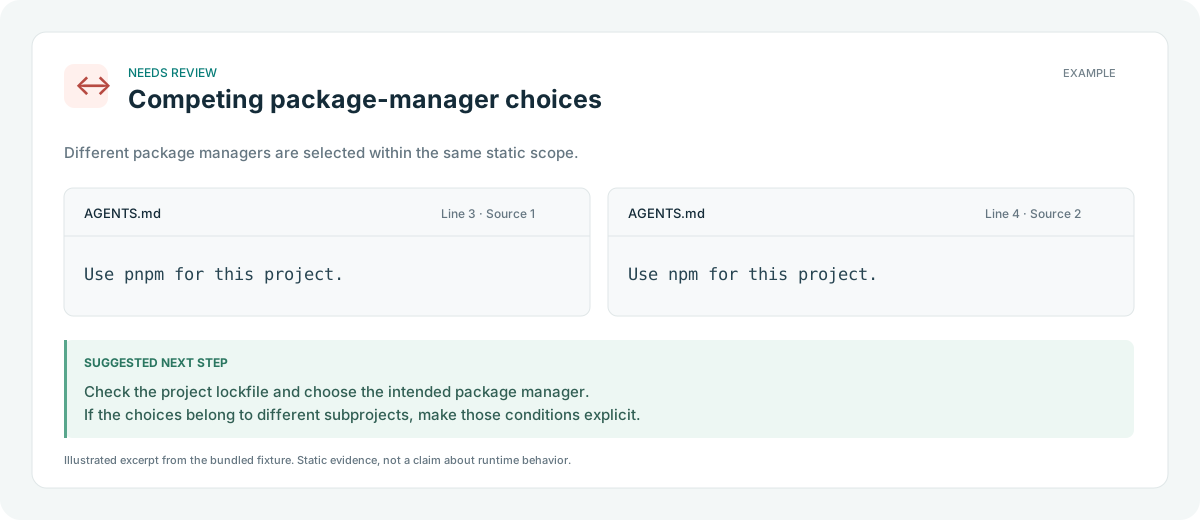
一个本地 CLI:扫描 AGENTS.md、CLAUDE.md 等指令文件,寻找重复规则、明确的潜在冲突和失效链接。生成的可视化报告保留原文、文件行号、检测依据和修改建议。
扫描时无需 API key、不调用模型、不上传文件。
开始使用
需要 Node.js 22+。在自己的项目目录直接运行:
npx @billwgong/contextlint@latest . --html --lang zh按终端显示的路径打开 HTML 报告。也可以全局安装:
npm install -g @billwgong/contextlint
contextlint . --html --lang zh
如需从源码构建,使用 pnpm:
git clone https://github.com/BillWGong/contextlint.git
cd contextlint
pnpm install --frozen-lockfile
pnpm build

# 先运行中文示例
node dist/cli.js examples/zh-demo --agent codex --lang zh --html report.html
在浏览器打开 report.html。右上角可以切换 English / 简体中文,也可以按类型筛选、搜索指令原文。报告离线可查看,筛选和语言切换需要 JavaScript。
然后换成自己的项目路径:
node dist/cli.js /你的项目路径 --agent codex --lang zh --html report.html每次生成 HTML 都会在 <扫描项目>/.contextlint/reports/ 保存一份独立历史报告,命令退出后仍可打开,不会自动删除。终端会显示绝对路径和 file:// 链接。使用 --html report.html 还会额外保存一份便于查找的副本,并自动创建父目录;再次扫描不会覆盖历史记录。扫描项目需要可写。 报告标题优先显示扫描项目 package.json 中的名称,没有有效名称时显示扫描目录名。
去掉 --html 就会直接显示终端报告。CLI 默认按系统语言选择中文或英文,也可以用 --lang en|zh 指定。指令原文始终保持原样,不进行机器翻译。
能发现什么
| 检查 | 展示的依据 | 修改方向 | | --- | --- | --- | | 包管理器选择冲突 | 明确的 pnpm / npm 等选择 | 检查 lockfile,统一工具或说明范围 | | 相反的动作要求 | 相同动作被要求和禁止 | 保留预期规则,或补充适用条件 | | 重复规则 | 有限归一化后相同的原文 | 判断是否需要多处保留 | | 失效链接 | 指向不存在文件的 Markdown 相对链接 | 修正路径、恢复文件或清理旧引用 |
每项发现都有文件和原始行号。可视化报告进一步说明判断依据和修改建议,不会自动修改文件。
检测支持少量明确的中英文句式。例如 Use pnpm、请使用 pnpm 管理依赖,以及同动作的 Always / Never、必须 / 禁止。复杂自然语言语义暂不支持。
范围会影响判断。 包管理器选择可在同一文件内跨标题比较;重复规则和正反指令仍按标题隔离。不同助手、跨文件的不同标题、父子目录规则,以及激活条件不明的跨文件规则,不会直接视为同一范围的冲突。这种保守策略也可能漏报。
常用命令
# 终端中文报告
node dist/cli.js . --agent codex --lang zh

# 英文示例和可视化报告
node dist/cli.js examples/demo --lang en --html report-en.html

# 程序接口:JSON 不随界面语言变化
node dist/cli.js . --json > findings.json

# CI:存在 warning 时返回退出码 1
node dist/cli.js . --agent codex --strict --json > findings.json

# 排除相对路径,可重复使用
node dist/cli.js . --exclude fixtures --exclude legacy
| 参数 | 用途 |
| --- | --- |
| --agent claude\|codex\|cursor\|copilot | 选择对应助手的静态来源集合 |
| --html [file.html] | 持久保存可视化报告,可另指定一份副本 |
| --lang en\|zh | 指定 CLI 和报告初始语言 |
| --json | 输出 schemaVersion: "1.0" 的稳定 JSON |
| --strict | 存在 warning 时返回 1 |
| --exclude <path> | 排除相对字面路径,不支持 glob |
HTML 与 JSON 为互斥输出模式。退出码:0 完成、1 严格检查未通过、2 执行或参数错误。JSON 字段名和诊断字符串保持英文,便于集成;终端和可视化界面支持中文。
文件支持与限制
支持 AGENTS.md、CLAUDE.md、.claude/rules/**/*.md、.cursor/rules/**/*.mdc / .md、.github/copilot-instructions.md 和 .github/instructions/**/*.instructions.md。具体分类和比较策略见 英文表格。
- 这是静态检查,无法证明 Codex 实际加载或遵守了哪些规则。
- 首版不扫描全局指令、导入、skills、
AGENTS.override.md或自定义 fallback 文件名。 - Markdown / frontmatter 是有限解析;代码示例、注释和已识别条件不会参与冲突判断。
- 同动作冲突需要动作文本匹配,不支持任意改写或翻译之间的语义匹配。
- 链接以指令文件目录为基准,只检查扫描根目录内目标;跳过 URL、绝对路径、图片和模板。
- Token 是启发式估算,不代表真实会话消耗或节省费用;无诊断不代表没有问题。
- 跳过常见依赖/构建目录和符号链接,不自动使用
.gitignore;额外路径用--exclude。超过 1 MiB 的指令文件会跳过。
详情见 规则说明、JSON Schema 和 验证记录。
开发与贡献
pnpm install --frozen-lockfile
pnpm test
pnpm build
pnpm pack
TypeScript + Node.js,无生产依赖。dist/index.js 导出 lint(root, options)。
欢迎提交误报、漏报和真实指令样例。提交前请清理私人路径与内容。贡献说明见 CONTRIBUTING.md,Issues 可以使用中文或英文。
下一步优先补充真实样例、改进条件解析,以及支持 Codex 的 override/fallback 来源查询。其他相关工具 也在探索这一领域。
许可证
MIT。
报告状态与保存安全
JSON 的 status 区分 complete(在所选范围内完成已支持的静态检查)、limited(部分检查受限)和 no-sources(没有检查到文件)。complete 不代表理解了全部自然语言,也不代表助手运行时一定加载了这些规则。严格模式先对警告返回 1;没有警告但结果受限或没有文件时返回 2。
输出副本会原子替换已有普通文件,拒绝符号链接。副本保存失败时,错误会给出已保留的历史路径。POSIX 下新报告权限为仅文件所有者可读写。请将 .contextlint/ 加入所扫描项目的 .gitignore;报告含指令原文片段,并非加密文件。
为防止异常仓库卡死,上限为:100,000 个目录条目、64 层目录、1,000 个指令文件、8 MiB 指令内容、10,000 条候选规则、单段 8,192 字符、200,000 次候选冲突比较、每类分析器 1,000 项发现。达到上限会明确标记结果不完整。显式排除和不支持的符号链接属于扫描范围选择;指令文件本身为符号链接时会提示分析受限。