
@bitsmist-js_v1/core
v0.12.4
Published
Web Components based Javascript Framework
Downloads
58

Maintainers
 my17560
Readme
BitsmistJS
Introduction
BitsmistJS is a JavaScript framework built upon Web Components. It operates on a component-based architecture with the main objective of facilitating the creation of components. While each component functions independently, it also interacts with other components to form a cohesive website.
The primary aim is to minimize the amount of code required. By configuring the settings, you can easily harness various functions.
Standard Javascript
We use standard Javascript technologies such as Web Components, Structured CSS, ShadowDOM, and asynchronous processing.
Components
You create distinct components and integrate them to form a website. Each component's role is well-defined, simplifying site modifications. Additionally, you can seamlessly incorporate a component into a part of the site.
Independent Plain HTML File
We simply use the original HTML as-is. Since JavaScript is written in a separate file, it's also easy for web designers to handle.
Autoloading
The necessary files are loaded when needed. All processing is asynchronous, so files can be loaded efficiently.
Event driven
Javascript codes for each event is written in a file that is separated from the HTML file. It's clear at a glance which processing is written where.
Extensibility
Components can be extended using a mechanism called “Perks. By simply preparing a perk and describing it in the configuration, new functions can be added to the component.
Installation
CDN
Load the BitsmistJS library from CDN in your HTML files.
<script type="text/javascript" src="https://cdn.jsdelivr.net/gh/bitsmist/[email protected]/dist/bitsmist-js_v1.min.js"></script>Download
Download the BitsmistJS library and put bitsmist-js_v1.min.js in the dist folder to somewhere under your websites and load it in your HTML files.
<script type="text/javascript" src="/js/bitsmist-js_v1.min.js"></script>Sample Unit
In BitmistJS, you create components (called units in this framework) and combine them to build a site. You can create HTML-only units that require no action and only an interface, HTML+Javascript units that require an interface and action, or Javascript-only units that require no interface and only action.
HTML Only Unit
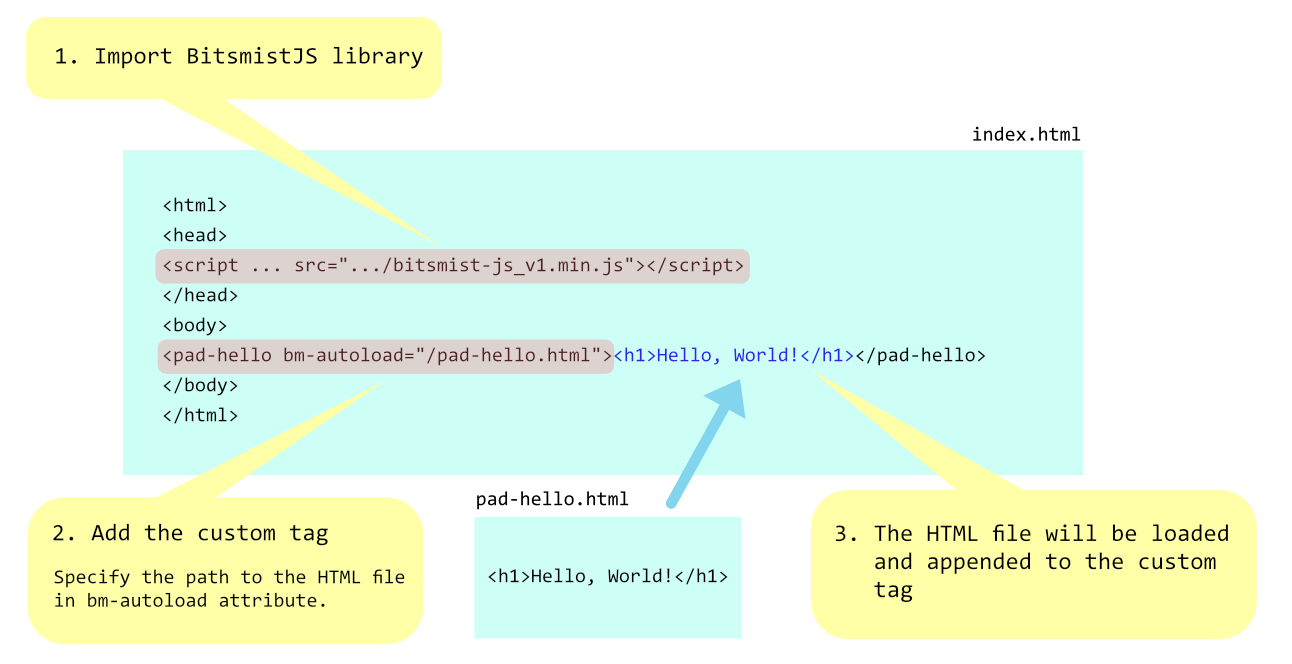
index.html
<html>
<head>
<script type="text/javascript" src="https://cdn.jsdelivr.net/gh/bitsmist/[email protected]/dist/bitsmist-js_v1.min.js"></script>
</head>
<body>
<pad-hello bm-autoload="/pad-hello.html"></pad-hello>
</body>
</html>
pad-hello.html
<h1>Hello, World!</h1>pad-hello.css
pad-hello {
    color: blue;
    display: block;
    text-align: center;
}
HTML and Javascript Unit
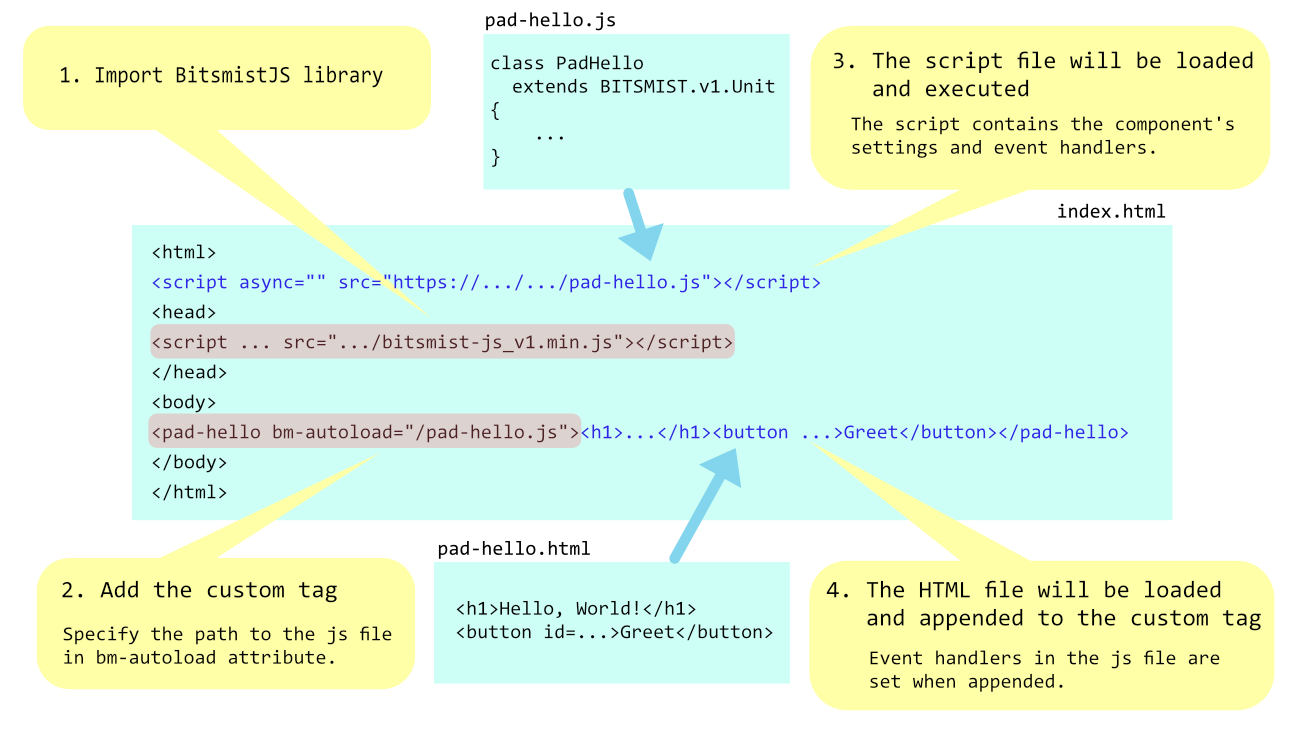
index.html
<html>
<head>
<script type="text/javascript" src="https://cdn.jsdelivr.net/gh/bitsmist/[email protected]/dist/bitsmist-js_v1.min.js"></script>
</head>
<body>
<pad-hello bm-autoload="/pad-hello.js"></pad-hello>
</body>
</html>
</file>
pad-hello.html
<h1>Hello, World!</h1>
<button id="btn-greet">Greet</button>
pad-hello.css
pad-hello {
    color: blue;
    display: block;
    text-align: center;
}
pad-hello.js
class PadHello extends BITSMIST.v1.Unit
{
    _getSettings()
    {
        return {
            "event": {
                "events": {
                    "btn-greet": {
                        "handlers": {
                            "click": "onBtnGreet_Click"
                        }
                    }
                }
            }
        };
    }

    onBtnGreet_Click(sender, e, ex)
    {
        alert("Hello, World!");
    }
}
Documentation
Contribution
Contributions are welcome. Currently, there are no rules on how to contribute yet.
- Coding: Bug report, improvement, advice, etc.
- Translation: Since I'm not a native English speaker, I appreciate someone translates into nicer English. Of course, other languages are welcome.