
@bloodshop/n8n-nodes-codex-pro
v1.0.7
Published
n8n node for local Codex CLI authentication via `codex login`, suitable for Codex-backed AI Agent workflows.

Maintainers
 bloodshop
Readme
n8n-nodes-codex-pro
An n8n community node package that exposes the local Codex CLI as both:
- Codex Pro LM: a Language Model node for n8n AI Agent orchestration
- Codex Pro Tool: an explicit AI Tool node for separate Codex runs when you want outside or higher-risk behavior isolated from the LM node
Install with n8n Community Nodes
This package is designed to be installed from inside n8n through Settings -> Community Nodes.
Important: installing the community node only installs the n8n package itself. It does not install the Codex CLI, run codex login, or create the required Docker/container setup for you.
You still need to provide:
- a working
@openai/codexinstallation in the same environment that runs n8n - a completed
codex login - access to the correct
CODEX_HOMEcontainingauth.jsonand optionallyconfig.toml
Recommended setup
What n8n installs vs what you must configure
When you install @bloodshop/n8n-nodes-codex-pro from Community Nodes:
- n8n downloads and installs the node package
- n8n makes the Codex Pro LM and Codex Pro Tool nodes available in the editor
But you must still configure the runtime yourself:
- install Codex CLI in the n8n host or Docker image
- make sure n8n can execute the
codexbinary - make sure n8n can read the Codex auth/config directory
If those pieces are missing, the node will be installed in n8n but it will not be able to run prompts.
Docker setup
If n8n runs in Docker, this is the setup that usually works best.
The container needs:
- Codex CLI installed in the image
- your Codex home mounted into the container
- the node package installed from n8n Community Nodes
Recommended Dockerfile:
FROM docker.n8n.io/n8nio/n8n:latest

USER root

RUN set -eux; \
    if command -v apt-get >/dev/null 2>&1; then \
      apt-get update; \
      apt-get install -y --no-install-recommends ca-certificates curl bubblewrap; \
      rm -rf /var/lib/apt/lists/*; \
    elif command -v apk >/dev/null 2>&1; then \
      apk add --no-cache ca-certificates curl bubblewrap; \
    fi

COPY pki/*.crt /usr/local/share/ca-certificates/custom/
RUN update-ca-certificates

RUN npm install -g @openai/codex

RUN CODEX_BIN="$(find /opt/nodejs -path '*/bin/codex' | head -n 1)" && \
    test -n "$CODEX_BIN" && \
    ln -sf "$CODEX_BIN" /usr/local/bin/codex

RUN mkdir -p /home/node/.codex \
    && chown -R node:node /home/node

USER node
WORKDIR /home/node
Recommended docker-compose.yml:
services:
  n8n:
    build: .
    ports:
      - "5678:5678"
    volumes:
      - ./n8n_data:/home/node/.n8n
      - /home/your-user/.codex:/home/node/.codex:ro
Then:
- Build and start the container.
- Open n8n.
- Go to Settings -> Community Nodes.
- Install
@bloodshop/n8n-nodes-codex-pro. - Restart the n8n container if n8n asks for it.
Host setup
If n8n runs directly on the host instead of Docker:
- Install Codex CLI on that machine:
npm install -g @openai/codex- Complete login as the same user that runs n8n, or otherwise make the correct
CODEX_HOMEavailable:
codex login- In n8n, go to Settings -> Community Nodes.
- Install
@bloodshop/n8n-nodes-codex-pro.
Quick start after Community Nodes install
- Make sure
codex --versionworks inside the n8n runtime. - Make sure
codex loginhas already been completed for that same runtime orCODEX_HOME. - In n8n, create the credential Codex CLI Auth.
- Leave Codex Binary Path empty first. The node will auto-detect common Codex install paths.
- Set CODEX_HOME if n8n runs in Docker or under a different user.
- Add Codex Pro LM to your AI Agent.
- Pick model
gpt-5-codexor another supported Codex/GPT-5 model.
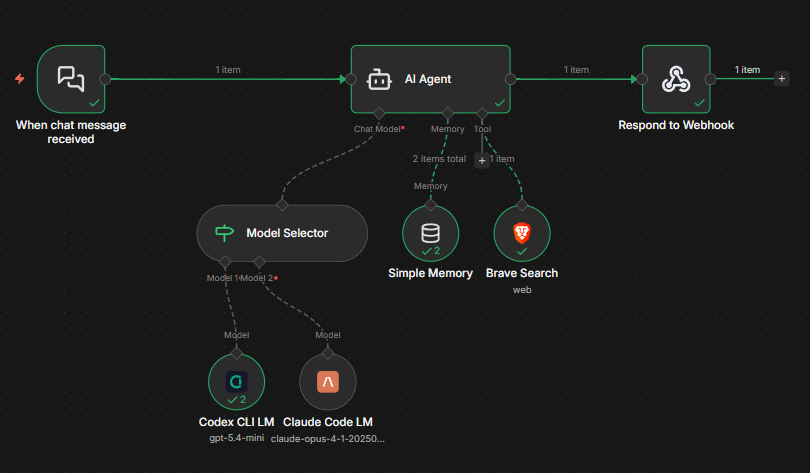
Recommended architecture:
- use Codex Pro LM as the AI Agent language model
- keep its defaults conservative for stable orchestration
- add Codex Pro Tool when you want a separate Codex request for research, external access, or more explicit runtime behavior
Example workflow:
Credentials
Create the n8n credential:
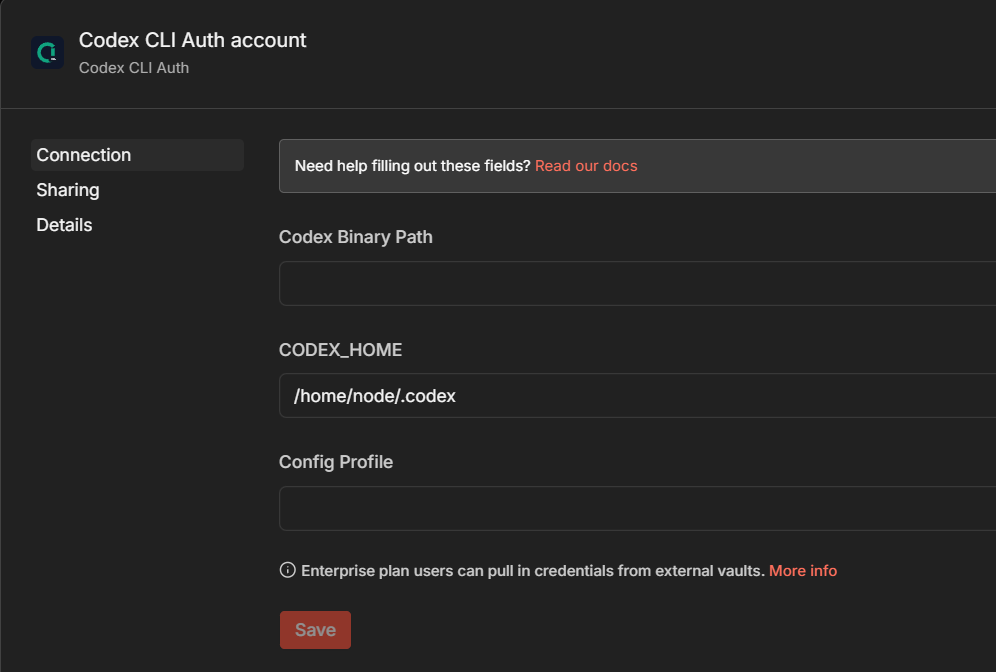
- Codex CLI Auth
Fields:
- Codex Binary Path: optional. Leave empty to auto-detect standard Codex install locations. This covers the recommended host and Docker setups, but custom installs may still need an explicit path.
- CODEX_HOME: optional override if n8n runs under a different home directory. In Docker, set
/home/node/.codex. - Config Profile: optional Codex profile name passed to
codex exec -p
Example credential setup:
Nodes
Codex Pro LM
Use this node as the AI Agent language model. It is intended to stay stable and conservative by default:
- Approval Policy defaults to
never - Sandbox Mode defaults to
read-only - Allow Codex MCP defaults to
off - Web Search defaults to
disabled
This is the safer default path for day-to-day AI Agent orchestration inside n8n.
Codex Pro Tool
Use this node when you want Codex to run as an explicit tool call instead of the main language model.
This is useful when:
- you want external or “outside” Codex behavior isolated behind a tool boundary
- you want the main LM node to stay conservative
- you want to enable web search or MCP only for specific tool calls
- you want an agent to decide when a separate Codex run is worth doing
The tool node takes:
- Tool Name
- Description
- Model
- System Instructions
- Include Metadata
- the same Codex runtime options collection as the LM node
Tool input schema:
task(required)context(optional)
When Include Metadata is enabled, the tool returns JSON containing the final response plus usageMetadata, responseMetadata, and additionalKwargs.
Node options
Open Options -> Add Option in the node editor to reveal these controls.
- Reasoning Effort: passed as
-c model_reasoning_effort="low|medium|high" - Approval Policy: passed as
-c approval_policy="untrusted|on-request|never" - Sandbox Mode: passed as
codex exec -s ... - Allow Codex MCP: allows Codex to use MCP servers defined in
CODEX_HOME/config.toml - Web Search: passed as
-c web_search="disabled|cached|live" - Personality: passed as
-c personality="friendly|pragmatic|none" - Service Tier: passed as
-c service_tier="fast|flex" - Model Provider: passed as
-c model_provider="<provider-id>" - Model Context Window: passed as
-c model_context_window=<value> - Tool Output Token Limit: passed as
-c tool_output_token_limit=<value> - Hide Agent Reasoning: passed as
-c hide_agent_reasoning=<true|false> - Show Raw Agent Reasoning: passed as
-c show_raw_agent_reasoning=<true|false> - Codex Config Overrides: one
key=valueper line, each passed as-c key=value - Timeout / Max Retries
Default values:
- Reasoning Effort:
high - Approval Policy:
never - Sandbox Mode:
read-only - Allow Codex MCP:
off - Web Search:
disabled - Personality:
pragmatic - Service Tier:
flex - Timeout:
300000 - Max Retries:
1 - Codex Binary Path: empty, which enables auto-detection
How it works
Both nodes shell out to:
codex execnon-interactively in a temporary directory and convert the result back into n8n-friendly outputs.
For Codex Pro LM, the node asks Codex to return structured JSON that either:
- contains a final assistant response
- or contains one or more tool calls for n8n to execute
For Codex Pro Tool, the node asks Codex to return a final response in the same structured envelope, then unwraps it and returns either plain text or a metadata-rich JSON payload.
Both nodes run Codex with JSON event output enabled, extract metadata from the event stream, and attach it to the n8n-facing output.
Output metadata
When the LM node returns a response, downstream n8n nodes can use more than just the final text.
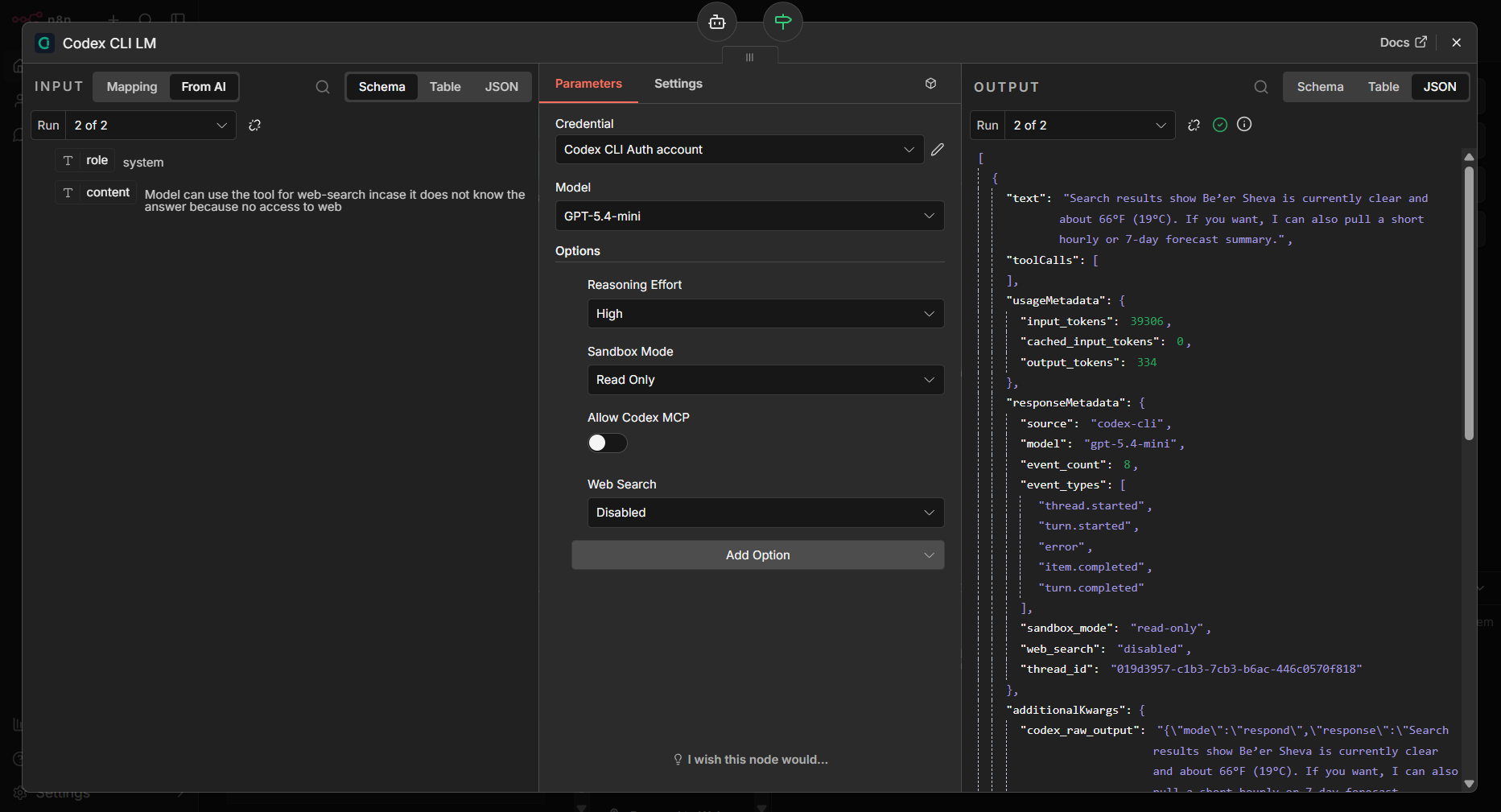
The output payload now includes:
text: the final assistant responsetoolCalls: any tool calls requested by the modelusageMetadata: token usage extracted from the Codex event streamresponseMetadata: run metadata such as model, sandbox mode, approval policy, web search mode, profile, and discovered session identifiersadditionalKwargs: debug-oriented extra fields including the raw structured response and parsed Codex JSON events
Typical usageMetadata fields:
input_tokenscached_input_tokensoutput_tokensreasoning_output_tokenstotal_tokens
Typical responseMetadata fields:
sourcemodelevent_countevent_typessandbox_modeapproval_policyweb_searchservice_tiermodel_providerprofileresponse_idconversation_idsession_idthread_idstatus
Example shape:
[
  {
    "text": "Here’s a strong security interview mock question...",
    "toolCalls": [],
    "usageMetadata": {
      "input_tokens": 1234,
      "output_tokens": 321,
      "reasoning_output_tokens": 88,
      "total_tokens": 1643
    },
    "responseMetadata": {
      "source": "codex-cli",
      "model": "gpt-5-codex",
      "sandbox_mode": "read-only",
      "approval_policy": "never",
      "web_search": "disabled",
      "event_count": 14,
      "event_types": [
        "session_configured",
        "task_complete"
      ]
    },
    "additionalKwargs": {
      "codex_raw_output": "{\"mode\":\"respond\",\"response\":\"...\",\"tool_calls\":[]}",
      "codex_stdout_jsonl": []
    }
  }
]
This makes it easier to store full run context in Simple Memory, inspect usage downstream, or route workflows based on Codex execution metadata instead of only the final text.
Example output:
Codex requirements
The machine or container running n8n must have:
@openai/codexinstalled- a completed
codex login - access to the same
CODEX_HOMEthat containsauth.json
This package is designed for the setup where Codex already works locally with:
codex loginand the CLI stores credentials in:
~/.codex/auth.jsonThe node does not send auth.json to the OpenAI API directly. It shells out to the local codex CLI, and the CLI handles authentication itself.
MCP support
If your Codex config.toml defines MCP servers, either node can optionally allow Codex to use them by enabling:
- Allow Codex MCP
The node simply inherits the MCP configuration already managed by Codex.
Supported Codex config surface
The node now exposes the most useful per-run Codex settings directly in the UI and still leaves a raw escape hatch through Codex Config Overrides for anything else supported by codex exec -c.
The first-class settings were aligned with the current Codex configuration docs:
- Config basics:
https://developers.openai.com/codex/config-basic - Advanced config:
https://developers.openai.com/codex/config-advanced - Config reference:
https://developers.openai.com/codex/config-reference - Sample config:
https://developers.openai.com/codex/config-sample
Troubleshooting
codex: not found
This means the n8n package is installed but the Docker image or host runtime does not have Codex CLI available on PATH.
Checks:
docker exec -it n8n sh -lc 'which codex && codex --version'Fix:
- install
@openai/codexin the same environment that runs n8n - if needed, add a symlink such as
/usr/local/bin/codex - leave Codex Binary Path empty first, then only set it manually if auto-detection still fails
invalid peer certificate: UnknownIssuer
This usually means the container does not trust the CA that signed the HTTPS connection, often because of a corporate proxy, custom internal CA, or incomplete CA bundle.
Checks:
docker exec -it n8n sh -lc 'node -e "fetch(\"https://api.openai.com\").then(r => console.log(\"status\", r.status)).catch(err => { console.error(err); process.exit(1); })"'Fix:
- install
ca-certificatesin the n8n image - copy your custom root CA certificates into
/usr/local/share/ca-certificates/custom/ - run
update-ca-certificates - rebuild the image
- if the core LM path works but this error only appears during web-enabled runs, keep Web Search disabled on the LM node and move those tasks to Codex Pro Tool
Codex could not find system bubblewrap at /usr/bin/bwrap
This warning does not always block requests. Codex can often fall back to the vendored bubblewrap.
If you want to avoid the warning:
- install
bubblewrapin the image - verify whether it is actually available under
bwraponPATH
Read-only filesystem warnings from Codex
Warnings such as cache TTL renewal failures or rollout recording failures can appear when parts of Codex state live on a read-only mount.
These warnings do not necessarily mean the request failed. If codex exec still returns a normal answer, the node can continue working.
Handling Codex path detection
The recommended path for users is:
- leave Codex Binary Path empty and rely on auto-detection
- or point to the Codex wrapper script (
.../@openai/codex/bin/codex.js), not the vendored platform binary
That makes upgrades easier because the wrapper script remains the stable entrypoint while the internal platform binary path may change between Codex releases.
If auto-detection fails in Docker, you can set the explicit wrapper path manually. For example:
/opt/nodejs/node-v24.13.1/lib/node_modules/@openai/codex/bin/codex.jsManual package install
Manual npm install into n8n custom folders is still possible, but it is no longer the recommended path for most users. Prefer installing the package from Community Nodes and only configuring the Codex runtime yourself.
Caveats
- This wraps the Codex CLI. It is not the same as calling the OpenAI Responses API directly.
- Behavior depends on the installed Codex CLI version.
- If n8n runs in Docker, the container needs both the
codexbinary and access to the correctauth.json. - Installing from Community Nodes does not replace the need to build the right Docker image or mount
CODEX_HOME. 1.0.4intentionally separates the stable LM path from the explicit tool path. Use the tool node when you want Codex behavior to be more isolated or more permissive than the main LM node.