
@blueking/status-tag
v1.2.3
Published
A framework-agnostic Status Tag Web Component with i18n support
Downloads
680

Maintainers
 blueking-magicbox
Readme
@blueking/status-tag
一个无框架依赖的状态标签 Web Component,支持国际化,适用于任何前端项目。
🔗 在线演示: Playground
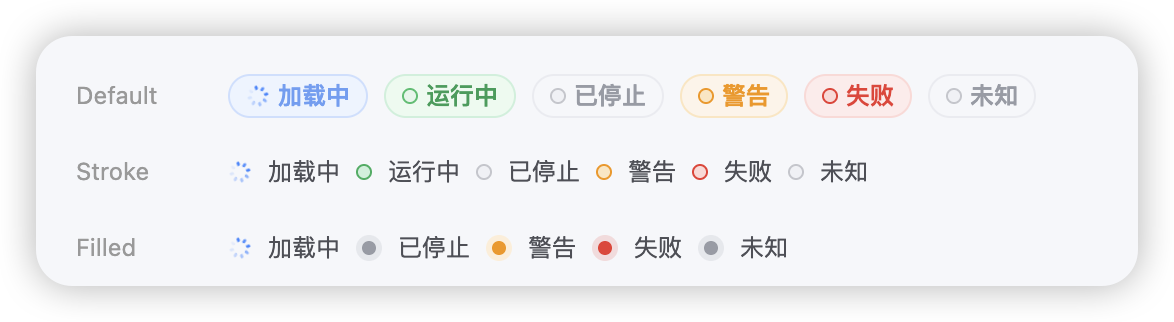
✨ 特性
- ✅ 无框架依赖 - 原生 Web Component,可在任何项目中使用
- ✅ 3 种视觉形态 - Default (背景框)、Stroke (描边)、Filled (光晕)
- ✅ 国际化支持 - 内置中英文,可扩展其他语言
- ✅ 智能匹配 - 支持大小写不敏感的状态匹配
- ✅ 自定义配置 - 支持自定义状态映射
- ✅ TypeScript - 完整的类型支持
🚀 快速开始
NPM 安装
npm install @blueking/status-tag基础使用
<!-- 引入组件 -->
<script type="module" src="node_modules/@blueking/status-tag/dist/status-tag.mjs"></script>

<!-- 使用组件 -->
<!-- 默认样式 -->
<status-tag status="running"></status-tag>

<!-- 描边样式 -->
<status-tag status="running" type="stroke"></status-tag>

<!-- 光晕样式 -->
<status-tag status="running" type="filled"></status-tag>

<!-- 纯文字(与 default 同色标签框,无前置圆点/加载图标) -->
<status-tag status="running" type="text"></status-tag>
后端返回什么就显示什么
未在 status-map 中匹配到的状态,会原样展示传入文本,无需为每个业务状态都预先配置:
<!-- 未命中映射:直接显示 "部署中",套用 unknown 主题兜底 -->
<status-tag status="部署中"></status-tag>
若还想让颜色也表达语义,用 theme 属性把颜色与文本解耦(theme 优先级最高):
<status-tag status="部署中"   theme="loading"></status-tag>  <!-- 蓝色 + 旋转图标 -->
<status-tag status="审批通过" theme="running"></status-tag>  <!-- 绿色 -->
<status-tag status="连接失败" theme="danger"></status-tag>   <!-- 红色 -->
📚 API 文档
属性 (Attributes)
| 属性名 | 类型 | 必填 | 默认值 | 说明 |
|--------|------|------|--------|------|
| status | string | ✅ | - | 状态值(如:'running', 'stop', 'warning', 'failed' 等)。未匹配到映射时原样展示传入文本(后端返回什么就显示什么),并套用 unknown 主题作为兜底 |
| theme | string | ❌ | '' | 主题覆盖,与 status 文本解耦。可选 'loading' \| 'running' \| 'unknown' \| 'warning' \| 'danger'。优先级最高,设置后覆盖 status-map 推导的主题;适用于「文本任意、颜色由前端决定」的场景 |
| type | string | ❌ | '' | 样式类型:''(默认,带状态图标)、'text'(同色标签框仅文字)、'stroke'(描边圆点)、'filled'(光晕圆点) |
| locale | string | ❌ | 'zh-CN' | 语言设置,支持 'zh-CN' 和 'en-US' |
| status-map | string (JSON) | ❌ | - | 自定义状态映射配置(JSON 字符串) |
支持的状态
| 状态 | 中文文本 | 英文文本 | 主题颜色 |
|------|----------|----------|------|
| loading | 加载中 | Loading | 蓝色 |
| running | 运行中 | Running | 绿色 |
| stop | 已停止 | Stopped | 灰色 |
| warning | 警告 | Warning | 橙色 |
| failed | 失败 | Failed | 红色 |
| unknown | 未知 | Unknown | 灰色 |
🎨 样式类型
- Default (默认): 带背景色的胶囊状标签,字体加粗。
- Stroke (描边): 无背景,仅图标带边框,字体常规,颜色 #4D4F56。
- Filled (光晕): 无背景,实心圆点带光晕,字体常规,颜色 #4D4F56。
📖 更多文档
📝 许可证
MIT License