
@boindahood/react-native-biometrics
v1.0.5
Published
react native biometrics
Downloads
96


Readme
@boindahood/react-native-biometrics
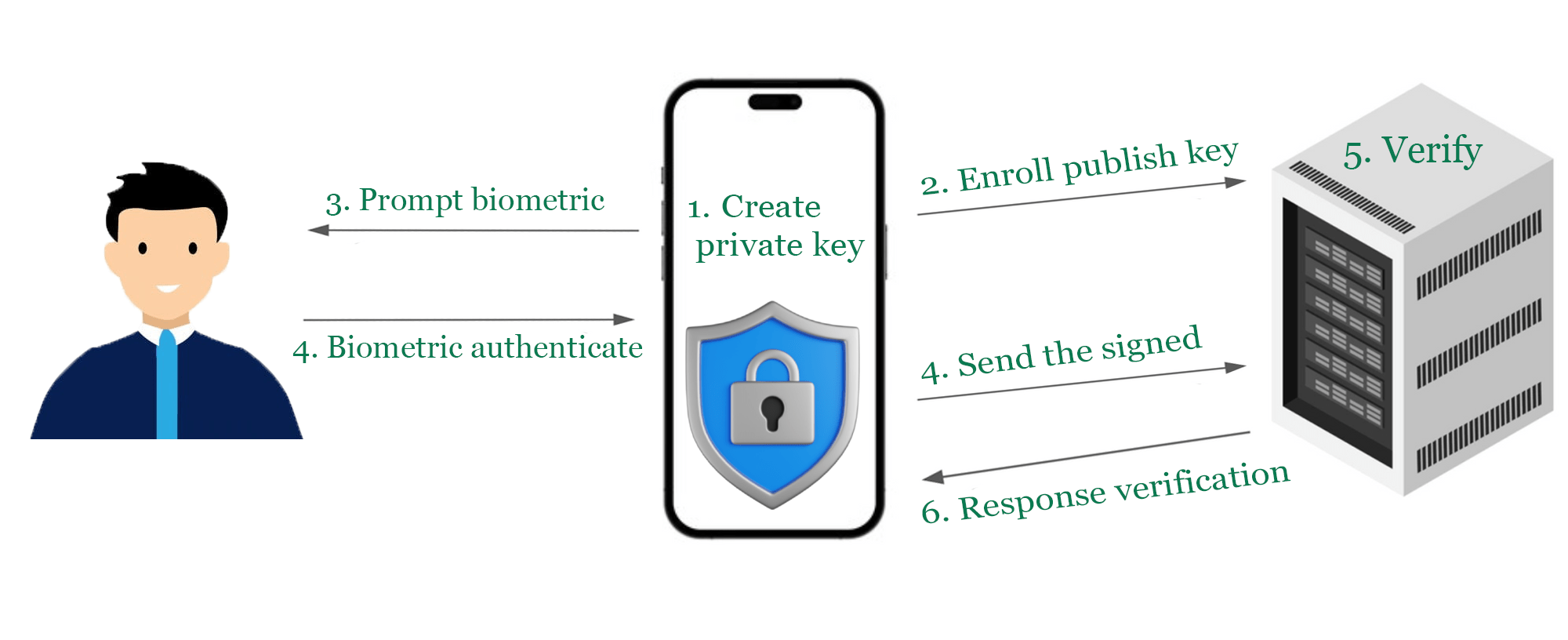
React Native biometric authentication with private key management. Create biometric-protected private keys and digital signatures using native iOS Keychain and Android Keystore.



Features
✅ Biometric Authentication - Face ID, Touch ID, Fingerprint, Iris recognition
✅ Private Key Management - Hardware-protected private keys with biometric access
✅ Digital Signatures - Create cryptographic signatures with biometric authentication
✅ Cross Platform - iOS (Keychain) and Android (Keystore) native storage
✅ TypeScript - Full type definitions included
✅ TurboModule - Built for React Native's new architecture
🎉 What's New in v1.0.4
Private Key Management
- Hardware-protected keys: Create and manage biometric-protected private keys
- Digital signatures: Sign data with biometric authentication:
createSignature - Cross-platform security: Secure Enclave (iOS) + Android Keystore support
- Key lifecycle management: Create, check existence, and delete keys:
createBiometricKey,biometricKeyExists,deleteBiometricKey
Breaking Changes
enumBiometricOtherwayMode: 'hide' | 'callback' | 'PIN'otherwayWithPIN: boolean→otherwayWith: BiometricOtherwayMode- New
otherwayWithmodes: ReplacedotherwayWithPIN: booleanwith flexible mode system'hide': iOS only - Biometric-only authentication, no fallback button'callback': Custom fallback button withpressedOtherwaycallback'PIN': Default mode - Native device PIN/passcode authentication
Screenshots
| iOS Authentication | iOS "Another way" fallback | Android "Another way" fallback |
|:---:|:---:|:---:|
| 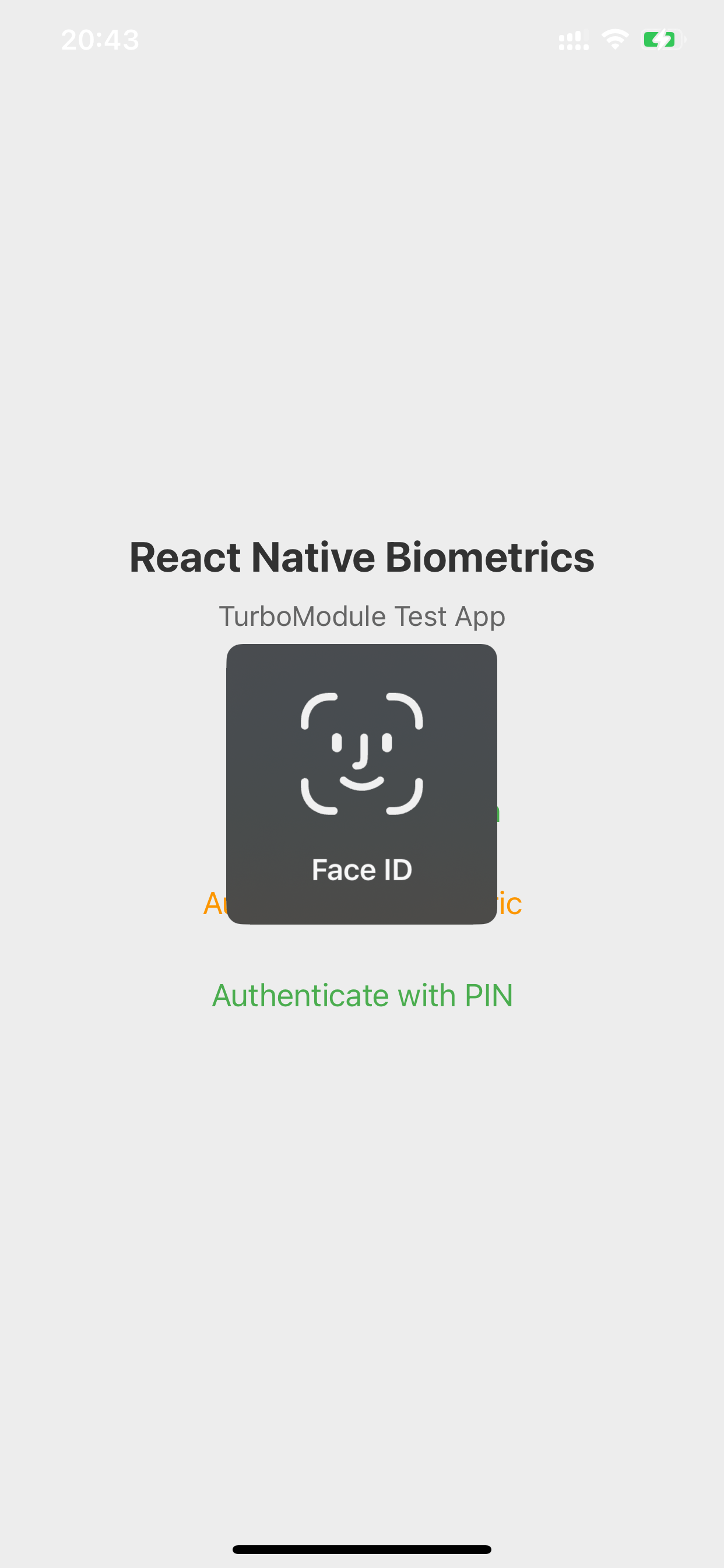 |
| 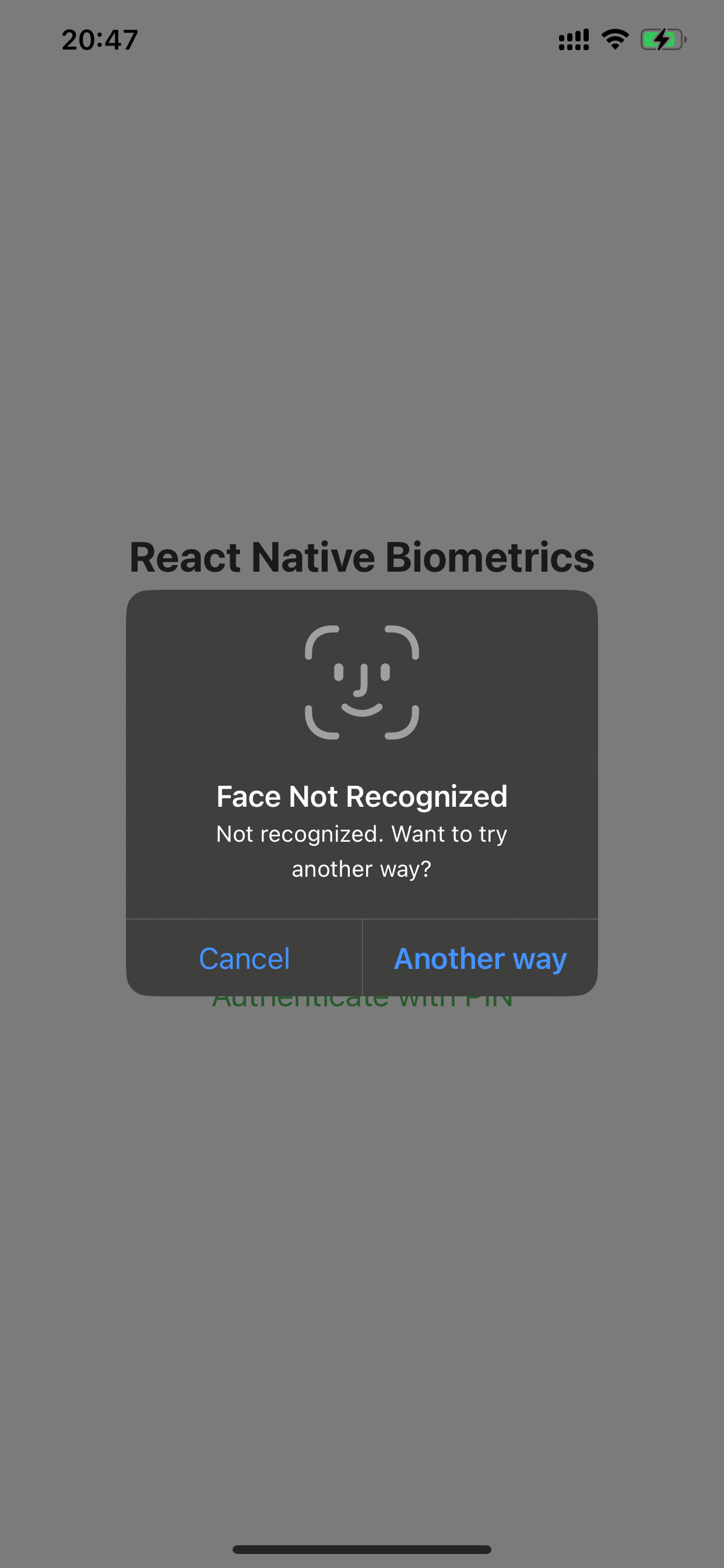 |
| 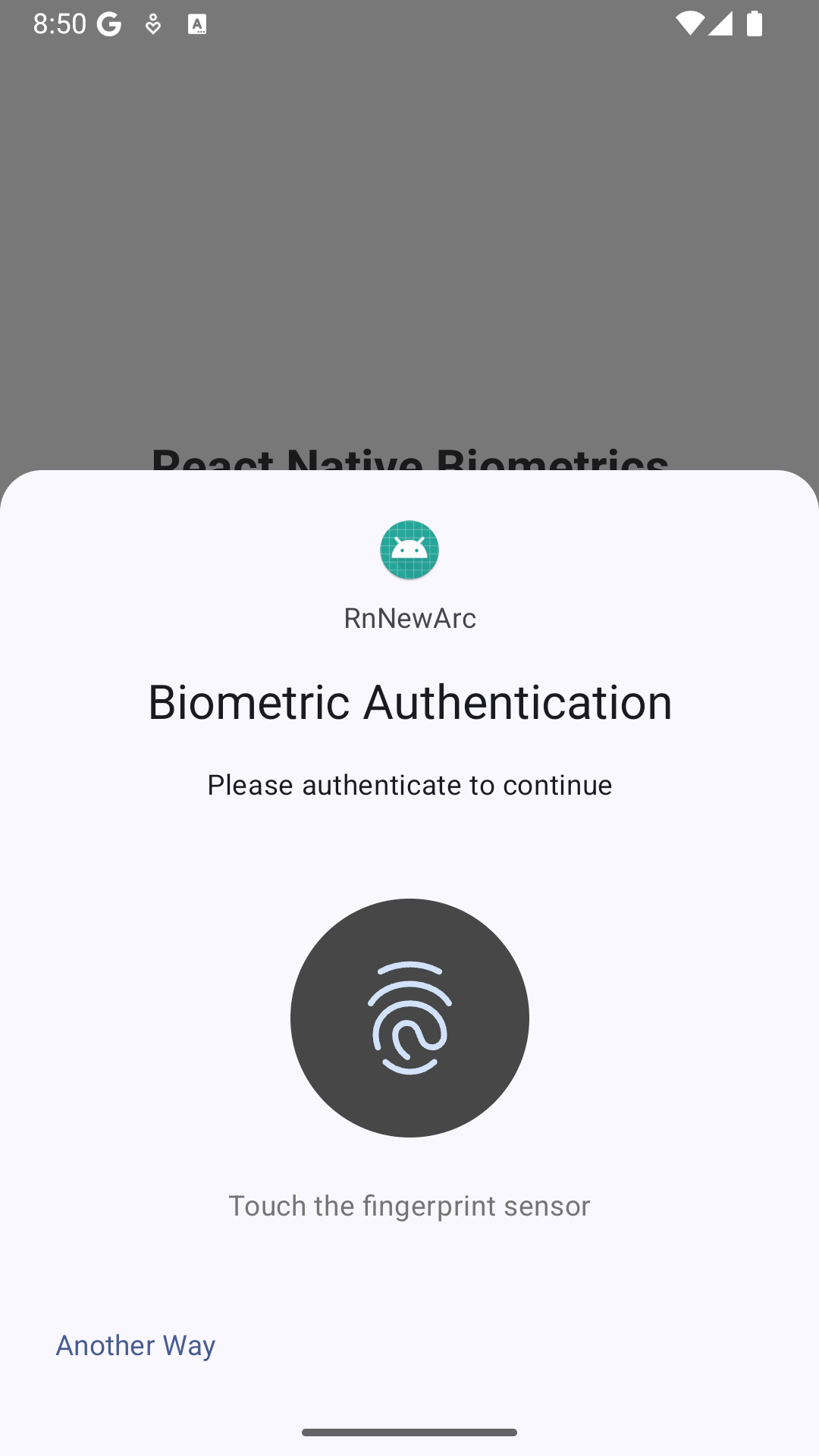 |
|
Installation
npm install @boindahood/react-native-biometrics
# or
yarn add @boindahood/react-native-biometrics
iOS Setup
- Add the following to your
Info.plist:
<key>NSFaceIDUsageDescription</key>
<string>This app uses Face/Touch ID for secure authentication</string>- The library automatically links with LocalAuthentication framework.
Android Setup
- Add the following permissions to your
android/app/src/main/AndroidManifest.xml:
<uses-permission android:name="android.permission.USE_BIOMETRIC" />
<uses-permission android:name="android.permission.USE_FINGERPRINT" />- Ensure your
minSdkVersionis at least 23 inandroid/app/build.gradle:
android {
    defaultConfig {
        minSdkVersion 23
        // ...
    }
}
Usage
Basic Authentication
import ReactNativeBiometrics, { BiometricOtherwayModem, BiometricType, BiometricErrorCode } from '@boindahood/react-native-biometrics';

// Check if biometric authentication is available
const result = await ReactNativeBiometrics.checkBiometricAvailability();

if (result.isAvailable) {
  // Authenticate with custom prompt
  const authResult = await ReactNativeBiometrics.authenticateBiometric({
    titlePrompt: 'Authenticate',
    otherwayWith: BiometricOtherwayMode.PIN
  });

  if (authResult.success) {
    console.log('Authentication successful');
  } else if (authResult.pressedOtherway) {
    console.log('User chose PIN authentication');
  }
}
Private Key Management
// Create a biometric-protected private key
const createResult = await ReactNativeBiometrics.createBiometricKey();

if (createResult.success) {
  // Create a digital signature with custom prompt
  const signResult = await ReactNativeBiometrics.createSignature('data to sign', {
    titlePrompt: 'Sign Transaction',
    otherwayWith: BiometricOtherwayMode.CALLBACK,
    otherwayText: 'Use Password'
  });

  if (signResult.success && signResult.signature) {
    console.log('Signature:', signResult.signature);
  } else if (signResult.pressedOtherway) {
    console.log('User wants to use password instead');
  }
}
API Reference
checkBiometricAvailability()
Checks if biometric authentication is available on the device.
Returns: Promise<BiometricAvailability>
| Property | Type | Description | iOS | Android | |:---------|:-----|:------------|:---:|:-------:| | isAvailable | boolean | Device supports and has biometrics enrolled | ✔ | ✔ | | allowAccess | boolean | App has permission to use biometrics | ✔ | ✔ | | biometricType | BiometricType | Primary biometric type available | ✔ | ✔ | | errorCode | BiometricErrorCode? | Error code if not available | ✔ | ✔ | | errorMessage | string? | Error message if not available | ✔ | ✔ |
Example:
const result = await ReactNativeBiometrics.checkBiometricAvailability();

if (result.isAvailable) {
  console.log(`Biometric type: ${result.biometricType}`);
} else {
  console.log(`Error: ${result.errorMessage}`);
}
requestBiometricPermission()
Requests permission to use biometric authentication.
Note:
- iOS: Triggers biometric permission prompt - user must grant access to use Face ID/Touch ID
- Android: Always returns
success: true(permissions granted via manifest)
Returns: Promise<BiometricPermissionResult>
| Property | Type | Description | iOS | Android | |:---------|:-----|:------------|:---:|:-------:| | success | boolean | Permission granted by user (iOS) or automatically granted (Android) | ✔ | ✔ | | errorCode | BiometricErrorCode? | Error code if permission denied or hardware issues | ✔ | ✔ | | errorMessage | string? | Error message if permission denied or hardware issues | ✔ | ✔ |
Example:
const result = await ReactNativeBiometrics.requestBiometricPermission();

if (result.success) {
  console.log('Permission granted');
}
authenticateBiometric(options?)
Performs biometric authentication with customizable prompts and fallback options.
Options Object:
| Property | Type | Description | iOS | Android | |:---------|:-----|:------------|:---:|:-------:| | titlePrompt | string? | Main authentication prompt title | ✔ | ✔ | | otherwayWith | 'hide' | 'callback' | 'PIN'? | Fallback button behavior (default: 'PIN') | ✔ | ✔ | | otherwayText | string? | Custom fallback button text (required on Android, fallback: "Another way") | ✔ | ✔ |
Fallback Options:
'hide': iOS only - No fallback button, biometric-only authentication (Android defaults to PIN)'callback': Show fallback button with custom text, returnspressedOtherway: truewhen pressed'PIN'(default): Allow device PIN/passcode as authentication alternative
Result Object:
| Property | Type | Description | iOS | Android | |:---------|:-----|:------------|:---:|:-------:| | success | boolean | Authentication successful | ✔ | ✔ | | pressedOtherway | boolean? | User pressed fallback button (when otherwayWith='callback') | ✔ | ✔ | | errorCode | BiometricErrorCode? | Error code if authentication failed | ✔ | ✔ | | errorMessage | string? | Error message if authentication failed | ✔ | ✔ |
Example:
// Simple biometric authentication (defaults to PIN fallback)
const result = await ReactNativeBiometrics.authenticateBiometric({
  titlePrompt: 'Authenticate'
});

// Explicitly with PIN fallback
const result = await ReactNativeBiometrics.authenticateBiometric({
  titlePrompt: 'Secure Login',
  otherwayWith: BiometricOtherwayMode.PIN
});

// With custom callback button
const result = await ReactNativeBiometrics.authenticateBiometric({
  titlePrompt: 'Biometric Auth',
  otherwayWith: BiometricOtherwayMode.CALLBACK,
  otherwayText: 'Use Password'
});

if (result.success) {
  console.log('Authentication successful');
} else if (result.pressedOtherway) {
  console.log('User chose alternative authentication');
}
authenticatePIN()
Performs authentication using device PIN/passcode only.
- Android: working normally, it just open prompt PIN only.
- iOS: open prompt full with Biometric + PIN flow (via manifest)
Returns: Promise<BiometricAuthResult>
| Property | Type | Description | iOS | Android | |:---------|:-----|:------------|:---:|:-------:| | success | boolean | Authentication successful | ✔ | ✔ | | errorCode | BiometricErrorCode? | Error code if authentication failed | ✔ | ✔ | | errorMessage | string? | Error message if authentication failed | ✔ | ✔ |
Example:
const result = await ReactNativeBiometrics.authenticatePIN();

if (result.success) {
  console.log('PIN authentication successful');
}
createBiometricKey()
Creates a new biometric-protected private key. Only one key per app is allowed for security.
Returns: Promise<BiometricKeyResult>
| Property | Type | Description | iOS | Android | |:---------|:-----|:------------|:---:|:-------:| | success | boolean | Key created successfully | ✔ | ✔ | | errorCode | BiometricErrorCode? | Error code if creation failed (e.g., BIOMETRIC_KEY_EXISTS) | ✔ | ✔ | | errorMessage | string? | Error message if creation failed | ✔ | ✔ |
Example:
const result = await ReactNativeBiometrics.createBiometricKey();

if (result.success) {
  console.log('Biometric key created successfully');
} else if (result.errorCode === 'BIOMETRIC_KEY_EXISTS') {
  console.log('Key already exists');
}
biometricKeyExists()
Checks if a biometric-protected private key exists.
Returns: Promise<BiometricKeyExistsResult>
| Property | Type | Description | iOS | Android | |:---------|:-----|:------------|:---:|:-------:| | exists | boolean | Key exists in keystore | ✔ | ✔ | | errorCode | BiometricErrorCode? | Error code if check failed | ✔ | ✔ | | errorMessage | string? | Error message if check failed | ✔ | ✔ |
Example:
const result = await ReactNativeBiometrics.biometricKeyExists();

if (result.exists) {
  console.log('Biometric key exists');
} else {
  console.log('No biometric key found');
}
deleteBiometricKey()
Deletes the biometric-protected private key.
Returns: Promise<BiometricKeyResult>
| Property | Type | Description | iOS | Android | |:---------|:-----|:------------|:---:|:-------:| | success | boolean | Key deleted successfully | ✔ | ✔ | | errorCode | BiometricErrorCode? | Error code if deletion failed | ✔ | ✔ | | errorMessage | string? | Error message if deletion failed | ✔ | ✔ |
Example:
const result = await ReactNativeBiometrics.deleteBiometricKey();

if (result.success) {
  console.log('Biometric key deleted successfully');
}
createSignature(payload, options?)
Creates a digital signature using the biometric-protected private key. Requires biometric authentication with customizable prompts.
IOS: options not working for this case, SecKey of iphone will automatic handle this flow. We cant make any impact
Parameters:
| Parameter | Type | Description | |:----------|:-----|:------------| | payload | string | The data to sign | | options | BiometricAuthOptions? | Authentication options for prompt customization |
Options Object: (Same as authenticateBiometric)
| Property | Type | Description | iOS | Android | |:---------|:-----|:------------|:---:|:-------:| | titlePrompt | string? | Main authentication prompt title | ✖ | ✔ | | otherwayWith | 'hide' | 'callback' | 'PIN'? | Fallback button behavior (default: 'PIN') | ✖ | ✔ | | otherwayText | string? | Custom fallback button text (required on Android, fallback: "Another way") | ✖ | ✔ |
Returns: Promise<BiometricSignatureResult>
| Property | Type | Description | iOS | Android | |:---------|:-----|:------------|:---:|:-------:| | success | boolean | Signature created successfully | ✔ | ✔ | | signature | string? | Base64 encoded signature | ✔ | ✔ | | pressedOtherway | boolean? | User pressed fallback button (when otherwayWith='callback') | ✔ | ✔ | | errorCode | BiometricErrorCode? | Error code if signature creation failed | ✔ | ✔ | | errorMessage | string? | Error message if signature creation failed | ✔ | ✔ |
Example:
// Basic signature creation (defaults to PIN fallback)
const result = await ReactNativeBiometrics.createSignature('data to sign');

// Explicitly with PIN fallback
const result = await ReactNativeBiometrics.createSignature('data to sign', {
  titlePrompt: 'Sign Transaction',
  otherwayWith: BiometricOtherwayMode.PIN
});

if (result.success && result.signature) {
  console.log('Signature:', result.signature);
  // Use the signature for authentication or verification
} else if (result.pressedOtherway) {
  console.log('User chose alternative authentication');
}
Biometric Types
| Type | Platform | Description |
|:-----|:---------|:------------|
| touchId | iOS | Touch ID fingerprint sensor |
| faceId | iOS/Android | Face ID facial recognition |
| fingerprint | Android | Fingerprint sensor |
| iris | Android | Iris recognition sensor |
Example:
import { BiometricType } from '@boindahood/react-native-biometrics'

const { biometricType } = await ReactNativeBiometrics.checkBiometricAvailability()

switch (biometricType) {
  case BiometricType.TOUCH_ID:
    console.log('Touch ID available')
    break
  case BiometricType.FACE_ID:
    console.log('Face ID available')
    break
  case BiometricType.FINGERPRINT:
    console.log('Fingerprint available')
    break
  case BiometricType.IRIS:
    console.log('Iris recognition available')
    break
  default:
    console.log('No biometrics available')
}
Error Handling
The library provides comprehensive error handling with standardized error codes:
| Error Code | Description | iOS | Android | |:-----------|:------------|:---:|:-------:| | BIOMETRIC_NOT_AVAILABLE | Biometric hardware not available | ✔ | ✔ | | BIOMETRIC_NOT_ENROLLED | No biometric credentials enrolled | ✔ | ✔ | | BIOMETRIC_PERMISSION_DENIED | App doesn't have biometric permission | ✔ | ✔ | | BIOMETRIC_LOCKOUT | Too many failed attempts, temporarily locked | ✔ | ✔ | | BIOMETRIC_LOCKOUT_PERMANENT | Permanently locked, requires device unlock | ✔ | ✔ | | BIOMETRIC_AUTH_FAILED | Authentication failed | ✔ | ✔ | | BIOMETRIC_USER_CANCEL | User canceled authentication | ✔ | ✔ | | BIOMETRIC_SYSTEM_CANCEL | System canceled authentication | ✔ | ✔ | | BIOMETRIC_PRESSED_OTHER_WAY | User pressed fallback button | ✔ | ✔ | | BIOMETRIC_KEY_EXISTS | Biometric key already exists | ✔ | ✔ | | BIOMETRIC_KEY_NOT_FOUND | Biometric key not found | ✔ | ✔ | | BIOMETRIC_UNKNOWN_ERROR | Unknown error occurred | ✔ | ✔ |
Example:
import { BiometricErrorCode, BiometricOtherwayMode } from '@boindahood/react-native-biometrics'

const result = await ReactNativeBiometrics.authenticateBiometric({
  titlePrompt: 'Authenticate',
  otherwayWith: BiometricOtherwayMode.CALLBACK,
  otherwayText: 'Use Password'
})

if (!result.success) {
  switch (result.errorCode) {
    case BiometricErrorCode.BIOMETRIC_NOT_AVAILABLE:
      console.log('Biometric hardware not available')
      break
    case BiometricErrorCode.BIOMETRIC_NOT_ENROLLED:
      console.log('No biometric credentials enrolled')
      break
    case BiometricErrorCode.BIOMETRIC_LOCKOUT:
      console.log('Too many failed attempts, try again later')
      break
    case BiometricErrorCode.BIOMETRIC_USER_CANCEL:
      console.log('User canceled authentication')
      break
    case BiometricErrorCode.BIOMETRIC_PRESSED_OTHER_WAY:
      console.log('User pressed fallback button')
      // Handle custom authentication flow
      break
    // Handle other error codes...
  }
} else if (result.pressedOtherway) {
  console.log('User wants to use alternative authentication')
  // Handle fallback authentication
}
Platform Differences
iOS
- Uses Local Authentication framework with Keychain Services
- Face ID and Touch ID support
- Requires user permission - first biometric access triggers system permission prompt
- Supports device passcode fallback via
otherwayWith: 'PIN' - Private keys stored in Secure Enclave when available
- Prompt customization:
titlePromptworks for all authentication methods - createSignature: iOS automatically handles biometric prompt, options mainly for consistency
Android
- Uses AndroidX Biometric library with Android Keystore
- authenticate simple use BIOMETRIC_WEAK prefer: finger > face > iris (avoid BIOMETRIC_LOCKOUT_PERMANENT when user input wrong too many)
- authenticate for createSignature use BIOMETRIC_STRONG
- Permissions granted via manifest - no runtime permission needed
- Supports fingerprint, face, and iris recognition
- Supports device PIN/pattern/password fallback via
otherwayWith: 'PIN' - Private keys stored in hardware-backed Android Keystore
- Prompt customization: Full support for all
BiometricAuthOptionsproperties - Fallback behavior:
'hide': Biometric-only, no fallback button'callback': Custom fallback button, returnspressedOtherway: true'PIN': Native PIN/pattern/password fallback option
Lockout Detection
Important: Both platforms can only reliably detect biometric lockout status during authentication attempts. The lockout information is provided through error codes:
BIOMETRIC_LOCKOUT- Temporary lockout (30 seconds on Android, varies on iOS)BIOMETRIC_LOCKOUT_PERMANENT- Permanent lockout, requires device unlock
To handle lockout, catch these error codes during authentication and guide users accordingly.
Requirements
- React Native >= 0.70
- iOS >= 12.0
- Android API >= 23
Example App
The library includes a comprehensive example app demonstrating all features. To run the example:
cd example
yarn install

# For iOS
yarn ios

# For Android
yarn android
Contributing
See the contributing guide to learn how to contribute to the repository and the development workflow.
License
MIT
Support
Made with ❤️ by boindahood