
@botom/quill-resize-module
v2.2.2
Published
Modern, secure Quill.js module to resize images, GIFs, videos, and iframes — touch & pinch-to-resize, keyboard accessible, persistent sizing through Quill Deltas, upload hooks, and zero known high-severity vulnerabilities.

Maintainers
 botom
botomKeywords
Readme
Quill Resize Module
A modern, secure module for the Quill rich text editor that allows you to resize images, videos, and iframes with comprehensive security updates and enhanced features.



✨ Features
- 🖼️ Image & GIF Resizing - Resize images and animated GIFs with drag handles
- 🎥 Video Resizing - Resize videos (and iframes) maintaining aspect ratio
- 📱 Responsive Design - Works on all devices
- 👆 Touch, Pointer & Pinch Support - Unified pointer events for mouse, touch, and pen, plus native two-finger pinch-to-resize on touch screens
- ⌨️ Keyboard Accessible - Real
<button>controls, focus management, and keyboard shortcuts - 💾 Persistent Sizing - Width, height, and alignment survive
getContents()/setContents()round-trips, copy-paste, and page reloads - 🌐 Multi-language Support - Customizable locale options
- 🔒 Security First - Zero vulnerabilities, modern dependencies, audited regularly
- ⚡ Performance Optimized - Lightweight (≈7 kB brotli) and fast
- 🎨 Customizable Toolbar - Show/hide alignment and size tools
- 📏 Size Display - Optional size indicator
- 🔔 Typed Callbacks -
onSelect,onResizeStart,onResize,onResizeEnd,onAlignChange - 📐 Resize Constraints - min/max width/height, aspect-ratio locking (globally or per embed tag), and
%/pxsize modes with configurable presets - 🧩 Custom Embeds - configure which tags trigger the overlay (
embedTags) or resolve arbitrary wrapper elements (resolveEmbed) without forking - ✏️ Media Attributes - edit
alttext andtitlefrom the toolbar, persisted through Quill's Delta model - ⬆️ Upload Hooks & Compression - intercept pasted/dropped images with
onImageUploadto send them to your own upload pipeline, with optional client-side downscaling viaimageCompression - 📦 Modern Packaging - real ESM (
.mjs) and UMD builds with correctexports/moduleresolution, plus first-class TypeScript types - 🧪 Framework Ready - integration guides for Vanilla JS, React, Next.js, Vue, and Angular
🆕 What's New in v2.1
- Pinch-to-resize on touch devices - place a second finger anywhere on the selected image/video and pinch or spread to resize proportionally, no need to target the small handle.
- More reliable touch dragging - the resize handle now uses Pointer Events (mouse, touch, and pen unified) with pointer capture and an enlarged invisible hit area.
- Native Quill persistence - width/height/alignment are now backed by registered Quill formats, so they survive Delta serialization instead of relying only on inline styles.
- Upload hooks with optional compression - wire
onImageUploadto intercept pasted/dropped images before they're inserted. - Custom embed support - resize arbitrary wrapper elements or extra
tags via
resolveEmbed/embedTags, without forking the library. - Keyboard accessibility - arrow-key resizing, focus management, and screen-reader-friendly controls.
- Dependency audit - vulnerabilities reduced from 23 to 1 (a documented, unfixable-upstream low-severity issue), with 100% of test and lint tooling kept current.
- Real ESM build -
dist/quill-resize-module.esm.mjsfixes a previous packaging bug whereimportresolved to a UMD bundle instead of true ESM.
🚀 Demo
Live Demo: https://botoom.github.io/quill-resize-module/
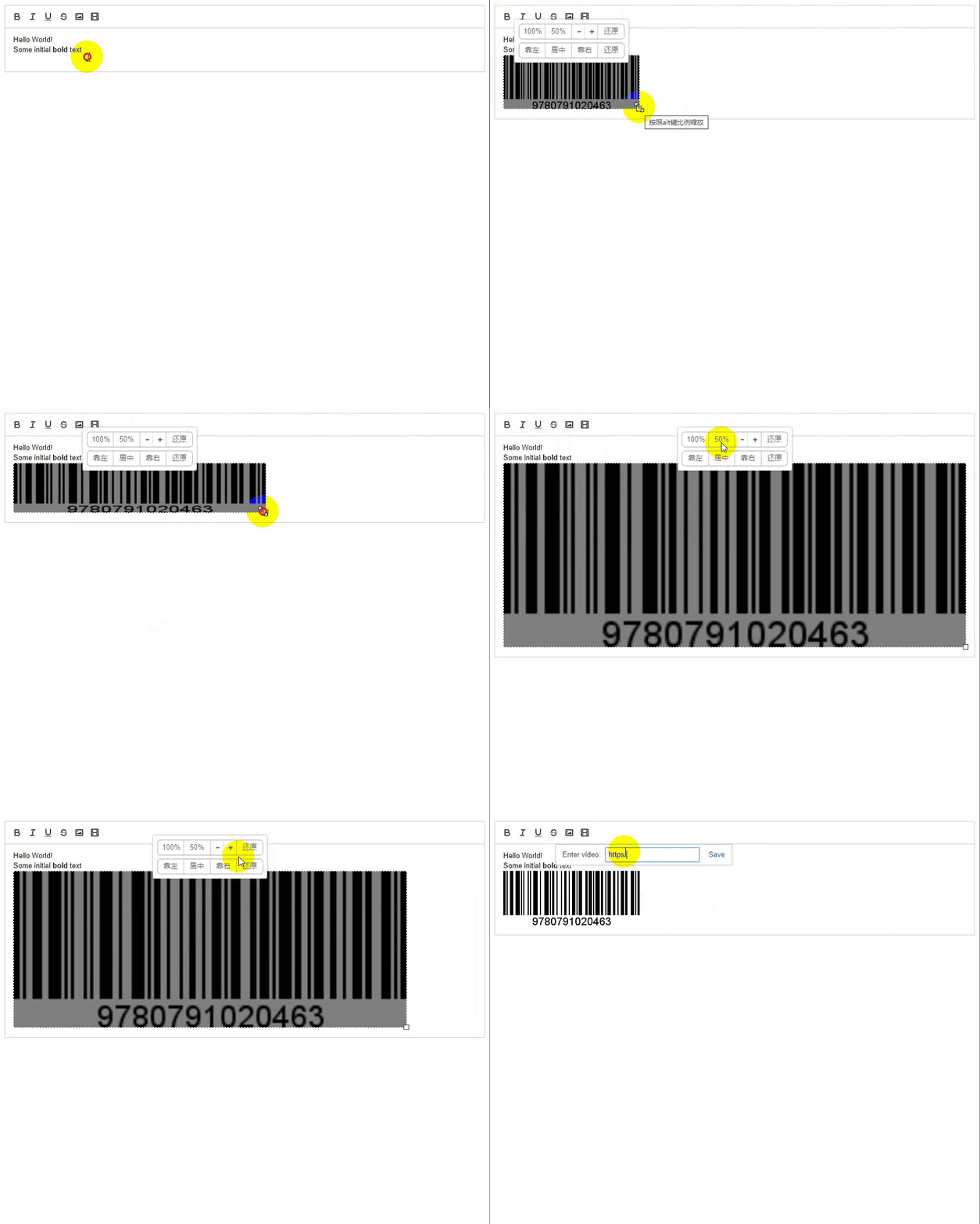
Framework-specific integration examples (Vanilla, React, Next.js, Vue,
Angular) with lifecycle/cleanup guidance are in
examples/.
📦 Installation
npm install @botom/quill-resize-moduleOr with pnpm:
pnpm add @botom/quill-resize-moduleWith Yarn, use yarn add @botom/quill-resize-module. quill is a peer
dependency, so install it in your application as well:
npm install quill
# or: pnpm add quill
# or: yarn add quill
This package ships three builds so both Node/bundler resolution and
plain <script> usage work correctly:
| Consumer | File | Format |
|----------|------|--------|
| Bundlers/Node (import) | dist/quill-resize-module.esm.mjs | Real ES module (export/import) |
| Bundlers/Node (require), CDN <script> | dist/quill-resize-module.min.js | UMD, minified |
| Legacy <script> (unminified/debug) | dist/quill-resize-module.js | UMD |
The package's exports map resolves import/require automatically —
you normally don't need to reference these paths directly.
🛠️ Usage
ES6/TypeScript
import Quill from "quill";
import ResizeModule from "@botom/quill-resize-module";

Quill.register("modules/resize", ResizeModule);

const quill = new Quill("#editor", {
  modules: {
    resize: {
      showSize: true,
      locale: {
        altTip: "Hold down the alt key to zoom",
        floatLeft: "Left",
        floatRight: "Right",
        center: "Center",
        restore: "Restore",
      },
    },
  },
});
Browser (CDN)
<!DOCTYPE html>
<html lang="en">
<head>
  <meta charset="UTF-8">
  <title>Quill Resize Module Demo</title>
  <link href="https://cdn.jsdelivr.net/npm/[email protected]/dist/quill.snow.css" rel="stylesheet">
  <script src="https://cdn.jsdelivr.net/npm/[email protected]/dist/quill.js"></script>
  <script src="https://cdn.jsdelivr.net/npm/@botom/quill-resize-module@latest/dist/quill-resize-module.js"></script>
</head>
<body>
  <div id="editor"></div>
  <script>
    Quill.register("modules/resize", window.QuillResizeModule);

    const quill = new Quill("#editor", {
      modules: {
        toolbar: ["bold", "italic", "image", "video"],
        resize: {
          showSize: true,
          locale: {}
        }
      },
      theme: "snow"
    });
  </script>
</body>
</html>
⚙️ Configuration Options
| Option | Type | Default | Description |
|--------|------|---------|-------------|
| showToolbar | boolean | true | Show/hide the toolbar |
| showSize | boolean | false | Display current dimensions as a floating label |
| locale | object | {} | Custom language strings |
| toolbar.sizeTools | boolean | true | Show size adjustment tools |
| toolbar.alignTools | boolean | true | Show alignment tools |
| toolbar.sizePresets | number[] | [100, 50] | Percentages rendered as quick-size preset buttons |
| toolbar.sizeUnit | "%" | "px" | "%" | Unit applied by preset buttons and the width input (see Resize Constraints & Modes) |
| toolbar.attributesTool | boolean | true | Show the "edit attributes" button that opens the alt/title panel (see Media Attributes) |
| constraints | ResizeConstraints | {} | Min/max width & height and aspect-ratio locking, applied to every target (see below) |
| constraintsByTag | object | {} | Per-tag override of constraints (e.g. { img: {...}, video: {...}, myEmbed: {...} }) |
| embedTags | string[] | ["img", "video"] | Tags that trigger the resize overlay on click. Fully replaces the default list — set it to add custom tags (e.g. ["img", "video", "canvas"]) |
| resolveEmbed | function | undefined | Custom resolver (clickedTarget, event) => HTMLElement \| null to support arbitrary wrapper elements (see Custom Embeds) |
| onImageUpload | function | undefined | (file: File) => Promise<string> \| string called for each pasted/dropped image; its resolved URL is inserted into the editor (see Upload Hooks & Compression) |
| imageCompression | ImageCompressionOptions \| false | undefined | Optional client-side downscaling applied before onImageUpload. Only takes effect when onImageUpload is set |
toolbar.alingTools(the original, misspelled name) still works as a deprecated alias fortoolbar.alignTools, but new code should use the corrected name.
Callbacks
| Callback | Signature | Fires when |
|----------|-----------|------------|
| onChange | (element: HTMLElement) => void | After any change (drag, keyboard resize, toolbar click/input). Kept for backward compatibility. |
| onSelect | (element: HTMLElement) => void | Once, when the overlay activates for a new img/video/iframe target. |
| onResizeStart | (element: HTMLElement) => void | When a resize gesture begins (pointer drag, keyboard arrow step, or a toolbar width action). |
| onResize | (element: HTMLElement, event: ResizeChangeEvent) => void | During a resize gesture. Fires on every pointermove for drags; once with the final size for keyboard/toolbar-driven resizes. |
| onResizeEnd | (element: HTMLElement) => void | When a resize gesture ends. |
| onAlignChange | (element: HTMLElement, align: "left" \| "center" \| "right" \| null) => void | When alignment changes via the toolbar. |
| onAttributesChange | (element: HTMLElement, attrs: ResizeMediaAttributes) => void | When alt/title are saved through the attributes panel. |
ResizeChangeEvent is { target: HTMLElement; width: number; height: number; align: "left" | "center" | "right" | null }.
import type { QuillResizeModuleOptions, ResizeChangeEvent } from "@botom/quill-resize-module";

const options: QuillResizeModuleOptions = {
  onSelect: (element) => console.log("selected", element),
  onResizeStart: (element) => console.log("resize start", element),
  onResize: (element, event: ResizeChangeEvent) => {
    console.log(`resizing to ${event.width}x${event.height}`, event.align);
  },
  onResizeEnd: (element) => console.log("resize end", element),
  onAlignChange: (element, align) => console.log("align changed", align),
};
Locale Configuration
const quill = new Quill("#editor", {
  modules: {
    resize: {
      locale: {
        altTip: "Hold down the alt key to zoom",
        floatLeft: "Left",
        floatRight: "Right",
        center: "Center",
        restore: "Restore",
      },
    },
  },
});
Toolbar Customization
// Hide alignment tools (e.g. for content pipelines that don't need it)
const quill = new Quill("#editor", {
  modules: {
    resize: {
      toolbar: {
        alignTools: false, // Hide alignment
        sizeTools: true,   // Keep size tools
      },
    },
  },
});
✏️ Media Attributes (Alt Text & Title)
Every resizable target gets an "edit attributes" button in the toolbar
(hide it with toolbar.attributesTool: false) that opens a small panel
for editing alt text and title:
const quill = new Quill("#editor", {
  modules: {
    resize: {
      onAttributesChange: (element, { alt, title }) => {
        console.log("attributes saved", { alt, title });
      },
    },
  },
});- The Alt text field is only shown for
<img>targets, matching native HTML semantics — videos and iframes don't have analtattribute. - The Title field is available for any target and sets a plain HTML
titleattribute (shown as a native tooltip by the browser). - Both fields are saved into Quill's Delta model (
alt/titleDelta attributes) when a live Quill instance is available, so they survivegetContents()/setContents()round trips exactly like width, height, and alignment. - Pressing Escape while focused inside the panel closes just the panel, leaving the resize overlay open.
📐 Resize Constraints & Modes
Control the bounds and behavior of every resize gesture (pointer drag,
keyboard arrow steps, and px-unit toolbar actions):
const quill = new Quill("#editor", {
  modules: {
    resize: {
      constraints: {
        minWidth: 80,
        maxWidth: 800,
        minHeight: 60,
        maxHeight: 600,
        lockAspectRatio: true, // always preserve ratio, without needing Alt
      },
      // Override constraints for specific embed tags — per-tag fields win
      // over the matching field in the global `constraints` above.
      constraintsByTag: {
        video: { lockAspectRatio: true },
        iframe: { lockAspectRatio: true, minWidth: 320 },
      },
    },
  },
});
An absolute 30px minimum always applies as a safety floor, even if a smaller
minWidth/minHeightis configured.
Toggle between relative (%) and absolute (px) sizing for the toolbar's
preset buttons and width input, and customize which percentages are
offered as presets:
const quill = new Quill("#editor", {
  modules: {
    resize: {
      toolbar: {
        sizePresets: [100, 75, 50, 25], // default is [100, 50]
        sizeUnit: "px", // default is "%"; presets/input become fixed px sizes
      },
    },
  },
});
In "%" mode (the default) the preset buttons/input set a relative
width: N%;, so the embed keeps resizing with its container. In "px"
mode they compute an absolute width from the embed's original size
(e.g. 50% of a 200px-wide image becomes width: 100px;) and set
height: auto;, so the embed keeps a fixed size regardless of the
container's width. minWidth/maxWidth constraints are enforced on
px-mode preset/input changes.
🧩 Custom Embeds
By default, clicking an img or video attaches the resize overlay
(iframes — e.g. YouTube embeds — are handled separately via focus
tracking, since clicks inside cross-origin iframe content don't bubble to
the parent document). You can extend or completely replace this behavior
without forking the library:
const quill = new Quill("#editor", {
  modules: {
    resize: {
      // Fully replaces the default ["img", "video"] list — include every
      // tag you want to be resizable.
      embedTags: ["img", "video", "canvas", "my-custom-embed"],
    },
  },
});
For embeds that aren't a single element (e.g. a wrapper <div> or
<figure> around an inner element), use resolveEmbed to resolve the
click to the element that should actually be resized:
const quill = new Quill("#editor", {
  modules: {
    resize: {
      resolveEmbed(clickedTarget, event) {
        // Clicking anywhere inside a ".chart-embed" wrapper resizes the
        // wrapper itself, not the element that was clicked.
        return clickedTarget.closest(".chart-embed");
      },
    },
  },
});
resolveEmbed is checked first; if it returns null/undefined, the
module falls back to embedTags-based matching on the clicked element's
own tag name. Both constraintsByTag and persistence through Quill's
Delta model (for blot-backed elements) work with custom embeds exactly
as they do for img/video.
⬆️ Upload Hooks & Compression
By default, pasting or dropping an image into the editor is handled by
Quill/the browser's native clipboard behavior (usually inlined as a
data: URL). Setting onImageUpload lets you intercept that flow and
send the file to your own upload pipeline instead — the module inserts
whatever URL you resolve:
const quill = new Quill("#editor", {
  modules: {
    resize: {
      async onImageUpload(file) {
        const formData = new FormData();
        formData.append("file", file);
        const response = await fetch("/api/upload", {
          method: "POST",
          body: formData,
        });
        const { url } = await response.json();
        return url;
      },
    },
  },
});onImageUploadis only invoked for image files pasted/dropped directly into the editor; non-image files and drag/drop of text or other content are left untouched.- If
onImageUploadis not configured, paste/drop behavior is completely unchanged — this feature is fully opt-in and backward compatible. - Returning a falsy value (e.g.
undefinedor an empty string) skips insertion for that file, which is useful if the upload fails and you want to show your own error UI instead. - Multiple pasted/dropped files are uploaded and inserted in order.
Optionally, downscale images client-side before they reach
onImageUpload with imageCompression:
const quill = new Quill("#editor", {
  modules: {
    resize: {
      onImageUpload /* ... */,
      imageCompression: {
        maxWidth: 1600,
        maxHeight: 1600,
        mimeType: "image/jpeg",
        quality: 0.8,
      },
    },
  },
});
imageCompression uses an in-memory <canvas> to resize/re-encode the
image and never upscales images that are already smaller than the
configured bounds. It only has an effect when paired with
onImageUpload (the paste/drop interceptor doesn't activate otherwise),
and it degrades gracefully — if canvas 2D rendering isn't available in
the current environment, or the compression step throws for any
reason, the original file is passed through unchanged instead of
failing the upload.
🔧 Advanced Configuration
Combine toolbar visibility with the live size label:
const quill = new Quill("#editor", {
  modules: {
    resize: {
      toolbar: {
        alignTools: false, // Disable alignment tools
      },
      showSize: true,
    },
  },
});
♿ Accessibility & Keyboard Shortcuts
The resize handle and every toolbar control are real <button> elements
(not anchors), so they are reachable and operable with a keyboard once
the overlay is active, and are announced correctly by screen readers.
When the overlay activates, focus moves to the resize handle automatically:
| Shortcut | Action |
|----------|--------|
| Arrow keys | Resize by 1px |
| Shift + Arrow keys | Resize by 10px |
| Alt + Arrow keys | Resize while keeping the original aspect ratio |
| 0 | Restore the original size |
| Escape | Close the overlay |
Touch and pen input are supported through Pointer Events, and the resize
handle has an enlarged (invisible) hit area for touch screens. On touch
devices, the whole selected media area also supports pinch-to-resize:
placing a second finger anywhere on the overlay and spreading or pinching
scales width and height together, proportionally to how far apart the
fingers move — no need to land precisely on the small handle. Pinching
cancels a single-finger handle drag in progress, and respects the same
constraints (min/max width/height) as every other resize gesture.
🐛 Bug Fixes & Security
Recent Fixes
- ✅ Fixed positioning when nested inside relative elements (PR #12)
- ✅ Security vulnerabilities resolved (DOM Clobbering XSS, RCE)
- ✅ Dependencies updated to latest secure versions
- ✅ Build system modernized with Rollup v3
Security Status
- 🔒 0 vulnerabilities in production dependencies (
npm audit --omit=dev --audit-level=high) - 🛡️ Modern dependencies — dev tooling vulnerabilities are tracked and remediated conservatively (see
MEJORAS_LIBRERIA.md) - ⚠️ One known low-severity issue in
quillitself (an XSS in its HTML export feature, GHSA-v3m3-f69x-jf25), affecting the latest publishedquillrelease with no fix available yet — tracked upstream, not introduced by this module - ✅ CI/CD security with Node.js 20.x
📱 Browser Support
| Browser | Version | |---------|---------| | Chrome | 70+ | | Firefox | 65+ | | Safari | 12+ | | Edge | 79+ |
🧬 Framework Compatibility
The module has no framework dependency of its own — it only needs a
Quill 2.x instance. Like Quill itself, it reads document/HTMLElement
at construction time, so it cannot run during server-side rendering; in
SSR frameworks (Next.js, Nuxt, Angular Universal, etc.) always create the
editor on the client only. See examples/ for
worked Vanilla, React, Next.js, Vue, and Angular integrations, including
SSR guidance and cleanup/destroy() lifecycle wiring.
🤝 Contributing
- Fork the repository
- Create your feature branch (
git checkout -b feature/amazing-feature) - Commit your changes (
git commit -m 'feat: add amazing feature') - Push to the branch (
git push origin feature/amazing-feature) - Open a Pull Request
Commit Convention
This project follows Conventional Commits for automated versioning:
feat:for new featuresfix:for bug fixesdocs:for documentationstyle:for formattingrefactor:for code refactoringtest:for testschore:for maintenance
📋 Development
# Clone the repository
git clone https://github.com/BOTOOM/quill-resize-module.git
cd quill-resize-module

# Install dependencies (choose one)
npm install
# pnpm install
# yarn install

# Start development
npm run dev

# Run tests
npm test

# Build for production
npm run build
📄 License
MIT © Edwar Diaz
🔗 Related Projects
- Quill.js - Modern rich text editor
- Quill Image Resize - Alternative image resize module
📊 Stats


