
@breadc/core
v1.0.0-beta.18
Published
Yet another Command Line Application Framework with fully strong TypeScript support

Maintainers
 yjl9903
Readme
🥪 Breadc




Yet another Command Line Application Framework desgined for TypeScript.
- TypeScript Infer: infer command arguments, option values, and action signatures in IDE automatically
- Command: support default command, command alias, and nested sub-commands like
git remote add <name> <url> - Group: organize commands by modules and build large multi-command CLI applications with clear structure
- Option: support boolean, required, optional, spread options,
--no-*negation, and--passthrough arguments - Middleware: support middleware pipeline and unknown option handling
- Builtin CLI Features: provide common help / version options and i18n support out of the box
Installation
npm i @breadc/coreUsage
Try ./examples/echo.ts.
import { breadc } from '@breadc/core';

const cli = breadc('echo', { version: '1.0.0' })
  .option('--host <host>', 'specify hostname', { initial: 'localhost' })
  .option('--port <port>', 'specify port', { initial: '3000', cast: (t) => +t });

cli.command('[message]', 'Say something!').action((message, option) => {
  console.log(message ?? 'You can say anything!');
  const { host, port } = option; // { host: string, port: number, '--': string[] }
  console.log(`Host: ${host}`);
  console.log(`Port: ${port}`);
});

cli.run(process.argv.slice(2)).catch((err) => console.error(err));
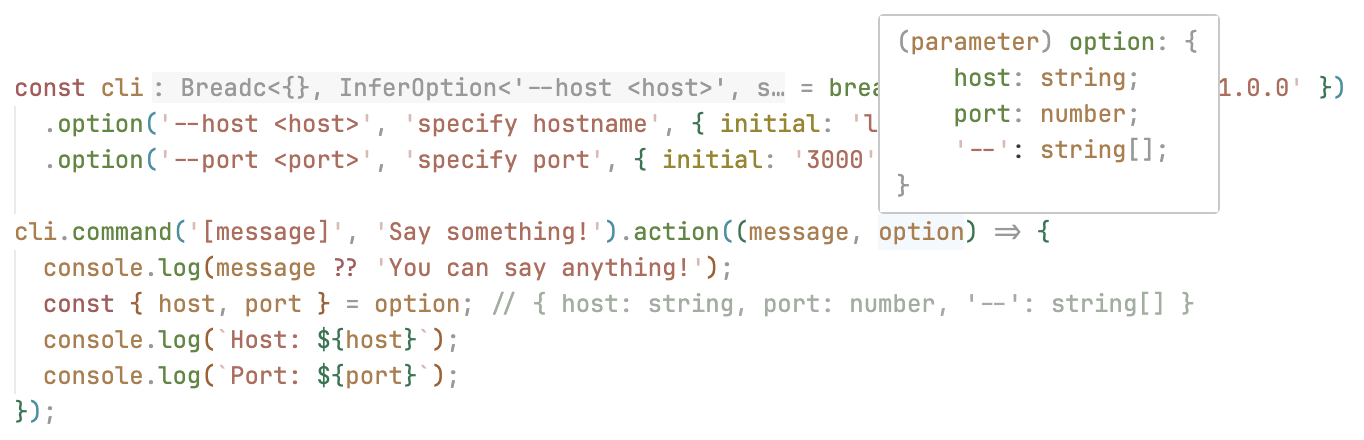
If you are using IDEs that support TypeScript (like Visual Studio Code), input something using option, and then you will find the option is automatically typed with { host: string, port: number }. In the figure below, Visual Studio Code will automatically infer that the type of option.host is string and the type of option.port is number.
Inspiration
- cac: Simple yet powerful framework for building command-line apps.
- Commander.js: Node.js command-line interfaces made easy.
- TypeScript: Documentation - Template Literal Types
License
MIT License © 2023 XLor