
@budarin/layered-infra-dev-logger
v1.0.6
Published
Infrastructure-focused dev logger toolkit for layered architectures.
Downloads
57

Maintainers
 budarin
Readme
@budarin/layered-infra-dev-logger
Infrastructure-focused dev logger toolkit for layered architectures.
Supported runtimes
The package is written against globalThis (with guarded fallbacks to standard intrinsics). It is safe to import and call createLayeredLoggerToolkit() in:
- Browser (document + full Web APIs)
- Service worker (no
window, often nolocalStorage) - Node.js (including Vitest /
node:testand other test runners in the default Node realm)
You do not need consumer-side shims such as globalThis.window = globalThis for this library.
Global control (globalControl)
- By default, control is attached with
Object.definePropertyonglobalThis(override withglobalControl.target). - Attachment is best effort: if
definePropertyis missing, not callable, or throws (non-configurable property, sealed object, revoked proxy, and similar cases), the failure is swallowed and the rest of the toolkit still works.controlon the returned toolkit is always available. - In browsers, when attachment succeeds, DevTools usage matches previous behavior (e.g.
globalThis.logger).
Persistence (persistence)
- Default persistence looks for
localStorageonglobalThis. If it is missing or does not exposegetItem/setItem/removeItemas functions, persistence is silently disabled (no throws). - You can pass a custom
persistence.storageadapter in any environment. - Invalid or unreadable stored payloads are cleared best effort; errors during read, parse, or cleanup are not propagated to the caller.
Console output
- Log methods resolve
globalThis.consoleon each emit. Ifconsoleor a level method is missing, that emit is a no-op (no throw).
Features
- Colored scope prefixes in console logs (
[ UI ] [ CONTAINER ] ...). - Runtime noise control with rules:
enable/disable/show/remove/preview/focus/reset/undo.
- Selector DSL with scope + level + message + args matching:
[ scopes ] | levels | message | args.
globandeq:matchers formessageandargs.- Optional persistence via
localStorageor custom storage adapter. - Optional global control attachment (
globalThis.loggerby default).
Install
pnpm add @budarin/layered-infra-dev-loggerQuick Start
import { createLayeredLoggerToolkit } from '@budarin/layered-infra-dev-logger';

// Defaults already enabled:
// - global control in DevTools console: globalThis.logger
// - persistence in localStorage
// - scope normalize: trim spaces + uppercase
const toolkit = createLayeredLoggerToolkit();

const base = toolkit.createLogger();
const coreLogger = base.child('CORE').child('USECASE', { color: '#ea580c' });

coreLogger.debug('sync failed', { code: 'E_TIMEOUT', todoId: '019...' });
Layered Project Setup (Composition Root)
import { createLayeredLoggerToolkit, createLayeredLoggers } from '@budarin/layered-infra-dev-logger';

// 1) Create one toolkit in bootstrap/composition root.
const toolkit = createLayeredLoggerToolkit();

// 2) Describe your layered structure once.
const baseLogger = toolkit.createLogger();
const {
    logger,
    uiLogger,
    uiContainerLogger,
    coreLogger,
    coreUseCaseLogger,
    coreAdapterLogger,
    storeLogger,
    serviceLogger,
    networkServiceLogger,
    themeServiceLogger,
} = createLayeredLoggers(baseLogger, {
    APP: {
        alias: 'logger',
        color: '#b45309',
        children: {
            UI: {
                alias: 'uiLogger',
                color: '#16a34a',
                children: {
                    CONTAINER: { alias: 'uiContainerLogger', color: '#22c55e' },
                },
            },
            CORE: {
                alias: 'coreLogger',
                color: '#c2410c',
                children: {
                    USECASE: { alias: 'coreUseCaseLogger', color: '#ea580c' },
                    ADAPTER: { alias: 'coreAdapterLogger', color: '#f59e0b' },
                },
            },
            STORE: { alias: 'storeLogger', color: '#dc2626' },
            SERVICE: {
                alias: 'serviceLogger',
                color: '#2563eb',
                children: {
                    NETWORK: { alias: 'networkServiceLogger', color: '#38bdf8' },
                    THEME: { alias: 'themeServiceLogger' }, // inherits SERVICE color
                },
            },
        },
    },
});

// 3) Wire them into your app boundaries/ports.
initUiLoggerPort(uiLogger);
initUiContainerLoggerPort(uiContainerLogger);
initCoreUseCaseLoggerPort(coreUseCaseLogger);
initCoreAdapterLoggerPort(coreAdapterLogger);
initStoreLoggerPort(storeLogger);
initServiceLoggerPort(serviceLogger);

// 4) Use in runtime code.
coreUseCaseLogger.debug('create todo start', { todoId: '019...' });
networkServiceLogger.warn('network degraded', { quality: 'slow-2g' });

// 5) Manual variant: same idea via child() chain.
const manualCoreUseCaseLogger = baseLogger
    .child('APP', { color: '#b45309' })
    .child('CORE', { color: '#c2410c' })
    .child('USECASE', { color: '#ea580c' });

manualCoreUseCaseLogger.debug('same logger built manually with child()');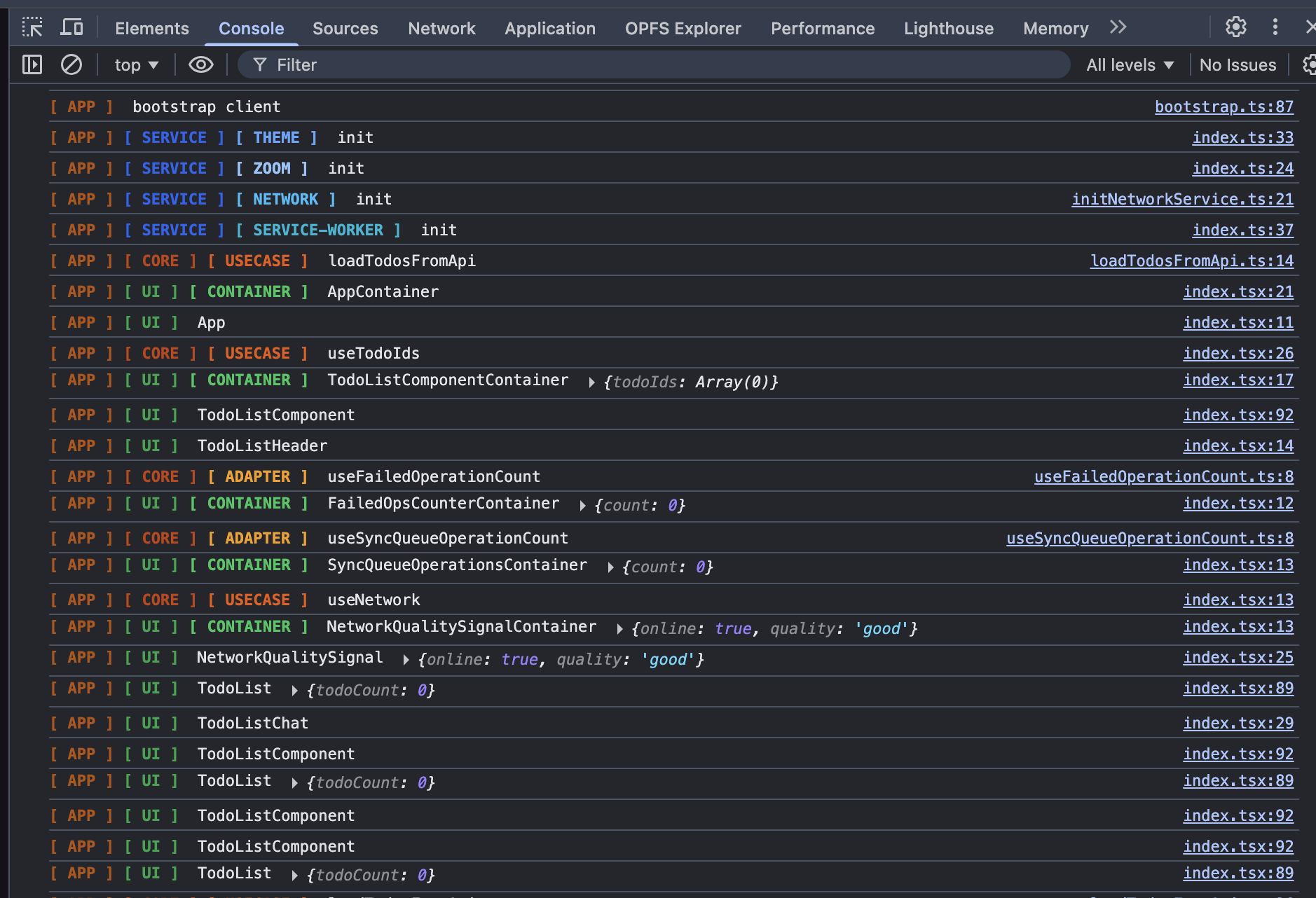
Tree root (APP is only one layout)
The big example above uses one top-level key so every branch shares the same first scope tag ([ APP ] …). Same API, two other common shapes:
A — Single root (any name). One first-level segment for the whole tree; it shows up in every branch’s log prefix.
createLayeredLoggers(baseLogger, {
    APP: {
        alias: 'logger',
        children: {
            CORE: { alias: 'coreLogger', children: { USECASE: { alias: 'coreUseCaseLogger' } } },
        },
    },
});
// → [ APP ] [ CORE ] [ USECASE ] …
B — Multiple roots (no shared “app” segment). Several keys at the first level; each branch has its own prefix chain.
createLayeredLoggers(baseLogger, {
    UI: {
        alias: 'uiLogger',
        children: { CONTAINER: { alias: 'uiContainerLogger' } },
    },
    CORE: {
        alias: 'coreLogger',
        children: { USECASE: { alias: 'coreUseCaseLogger' } },
    },
});
// → [ UI ] [ CONTAINER ] …
// → [ CORE ] [ USECASE ] …
Why this pattern matters
- You keep one source of truth for logger config and rule state.
- Every layer gets stable scope prefixes and colors.
- Alias is configured directly on each layer node, so no second
aliasesconfig is needed. - If
coloris omitted on a node, it inherits nearest parent color automatically. - Noise-control rules can target architecture boundaries directly:
[ CORE ][ USECASE ] | debug | * | *[ SERVICE ][ NETWORK ] | warn,error | * | *[ UI ][ CONTAINER ][ * ] | debug | *render* | *
DevTools Console Control API
Control API is intended for runtime debugging directly in browser console (globalThis.logger by default).
// mode and rules
logger.showMode();
logger.show('all');

// disable by selector
logger.previewDisable('[ CORE ][ USECASE ] | debug | * | *"code":"E_TIMEOUT"*');
logger.disable('[ CORE ][ USECASE ] | debug | * | *"code":"E_TIMEOUT"*');

// re-enable
logger.enable('[ CORE ][ USECASE ] | debug | * | *"code":"E_TIMEOUT"*');

// remove by id
logger.remove(3);

// remove by selector
logger.previewRemove('[ CORE ][ * ]');
logger.remove('[ CORE ][ * ]');

// “solo” one selector: baseline becomes all-disabled, rules cleared, one enable rule added
logger.focus('[ UI ][ CONTAINER ][ * ] | debug');

// baseline all-enabled again and all rules removed (factory-default filtering)
logger.reset();

// revert the last control change (focus/reset/enable/disable/show/remove/clear, …)
logger.undo();
focus(selector) — Show only logs that match this selector: it sets baseline to all-disabled, drops every existing rule, then adds a single enabled rule for selector. Handy in the console when you want one branch (for example UI under CONTAINER) without turning off many disable rules by hand.
reset() — Restore the default filter state: baseline all-enabled and an empty rule list (nothing explicitly disabled).
undo() — Pop one entry from the control history and restore the previous baseline + rules. History is recorded for focus, reset, enable, disable, remove, clear, and for baseline flips when enable/disable is called with the * selector.
Advanced Options (optional)
Use these only if defaults do not fit your project.
const toolkit = createLayeredLoggerToolkit({
    mode: 'all-disabled',
    scope: {
        // default normalize is already "remove spaces + uppercase"
        normalize: (segment) => segment.trim().toLowerCase(),
    },
    persistence: {
        enabled: false, // default is true
    },
    globalControl: {
        enabled: false, // default is true
        key: 'devLogger',
    },
});

// 2b) You can also build loggers manually with child() when needed.
const manualCoreUseCaseLogger = baseLogger
    .child('APP', { color: '#b45309' })
    .child('CORE', { color: '#c2410c' })
    .child('USECASE', { color: '#ea580c' });

manualCoreUseCaseLogger.debug('manual chain logger is also valid');
Selector DSL
[ scopes ] | levels | message | args
scopes: required ([ CORE ][ USECASE ]), prefix mode via[ * ]tail.levels: optional (debug,warn), default*.message: optional (*retry*,eq:Sync failed), default*.args: optional (*"code":"E_TIMEOUT"*,eq:{"code":"E_TIMEOUT"}), default*.
Examples:
[ CORE ][ USECASE ][ CORE ][ USECASE ][ * ] | debug,warn[ UI ][ * ] | * | *retry*[ CORE ][ USECASE ] | debug | * | *"code":"E_TIMEOUT"*
Notes
- This package is intended for development-time logging and filtering.
- State persistence is best-effort; invalid or broken storage payload is auto-reset.
- Built-in globals (
Date,JSON,Object, …) are read viaglobalThiswhen present so the same bundle works across browser, worker, and Node without referencingwindow.