
@buildingthefuture/lineage
v0.1.1
Published
Trace rendered React elements back to API response fields

Maintainers
 mostlyhavingfun
Readme
React Source Lineage
React Source Lineage answers a common frontend debugging question: which request and response field produced this rendered value?
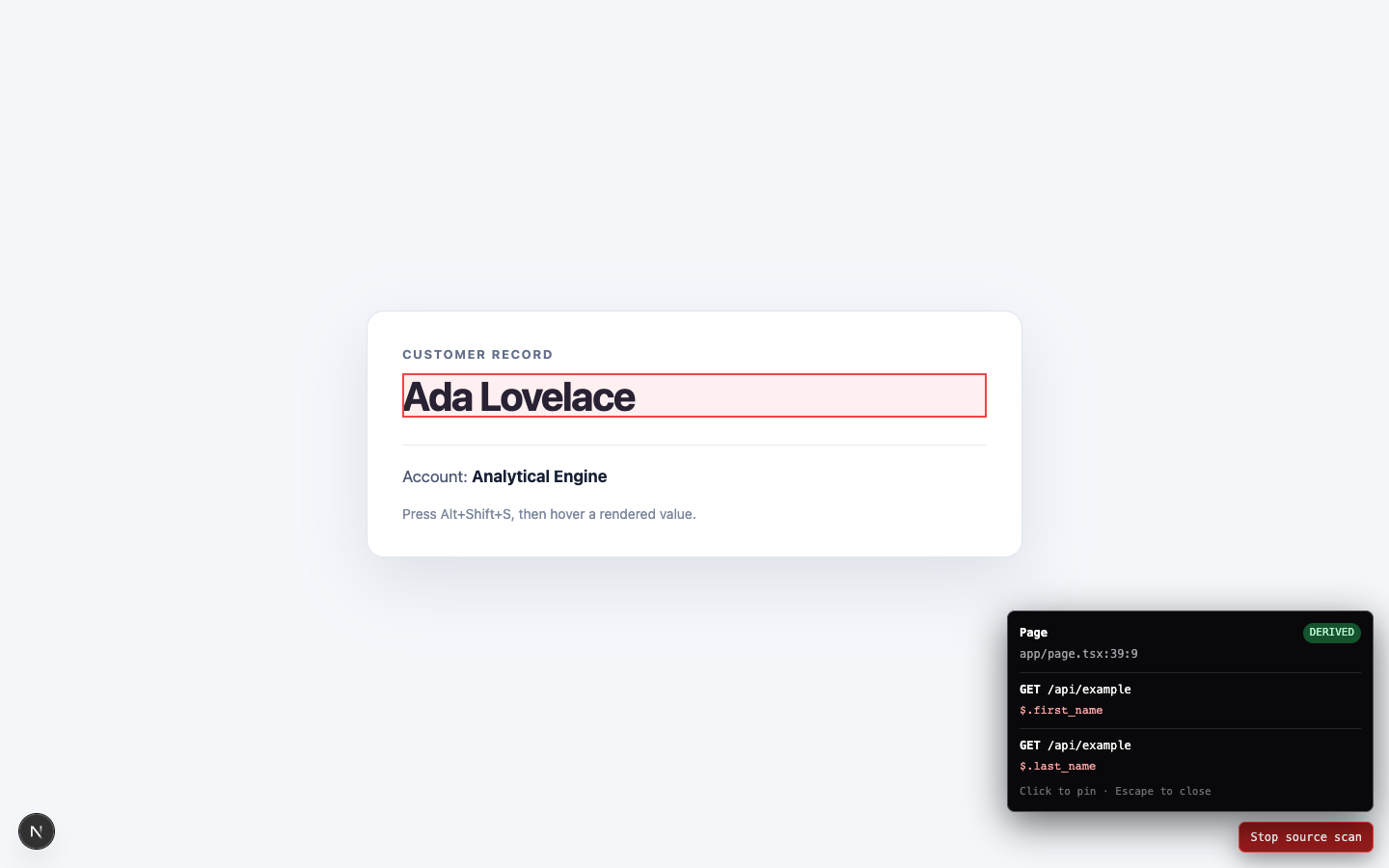
Turn on inspect mode, hover an element, and see:
UserCard
src/components/UserCard.tsx:18:7
GET /api/users/:id
$.profile.name
exact
It runs only in development. It does not match DOM text against captured responses. It records lineage while instrumented code executes, so duplicate values do not get confused.
Status
Alpha. The supported path is React 18/19 with a Next.js Webpack development build, native fetch().json(), and client files carrying an explicit "use client" directive.
The compiler preserves lineage when response data is:
- read directly in JSX;
- copied into local variables;
- combined into a derived value;
- assigned during a synchronous transformation;
- returned in a new object;
- stored in React state and rendered later.
See Current gaps before adopting it across a large application.
Install with Bun
bun add --dev @buildingthefuture/lineagenpm, pnpm, and yarn work as well.
1. Add the Next.js adapter
Preserve the rest of your existing Next.js configuration:
// next.config.mjs
import { withSourceLineage } from "@buildingthefuture/lineage/next"

const nextConfig = {
  // your existing configuration
}

export default withSourceLineage(nextConfig)
The adapter adds a Webpack pre-loader only when Next reports a development build. Production compilation is left unchanged.
The adapter automatically installs fetch tracing and mounts the inspector in development. No root-layout change, provider, or component annotation is required. Set REACT_SOURCE_LINEAGE=false before starting the development server to disable it entirely.
2. Inspect
Start the development server, then press Alt+Shift+S or click Source scan. Hover an outlined element to see its component, file and line, normalized request route, JSON path, and confidence. Click to pin the result. Press Escape to close.
Copy this for your coding agent
Install React Source Lineage in this React application.

Read the repository instructions and existing build configuration first. Use the repository's current package manager.

For a Next.js application:
1. Add `@buildingthefuture/lineage` as a development dependency.
2. Wrap the existing Next configuration with `withSourceLineage` from `@buildingthefuture/lineage/next`. Preserve every existing configuration field and existing webpack hook.
3. Do not add a provider, root-layout component, component annotation, or application data-transformation wrapper. The Next adapter installs the development runtime automatically, and lineage propagation belongs to the package.
4. Run type checking and the repository's tests.
5. Start a development build and verify that `Alt+Shift+S` shows the inspector, a direct API field reports its route and JSON path, and an untraced static value reports `unknown` rather than a guessed source.
6. Run a production build and verify generated production HTML contains no `data-source-scan-id` attributes and production chunks contain no `Stop source scan` string.

Done when development inspection works end to end and production output contains no Source Lineage instrumentation.
Confidence
exact: one observed response path contributed to the rendered element.derived: multiple observed response paths contributed to it.unknown: no defensible response lineage was observed.
The tool reports unknown instead of guessing from matching response and DOM values.
How it works
- The development runtime intercepts native
fetchand lazily proxies JSON objects and arrays. - The compiler wraps intrinsic JSX elements with source locations.
- Property reads record request and JSON-path metadata in the active render context.
- Compiler-managed shadow lineage carries metadata through synchronous local bindings, assignments, and returned object fields without wrapping JavaScript primitives.
- The rendered DOM receives only an opaque local ID. The overlay resolves that ID against an in-memory registry.
React useId() supplies stable server/client instance IDs, including repeated list elements. Keyed JSX children retain their original keys.
Data handling
React Source Lineage does not record request headers, request bodies, response values, or query strings. It retains the request method, normalized route, response path, and source location in browser memory. DOM elements contain only an opaque local ID.
Current gaps
- Next.js support currently uses Webpack; Turbopack is not supported.
- Only native
fetch().json()is traced. XHR, Axios, GraphQL clients, React Query, SWR, Apollo, and Relay need adapters. - Only files with an explicit
"use client"directive are transformed by the Next.js adapter. - Object spreads, computed object keys, transformations inside uninstrumented dependencies, asynchronous transformation overlap, and primitive values passed through component props can lose lineage.
- Route normalization replaces numeric and UUID path segments with
:id; application-specific route templates are not yet accepted. - Runtime records last for the current page session only.
Babel plugin
Non-Next Webpack setups can apply the Babel plugin from @buildingthefuture/lineage/babel-plugin. Set its autoInstall option to true, or import @buildingthefuture/lineage/auto once from a development-only browser entry.
Development
bun install
bun run verify
bun run verify runs strict TypeScript checking, unit tests, and the package build. An isolated end-to-end fixture is maintained separately so private applications are never used as checked-in test data.
License
MIT