
@burtson-labs/bandit-engine
v2.0.161
Published
<a href="https://burtson.ai"> <picture> <source media="(prefers-color-scheme: dark)" srcset="https://cdn.burtson.ai/logos/burtson-labs-logo-alt.png" /> <source media="(prefers-color-scheme: light)" srcset="https://cdn.burtson.ai/logos/burtson-la


Readme
Bandit Engine
An AI chat toolkit built for speed, design, and control. Power branded AI assistants with battle-tested React components and a secure gateway contract.





Features
- Plug-and-play React chat, modal, and management surfaces
- Memory, searchable knowledge, and provider switching behind a secure gateway
- Full MUI theming, dark mode, and branding controls out of the box
- Multimodal support (voice, images, documents) with Bandit AI, Ollama, OpenAI, Azure OpenAI, Anthropic, and xAI today — tell us which providers you need next so we can prioritize them
- CLI scaffolding, sample gateway, and docs to launch in minutes
Bandit keeps confidentiality, integrity, and availability front and center: data stays within your routes, answers stay auditable, and the UI falls back gracefully when a provider is unavailable.
Bandit package ecosystem
This package is the core React engine. Related packages:
| Package | Purpose | Install weight |
|---------|---------|----------------|
| @burtson-labs/bandit-engine | React chat, modal, and management UI — this package | Full |
| @burtson-labs/bandit-cli | Quickstart scaffolding CLI — npx @burtson-labs/bandit-cli create | Minimal (Node.js only) |
| @burtson-labs/bandit-themes | MUI theme pack — use Bandit design tokens without the engine | MUI only |
| @burtson-labs/bandit-types | Gateway contract type definitions — type your own gateway or server | Zero runtime deps |
Quick Links
- Full docs: banditailabs.com/npm-package (mirrors
/docsin this repo) - Live demo with OAuth sign-in: banditailabs.com
- Playground (no auth required): banditailabs.com/playground
- Sample gateway:
examples/gateway-node
Quick Start
CLI Scaffold
Want a working playground instantly? Scaffold a Bandit app and gateway in one command:
npx @burtson-labs/bandit-cli create my-bandit-app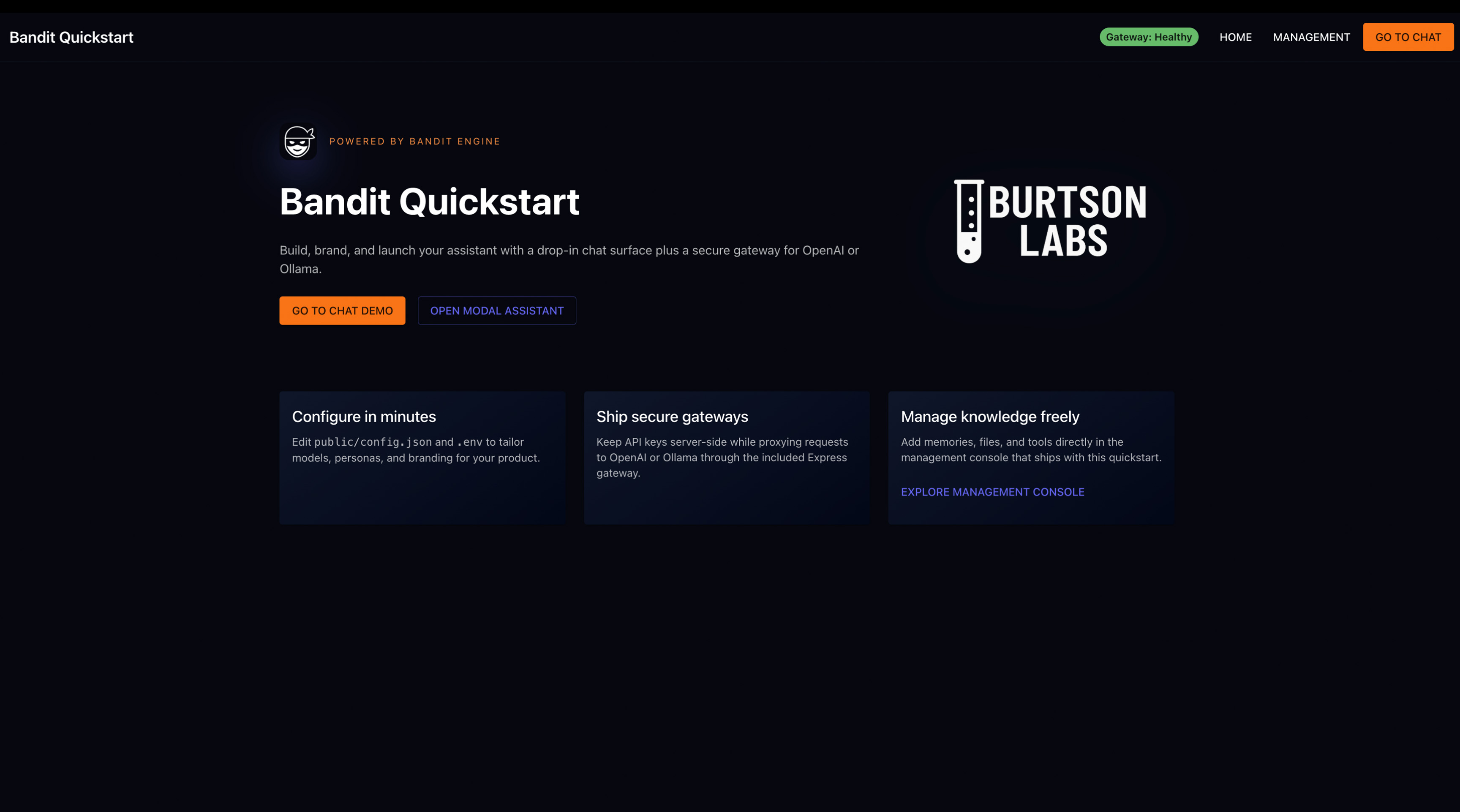
What you get out of the box:
- Vite + React project wired with
Chat,ChatModal, andChatProvider - Express gateway that proxies Bandit AI, OpenAI, Azure OpenAI, Anthropic, xAI, or Ollama behind
/api - Next.js App Router gateway scaffold (in
server/next-app/) ready to copy into a Next project - Branding + persona config in
public/config.json, ready for your logo or prompts
Customize the output with options such as:
--branding-text "Bandit Support"to set the assistant display name--frontend-port 5190to change the Vite dev server port--gateway-port 9090to run the sample gateway on an alternate port--yes/--skip-promptsto accept defaults non-interactively--forceto overwrite a non-empty directory
The generated project installs directly from
https://registry.npmjs.org/— no GitHub npm token is required once the package is public.
The scaffolded gateway focuses on Bandit AI/OpenAI/xAI/Ollama chat and model discovery. All advanced routes (file storage uploads, vector embedding, voice, MCP, etc.) are generated as
501placeholders so you can wire them to your own infrastructure. Implement the contracts below before turning on those features in production.
Check out the CLI quick start guide for the full walkthrough, option matrix, and project anatomy.
CLI Options
| Flag | Description | Example |
| --- | --- | --- |
| --branding-text <text> | Set the assistant name shown in the UI. | --branding-text "Bandit Support" |
| --frontend-port <port> | Change the Vite dev server port (default 5183). | --frontend-port 5190 |
| --gateway-port <port> | Change the sample gateway port (default 8080). | --gateway-port 9090 |
| --yes, --skip-prompts | Accept defaults without interactive questions. | --yes |
| --force | Overwrite the target directory if it already exists. | --force |
The CLI prints next steps (install, copy .env, run dev server) once scaffolding completes, so you can copy-paste and ship immediately.
Playground (Password-Free Preview)
Want to feel the UX without wiring a gateway or signing in? Visit the hosted playground:
- URL:
https://banditailabs.com/playground - What you get: Mock streaming answers, conversation starters, and theming preview powered by the built-in
PlaygroundProvider. - What’s simulated: Responses come from canned scripts – no external API keys, tokens, or backend required.
The playground is ideal for product demos, initial stakeholder reviews, or QA before you connect real providers. When you’re ready to go live, swap the provider back to your gateway for production traffic.
Getting Started – Plug & Play AI
Bandit ships with responsive layouts baked in — the chat surface, management console, and modal all collapse gracefully on phones and tablets. Install it inside a Vite project and you can ship a polished PWA: the package works offline when cached, supports mobile nav patterns, and plays nicely with add-to-home-screen flows.
- Add a config.json to your public folder (or host it on a CDN) and point
brandingConfigUrlat it:
Host it locally in /public or serve it from a CDN and reference it via brandingConfigUrl.
{
  "theme": "bandit-dark",
  "branding": {
    "brandingText": "Bandit Chat Premium Beta",
    "logoBase64": ""
  },
  "models": [
    { "name": "Bandit-Core", "description": "General purpose model" },
    { "name": "Bandit-Muse", "description": "Creative writing model" }
  ]
}
No bloated setup. No magic strings. Just drop in your config.json, hook up a few props, and let your AI speak for itself.
- Wrap your entire app with
ChatProviderto enable Bandit features globally:
import React from "react";
import ReactDOM from "react-dom/client";
import App from "./App";
import { CssBaseline, ThemeProvider } from "@mui/material";
import { banditDarkTheme } from "./theme/banditTheme";
import { AppInitializer } from "./app-initializer";
import { ChatProvider } from "@burtson-labs/bandit-engine";

const chatPackageSettings = {
  // New Gateway Provider Configuration (Recommended)
  aiProvider: {
    type: "gateway" as const,
    gatewayUrl: import.meta.env.VITE_GATEWAY_API_URL!,
    provider: "bandit" // Backend: bandit, openai, azure-openai, anthropic, xai, ollama
  },

  // Direct Ollama configuration (development only)
  // ollamaUrl: import.meta.env.VITE_OLLAMA_URL!,

  // Model Configuration
  defaultModel: import.meta.env.VITE_DEFAULT_MODEL!,
  fallbackModel: import.meta.env.VITE_FALLBACK_MODEL,

  gatewayApiUrl: import.meta.env.VITE_GATEWAY_API_URL!,

  // Branding and optional overrides
  brandingConfigUrl: "/config.json",
  // fileStorageApiUrl: import.meta.env.VITE_FILE_STORAGE_API_URL,
  // homeUrl: "https://yourapp.com",
  // feedbackEmail: "[email protected]",
};

ReactDOM.createRoot(document.getElementById("root")!).render(
  <React.StrictMode>
    <ThemeProvider theme={banditDarkTheme}>
      <CssBaseline />
      <AppInitializer />
      <ChatProvider packageSettings={chatPackageSettings}>
        <App />
      </ChatProvider>
    </ThemeProvider>
  </React.StrictMode>
);
Within minutes, you'll have a fully functional chat interface that can read, speak, and reason – all brandable, themeable, and extensible.
Quick Provider Setup
Option 1: Gateway Provider (Recommended)
// Most controlled - all traffic flows through your gateway
// Your gateway can be built in ANY language: Node.js, Python, .NET, Java, PHP, Go, etc.
aiProvider: {
  type: "gateway",
  gatewayUrl: "https://your-api-gateway.com", // Your backend API
  provider: "bandit" // Specify which AI provider to use (bandit, openai, azure-openai, anthropic, xai, ollama)
}
Option 2: Direct Provider (Development)
// Quick start - API keys in frontend (not for production)
aiProvider: {
  type: "ollama",
  baseUrl: "http://localhost:11434"
}
Gateway Requirements: Implement the endpoints that match the features you turn on:
- Core status & discovery
GET /api/health— system health and provider availabilityGET /api/modelsandGET /api/models/{provider}— model inventoryGET /api/memory— hydrate personal memory when the feature is enabled
- Chat & text generation
POST /api/chat/completions— default provider routingPOST /api/{provider}/chat/completions— provider-specific routing (e.g.bandit,openai,azure-openai,anthropic,xai)POST /api/ollama/chat— native Ollama chat formatPOST /api/generate— non-chat generation (conversation starters, summaries, etc.)POST /api/{provider}/generate— same contract, but scoped per provider (required for conversation starters to respect Bandit/OpenAI/Azure routing)
- Knowledge & vector search (required for memories, knowledge management, and MCP document tools)
POST /api/embedding/embed-memoryPOST /api/embedding/batch-embed-memoriesPOST /api/embedding/embed-documentPOST /api/embedding/searchandPOST /api/embedding/search-memoriesGET /api/embedding/my-memories(withskip/limit)DELETE /api/embedding/memory/{memoryId}andPUT /api/embedding/memory/{memoryId}/pinGET /api/embedding/available-filesandGET /api/embedding/files- See File Storage API Contract for the companion
/file/*routes used to upload and download source documents.
- Voice & transcription
POST /api/tts— synthesize speechGET /api/tts/available-models— advertise available voicesPOST /api/stt/transcribe— speech-to-text ingestion
- Feedback & subscriptions (optional but recommended)
POST /api/feedback— submit in-app feedbackGET /subscription/{userId}andPUT /subscription/{userId}— synchronize subscription tiers used by the feature-flag system
Important: The Bandit Engine automatically routes to provider-specific endpoints:
- Bandit AI →
/api/bandit/chat/completions(OpenAI format, token or API key)- Ollama →
/api/ollama/chat(native Ollama format)- OpenAI/Azure/xAI/Anthropic →
/api/{provider}/chat/completions(OpenAI format)- TTS/STT → Technology-agnostic endpoints that work with any backend implementation
Ollama .env Setup
To run the quickstart purely against an Ollama daemon:
Install (or build) the models you want to expose, e.g.:
ollama pull llava:latest
ollama pull gemma2:9b-instruct
Edit the generated
.envand point both the frontend and gateway at Ollama:# Frontend VITE_GATEWAY_PROVIDER=ollama VITE_DEFAULT_MODEL=llava:latest # any model installed on your Ollama box VITE_FALLBACK_MODEL=gemma2:9b-instruct # optional, but handy for text-only fallbacks # Gateway / server OLLAMA_URL=http://localhost:11434 # or the remote daemon address
Gateway tip
SetVITE_DEFAULT_MODEL/VITE_FALLBACK_MODELto the exact Ollama model tags you have available (gemma,llava,moondream, or your own custom builds). Bandit automatically detects multimodal Ollama models, so usingllava,moondream, or other vision-capable variants enables image understanding with no extra code.
Voice Services (TTS/STT)
The Bandit Engine supports Text-to-Speech (TTS) and Speech-to-Text (STT) through your gateway API. These services are technology-agnostic - you can implement them using any backend technology:
TTS Endpoint (POST /api/tts)
- Input:
{ text: string, voice?: string, speed?: number } - Output: Audio file (MP3, WAV, etc.) or streaming audio
- Compatible with: OpenAI TTS, Azure Speech, Google Cloud TTS, AWS Polly, local TTS servers, or custom implementations
STT Endpoint (POST /api/stt/transcribe)
- Input: Audio file upload (multipart/form-data)
- Output:
{ text: string }or{ transcription: string } - Compatible with: OpenAI Whisper, Azure Speech, Google Speech, AWS Transcribe, local Whisper servers, or custom implementations
Service Discovery (GET /api/tts/available-models)
- Output:
{ models: string[], defaultModel: string, fallbackModel: string } - Used for automatic service availability detection and voice model selection
Quickstart note: the generated Express gateway ships these TTS/STT routes as
501placeholders so you can connect your own provider. Voice features remain disabled until you implement them server-side.
See the Gateway API Contract for complete implementation examples in multiple languages.
Use the Management interface to switch providers anytime or migrate from direct to gateway setup.
- Development
- Use
npm linkor a monorepo workspace to test locally before publishing. - Build with
tsup.
Compatibility
What each release is tested against. scripts/check-consumer.sh packs the build and loads it in a fresh app with these versions.
| Host | Supported | Notes |
| --- | --- | --- |
| React | 19.x | The engine ships its own React for custom-element hosts. A React app must be on 19 so both share one copy; on 18 the engine's hooks fail. |
| MUI (@mui/material) | 7.x | Earlier versions are not tested. |
| Module formats | ESM and CommonJS | Both entry points are loaded by the consumer check. |
| Icons | @burtson-labs/icons 0.5 | A dependency, not a peer: the engine's icons are Burtson Icons through its MUI entry (@burtson-labs/icons/mui/<name>), so nothing extra is installed and no other icon library is bundled. |
| Angular / Vue | Experimental | Through defineCustomElement. Not covered by the consumer check. |
Earlier releases declared react >=18 and @mui/material >=5. Those ranges were never tested; the declarations now match what is.
Sending and attachments
In <Chat />, a message that fails before the model starts answering goes back into the composer with its attachments, and the thread shows that nothing came back. Enter that confirms an IME candidate doesn't send, and a second Enter while a send is in flight is ignored. Attached documents keep their text as written (accents, CJK, emoji, code blocks); a file that can't be read, or has no text, stops the send with a message instead of being dropped.
Consuming the Components
Once you've wrapped your app with ChatProvider, you can selectively integrate Bandit's components as needed:
<Chat />: The main chat interface, designed to be used on a dedicated page or embedded into your product.<Management />: A full-featured admin and model configuration UI. This should not be on the same page as<Chat />. Use this to allow authenticated users to manage themes, models, and embedded knowledge.<ChatModal />: A flexible, mobile-friendly modal that can be launched anywhere in your app for quick AI interactions. Features include:- Chat Control Center: Built-in conversation management, voice model switching, and memory controls
- Context Switching: Toggle between local session and saved conversation history
- Voice Integration: Voice model selection with real-time preview (when TTS is configured)
- Navigation: Seamless transition from modal to full chat interface
- Auto-theming: Automatically uses the theme configured in the Management interface
import { Chat, Management, ChatModal, ChatProvider } from '@burtson-labs/bandit-engine';
import { useState } from 'react';

function YourPage() {
  const [isModalOpen, setIsModalOpen] = useState(false);

  return (
    <>
      <Chat />
      {/* Use <Management /> on a separate admin route with access controls */}

      {/* Trigger the AI modal anywhere in your app */}
      <button onClick={() => setIsModalOpen(true)}>
        Ask AI
      </button>
      <ChatModal
        open={isModalOpen}
        onClose={() => setIsModalOpen(false)}
      />
    </>
  );
}
Utility Functions & Hooks
Bandit Engine exports several utility functions for advanced use cases:
Debug Logger
Replace console statements with structured logging:
import { debugLogger } from '@burtson-labs/bandit-engine';

debugLogger.info('Chat session started');
debugLogger.warn('Fallback model selected');
debugLogger.error('Connection failed', { error: details });
AI Prompt Utilities
Access the same prompt functions used internally:
import {
  generateConversationStarters,
  detectMessageMood,
  detectUserInterestAndExcitement,
  summarizeDocument,
  determineRelevantDocuments
} from '@burtson-labs/bandit-engine';

// Generate conversation starters
const starters = await generateConversationStarters({
  limit: 5,
  topicOfInterest: "technology, coding, AI"
});

// Detect user mood for adaptive responses
const mood = await detectMessageMood("I'm so excited about this project!");
// Returns: "high" | "neutral" | "low"
Date/Time Context
All AI interactions automatically include current date/time context to improve relevance and accuracy of responses.
Important: Each component (
<Chat />,<Management />,<ChatModal />) must be wrapped in aChatProviderto function correctly.
In React, you can wrap your app once at the root.
In Angular or Vue, you may need to wrap each usage with a<bandit-chat-provider>tag and pass settings each time until full reactive context is supported.
Chat Control Center (ChatModal Feature)
The <ChatModal /> includes a comprehensive Chat Control Center that provides advanced session management:
Core Features
- Session vs. Conversation Context: Toggle between local modal session and persistent conversation history
- Voice Model Selection: Real-time voice switching with preview greetings (requires TTS gateway configuration)
- Memory Management: View and manage AI personal memory entries
- Conversation Navigation: Seamless transition from modal to full chat interface
- Manual Refresh: Force reload of conversations and voice models for troubleshooting
Voice Integration
When your gateway API includes TTS endpoints, the Chat Control Center provides:
- Voice Selection Dropdown: Choose from available voice models (e.g., Mark, Amy, Kathleen, Lessac, Ryan)
- Real-time Preview: Hear voice greetings when switching models
- Consistent Formatting: Voice names display as proper titles (e.g., "Mark" instead of "en_US-mark-premium")
- Availability Detection: Automatic detection and fallback when voice services are unavailable
Context Switching
- Local Session: Quick interactions within the modal scope
- Main Conversation: Access full conversation history with automatic navigation to
/chatroute - Smart Conversation Selection: Automatically loads most recent conversation when switching contexts
Memory Features
- Personal Memory Display: View AI's stored personal information about the user
- Memory Entry Count: Real-time count of stored memory entries
- Memory Management Modal: Full CRUD operations for memory entries
Example Usage:
import { ChatModal } from '@burtson-labs/bandit-engine';

function App() {
  const [modalOpen, setModalOpen] = useState(false);

  return (
    <>
      <button onClick={() => setModalOpen(true)}>
        Open AI Assistant
      </button>
      <ChatModal
        open={modalOpen}
        onClose={() => setModalOpen(false)}
        // Chat Control Center is automatically included
      />
    </>
  );
}
Feedback System
The Bandit Engine includes a comprehensive feedback system that can be configured and customized for your application.
Configuration:
// Package Settings - Configure feedback email
const chatPackageSettings = {
  // ... other settings
  feedbackEmail: "[email protected]", // Optional: custom feedback email
};

// Preferences - Enable/disable feedback in management UI
// Users can toggle feedback button on/off in preferences
Standalone Usage:
import { FeedbackButton } from '@burtson-labs/bandit-engine';

// Floating FAB button (default)
<FeedbackButton
  feedbackEmail="[email protected]" // Optional: override default
  size="small" // small | medium | large
  position={{ bottom: 24, right: 24 }} // Custom positioning
/>

// Inline button
<FeedbackButton
  inline={true}
  buttonText="Send Feedback"
  size="medium"
/>
Features:
- Responsive Design: Automatic floating FAB on desktop, inline button on mobile
- Category System: Bug reports, feature requests, general feedback
- Priority Levels: Low, medium, high, critical
- Annoyance Slider: Measure user frustration (1-5 scale)
- Single Image Support: Automatic clipboard integration
- Email Fallback: Generates mailto URLs when API unavailable
- User Preferences: Can be enabled/disabled in management UI
Auto-Integration:
- Desktop: Floating feedback button (when
preferences.feedbackEnabledis true) - Mobile: Integrated into chat input controls
- Preferences: Toggle available in management interface
Angular Integration (Experimental)
To use Bandit Engine in an Angular project:
- Install the package:
npm install @burtson-labs/bandit-engine- Usage:
import { Chat, Management, ChatModal } from '@burtson-labs/bandit-engine';
import { defineCustomElement } from '@burtson-labs/bandit-engine';

customElements.define('bandit-chat', defineCustomElement(Chat));
customElements.define('bandit-management', defineCustomElement(Management));
customElements.define('bandit-modal', defineCustomElement(ChatModal));
These components can now be used in your templates inside a <bandit-chat-provider> block.
Usage in HTML:
<bandit-chat-provider
  packageSettings='{"ollamaUrl":"https://your-ollama-url.com","defaultModel":"Bandit-Core","brandingConfigUrl":"https://cdn.burtson.ai/configs/default-config.json"}'
>
  <bandit-chat></bandit-chat>
  <bandit-management></bandit-management>
  <bandit-modal></bandit-modal>
</bandit-chat-provider>
Note: You only need to define the elements you intend to use. Don't mount all components on the same page. Use <bandit-management> for secure admin routes and <bandit-modal> for contextual triggers.
Vue.js Integration (Experimental)
To use Bandit Engine in a Vue 3 project:
- Install the package:
npm install @burtson-labs/bandit-engine- Usage:
import { Chat, Management, ChatModal } from '@burtson-labs/bandit-engine';
import { defineCustomElement } from '@burtson-labs/bandit-engine';

customElements.define('bandit-chat', defineCustomElement(Chat));
customElements.define('bandit-management', defineCustomElement(Management));
customElements.define('bandit-modal', defineCustomElement(ChatModal));
These components can now be used in your templates inside a <bandit-chat-provider> block.
Usage in HTML:
<bandit-chat-provider
  packageSettings='{"ollamaUrl":"https://your-ollama-url.com","defaultModel":"Bandit-Core","brandingConfigUrl":"https://cdn.burtson.ai/configs/default-config.json"}'
>
  <bandit-chat></bandit-chat>
  <bandit-management></bandit-management>
  <bandit-modal></bandit-modal>
</bandit-chat-provider>
Note: You only need to define the elements you intend to use. Don't mount all components on the same page. Use <bandit-management> for secure admin routes and <bandit-modal> for contextual triggers.
defineCustomElementallows usage in Vue and Angular apps via native Web Components, making Bandit fully framework-agnostic.
Similar to Angular, when using
<Management />or<ChatModal />, wrap each one with a<bandit-chat-provider>to ensure proper context injection.
Make sure
packageSettingsis passed as a serialized JSON string when using with HTML-based custom elements.
Note: Ensure React and ReactDOM are correctly bundled and available to your Vue project. You may need additional tooling or wrappers to handle lifecycle and rendering behavior between frameworks. Full Vue support is on our roadmap.
Custom Element Support
To use Bandit components (Chat, Management, ChatModal) in any modern JS framework (Angular, Vue, Svelte, etc.), you can register them as native custom elements:
import { defineCustomElement } from '@burtson-labs/bandit-engine';

const BanditModal = defineCustomElement('ChatModal');
customElements.define('bandit-modal', BanditModal);
Wrap it in <bandit-chat-provider> and you’re ready to go. Ideal for environments where React isn’t used directly.
Note for Non-React Users:
When using Bandit components as custom elements (e.g., in Angular, Vue, or static HTML), make sure the compiled custom elements script is loaded before usage. You can do this by importing or referencing it in your HTML or entry file. This ensures the custom elements are defined before being rendered.
To create custom elements, you must import the React components and pass them to defineCustomElement. For example:
import { ChatModal } from '@burtson-labs/bandit-engine';
import { defineCustomElement } from '@burtson-labs/bandit-engine';
customElements.define('bandit-modal', defineCustomElement(ChatModal));
Live Preview
Here are some screenshots of Bandit Chat in action:
Chat Demo – Your AI-powered UI
Conversation Drawer & Project Context
Chat Modal – Quick Assist Anywhere
Management – Branding Controls
Management – Personas
Management – Preferences
- CDN-Based Config (Optional)
To streamline configuration, you can host your config.json (and related assets like model presets or branding) via your own CDN or edge cache.
Update the brandingConfigUrl like this:
<ChatProvider
  packageSettings={{
    ...chatPackageSettings,
    brandingConfigUrl: "https://cdn.burtson.ai/configs/default-config.json"
  }}
>
  <App />
</ChatProvider>
This enables remote control of Bandit appearance, available models, and more — without redeploying your frontend.
Note: All CDN assets such as logos, avatars, config, and workers are available at
https://cdn.burtson.ai/. You may override these by hosting your own versions and pointingpackageSettingsto the appropriate URLs.
Configuration Options
defaultModel: Primary chat model (string; required)fallbackModel: Optional fallback model if the default is unavailablegatewayApiUrl: Gateway API base URL for AI, TTS, STT, and MCPaiProvider: Provider configuration object (recommended for new installs)ollamaUrl: Legacy Ollama base URL (deprecated, preferaiProvider)fileStorageApiUrl: Optional file storage API base URL (defaults togatewayApiUrl)brandingConfigUrl: Hosted branding JSON used to hydrate UI theminghomeUrl: Optional URL for the home button in management UIfeedbackEmail: Optional email address for feedback submissionsfeatureFlags: Optional feature flag configuration (see examples below)types: Official TypeScript entry point is available at@burtson-labs/bandit-engine/types. Importing from that path gives you rich IntelliSense forChatProviderProps,PackageSettings,ChatModalProps, gateway contracts, and more.
File Storage API Contract
Enabling fileStorageApiUrl activates document uploads for vector memories, but the CLI quickstart intentionally leaves the backend stubbed. When you point the frontend at a file storage service, Bandit expects these authenticated endpoints:
POST /file/upload—multipart/form-databody withfileand optionalshareWithTeam; returns{ fileId, message? }GET /file/files?skip=0&limit=50— lists previously uploaded files and metadata (id,filename,size,contentType,updatedAt)GET /file/download/{fileId}— streams the file associated with the supplied identifier
All requests include a Bearer token issued by your gateway. Implementers can back these routes with S3, MinIO, or any storage provider — the frontend only requires the contract above.
These file operations are invoked in tandem with the /api/embedding/* endpoints described earlier to keep the vector index in sync.
Quickstart note: the bundled Express gateway does not implement these upload/download routes; they currently return
501until you connect real storage.
AI Provider System
Bandit Engine features a unified, gateway-based AI provider architecture that supports multiple AI services through a secure backend:
Supported Providers
- Gateway Provider (Recommended): Routes all requests through your secure backend
- Bandit AI: Bandit Core models served through the secure gateway
- Ollama: Self-hosted models and Ollama-compatible endpoints
- OpenAI: GPT models via OpenAI API
- Azure OpenAI: Azure-hosted OpenAI models
- Anthropic: Claude models via Anthropic API
- xAI: Grok models via xAI API
We do not support every AI provider yet. Let us know which services you rely on—community interest directly shapes the integration roadmap.
Gateway Provider (Recommended)
The gateway provider offers the most secure and scalable approach by routing all requests through your backend API:
const chatPackageSettings = {
  // Gateway provider configuration
  aiProvider: {
    type: "gateway" as const,
    gatewayUrl: "https://your-gateway-api.example.com",
    provider: "bandit" // Backend provider: bandit, openai, azure-openai, anthropic, xai, ollama
  },
  // ... other settings
};
Benefits:
- Control: Your gateway owns credentials, routing, and policy enforcement
- Monitoring: Request logging and usage analytics
- Rate Limiting: Built-in throttling and quotas
- Provider Switching: Change backends without frontend updates
- Authentication: Unified auth and request validation across services
Gateway Requirements:
Your gateway API can be built with any technology (Node.js, Python, .NET, Java, etc.) as long as it implements:
GET /api/health— Health check endpoint that lists available providers.GET /api/modelsandGET /api/models/{provider}— Model discovery for the management UI.POST /api/chat/completionsandPOST /api/generate— Default OpenAI-style routes when no provider override is present.POST /api/{provider}/chat/completionsandPOST /api/{provider}/generate— Provider-specific routing forbandit,openai,azure-openai,anthropic, andxai.POST /api/ollama/chatandPOST /api/ollama/generate— Native Ollama routes (no/chat/completionssuffix).
Legacy Direct Providers
Direct providers are still supported but marked as deprecated for production use:
// ⚠️ Deprecated: Direct OpenAI (exposes API keys)
aiProvider: {
  type: "openai",
  apiKey: "sk-...", // Exposed in frontend
  baseUrl: "https://api.openai.com/v1"
}

// ⚠️ Deprecated: Direct Ollama (no auth/monitoring)
aiProvider: {
  type: "ollama",
  baseUrl: "http://localhost:11434"
}
Migration to Gateway
- Deploy Gateway Backend: Set up your preferred gateway service
- Update Configuration: Switch from direct to gateway provider
- Test Connection: Use the Management interface to validate
- Update API Keys: Move keys from frontend to backend config
Image/Multimodal Support
The Bandit Engine provides comprehensive image support across all AI providers through the gateway architecture:
Supported Providers & Models:
- Ollama:
llava,llava:13b,bakllava,llava-phi3 - OpenAI:
gpt-4-vision-preview,gpt-4o,gpt-4o-mini - Azure OpenAI:
gpt-4-vision-preview(deployed models) - Anthropic:
claude-3-opus,claude-3-sonnet,claude-3-haiku
Key Features:
- Universal Image Input: Drop, paste, or upload images directly in chat
- Provider-Specific Formatting: Automatic conversion to each provider's image format
- Multi-Image Support: Send multiple images in a single message
- Vision Models: Seamless integration with multimodal AI models
Usage Example:
// Images are automatically handled by the chat interface
// Users can:
// 1. Drag & drop images into the chat input
// 2. Paste images from clipboard (Ctrl+V / Cmd+V)
// 3. Use the attach button to select image files
// 4. Ask questions about the images naturally

// The gateway provider automatically formats images correctly:
// - Ollama: base64 arrays in message.images
// - OpenAI/Azure/xAI/Anthropic: structured content with image_url objects
Backend Requirements: Your gateway API should accept images in the standardized format sent by the Bandit Engine and forward them appropriately to each provider. No transformation needed - the frontend handles provider-specific formatting.
// Example: Gateway forwards images as-is using provider-specific routes
app.post('/api/openai/chat/completions', async (req, res) => {
  const { messages, ...options } = req.body;
  const response = await fetch('https://api.openai.com/v1/chat/completions', {
    method: 'POST',
    headers: {
      'Content-Type': 'application/json',
      Authorization: `Bearer ${process.env.OPENAI_API_KEY}`
    },
    body: JSON.stringify({ messages, ...options })
  });

  res.status(response.status);
  response.body?.pipe(res);
});

app.post('/api/ollama/chat', async (req, res) => {
  const { messages, ...options } = req.body;
  const response = await fetch(`${process.env.OLLAMA_URL}/api/chat`, {
    method: 'POST',
    headers: { 'Content-Type': 'application/json' },
    body: JSON.stringify({ messages, ...options })
  });

  res.status(response.status);
  response.body?.pipe(res);
});
Using the AI Provider
All chat interactions use the unified provider system regardless of backend:
import { useAIProvider } from '@burtson-labs/bandit-engine';

function MyComponent() {
  const { generateResponse, isLoading } = useAIProvider();

  const handleChat = async (message: string) => {
    const response = await generateResponse(message);
    console.log(response);
  };
}
Model Context Protocol (MCP) Integration
Bandit Engine now supports Model Context Protocol (MCP) for extending AI capabilities with external tools and services:
MCP Features
- Tool Integration: Connect external APIs and services to your AI conversations
- Dynamic Tool Discovery: Automatically detect and configure available MCP tools
- Secure Execution: All MCP tool calls go through your gateway API with proper authentication
- Real-time Updates: Tools can be enabled/disabled without restarting the application
Using MCP Tools
MCP tools are automatically available in chat conversations when configured:
// MCP tools are managed through the store
import { useMCPToolsStore } from '@burtson-labs/bandit-engine';

function MCPManager() {
  const { tools, toggleTool, getEnabledTools } = useMCPToolsStore();

  // Enable/disable tools
  const handleToggle = (toolId: string) => {
    toggleTool(toolId);
  };

  // Get currently enabled tools
  const enabledTools = getEnabledTools();
}
MCP Tool Configuration
Tools are configured through your gateway API and automatically discovered by the engine:
{
  "function": {
    "name": "search_web",
    "description": "Search the web for current information",
    "parameters": {
      "type": "object",
      "properties": {
        "query": {
          "type": "string",
          "description": "Search query"
        }
      }
    }
  },
  "endpoint": "/mcp/search",
  "method": "POST",
  "enabled": true
}
MCP Service API
For advanced usage, you can directly execute MCP tools:
import { executeMCPTool, isMCPAvailable } from '@burtson-labs/bandit-engine';

// Check if MCP is available
if (isMCPAvailable()) {
  // Execute a tool
  const result = await executeMCPTool({
    toolName: "search_web",
    parameters: { query: "latest AI news" }
  });

  if (result.success) {
    console.log(result.data);
  }
}
Feature Flags & Subscription Tiers
Bandit Engine includes a comprehensive tier-based feature flag system that enables subscription-based access control and feature gating:
Subscription Tiers
The engine supports multiple subscription tiers with different feature access levels:
- Basic: Core chat functionality with limitations
- Premium: Enhanced features and higher limits
- Pro: Advanced features for power users
- Team: Collaboration features and team management
- Trial: Temporary access with premium features
- Expired: Limited access for expired subscriptions
Feature Flag Configuration
Configure feature flags in your package settings:
const chatPackageSettings = {
  // ... other settings
  featureFlags: {
    // Default tier (fallback when no JWT subscription info available)
    subscriptionType: "premium", // basic | premium | pro | team | trial

    // JWT claim configuration for authentication
    rolesClaimKey: "roles", // JWT claim key for user roles
    subscriptionTypeClaimKey: "subscriptionType", // JWT claim for subscription type
    isSubscribedClaimKey: "isSubscribed", // JWT claim for subscription status
    jwtStorageKey: "authToken", // Local storage key for JWT token
    adminRole: "admin", // Admin role name for elevated access

    // Development settings
    debug: process.env.NODE_ENV === "development", // Enable debug logging

    // Optional: Override specific features
    featureMatrix: {
      tts: true, // Enable/disable Text-to-Speech
      stt: true, // Enable/disable Speech-to-Text
      // ... other feature overrides
    }
  }
};
Tier-Based Feature Matrix
Different subscription tiers have access to different features:
| Feature | Basic | Premium | Pro | Team | Trial | |---------|-------|---------|-----|------|-------| | Core Chat | | | | | | | Text-to-Speech | | | | | | | Speech-to-Text | | | | | | | Document Upload | | | | | | | Model Management | | | | | | | Admin Dashboard | | | | | | | API Access | | | | | | | Team Collaboration | | | | | | | Custom Branding | | | | | |
JWT-Based Authentication
The feature flag system integrates with JWT tokens for dynamic subscription management:
// Example JWT payload structure
{
  "sub": "user123",
  "subscriptionType": "pro", // Controls tier access
  "isSubscribed": true, // Overall subscription status
  "roles": ["user", "admin"], // User roles for admin features
  "exp": 1640995200
}
Using Feature Flags in Components
Access feature flags throughout your application:
import { useFeatureFlags } from '@burtson-labs/bandit-engine';

function MyComponent() {
  const {
    hasFeature,
    currentTier,
    isAdmin,
    isSubscribed
  } = useFeatureFlags();

  // Check specific features
  if (hasFeature('tts')) {
    // Show text-to-speech controls
  }

  // Check subscription tier
  if (currentTier === 'pro' || currentTier === 'team') {
    // Show advanced features
  }

  // Check admin access
  if (isAdmin) {
    // Show admin controls
  }
}
Subscription State Management
The engine automatically handles subscription state changes:
import { useAuthenticationStore } from '@burtson-labs/bandit-engine';

function SubscriptionManager() {
  const {
    subscriptionType,
    isSubscribed,
    refreshSubscription
  } = useAuthenticationStore();

  // Handle subscription upgrades
  const handleUpgrade = async () => {
    // After successful payment processing
    await refreshSubscription(); // Reload JWT and feature access
  };

  // Display upgrade prompts for limited features
  if (!isSubscribed && attemptedRestrictedFeature) {
    return <UpgradePrompt />;
  }
}
Feature Restrictions & Upgrade Prompts
The engine automatically shows upgrade prompts when users try to access restricted features:
- Graceful Degradation: Features are hidden or disabled based on subscription tier
- Upgrade Prompts: Users see contextual upgrade suggestions when attempting restricted actions
- Real-time Updates: Subscription changes take effect immediately without app restart
Development & Testing
For development and testing environments:
// Override subscription tier for testing
const devSettings = {
  featureFlags: {
    subscriptionType: "team", // Test with highest tier
    debug: true, // Enable detailed logging
    featureMatrix: {
      // Force enable specific features for testing
      experimentalFeature: true,
    }
  }
};
Backend Integration
Your gateway API should validate subscription tiers and return appropriate feature access:
// Example: Gateway API subscription validation
app.post('/api/openai/chat/completions', authenticateJWT, async (req, res) => {
  const { subscriptionType, isSubscribed } = req.user;

  // Validate tier access for requested features
  if (req.body.tts && !hasFeature(subscriptionType, 'tts')) {
    return res.status(403).json({
      error: 'TTS requires Premium subscription or higher'
    });
  }

  // Proceed with AI request
  const response = await fetch('https://api.openai.com/v1/chat/completions', {
    method: 'POST',
    headers: {
      'Content-Type': 'application/json',
      Authorization: `Bearer ${process.env.OPENAI_API_KEY}`
    },
    body: JSON.stringify(req.body)
  });

  res.status(response.status);
  response.body?.pipe(res);
});
This feature flag system enables you to build sophisticated subscription-based AI products with fine-grained access control and seamless upgrade flows.
Debug Logger
Bandit Engine exports a debug logger for consistent logging across your application:
import { debugLogger } from '@burtson-labs/bandit-engine';

// Use instead of console.log/warn/error
debugLogger.info('Chat message sent');
debugLogger.warn('Fallback model used');
debugLogger.error('Failed to connect to AI service');
Security Best Practices
Important Security Notice:
While Bandit Engine supports direct API key configuration for development and testing, we strongly recommend against using API keys directly in frontend applications for production environments.
Recommended Architecture
- Use an API Gateway/Wrapper: Deploy the OllamaGateway (soon to be renamed AiGateway) or similar backend service
- Proxy AI Requests: Route all AI requests through your secure backend
- Environment Isolation: Keep credentials and sensitive configuration in backend services (not the browser bundle)
- Authentication: Implement proper user authentication and request validation
Gateway Setup
The recommended approach is to use a gateway service that:
- Handles API key management securely
- Provides rate limiting and usage tracking
- Exposes standardized endpoints for AI, TTS, and STT services
- Manages provider switching and fallback logic
- Technology-agnostic: Works with any backend implementation
// Recommended: Use gateway with unified API
const chatPackageSettings = {
  aiProvider: {
    type: "gateway",
    gatewayUrl: "https://your-api-gateway.com",
    provider: "bandit" // or "openai", "anthropic", "azure-openai", "xai", "ollama"
  },
  gatewayApiUrl: "https://your-api-gateway.com", // Same URL for TTS/STT services
  // No API keys in frontend code
  // ... other settings
};
Legacy Configuration (Deprecated)
Legacy TTS/STT URLs are deprecated. Use the unified gatewayApiUrl instead:
// ❌ Deprecated (still works but not recommended)
const oldSettings = {
  ttsUrl: "/api/tts",
  sttUrl: "/api/stt/transcribe",
  ollamaUrl: "http://localhost:11434",
};

// ✅ Recommended (unified gateway approach)
const newSettings = {
  aiProvider: { type: "gateway", gatewayUrl: "https://your-gateway.com", provider: "bandit" },
  gatewayApiUrl: "https://your-gateway.com", // Handles TTS, STT, and MCP
};
Development vs Production
- Development: Direct provider API keys are acceptable for local testing
- Production: Always use a gateway/wrapper service to protect sensitive credentials
Requirements
Gateway API Services
The Bandit Engine uses a unified gateway approach for all backend services. Your gateway API should implement these endpoints:
Core AI Services:
GET /api/health- Health check and service discoveryPOST /api/chat/completions- Chat completions (OpenAI format)POST /api/generate- Text generation- Provider-specific routing (automatically handled)
Voice Services (Optional):
POST /api/tts- Text-to-Speech conversion- Input:
{ text: string, voice?: string, speed?: number } - Output: Audio file or streaming audio
- Technology-agnostic: Works with OpenAI TTS, Azure Speech, Google TTS, AWS Polly, Whisper.cpp, or custom implementations
- Input:
POST /api/stt/transcribe- Speech-to-Text transcription- Input: Audio file upload (multipart/form-data)
- Output:
{ text: string }or{ transcription: string } - Technology-agnostic: Works with OpenAI Whisper, Azure Speech, Google Speech, AWS Transcribe, local Whisper, or custom implementations
GET /api/tts/available-models- Voice model discovery- Output:
{ models: string[], defaultModel: string, fallbackModel: string } - Used for automatic service availability detection
- Output:
MCP Services (Optional):
- Model Context Protocol endpoints for tool integration
Technology-Agnostic Implementation
Your gateway can be implemented in any language or framework:
- Node.js/Express, Python/FastAPI, .NET Core, Java/Spring
- PHP/Laravel, Ruby on Rails, Go/Gin, Rust/Axum
- Serverless (AWS Lambda, Vercel Functions, Cloudflare Workers)
The Bandit Engine only requires that your endpoints follow the expected input/output contracts. The underlying implementation is completely flexible.
Additional Resources
- PDF Worker: For document embedding features, the engine uses the PDF parsing worker from
https://cdn.burtson.ai/scripts/pdf.worker.js - CDN Resources: Default avatars, logos, and configurations load from
https://cdn.burtson.ai/if not overridden locally
Vision & Roadmap
Bandit Engine isn't just a component – it's a foundation. Coming soon:
- Multi-modal input: image, voice, document uploads
- Agentic flow support with visualized cards and suggestions
- Pluggable memory and long-term knowledge
- Customizable avatars and real-time voice playback
- Client-defined RAG and embedding search
We’re building this to be the interface layer of your AI-first products. Own the UX. Own the brand. Own the experience.
Migration Guide
From Legacy TTS/STT URLs to Gateway API
If you're currently using separate ttsUrl and sttUrl settings, migrate to the unified gateway approach:
Before (Deprecated):
const settings = {
  ttsUrl: "https://your-tts-service.com/api/tts",
  sttUrl: "https://your-stt-service.com/api/stt/transcribe",
  ollamaUrl: "https://your-ollama.com",
};
After (Recommended):
const settings = {
  aiProvider: {
    type: "gateway",
    gatewayUrl: "https://your-gateway.com",
    provider: "openai"
  },
  gatewayApiUrl: "https://your-gateway.com", // Unified endpoint for all services
};
The new approach provides:
- Unified API: One endpoint for all services
- Better Security: Centralized authentication and rate limiting
- Technology Flexibility: Use any backend implementation
- Automatic Discovery: Real-time service availability detection
License & Protection
This software is protected under the Business Source License (BUSL) 1.1 by Burtson Labs LLC.
License Summary
- Development & Evaluation: Free for internal development, testing, and evaluation
- Non-Commercial Use: Free for educational, research, and personal projects
- Commercial Production: Requires commercial license for production deployment
- Competitive Use: Cannot be used to create competing AI chat products
- AI Training: Cannot be used as training data for AI models
Usage Rights
Permitted:
- Internal development and testing
- Educational and research purposes
- Evaluation for potential commercial licensing
- Contributions back to the project (under same license)
Prohibited:
- Production use without commercial license
- Creating derivative commercial products
- Using as training data for AI/ML models
- Removing or modifying license notices and watermarks
Protection Features
This codebase includes multiple protection layers:
- Embedded Watermarks: Visible and stealth fingerprints in all source files
- Audit Trails: Usage tracking and compliance monitoring
- License Validation: Runtime checks for compliance
- Honey Pot Files: Trap files that trigger license violations when accessed
Warning: Removing, modifying, or bypassing these protection mechanisms constitutes a license violation and may result in immediate license termination.
Commercial Licensing
Production License: Required for commercial deployment
- Full production rights
- Priority support and maintenance
- Custom integrations and features
- Enterprise SLA options
Contact for Licensing:
- Email: [email protected]
- Website: https://burtson.ai/license
- Sales: [email protected]
For Contributors & Developers
Before contributing or publishing a new Pull Request, run the available validation scripts:
npm run lint               # Static analysis for the src tree
npm run test               # Vitest suite
npm run build              # Generate the dist bundle with tsup
npm run validate-protection # Ensure license headers and fingerprints are intact
Developer Resources:
- PROTECTION-README.md - Quick protection system guide
- PRE-PUSH-CHECKLIST.md - Complete workflow documentation
- PROTECTION-NOTICE.md - Legal notices and compliance requirements
- LICENSE - Full BUSL 1.1 license text
License Compliance
All source files must include proper license headers and watermarks. The protection system automatically:
- Adds license headers to new files
- Validates compliance on every build
- Tracks usage and modifications
- Prevents unauthorized distribution
Quick Commands:
npm run protect             # Apply protection to new files
npm run validate-protection # Check for license violations
© 2025 Burtson Labs LLC. All rights reserved.