
@bybrave/bug-report-widget
v0.5.1
Published
Embeddable bug report widget: screenshot, annotations, console/network capture. Framework-agnostic, one script tag.

Maintainers
 bybrave
Readme
bug-report-widget
Portable bug report button: page screenshot, annotations (rect / arrow / pencil / text), capture of console errors and failed network requests, submission to your endpoint. A single JS file (~63 kB gzip), Shadow DOM — host page styles don't leak in or break. No React/Tailwind required in the consuming project.
Preact + Tailwind v4 inside, compiled into the bundle.
Screenshots
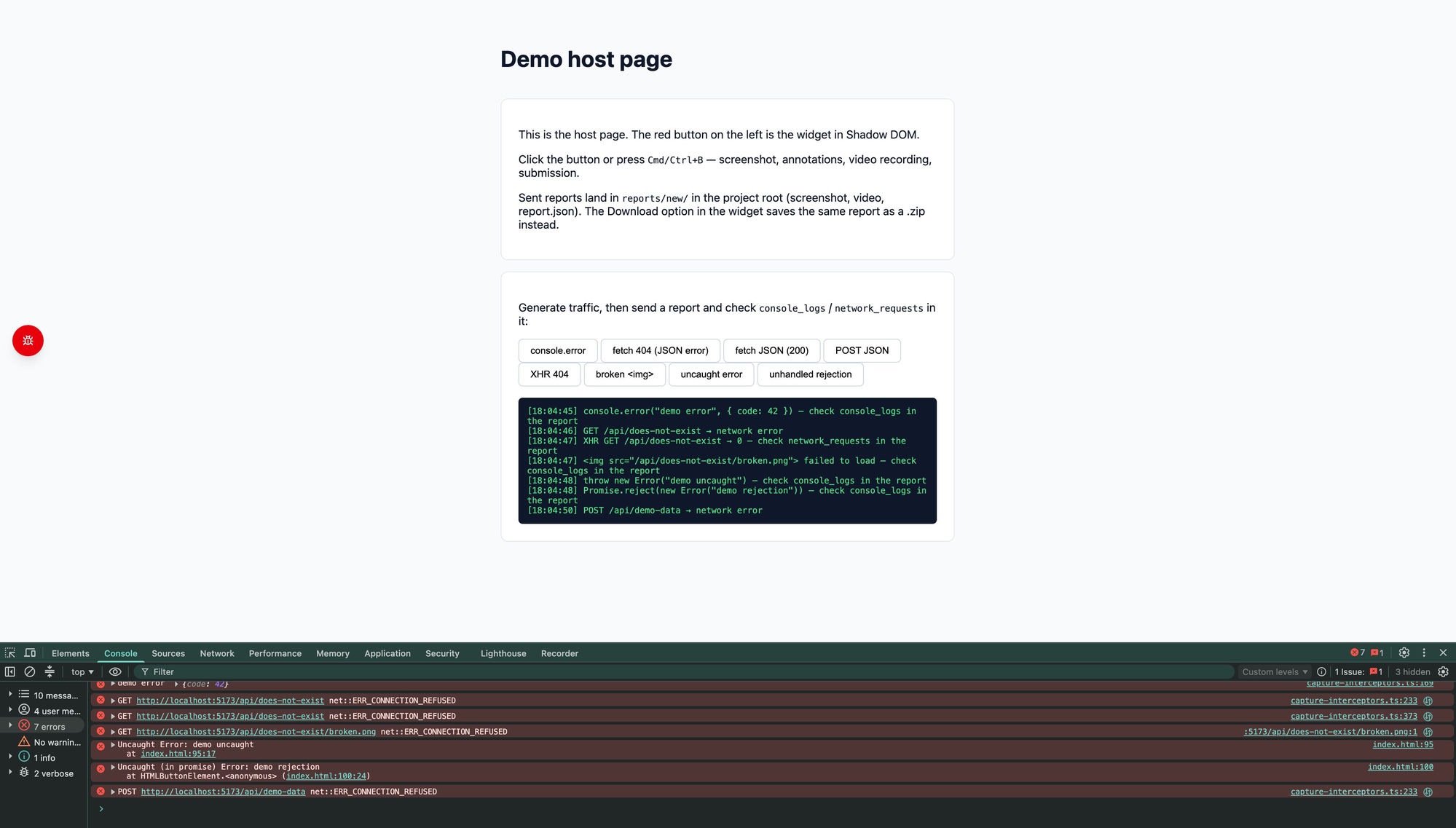
The floating button sits on the host page (draggable, position is remembered):
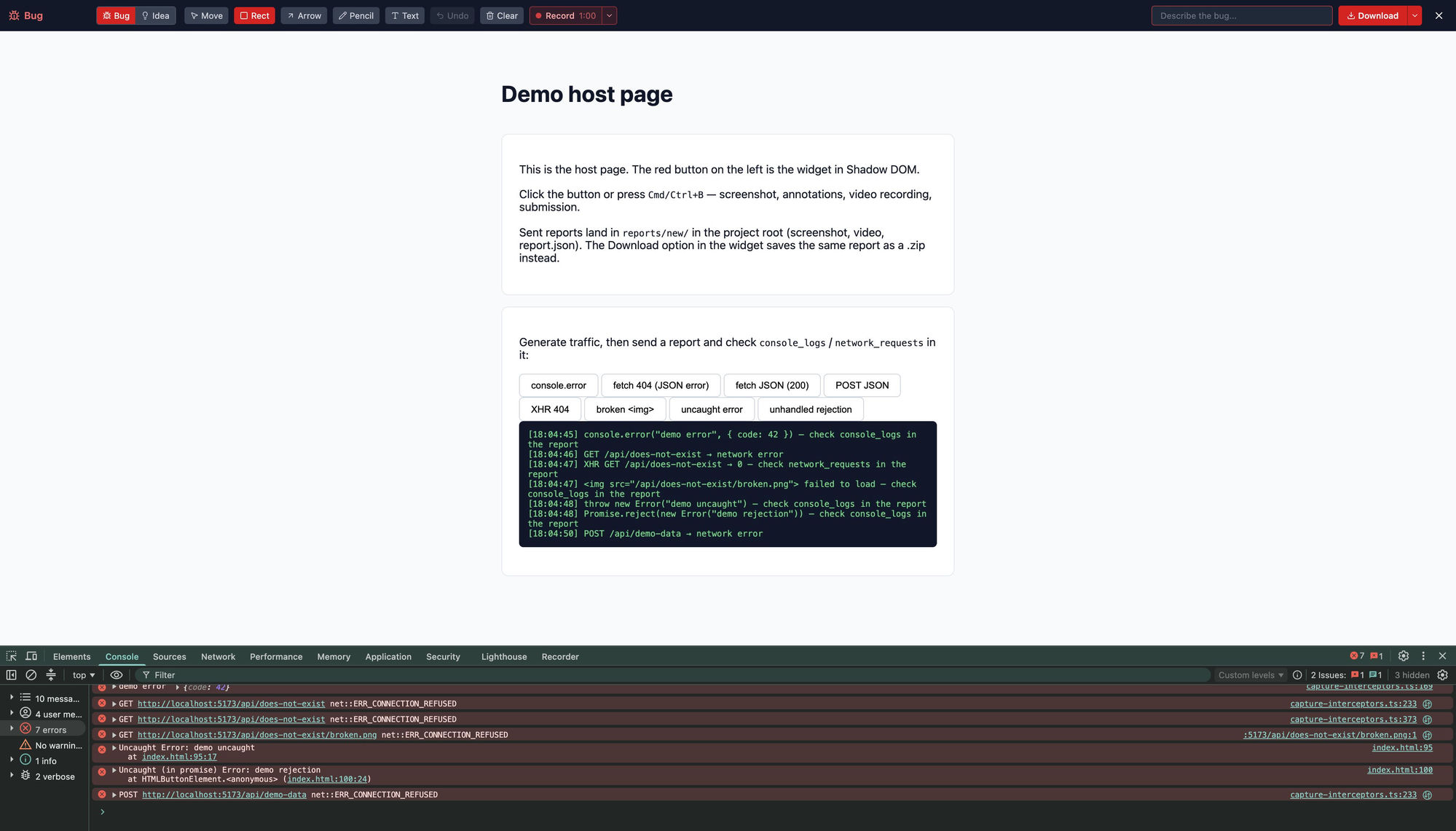
Click it — the page freezes into an annotated screenshot with tools and a destination picker:
Build
npm install
npm run build   # dist/bug-report-widget.iife.js (script tag) + dist/bug-report-widget.js (ESM)
npm run dev     # demo page at http://localhost:5173 with a mock endpoint
Usage
Option 1 — script tag (any stack)
<script
  src="/bug-report-widget.iife.js"
  data-endpoint="/api/reports"
></script>
Or straight from a CDN, no build step:
<script
  src="https://unpkg.com/@bybrave/bug-report-widget"
  data-endpoint="/api/reports"
></script>
Attributes: data-endpoint (required unless data-destination="download"), data-destination="download" (save the report as a .zip to the user's computer instead of POSTing), data-download="false" (hide the Download option — reports can only be sent to the endpoint), data-network="all" (capture every request, not just failed ones), data-hotkey="false" (disable Cmd/Ctrl+B) or data-hotkey="k" (remap to Cmd/Ctrl+K), data-position="bottom-right" (initial button position), data-screenshot-quality="0.7" (screenshot JPEG quality, 0–1), data-screenshot-scale="2" (screenshot raster scale, 0.5–3; default 1 — pass the device pixel ratio for retina-sharp shots at the cost of a slower capture), data-credentials="include".
Manual initialization instead of attributes:
<script src="/bug-report-widget.iife.js"></script>
<script>
  BugReport.init({ endpoint: '/api/reports' })
</script>
Option 2 — npm / ESM (React, Next.js, Vue, anything)
npm install @bybrave/bug-report-widgetimport { init, destroy } from '@bybrave/bug-report-widget'
init({ endpoint: '/api/reports' })In Next.js — call it in a client component inside useEffect (the widget is browser-only):
'use client'
import { useEffect } from 'react'
import { init, destroy } from '@bybrave/bug-report-widget'

export function BugReportLoader() {
  useEffect(() => {
    init({ endpoint: '/api/reports' })
    return destroy
  }, [])
  return null
}
Updating
The package is on a 0.x version, so npm update won't pick up new minor releases (^0.4.1 doesn't allow 0.5.0 — that's how semver treats zero-major versions). To update to the latest version:
npm install @bybrave/bug-report-widget@latestThe unversioned CDN URL (https://unpkg.com/@bybrave/bug-report-widget) always resolves to the latest release — nothing to update. To avoid surprise updates, pin a version instead: https://unpkg.com/@bybrave/[email protected] and bump it manually.
Config
init({
  endpoint: '/api/reports',        // required unless destination is 'download'
  destination: 'endpoint',         // default destination: 'endpoint' (POST) | 'download' (.zip)
  download: true,                  // false hides the Download option, reports go to `endpoint` only
  network: 'errors',               // network capture: 'errors' (failed requests only) | 'all' (every request)
  headers: { 'X-Api-Key': '...' }, // optional
  credentials: 'include',          // optional (RequestCredentials)
  hotkey: true,                    // Cmd/Ctrl+B; false disables, 'k' remaps to Cmd/Ctrl+K
  position: 'left',                // initial button position, see below
  onSubmit: (report) => {},        // after a report is sent or downloaded
  onError: (error) => {},          // when capture or sending fails
  screenshotQuality: 0.85,         // screenshot JPEG quality, 0–1
  screenshotScale: 1,              // screenshot raster scale, 0.5–3 (1 = CSS pixels; devicePixelRatio for retina)
  labels: { send: 'Submit' },      // partial override of any label
})
position accepts an edge/corner preset — 'left' (default), 'right', 'top-left', 'top-right', 'bottom-left', 'bottom-right' — or exact pixel coordinates { x, y }. It only sets the starting point: the user can drag the button anywhere, and the dragged position is remembered in localStorage.
onSubmit receives { type, description, destination }; onError receives the thrown error. Useful for host-side toasts or analytics.
Report destination
The user picks where the report goes right in the widget: the arrow next to the submit button opens a Send / Download menu (the choice is remembered in localStorage). destination in the config only sets the default. Download saves bug-report-<timestamp>.zip with screenshot.jpg and report.json (url, description, type, console/network logs).
With destination: 'download' and no endpoint, the widget is download-only and needs no backend at all.
With download: false (or data-download="false"), the destination picker is hidden and every report goes to endpoint — use it when reports must not end up on users' machines.
Backend contract
POST {endpoint}, multipart/form-data:
| Field | Type | Description |
|---|---|---|
| screenshot | file (JPEG) | screenshot with annotations |
| url | string | page URL |
| page_title | string | page title |
| description | string | report text |
| type | string | bug | improvement |
| console_logs | string (JSON) | recent warn/error console entries, uncaught exceptions, unhandled promise rejections and failed resource loads (broken images/scripts/styles) |
| network_requests | string (JSON) | failed requests (status ≥ 400 or network error); every request with network: 'all'. Both fetch and XMLHttpRequest (axios etc.) are captured. Each entry: method, url, status, duration, request/response headers, bodies (JSON bodies as parsed objects). Sensitive headers (Authorization, Cookie, Set-Cookie, X-Api-Key) are redacted |
| meta | string (JSON) | environment snapshot: user_agent, language, viewport, screen, device_pixel_ratio, timezone |
Any 2xx response is treated as success.
Example route handler for Next.js
// app/api/reports/route.ts
import { NextRequest, NextResponse } from 'next/server'
import { mkdir, writeFile } from 'fs/promises'
import path from 'path'

export async function POST(req: NextRequest) {
  const form = await req.formData()
  const screenshot = form.get('screenshot') as File
  const id = `report_${new Date().toISOString().replace(/[:.]/g, '-')}`
  const dir = path.join(process.cwd(), 'reports', 'new')
  await mkdir(dir, { recursive: true })
  await writeFile(path.join(dir, `${id}.jpg`), Buffer.from(await screenshot.arrayBuffer()))
  await writeFile(
    path.join(dir, `${id}.json`),
    JSON.stringify(
      {
        id,
        timestamp: new Date().toISOString(),
        url: form.get('url'),
        page_title: form.get('page_title'),
        description: form.get('description'),
        type: form.get('type'),
        console_logs: JSON.parse((form.get('console_logs') as string) || '[]'),
        network_requests: JSON.parse((form.get('network_requests') as string) || '[]'),
        meta: JSON.parse((form.get('meta') as string) || '{}'),
        status: 'new',
      },
      null,
      2,
    ),
  )
  return NextResponse.json({ id }, { status: 201 })
}
Features
- Floating draggable button (position persisted in localStorage), mouse and touch
- Cmd/Ctrl+B hotkey (layout-independent, ignored inside inputs and rich-text editors)
- Screenshot via snapdom (no browser permissions needed)
- Tools: select/move, rectangle, arrow, pencil (adjustable line thickness), text (adjustable size); Undo (Cmd/Ctrl+Z), Clear
- Report type: Bug / Improvement
- Destination: POST to your endpoint or a .zip download (no backend required)
- Captures console warn/error, uncaught exceptions, unhandled rejections and failed resource loads (up to 100)
- Captures
fetchandXMLHttpRequest(up to 50; failed only by default, all withnetwork: 'all'), 512 KB total cap; streaming responses are not buffered, sensitive headers are redacted - Environment metadata in every report: user agent, language, viewport, screen, DPR, timezone
Feedback
Found a bug or have a feature request? Open an issue.
Support
If this widget saves you time, you can support development:
- Ko-fi
- Bitcoin (BTC):
bc1q37557q5jpeaxqydzwvf3jgj7zhnfpn2td3q40q