
@bydga/homebridge-garage-door-shelly1
v1.1.5
Published
Homebridge plugin for a simple garage door opener using Shelly 1 relay

Maintainers
 bydga
bydgaReadme
homebridge-garage-door-shelly1


This work is forked from https://github.com/jmaferreira/homebridge-garage-remote-http.
Fixed a bug, where calling "close the garagedoor" on already closed door actually opens them. - by Bydga
Description
This homebridge plugin exposes a web-based garage opener to Apple's HomeKit. Using simple HTTP requests, the plugin allows you to open/close the garage. It works as a general purpose HTTP client for any relay, but it works particularly well with a Shelly 1 relay.
Installation
- Install Homebridge.
- Install the plugin by running
npm install -g homebridge-garage-door-shelly1or by searching forhomebridge-garage-door-shelly1on the plugins tab if you are using Homebridge UI or Hoobs. - Update your Homebridge
config.jsonaccordingly.
Configuration
NOTE: Don't forget to update shelly_ip to the IP address of your Shelly relay.
"accessories": [
     {
        "accessory": "GarageDoorOpener",
        "name": "Back door",
        "http_method": "GET",
        "openURL": "http://shelly_ip/relay/0?turn=on",
        "closeURL": "http://shelly_ip/relay/0?turn=on",
        "autoLock": false,
        "autoLockDelay": 60,
        "openTime": 21,
        "closeTime": 17,
        "polling": true,
        "pollInterval": 60,
        "username": "garage",
        "password": "Mh4hc7EDJF8mMkzv",
        "manufacturer": "BFT",
        "model": "SCE-MA (Board)",
        "statusURL": "http://shelly_ip/status",
        "statusKey": "$.inputs[0].input",
        "statusValueOpen": "0",
        "statusValueClosed": "1",
        "debug": "false"
    }
]
Options
Core
| Key | Description | Default |
| ----------- | ----------------------------------------- | ------- |
| accessory | Must be GarageDoorOpener | N/A |
| name | Name to appear in the Home app | N/A |
| openURL | URL to trigger the opening of your garage | N/A |
| closeURL | URL to trigger the closing of your garage | N/A |
Optional fields
| Key | Description | Default |
| -------------------- | --------------------------------------------------------------------------------------------------------------------------------------------------------------------------- | ------------------- |
| openTime | Time (in seconds) to simulate your garage opening | 10 |
| closeTime | Time (in seconds) to simulate your garage closing | 10 |
| autoLock | Whether your garage should auto-close after being opened | false |
| autoLockDelay | Time (in seconds) until your garage will automatically close (if enabled) | 20 |
| switchOff | Closes the garage immediately without animation. For IR remote control use. | false |
| switchOffDelay | Time (in seconds) until your garage will automatically close without animation (if enabled) | 2 |
| polling | Whether the state should be polled at intervals | false |
| pollInterval | Time (in seconds) between device polls (if polling is enabled) | 120 |
| statusURL | URL to retrieve state on poll (if statusField* options are not set, expects HTTP response body to be 0 or 1) | N/A |
| statusKey | JSONPath that identifies the property that contains the status of the door (e.g. $.inputs[0].input is the default for Shelly 1) | $.inputs[0].input |
| statusValueOpen | Regex that will match the open state of the relay status (e.g. open) | 0 |
| statusValueClosed | Regex that will match the closed state of the relay status (e.g. closed) | 1 |
| statusValueOpening | Regex that will match the opening state of the relay status (e.g. opening) | 2 |
| statusValueClosing | Regex that will match the closing state of the relay status (e.g. closing) | 3 |
Additional options
| Key | Description | Default |
| -------------- | -------------------------------------------------------------------------------------------------- | ------- |
| timeout | Time (in milliseconds) until the accessory will be marked as Not Responding if it is unreachable | 3000 |
| http_method | HTTP method used to communicate with the device | GET |
| username | Username if HTTP authentication is enabled | N/A |
| password | Password if HTTP authentication is enabled | N/A |
| model | Appears under the Model field for the accessory | plugin |
| serial | Appears under the Serial field for the accessory | version |
| manufacturer | Appears under the Manufacturer field for the accessory | author |
| firmware | Appears under the Firmware field for the accessory | version |
| debug | Display debug messages on Homebridge log | false |
State key
| State | Description |
| ----- | ----------- |
| 0 | Open |
| 1 | Closed |
| 2 | Opening |
| 3 | Closing |
Wiring
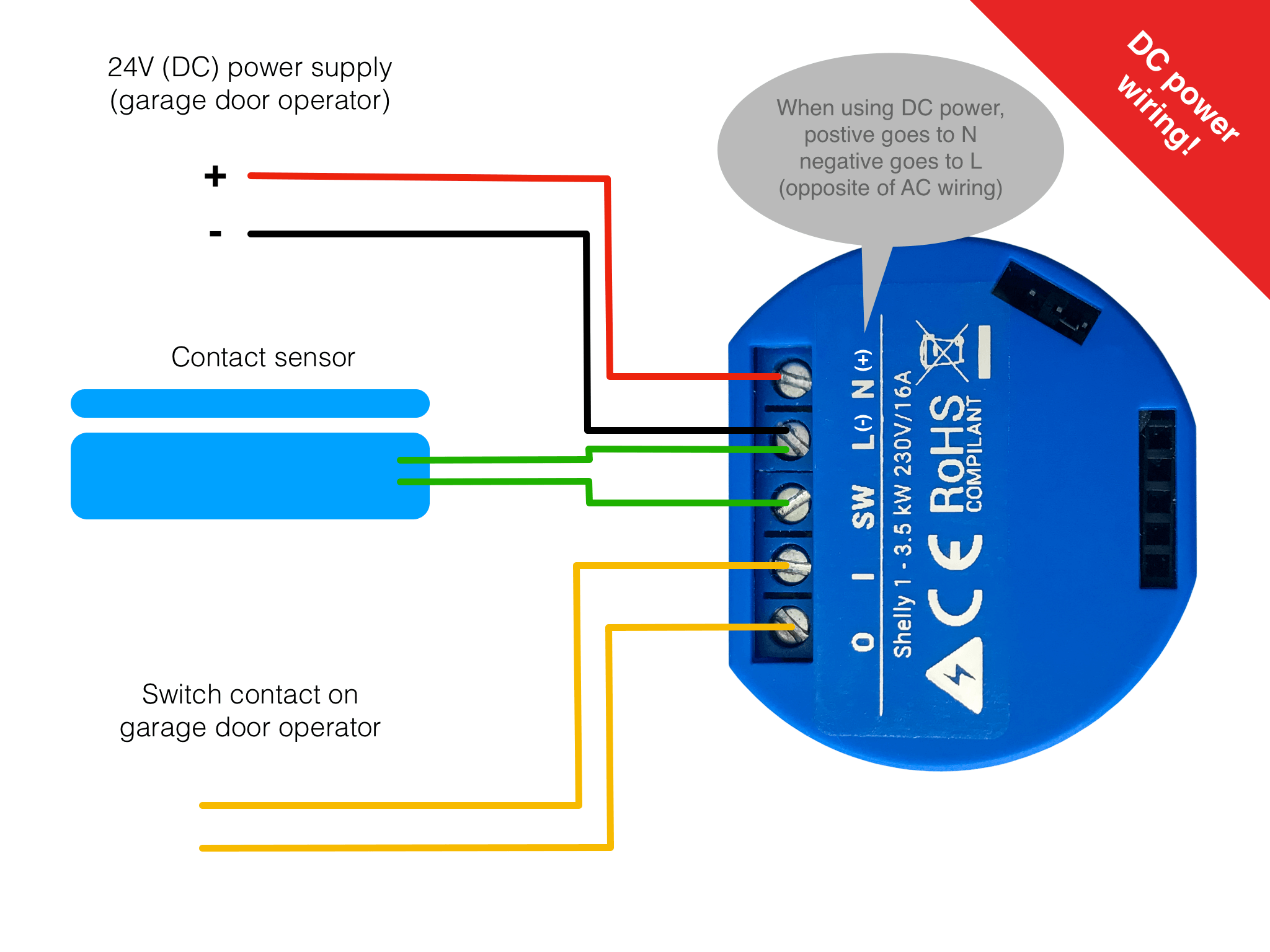
More information at https://savjee.be/2020/06/make-garage-door-opener-smart-shelly-esphome-home-assistant/
Videos on wiring
Door open/closed sensor
In order to know for sure if your gate is open or closed you need to install a Reed Switch sensor connected between L and SW (order is irrelevant). These cost between €2 and €5.
For Shelly 1 and a normally open reed switch (NO) the following options need to be set:
"accessories": [
     {
       ...
		 "statusKey": "$.inputs[0].input",
		 "statusValueOpen": "0",
		 "statusValueClosed": "1"
		 ...
	  }
	]
For a normally closed switch (NC), use:
"accessories": [
     {
       ...
		 "statusKey": "$.inputs[0].input",
		 "statusValueOpen": "1",
		 "statusValueClosed": "0"
		 ...
	  }
	]