
@bytehumi/maxmem
v0.1.12
Published
Local-first handoff capsules for Codex, Claude Code, and OpenCode.

Maintainers
 bytehumi
Readme
Why MaxMEM Exists
AI coding agents are strong inside one session and weak at clean handoffs. When you switch from Codex to Claude Code, restart a terminal, compact context, or open a new agent, the next model usually needs a long recap.
MaxMEM solves that by saving only the work state that matters:
- repo, branch, head, changed files, and recent commits
- transcript-derived commands, file mentions, decisions, and blockers
- the current task, next actions, verification commands, risks, and open questions
- durable project memory for decisions, blockers, notes, verification, and completed tasks
- handoff read history so you can see whether context was actually injected
- source agent and timestamp
- optional redacted raw snippets only when explicitly requested
Raw chat is off by default. The capsule is designed to be short enough for an agent to read and concrete enough for it to continue safely.
How It Works
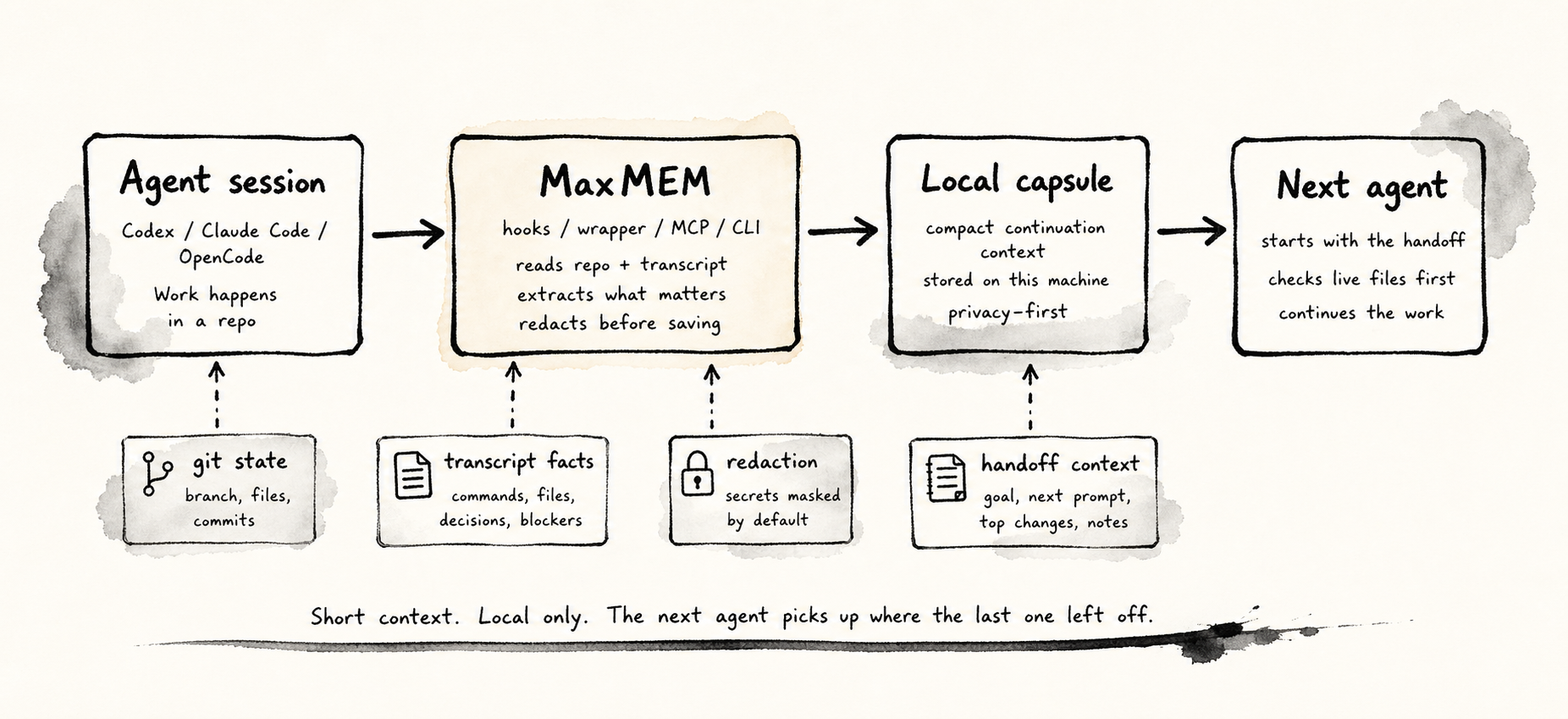
- An agent starts, stops, compacts, or calls a MaxMEM command.
- MaxMEM reads live git state and the latest known transcript path.
- The adapter registry selects the right parser for Codex, Claude Code, or OpenCode.
- The parser extracts commands, files, decisions, blockers, next actions, test/check commands, open questions, and risks.
- Redaction runs before anything is saved or rendered.
- Durable project memory is updated with decisions, blockers, risks, and the current task.
- The next agent receives a compact handoff through hooks, MCP, slash commands, wrapper injection, or the companion UI.
- MaxMEM records read events when a handoff is injected or fetched through MCP.
Capsule Anatomy
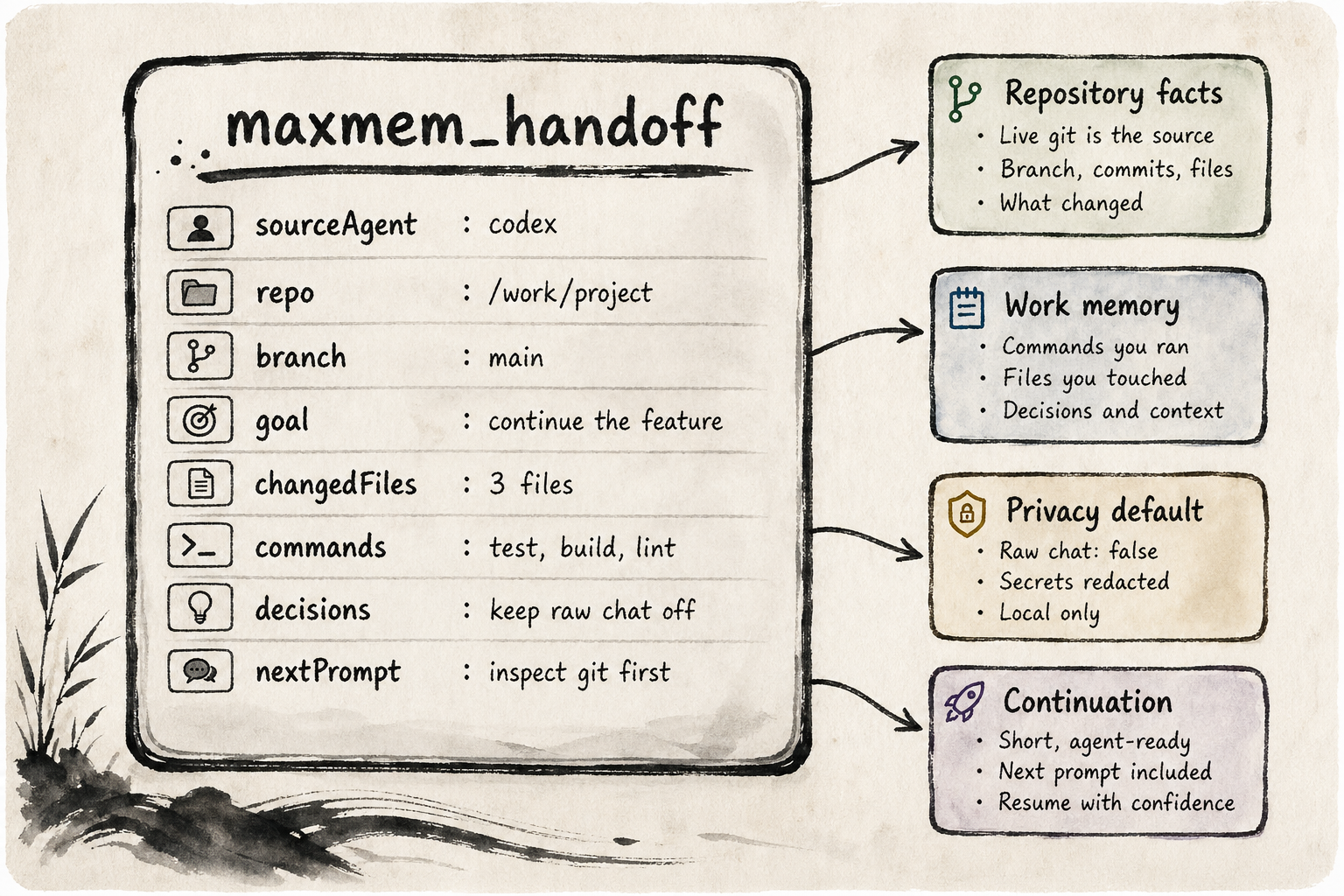
The default capsule is privacy-first:
compact: default, no raw chat, short extracted contextstandard: more transcript-derived context, still no raw chatfull: includes redacted raw snippets only when explicitly selected
Use --raw-chat or --verbosity full only when you actually want raw snippets included.
Every capsule now includes a task-state section:
- current task
- next actions
- verification commands/results
- open questions
- risks
Install
Prerequisite: Bun must be available because the package executable is a Bun CLI shim.
npm install -g @bytehumi/maxmemAfter install, MaxMEM runs setup automatically and wires Codex, Claude Code, and OpenCode. The first normal maxmem command also checks setup and repairs missing integration wiring.
Restart any already-running Codex, Claude Code, or OpenCode session after install. Their command menus are loaded when the agent starts.
Run setup manually only when you want to force reinstall integrations:
maxmem setupFor local development from this repo:
bun install
bun link
bun run dev status
What Setup Installs
| Target | What MaxMEM wires |
| --------------- | --------------------------------------------------------------------- |
| Codex | SessionStart and Stop hooks, MCP config, and a local MaxMEM skill |
| Claude Code | hooks, status line, MCP config, and /maxmem-* slash commands |
| OpenCode | plugin hooks, MCP config, and maxmem-* commands |
| Desktop/browser | local companion UI for viewing capsules and launching handoffs |
Common commands after setup:
maxmem companion
maxmem launch codex
maxmem launch claude
maxmem launch opencode
maxmem handoff --select
maxmem memory --add "Keep handoffs local" --kind decision
maxmem inspect --capsule
Commands
| Command | Purpose |
| -------------------------------------------- | -------------------------------------------------------------- |
| maxmem codex [args...] | Launch Codex through the MaxMEM wrapper |
| maxmem claude [args...] | Launch Claude Code through the MaxMEM wrapper |
| maxmem opencode [args...] | Launch OpenCode through the MaxMEM wrapper |
| maxmem handoff | Create and print a compact handoff capsule |
| maxmem handoff --copy | Copy the capsule on macOS |
| maxmem handoff --select | Choose exactly which sections to include |
| maxmem handoff --verbosity standard | Include more extracted context without raw chat |
| maxmem handoff --verbosity full | Include redacted raw snippets when selected |
| maxmem inspect | Inspect latest transcript and capsule state |
| maxmem launch <agent> | Create a handoff and open an agent in the current terminal app |
| maxmem companion | Open the local capsule viewer and launcher |
| maxmem memory | List durable project memory for the current repo |
| maxmem memory --add "text" | Save a project memory note |
| maxmem memory --kind decision --add "text" | Save a typed project memory record |
| maxmem mcp | Run the stdio MCP server |
| maxmem inject | Print latest injectable context for this repo |
| maxmem setup | Install or repair integrations |
| maxmem status --verbose | Show repository handoff status |
Agent Shortcuts
Claude Code slash commands:
/maxmem
/maxmem-handoff
/maxmem-memory
/maxmem-companion
/maxmem-codex
/maxmem-claude
/maxmem-opencode
OpenCode commands:
maxmem
maxmem-handoff
maxmem-memory
maxmem-companion
maxmem-codex
maxmem-claude
maxmem-opencode
Codex:
maxmem handoff
maxmem memory
maxmem companion
maxmem launch claude
/maxmem/handoff
/maxmem/memory
/maxmem/companion
/maxmem/claude
On macOS, launch shortcuts opened from VS Code or Cursor create a new integrated terminal in the active workspace. From Terminal.app they open a new Terminal window.
Codex CLI v0.125 only autocompletes built-in slash commands in the / picker. MaxMEM is still wired into Codex through hooks, MCP tools, and a local skill visible from /skills; slash-like inputs with a nested slash such as /maxmem/handoff are passed to the model and handled by the MaxMEM skill.
Companion UI
maxmem companion starts a local browser UI for the current repository. It shows recent capsules, the latest rendered handoff, task state, project memory, read history, repository status, and launch buttons for Codex, Claude Code, and OpenCode. The left capsule rail, middle handoff rail, and right control rail scroll independently inside a dark ink-wash workspace.
It is intentionally local. It does not need a cloud account, hosted database, or remote sync service.
MCP Tools
Agents that prefer tool calls can use MaxMEM without relying only on shell hooks:
| Tool | Purpose |
| ---------------------------- | ------------------------------------------------ |
| maxmem_start_session | Save session metadata and return handoff context |
| maxmem_save_handoff | Create a compact handoff capsule |
| maxmem_get_latest_handoff | Fetch latest handoff context and record the read |
| maxmem_status | Read repo, session, memory, and handoff status |
| maxmem_save_project_memory | Save a typed project memory record |
| maxmem_list_project_memory | List durable project memory |
| maxmem_list_handoff_reads | List handoff read events |
| maxmem_save_decision | Save a durable decision |
| maxmem_save_blocker | Save a durable blocker |
| maxmem_save_verification | Save a verification command or result |
| maxmem_mark_task_done | Save a completed-task marker |
Architecture
The repository root is intentionally shallow. Product code lives under app/, README media lives under docs/, and the root keeps only package metadata, license, lockfile, and this README.
app/
  bin/               npm executable shim
  scripts/           build, postinstall, and local install helpers
  src/               CLI, core, integrations, MCP, companion, and UI code
  tests/             parser, capsule, and redaction tests
docs/readme/         README PNG visuals
Key files:
app/src/core/agents.ts: typed agent adapter registryapp/src/core/transcript.ts: Codex, Claude Code, and OpenCode transcript parsingapp/src/core/capsule.ts: capsule creation and injection contextapp/src/core/capsuleRender.ts: rendered handoff formatsapp/src/core/store.ts: local SQLite capsules, project memory, and read trackingapp/src/integrations/installers.ts: public setup installer entry pointapp/src/mcp/tools.ts: MCP tool definitions
Development
bun run build
npx tsc --noEmit
bun run lint
bun run format
bun test
Before committing, run:
bun run build
npx tsc --noEmit
bun run lint
bun run format
There is no committed dist/cli.js. The package bin is app/bin/maxmem, and the readable implementation lives in app/src.
Roadmap
- Add more provider-specific transcript fixtures as formats evolve.
- Harden Linux and Windows terminal launching beyond the current macOS-first path.
- Add richer companion history filters and per-repo capsule search.
- Harden package release automation now that the package is public.