
@cairncms/directus-extension-formatter
v0.1.0
Published
Normalize and format field values in Flows

Maintainers
 cairncms-dev
Readme
Formatter
Normalize phone numbers, clean up text, create slugs, and format dates and numbers for a locale in Directus Flows.
Once installed, Formatter appears in the Flow operation list. Use it to normalize fields before saving an item or prepare values for notifications and other flow steps.
Formatter runs in the Directus extension sandbox and uses Node.js's locale formatting. It requests no sandbox permissions: it reads only the operation's own options and does not access the network, the database, or other Directus services.
Requirements
- Directus 11 or 12.
- For locale formatting, a Node.js build with full ICU. The official Directus Docker images include it.
Locale data can change with a Directus or Node.js upgrade, which can change formatted output, including spacing and punctuation. See Custom Node.js builds if you run Directus on a build with reduced ICU support.
Installation
Choose the method that fits your deployment. After installation, check that Settings > Extensions lists @cairncms/directus-extension-formatter as enabled.
From the Marketplace
- In Directus, open Settings > Marketplace.
- Search for Formatter and install it.
Formatter is a sandboxed extension, so it installs with the default MARKETPLACE_TRUST setting.
Into the extensions folder
For a Docker Compose project that mounts ./extensions at /directus/extensions, run these commands from the project folder:
npm pack @cairncms/directus-extension-formatter
mkdir -p extensions/directus-extension-formatter
tar -xzf cairncms-directus-extension-formatter-*.tgz -C extensions/directus-extension-formatter --strip-components=1
rm cairncms-directus-extension-formatter-*.tgz
docker compose restart directus
For other deployments, unpack the package into a directus-extension-formatter subfolder of your extensions folder and restart Directus.
In a custom Docker image
FROM node:22-alpine AS build
RUN corepack enable
WORKDIR /extension-build
RUN pnpm init
RUN pnpm add @cairncms/directus-extension-formatter

FROM directus/directus:12.5.1
COPY --from=build /extension-build/node_modules/@cairncms/directus-extension-formatter /directus/extensions/directus-extension-formatter
Build and deploy the image as usual. Pin exact versions in production, such as @cairncms/[email protected] and your Directus image tag, to keep rebuilds reproducible.
Choose a mode
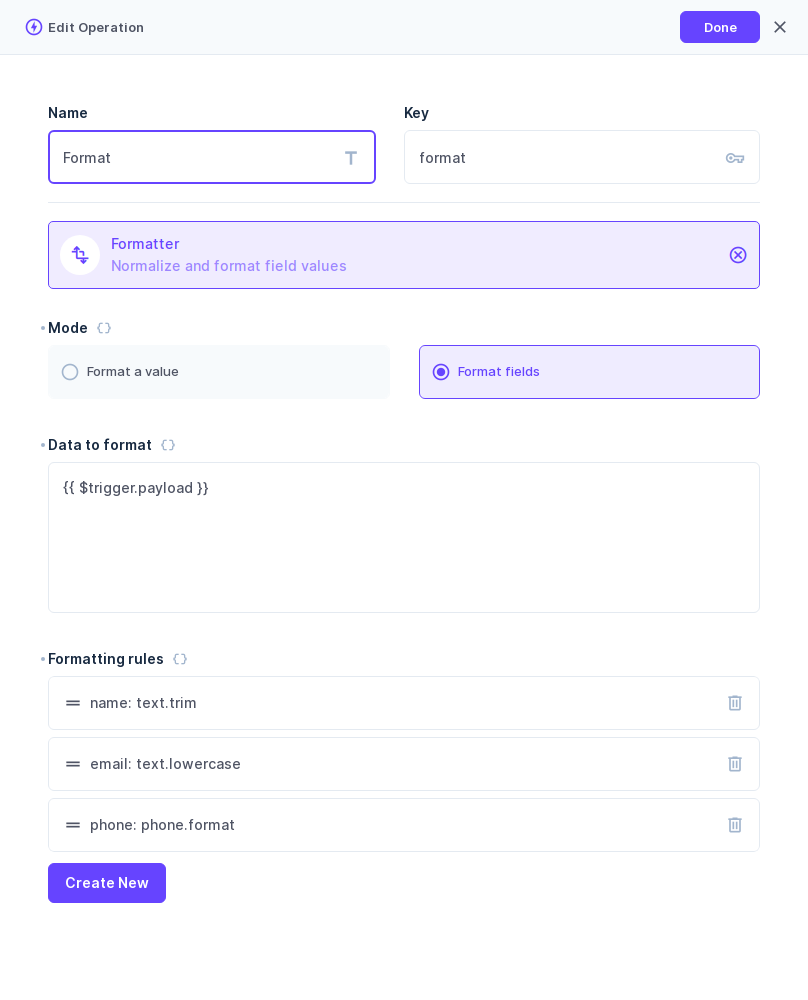
- Format fields takes an object or array and applies rules to selected fields. It returns the data with those fields formatted and other fields preserved.
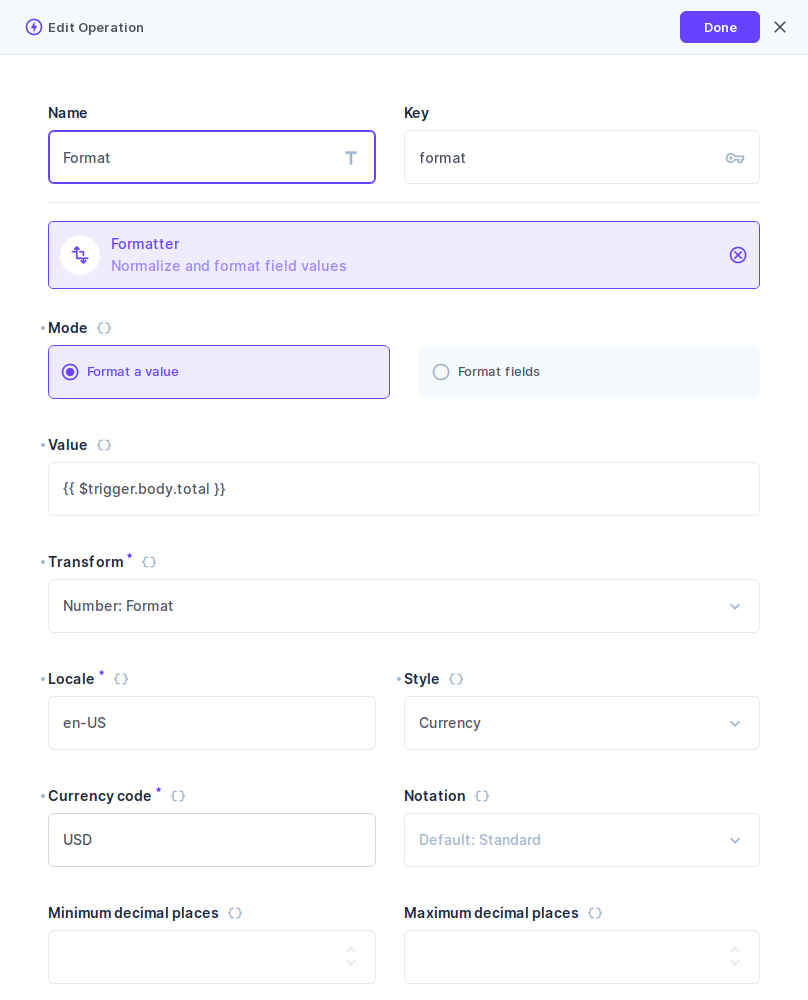
- Format a value takes one value and one transform. It returns the result for use by another step, such as a notification.
Required options have an asterisk. The editor allows incomplete configurations to be saved, so fill these options and test the flow before using it.
Format fields before saving
Use a blocking flow to normalize values as items are created or updated. This example uses a single Formatter operation.
- Create a Flow with an Event Hook trigger and choose Filter (Blocking).
- Select the create and update events for your collection.
- In the same flow setup drawer, set Response Body to Data of Last Operation.
- Save the flow setup, then add Formatter and choose Format fields.
- Set Data to format to
{{ $trigger.payload }}. - Add a rule with the field path, transform, and options. For example,
phone_number, Phone: Format, and regionUS. - Save the flow.
With this example, saving 2015550123 stores +12015550123. A later update to a different field preserves the stored phone number. Keep When no fields match set to Skip formatting so updates that omit the phone field can still save.
- Formatter can run anywhere in a longer flow. Configure later steps to use its result, and set Response Body in the flow setup to whichever step contains the final item data to save.
- Do not use All Data as the response body. It returns the whole flow data chain instead of the item data and can discard edits.
- An unhandled formatting error prevents the save.
Only writes that trigger the flow are formatted. Existing values are not changed until a matching write includes those fields. Direct database writes and operations with Emit Events off bypass the flow.
Write back from a non-blocking flow
Use an Action (Non-Blocking) flow when formatting should not prevent the original save. It needs a separate Update Data step to store the result. This setup covers create events. For updates, use the blocking setup above.
For a phone-number flow on item creation:
Start with a Condition step. Enter the following in Condition Rules:
{
  "$trigger": {
    "payload": {
      "phone_number": { "_nnull": true }
    }
  }
}
Connect Formatter to the Condition's success path. Choose Format fields, set Data to format to
{{ $trigger.payload }}, and add the phone rule.Add Update Data after Formatter. Select the same collection and set its payload to
{{ $last }}.Set IDs to
{{ $trigger.key }}.Turn Emit Events off on Update Data to prevent the write-back from triggering the flow again.
The Condition skips saves that omit the phone field or set it to null. An empty string still passes, so Formatter's empty-input setting applies to "", not to null, in this setup.
To treat spaces-only input as empty, add a Text: Trim rule before Phone: Format for the same field. Trimming turns the spaces into "", so the phone rule's When the input is empty setting applies.
When Formatter succeeds, Update Data makes a second write, even if the value was already formatted. If formatting fails, the original save is not cancelled.
Rule order and missing fields
In Format fields, rules run from top to bottom. A later rule sees the result of earlier rules, including changes to the same field. Drag rows to change their order.
Separate Formatter steps need explicit input wiring. To continue from the preceding step's result, use {{ $last }} as the next step's input.
Each rule has a When no fields match setting:
- Skip formatting is the default. If the path matches nothing, the rule does nothing and the remaining rules run.
- Fail the operation rejects the operation when the path matches nothing.
A wildcard such as items[*].price must reach at least one field. An empty or absent array produces no matches.
Formatter checks only the supplied data, not the stored item. On an update, an omitted field is therefore a missing match. Choose Fail the operation only when the field must be present in that input.
Empty values
When the input is empty applies to null and "", not whitespace, 0, or false.
- Skip formatting (the default) returns the empty value unchanged.
- Fail the operation rejects the empty input.
- Use a replacement value returns the replacement without formatting it.
- Set to null returns
null.
Date: Now ignores its input. Phone: Validate and Lookup: Table handle "" themselves and reject null. These three transforms do not show the empty-input setting.
A non-empty value that cannot be formatted fails the operation. There is no leave-unchanged setting for invalid input.
Saving null: a non-nullable column rejects null. Column constraints, field validation, and permissions still apply to the data a flow saves.
Errors and troubleshooting
A Formatter error follows the operation's failure path:
- In a Filter (Blocking) flow, an unhandled rejection prevents the triggering write.
- In an Action (Non-Blocking) flow, a rejection cannot cancel that write and is not shown to the person saving.
For a rejected blocking save, invalid input produces a 400 Invalid Payload error with the reason, such as Invalid payload. not a valid phone number for the region. Configuration errors, missing ICU support, and exceeded limits produce a generic server error for non-admins. Admins see the detailed reason.
To record failures in the flow logs, set Activity & Logs Tracking to Track Activity & Logs. These records retain resolved settings, inputs, and results, so storage grows with payload size and the number of steps.
Transform reference
Each category lists what the transforms do, the options they require, and examples. Required options must be supplied for the transform to run.
Text
| Transform | What it does | Required options | Example |
| --- | --- | --- | --- |
| Text: Trim | Removes leading and trailing whitespace. Collapse internal whitespace also replaces internal spaces, tabs, and newlines with single spaces. | None | " Hello World " becomes "Hello World" with collapse off or "Hello World" with it on. |
| Text: Normalize | Applies Unicode NFC without removing accents or changing case. | None | An e followed by a combining acute accent becomes é. |
| Text: Uppercase | Changes text to uppercase. Locale enables language-specific casing. | None | "hello" becomes "HELLO". With locale tr, "i" becomes "İ". |
| Text: Lowercase | Changes text to lowercase. Locale enables language-specific casing. | None | "HELLO" becomes "hello". With locale tr, "I" becomes "ı". |
| Text: Truncate | Shortens text, for example a notification preview. Append ellipsis includes the ellipsis within the limit. | Maximum length | "Hello World" at length 5 becomes "Hello", or "Hell…" with the ellipsis on. |
| Text: Replace | Replaces every occurrence of Find with Replace with. An empty replacement deletes matches. | Find | Replacing "-" with " " turns "a-b-c" into "a b c". |
| Text: Slugify | Creates a URL slug. | None | "Hello World!" becomes "hello-world". |
Without a Locale, Uppercase and Lowercase use ordinary Unicode casing.
Phone
| Transform | What it does | Required options | | --- | --- | --- | | Phone: Format | Returns a formatted number. Output format defaults to E.164. | Default region | | Phone: Validate | Returns a diagnostic object. Available in Format a value, not as a field rule. | Default region |
Default region must be an uppercase two-letter code such as US. Lowercase us is not accepted. The region interprets national-format input such as 2015550123.
Phone: Format outputs, with region US:
| Output format | Input | Result |
| --- | --- | --- |
| E.164 | 2015550123 | +12015550123 |
| RFC 3966 | 2015550123 ext. 42 | tel:+12015550123;ext=42 |
| National | 2015550123 ext. 42 | (201) 555-0123 ext. 42 |
| International | 2015550123 ext. 42 | +1 201 555 0123 ext. 42 |
E.164 cannot represent an extension. Formatter rejects extension-bearing input under E.164 rather than dropping the extension. Choose one of the other formats to keep it.
Both phone transforms can extract a single number from surrounding text, such as "Call 2015550123 now". Do not use them to separate multiple numbers.
Phone: Validate results, with region US. Each result is an object with these four properties:
| Input | value | extension | valid | possible |
| --- | --- | --- | --- | --- |
| "2015550123" | "+12015550123" | null | true | true |
| "2015550123 ext. 42" | "+12015550123" | "42" | true | true |
| "abc" | null | null | false | false |
value is the E.164 main number, without an extension. possible can be true when a number has a plausible structure but is not valid. Non-string input is rejected.
Phone validity follows the numbering metadata bundled with Formatter. It does not establish whether a number is assigned or reachable. Newly allocated ranges may need a metadata update in a later release.
Number
| Transform | What it does | Required options | Example |
| --- | --- | --- | --- |
| Number: Round | Rounds a number or numeric string. Defaults to Half up and String output. | Decimal places | "1.005" at 2 places becomes "1.01". |
| Number: Format | Produces localized text. Style defaults to Decimal. | Locale, plus the style-specific options below | 12000 in en-US becomes "12,000". |
Number: Round modes:
| Rounding mode | Behavior | | --- | --- | | Half up | Rounds to the nearest value, with ties away from zero. | | Half even | Rounds to the nearest value, with ties to an even final digit. | | Toward zero | Discards digits beyond the selected decimal places. | | Away from zero | Rounds away from zero when any discarded digit is nonzero. |
Number: Round output types, with input 1.5 and Decimal places set to 2:
| Output type | Result | Trailing zeros |
| --- | --- | --- |
| String | "1.50" | Preserved |
| Number | 1.5 | Not preserved |
Choose the type needed by the destination or later flow step. Formatter does not infer it from the collection schema.
Number: Format styles, with locale en-US:
| Style | Additional required options | Example |
| --- | --- | --- |
| Decimal | None | 12000 becomes "12,000" with Standard notation or "12K" with Compact notation. |
| Currency | Currency code | 75 with currency USD becomes "$75.00". |
| Unit | Unit | 5 with unit kilometer becomes "5 km". |
| Percent | Percent input scale | Fraction reads 0.25 as "25%". Points reads 25 as "25%". |
| Decimal-place option | Effect |
| --- | --- |
| Minimum decimal places | Adds trailing zeros when needed. For USD, set it to 0 to display "$75" instead of "$75.00". |
| Maximum decimal places | Limits the digits after the decimal separator, rounding the display value. |
Currency defaults follow the currency's usual decimal places.
Date
Date: Format, Date: Convert, and Date: Range use Input kind to interpret the input:
| Input kind | Expected value |
| --- | --- |
| Date | A YYYY-MM-DD string |
| Instant | An ISO timestamp with Z or an explicit offset |
| Epoch seconds | An integer count of seconds since the Unix epoch |
| Epoch milliseconds | An integer count of milliseconds since the Unix epoch |
| Transform | What it does | Required options |
| --- | --- | --- |
| Date: Format | Produces localized text. Format style selects preset date/time styles or individual components. | Input kind and Locale. Instants and epochs also require an IANA Time zone, such as America/New_York. |
| Date: Convert | Converts machine-readable dates and timestamps. Output selects ISO, epoch seconds, or epoch milliseconds, defaulting to ISO. | Input kind |
| Date: Now | Supplies the current timestamp, for example in an outbound message. Ignores the input. Without Locale it returns ISO without milliseconds. With Locale it returns formatted text. | Time zone when Locale is supplied |
| Date: Relative | Formats a numeric offset. It does not calculate the difference between dates. | Locale and Unit |
| Date: Range | Formats a { "start": ..., "end": ... } pair using the same formatting options as Date: Format. | Input kind and Locale. Instants and epochs also require Time zone. |
Date examples:
| Transform | Settings | Input | Result |
| --- | --- | --- | --- |
| Date: Format | Date, en-US, Date style Long | "2024-01-05" | "January 5, 2024" |
| Date: Format | Instant, en-US, America/New_York, Date style Long, Time style Short | "2024-01-15T17:30:00Z" | "January 15, 2024 at 12:30 PM" |
| Date: Convert | Instant, Output ISO | "2024-03-10T07:00:00-05:00" | "2024-03-10T12:00:00.000Z" |
| Date: Convert | Instant, Output Epoch seconds | "2024-03-10T07:00:00-05:00" | 1710072000 |
| Date: Convert | Date | "2024-01-05" | "2024-01-05" |
| Date: Now | No Locale | Ignored | The current time, such as "2026-10-13T05:41:24Z" |
| Date: Relative | en-US, Unit Day | -3 or 2 | "3 days ago" or "in 2 days", respectively |
| Date: Range | Date, en-US, Date style Medium | { "start": "2024-01-05", "end": "2024-01-08" } | "Jan 5 – 8, 2024" |
Date-only input uses neither a time zone nor time components. Date: Convert keeps it as a date-only string and ignores Output. It does not parse regional text such as 10/12/2026.
Date: Range rejects a start after its end. Equal endpoints are allowed, and instants are compared by their actual time, including offsets.
Locale
| Transform | What it does | Required options | Example |
| --- | --- | --- | --- |
| Locale: List | Joins strings into readable text, such as selected colors. Type defaults to Conjunction. | Locale | ["red", "green", "blue"] in en-US becomes "red, green, and blue". |
| Locale: Display name | Turns a code into a localized label. | Locale and Type | "US" with en-US and type Region becomes "United States". |
| Locale: Plural | Chooses a word form for a count. Returns only the form text, without the count. | Locale, plus Other or every category used by that locale and type | With English cardinal forms One = item and Other = items, 1 returns "item" and 2 returns "items". |
Locale: Plural forms, with locale en:
| Type | Use | Category slots | Examples |
| --- | --- | --- | --- |
| Cardinal | Quantity | One = item, Other = items | 1 returns "item", 2 returns "items". |
| Ordinal | Position | One = st, Two = nd, Few = rd, Other = th | 1 returns "st", 3 returns "rd". |
Blank slots are ignored. Other is the fallback when the selected category has no form.
Lookup
| Transform | What it does | Required options | Example |
| --- | --- | --- | --- |
| Lookup: Table | Maps an input to an output. Matching is case-sensitive by default. | Lookup table | A row with key "us" and value "United States" returns "United States" for input "us". |
Fallback supplies a result when nothing matches. Without a fallback, an unmatched input is rejected.
Storage and scope
Store canonical values where possible and apply display formatting when presenting them. For example, keep a phone number without an extension in E.164 and render it in national format for a notification.
- Format fields replaces matched values in place. It does not create a field or write a result to a different field.
- Paths can reach nested objects and arrays in the supplied data, including JSON fields. Formatting nested relational writes has not been verified.
- Formatter offers selected formatting operations, not every option or API available through JavaScript's
Intl.
Use Run Script for locale-aware sorting and comparison (Intl.Collator, localeCompare), segmentation (Intl.Segmenter), formatted parts (formatToParts, formatRangeToParts), calendar and date-field display names, and locale utilities (Intl.Locale, Intl.getCanonicalLocales, Intl.supportedValuesOf).
Formatter has no duration transform. Intl.DurationFormat is not available in Node.js 22.
Limits
Formatter bounds input size and processing work. Exceeding a limit fails the operation.
| Applies to | Limit | | --- | --- | | A text input | 100,000 characters | | A number written as text | 256 characters, 100 digits, and an exponent up to 300 | | Items joined by Locale: List | 1,000 items and 100,000 characters in total | | A transform's text output, and Text: Truncate's Maximum length | 1,000,000 characters | | Data passed to Format fields, and each transform's result | 32 levels of nesting, 20,000 values, and 1 MiB as JSON | | Rules in one Format fields step | 64 | | A rule's field path | 512 characters and 16 segments | | Fields that one wildcard path can match | 10,000 | | Field values formatted in one Format fields step | 20,000 | | Field content formatted in one Format fields step | 1 MiB as JSON | | Data that one Format fields step returns | 1 MiB as JSON | | A text setting, such as a currency code or a replacement value | 256 characters | | Text: Replace Find and Replace with | 100,000 characters each | | A locale or time zone identifier | 64 characters | | Lookup: Table | 1,000 rows and 262,144 characters in total | | All of one step's transform settings combined | 20,000 values and 1 MiB as JSON |
JSON sizes use conservative counting, adding one byte per non-empty object or array beyond its JSON text. A payload whose JSON text is exactly 1 MiB therefore exceeds the limit. These limits are ceilings, not performance guarantees.
Sandbox limits
Directus also limits the time and memory of each run of a sandboxed operation: 1 second (EXTENSIONS_SANDBOX_TIMEOUT, in milliseconds) and 100 MB (EXTENSIONS_SANDBOX_MEMORY, in megabytes) by default. Typical Formatter operations finish in milliseconds.
Custom Node.js builds
The official Directus images need no extra ICU setup. On custom builds:
- Without full ICU, Number: Format, Date: Format, Date: Range, Date: Relative, localized Date: Now, and the Locale transforms fail with an error naming the missing capability.
- Without Intl, Text: Normalize, Text: Slugify, and locale-sensitive Uppercase and Lowercase also fail.
- Transforms that do not need those capabilities remain available.
About
Formatter for Directus is developed by the CairnCMS project. It is built from the CairnCMS Formatter extension, @cairncms/extension-formatter 0.1.0, and shares its transforms and limits.
Report problems in this repository's issues.
License
GPL-3.0-only. The built package bundles third-party material with its own terms, listed in THIRD_PARTY_NOTICES.md.