
@calibur/dark-mode
v1.0.17
Published
h5页面深色模式的less/scss颜色转换
Downloads
9


Readme
@calibur/dark-mode
h5页面深色模式的less/scss颜色转换
快速引入
npm install @calibur/dark-mode全局引用
// webapck中全局引用深色模式转换 mixins
{
  loader: 'style-resources-loader',
  options: {
    // dark-mixins.scss or dark-mixins.less
    patterns: [require.resolve('@calibur/dark-mode/dark-mixins.less')],
  }
}
局部引用
// 局部引用深色模式转换 mixins
@import '~@calibur/dark-mode/dark-mixins.less';如果为深色模式,在html节点上添加class="night-mode".
例如:
document.querySelector('html').classList.add('night-mode');mixin 函数使用规范
以less为例
@key是css属性,例如backgroundbackground-colorcolorborder-color等,@value是具体的颜色色值,支持hex/rgb/rgba/hsl/hsla。
- ~~
.dark-img();~~ .dark-elem(@property, @value);.dark-bg(@property, @value);.dark-gray-bg(@property, @value);.dark-cus(@property, @lightCSS, @darkCSS);
具体用法请继续往下看!
请按照以下四种元素类型使用对应转换函数
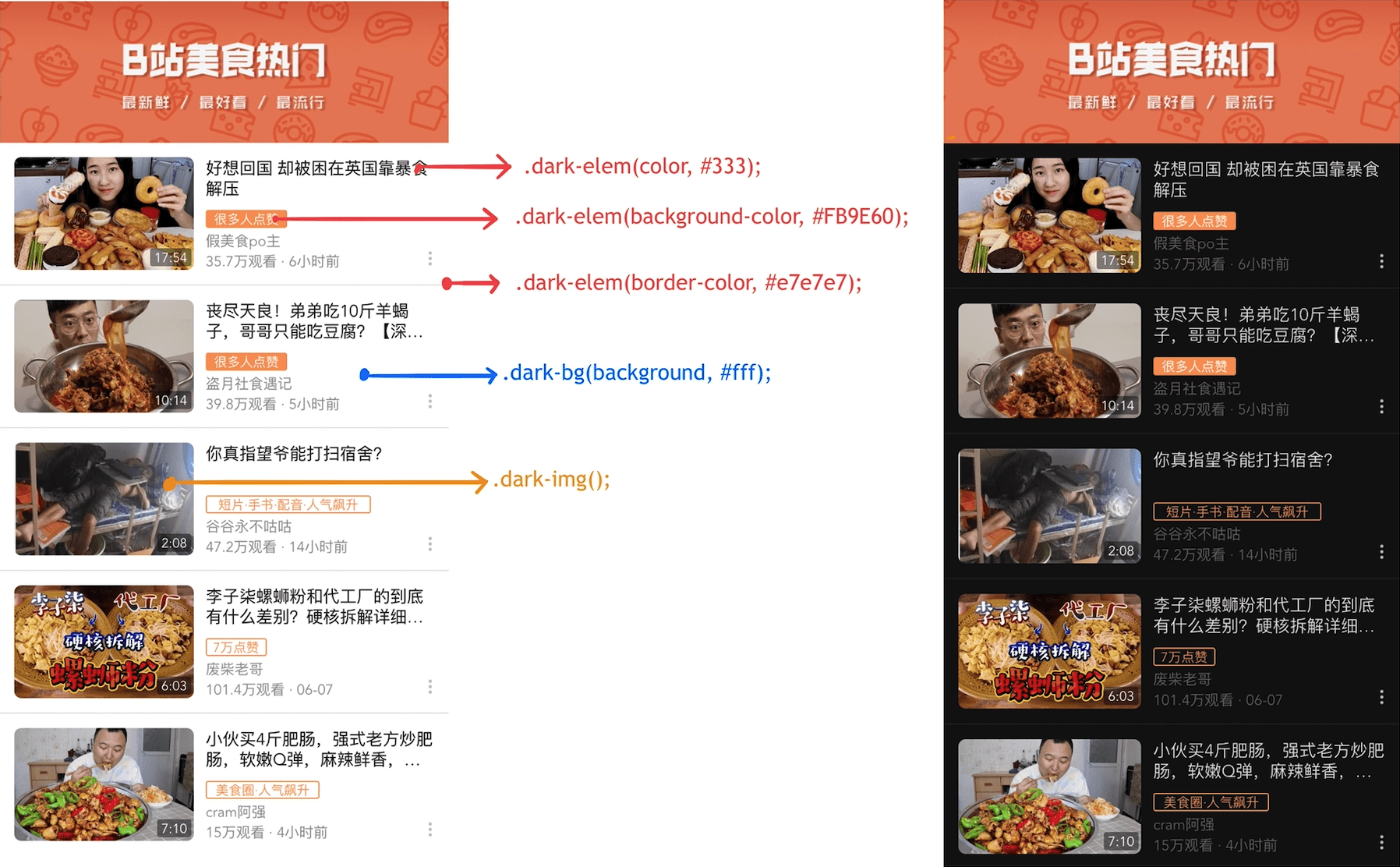
~~1. 图片/背景图片/多色图标 .dark-img();~~
图片不需要处理
2. 文字/图标/按钮背景色/描边 .dark-elem(@property, @value);
将
.text {
  font-size: 13px;
  color: #333;
  border: 2px solid #333;
}

// 按钮背景色
.button {
  width: 80px;
  height: 30px;
  color: #333;
  background: #fff;
}
更换为
.text {
  font-size: 13px;
  border: 2px solid;
  .dark-elem(color, #333);
  .dark-elem(border-color, #333);
}

.button {
  width: 80px;
  height: 30px;
  .dark-elem(color, #333);
  .dark-elem(background, #fff);
}
3. 色块/背景色 .dark-bg(@property, @value);
提示:按钮/图标/描边的背景色,用 .dark-elem()
将
.box {
  background: #fff;
  width: 100px;
}
更换为
.box {
  .dark-bg(background, #fff);
  width: 100px;
}
4. 浅灰色分割条或背景 .dark-gray-bg(@property, @value);
background为浅灰色且亮度>=95%的背景色 #f3f3f3 #f2f2f2 #f7f7f7 #fafafa #fcfcfc
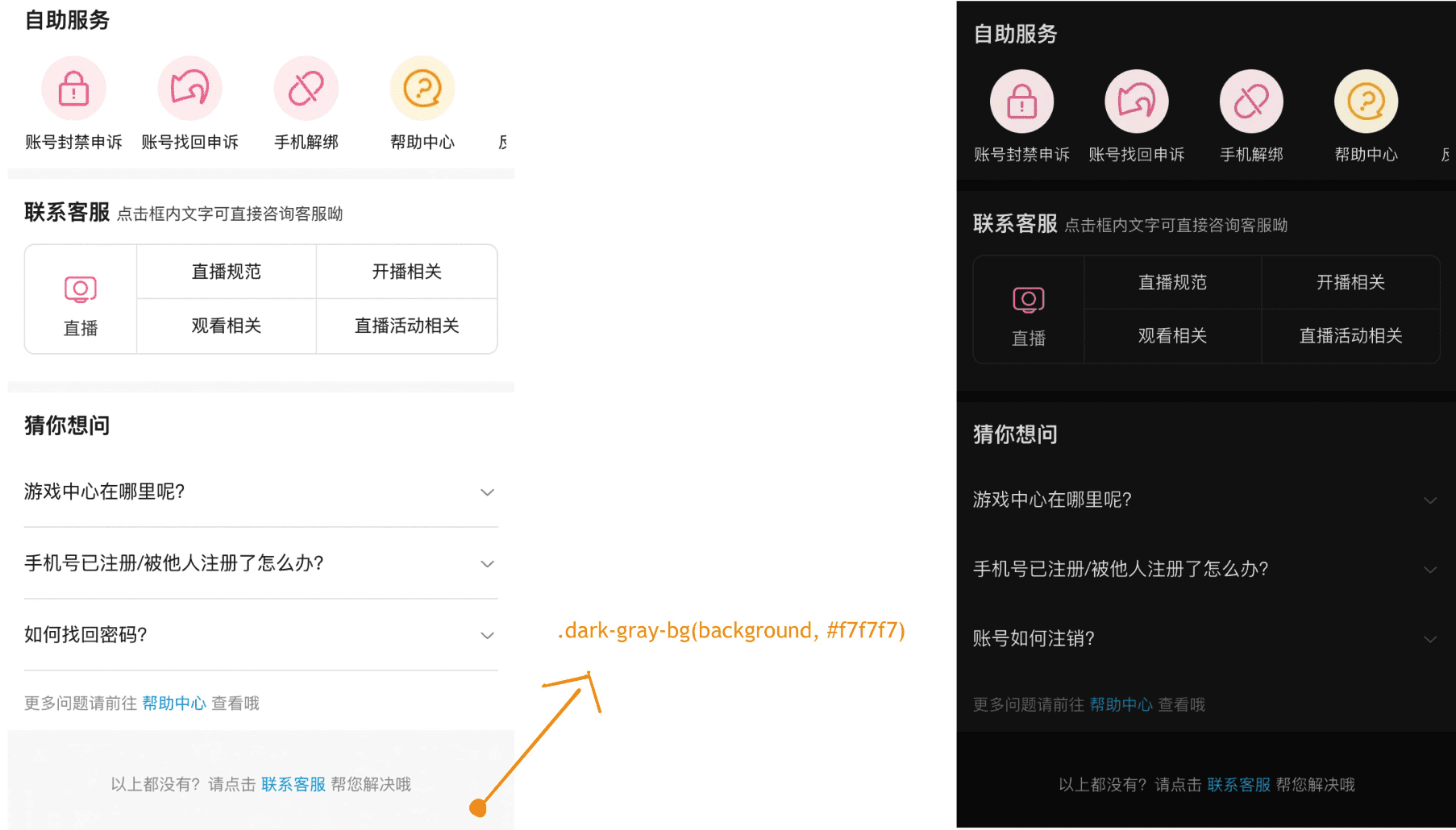
将
.app {
  width: 100%;
  height: 100%;
  background: #f7f7f7;
}
改成
.app {
  width: 100%;
  height: 100%;
  .dark-gray-bg(background, #f7f7f7);
}
5. 自定义转换 .dark-cus(@property, @lightCSS, @darkCSS);
对于较复杂的属性,建议自行转换为对应的深色属性,填入第三个参数中,
@darkValue
将
.app {
  width: 100%;
  height: 100%;
  box-shadow: 10px 5px 5px #F4F4F4;
  background: linear-gradient(0.25turn, #3f87a6, #ebf8e1, #f69d3c);
}
改成
.app {
  width: 100%;
  height: 100%;
  .dark-cus(box-shadow, 10px 5px 5px #F4F4F4, 10px 5px 5px #1E1E1E);
  .dark-cus(background, linear-gradient(0.25turn, #3f87a6, #ebf8e1, #f69d3c), linear-gradient(0.25turn, #467C94, #2A3025, #E19441));
}