
@callstack/repack-atlas
v0.1.1
Published
Local developer tooling for React Native Module Federation workspaces built with Re.Pack.


Readme
Repack Atlas
Local developer tooling for React Native Module Federation workspaces built with Re.Pack. It answers three questions in seconds, without a simulator:
- What is my federation setup? A graph of host and mini-apps: who exposes what, who consumes it, which shared versions and native modules are in play.
- Is it correct? A doctor that finds shared-version drift, singleton and eager mismatches, circular remotes, and native modules the host does not declare.
- Can I run it? An interactive dev runner that starts the whole workspace and serves a read-only Federation Studio page.
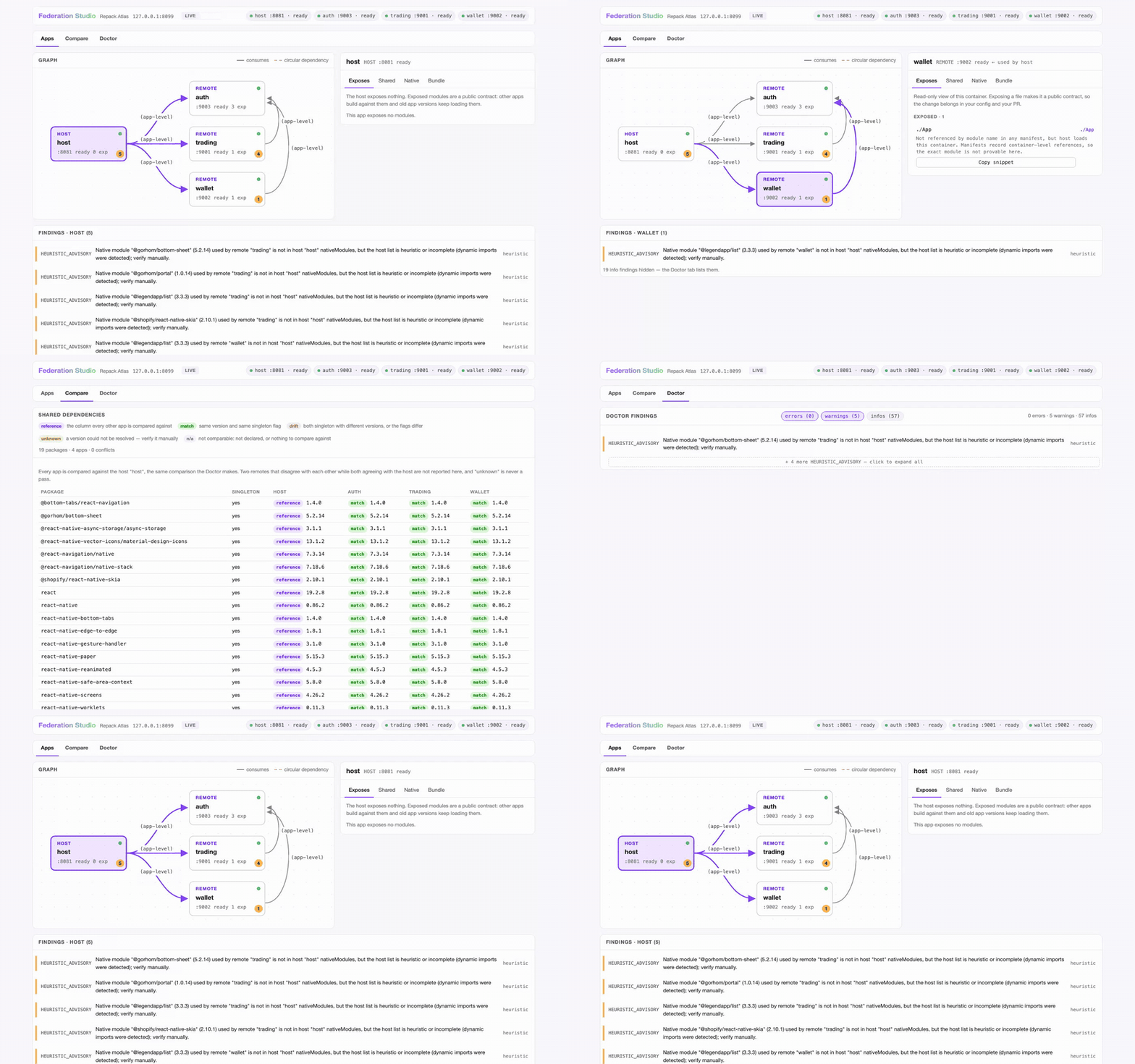
Federation Studio on a real Re.Pack workspace (host + 3 mini-apps), walking
its three tabs: Apps (the graph, an inspector per app, and the findings
that mention the selected app), Compare (every shared package × every app,
with the host as the reference column, so singleton drift is one glance away)
and Doctor (the workspace-wide findings table, severity chips and per-code
collapse; clicking a finding jumps back to the app it mentions). The
walkthrough is in
docs/demo-showcase.md.
Atlas grew out of three stacked Re.Pack PRs
(#1463,
#1466,
#1467). The Re.Pack team
concluded this is workspace tooling, not bundler scope, so it lives here; core
Re.Pack keeps only the small enabling changes. docs/PRD.md is the source of
truth for the whole design.
Install
Atlas is on npm as @callstack/repack-atlas. Add it to the workspace you
want to check — it is a dev tool, so keep it a devDependency:
npm install -D @callstack/repack-atlas   # or: pnpm add -D @callstack/repack-atlas
npx repack-atlas --version               # or: pnpm exec repack-atlas --version
Requires Node >= 22.13. @callstack/repack is a peer dependency, resolved from
your project — Atlas never bundles it. The package ships dist/ only: the
fixture workspaces behind the demo below live in this repository, not in the
published artifact, so the demo and the contributor commands need a clone.
Quickstart (from a clone)
Requirements: Node >= 22.13, pnpm >= 10 (packageManager pins the exact version).
git clone <this repo> && cd repack-atlas
pnpm install
pnpm build
pnpm test        # 274 tests, fixtures only, a few seconds
The 3-minute demo
The repo ships throwaway fixture workspaces under fixtures/, so you can see
the doctor and the runner with zero setup. The commands below were run from a
fresh clone; the output is real.
Doctor on a workspace with a deliberate singleton version conflict:
$ node dist/cli.js doctor --workspace fixtures/fixture-version-drift; echo $?
host:   host  .../fixtures/fixture-version-drift/manifests/host.json
remote: mini_auth  .../fixtures/fixture-version-drift/manifests/mini-auth.json
remote: mini_store  .../fixtures/fixture-version-drift/manifests/mini-store.json

errors (1):
  SHARED_VERSION_DRIFT [static] Singleton shared dependency "react" resolves to
  different versions: host "host" has 19.0.0, remote "mini_store" has 19.1.0.
  Align the versions (or remove singleton).

summary: 1 error, 0 warnings, 0 info
1
Doctor on a workspace that only trips findings by convention (host eager, remotes lazy — an info finding, not a problem):
$ node dist/cli.js doctor --workspace fixtures/fixture-eager-advisory; echo "EXIT=$?"
host:   host  .../fixtures/fixture-eager-advisory/manifests/host.json
remote: mini_auth  .../fixtures/fixture-eager-advisory/manifests/mini-auth.json
remote: mini_store  .../fixtures/fixture-eager-advisory/manifests/mini-store.json

infos (4 hidden — --show-infos or --code CODE to list):
  EAGER_ADVISORY [static] × 4

summary: 0 errors, 0 warnings, 4 info
EXIT=0
The human output keeps signal high: info findings are hidden by default (list
them with --show-infos, or any single code with repeatable --code <CODE>),
and repeated codes collapse to a first line plus a + N more pointer. Exit
codes always come from the full report, and --json always reports every
finding regardless of these flags.
Exit codes are a contract: 0 clean (warnings allowed), 1 ran and found
errors, 2 could not answer. The clean fixture exits 0. A remote manifest
that exists but cannot be read is a named MANIFEST_UNREADABLE error (exit 1,
the other remotes are still checked); exit 2 is for runs with nothing to
compare: no or invalid config, an unreadable host manifest, or every remote
manifest exists but is unreadable. Missing remote manifests keep exit 1
(0 with --allow-missing-manifests). When remotes exist but none of them
could be compared (all missing, or missing plus unreadable), doctor adds a
NOTHING_COMPARED warning so a clean exit is not read as "the federation was
checked"; like any warning it only affects the exit code under
--fail-on-warnings.
The dev runner
repack-atlas dev starts every app in a workspace, serves the Studio page and,
if you ask, launches the app on a device. On a terminal it opens a wizard:
repack-atlas devThe wizard asks which remotes to run (all are preselected; deselect them all,
or type none in the readline fallback, for a host-only session, the same as
--apps host), the platform (iOS, Android or all),
whether to launch the app (one platform only), a port for each app and, for
remotes that declare standalone: true, whether to run one standalone. Ctrl-C
at any question exits 0 with nothing started.
The same session with flags, which is also what runs in CI and pipes (no wizard without a TTY):
repack-atlas dev --apps host,mini_auth --platform ios --no-interactive
repack-atlas dev --platform ios --launch --device "iPhone 16"   # put the app on the device
repack-atlas dev --dry-run --platform android                   # print the plan, spawn nothing
Real output on the fixture workspace (stub bundlers that serve checked-in manifests, which is why it takes seconds):
$ node dist/cli.js dev --workspace fixtures/workspace --ci --studio-port 0
Federation Studio (read-only): http://127.0.0.1:62053/
dev: supervising 3 app(s) (host:8081 mini_auth:8082 mini_store:8083)
dev: host → starting (port 8081)
[host] ready
dev: mini_auth → starting (port 8082)
[mini_auth] ready
dev: mini_store → starting (port 8083)
[mini_store] ready
dev: host → ready (port 8081)
dev: mini_auth → ready (port 8082)
dev: mini_store → ready (port 8083)
Open the printed URL. The Studio page is read-only forever (manifest content is
rendered as text, the server binds 127.0.0.1 only, there is nothing to write)
and has three tabs: Apps (graph + inspector + the selected app's findings),
Compare (the shared-dependency matrix — each app against the host, the same
comparison the doctor makes) and Doctor (the workspace-wide findings
table). Without --ci a terminal also gets key handling (press
v to open the Studio, q to quit).
| Flag | Effect |
|---|---|
| --apps <list> | Config keys to run (host, remote names). Skips the wizard. |
| --platform ios\|android | Platform for the session. |
| --port <n> / --auto-ports | Host port (default 8081); move busy ports to free ones instead of failing. |
| --standalone <remote> | Run a remote declared standalone: true on its own. |
| --launch / --no-launch / --device <id> | Launch the app once the target is ready (needs --platform). |
| --no-interactive / --ci | Never prompt (--ci also disables key handling). |
| --dry-run / --json | Print the plan and exit / one JSON event per line. |
| --no-studio / --studio-port <n> | Skip the Studio or pick its port. |
Exit codes: 0 clean (also a wizard cancel), 1 a port conflict or an app
that errored, 2 could not answer (bad flags, unknown app, missing
react-native). The host defaults to 8081; if it is busy the run exits 1
unless you pass --auto-ports. repack-atlas dev --help has every detail and
docs/PRD.md §7.1.1 the full contract.
What each app runs is decided per app in repack-federation.json:
root: the app directory. By default Atlas runs the app's ownnode_modules/.bin/react-nativeshim (node <react-native CLI>when there is no shim) withstart [--bundler <rspack|webpack>] --port <n>from there, soreact-nativemust be installed in each app root. One app without it fails the whole run (exit2).--bundlerand--standaloneare passed only when the app's installedstartcommand declares them (read from itsreact-native.config.js): published Re.Pack 5.x has neither, since its config picks the bundler, while builds with callstack/repack PR #1467 have both.--standaloneon a start without it exits2naming the app.config: the bundler config file, relative to the config directory. Without it the bundler is detected fromrspack.config.*/webpack.config.*.port: the declared port. A remote without one gets a free port.standalone:truelets--standalone <remote>run it alone.command: an explicit override, run verbatim through a shell from the config directory. It gets the platform and standalone choice only asATLAS_APP_PLATFORMandATLAS_APP_STANDALONE. The fixtures use it for their stub bundlers.
init no longer writes command: it writes root and the default argv does
the rest.
Your own workspace
Atlas reads repack-federation.json plus one federation manifest per app. To
point it at a real project, add two plugins to each app's rspack config:
@callstack/repack-atlas/plugin (emits the manifest) and
@callstack/repack-atlas/introspection
(feeds init and the workspace config). Both are opt-in. Both subpaths are
Atlas public API (semver applies once published), and Re.Pack / Module
Federation compatibility is validated by Atlas, not upstream; see PRD §8.2.
Then:
npx repack-atlas init --workspace /path/to/workspace   # discovers apps, writes root and port
npx repack-atlas doctor --workspace /path/to/workspace
Two optional repack-federation.json fields are easy to misread:
root(host and remotes): only the dev runner uses it. It is resolved against the config directory, handed to the app process asATLAS_APP_ROOT, and is where the defaultreact-native startruns. Doctor, graph and Studio resolvemanifestrelative to the config directory and ignoreroot.remotes.<name>.standalone: a flag you declare ("this remote can run without the host"). Doctor and the Studio only check it is a boolean (the Studio shows a read-onlystandalonebadge whentrue); the dev runner uses it to allow--standalone <remote>and the wizard's standalone question.
Installing Atlas in a project
From npm, as above — npm install -D @callstack/repack-atlas. The binary is
repack-atlas and the two plugin subpaths are imported from the same package,
so an npm install is all a project needs.
Do not install from a git URL: dist/ is gitignored, so a git install gets
sources only and the repack-atlas binary is missing.
Building from a clone is for working on Atlas itself. To try an unreleased
commit from a project, link that clone (an absolute path;
pnpm link --global is not valid on pnpm 11) and rebuild it after each change:
git clone https://github.com/callstackincubator/repack-atlas.git
cd repack-atlas && pnpm install && pnpm build

# In the project that should get the `repack-atlas` binary:
pnpm link /absolute/path/to/repack-atlas
In the app you want to instrument, add the two Atlas plugins (see
docs/demo-showcase.md);
they resolve @callstack/repack from that app, not from Atlas.
docs/decisions/npm-publish.md
tracks the publish decision and the release runbook.
Fixtures tour
Each fixture variant provokes exactly one finding; pnpm test asserts every
row. Expectations also live in fixtures/README.md.
| Variant | Finding | Exit |
|---|---|---|
| workspace/ | none (clean) | 0 |
| fixture-remote-cycle/ | REMOTE_CYCLE (warning) | 0 |
| fixture-version-drift/ | SHARED_VERSION_DRIFT | 1 |
| fixture-missing-native/ | MISSING_NATIVE_MODULE | 1 |
| fixture-corrupt-manifest/ | MANIFEST_UNREADABLE (names the app) | 1 |
| fixture-heuristic-downgrade/ | HEURISTIC_ADVISORY (warning) | 0 |
| fixture-eager-advisory/ | EAGER_ADVISORY (info — host-eager/remote-lazy is the MF convention) | 0 |
| fixture-missing-remote-manifest/ | MISSING_REMOTE_MANIFEST | 1 (0 with --allow-missing-manifests) |
| fixture-nothing-compared/ | NOTHING_COMPARED (warning) plus a MISSING_REMOTE_MANIFEST per remote | 1 (0 with --allow-missing-manifests) |
| fixture-xss/ | hostile strings render as text in Studio | 0 |
Agent files
This repo is set up to be worked on by any coding agent: Claude Code, Codex,
Apex/OpenCode, Cursor, VS Code. AGENTS.md is the single source of truth;
canonical skills live in .agents/skills/ (agentskills.io format), and
pnpm agent:sync generates the .claude/skills/ symlinks plus the AGENTS.md
tables. CI runs pnpm agent:check and fails on drift. Add a skill by dropping
a folder with a SKILL.md and running the sync; see CONTRIBUTING.md.
Checks CI runs (reproduce locally)
pnpm lint          # ESLint incl. bridge-fence and core-boundary rules
pnpm typecheck     # tsc --noEmit over src + tests
pnpm build         # src -> dist
pnpm test          # node:test via tsx
pnpm agent:check   # agent files sync drift (exit 1 on drift)
pnpm check:vendored  # every vendored file is in VENDORED.md w/ a commit sha
pnpm test:e2e      # Playwright over the Studio preview (needs:
                   #   pnpm exec playwright install chromium)
Vendored code
src/repack-bridge/vendored/ contains code copied from
callstack/repack (branch feat/federation-manifest, commit c5df67f0)
under the MIT license, with per-file copyright headers. Re.Pack will not merge
that branch, so the code is an Atlas-owned fork and a supported part of Atlas.
VENDORED.md is the provenance ledger: every file, its upstream path and source
commit. CI enforces the ledger (pnpm check:vendored).
License
MIT. See LICENSE. Vendored files retain their upstream MIT copyright headers.