
@capgo/capacitor-watch
v8.1.3
Published
Capacitor plugin for Apple Watch communication with bidirectional messaging support


Readme
@capgo/capacitor-watch
Apple Watch communication plugin for Capacitor with bidirectional messaging support.
Why Capacitor Watch?
The only Capacitor 8 compatible plugin for bidirectional Apple Watch communication:
- Two-way messaging - Send and receive messages between iPhone and Apple Watch
- Application context - Sync app state with latest-value-only semantics
- User info transfers - Reliable queued delivery even when watch is offline
- Request/Reply pattern - Interactive workflows with callback-based responses
- SwiftUI ready - Includes watch-side SDK with ObservableObject support
- iOS 15+ - Built for modern iOS with Swift Package Manager
Essential for health apps, fitness trackers, remote controls, and any app extending to Apple Watch.
Documentation
The most complete doc is available here: https://capgo.app/docs/plugins/watch/
Compatibility
| Plugin version | Capacitor compatibility | Maintained | | -------------- | ----------------------- | ---------- | | v8.*.* | v8.*.* | ✅ | | v7.*.* | v7.*.* | On demand | | v6.*.* | v6.*.* | ❌ | | v5.*.* | v5.*.* | ❌ |
Note: The major version of this plugin follows the major version of Capacitor. Use the version that matches your Capacitor installation (e.g., plugin v8 for Capacitor 8). Only the latest major version is actively maintained.
Install
You can use our AI-Assisted Setup to install the plugin. Add the Capgo skills to your AI tool using the following command:
npx skills add https://github.com/cap-go/capacitor-skills --skill capacitor-pluginsThen use the following prompt:
Use the `capacitor-plugins` skill from `cap-go/capacitor-skills` to install the `@capgo/capacitor-watch` plugin in my project.If you prefer Manual Setup, install the plugin by running the following commands and follow the platform-specific instructions below:
npm install @capgo/capacitor-watch
npx cap sync
Requirements
- iOS: iOS 15.0+ (Capacitor 8 minimum). Requires WatchConnectivity capability.
- watchOS: watchOS 9.0+. Requires companion app with CapgoWatchSDK.
- Android: Not supported (Apple Watch is iOS-only). Methods return appropriate errors.
- Hardware: Real Apple Watch required - simulators do not support WatchConnectivity.
Complete Setup Tutorial
This tutorial walks you through setting up bidirectional communication between your Capacitor app and Apple Watch. Follow each step carefully.
Step 1: Install the Plugin
First, add the plugin to your Capacitor project:
npm install @capgo/capacitor-watch
npx cap sync ios
Then open your iOS project in Xcode:
npx cap open iosStep 2: Add iOS App Capabilities
Your iOS app needs specific capabilities to communicate with Apple Watch.
- Select your App target in Xcode (not the project)
- Go to the Signing & Capabilities tab
- Click the + Capability button
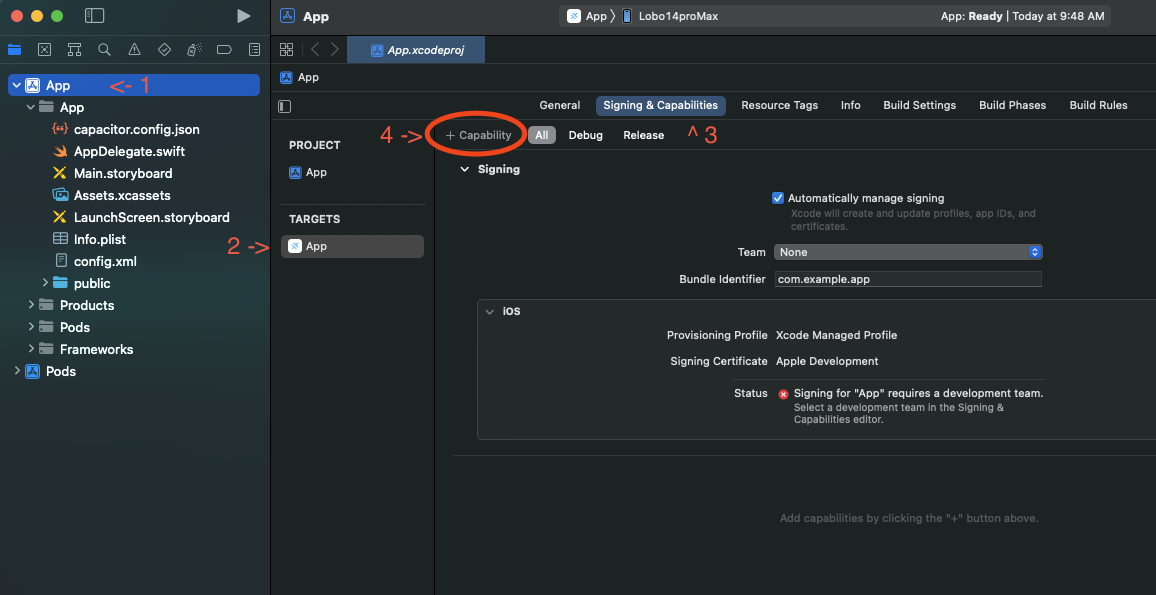
- Add the following capabilities:
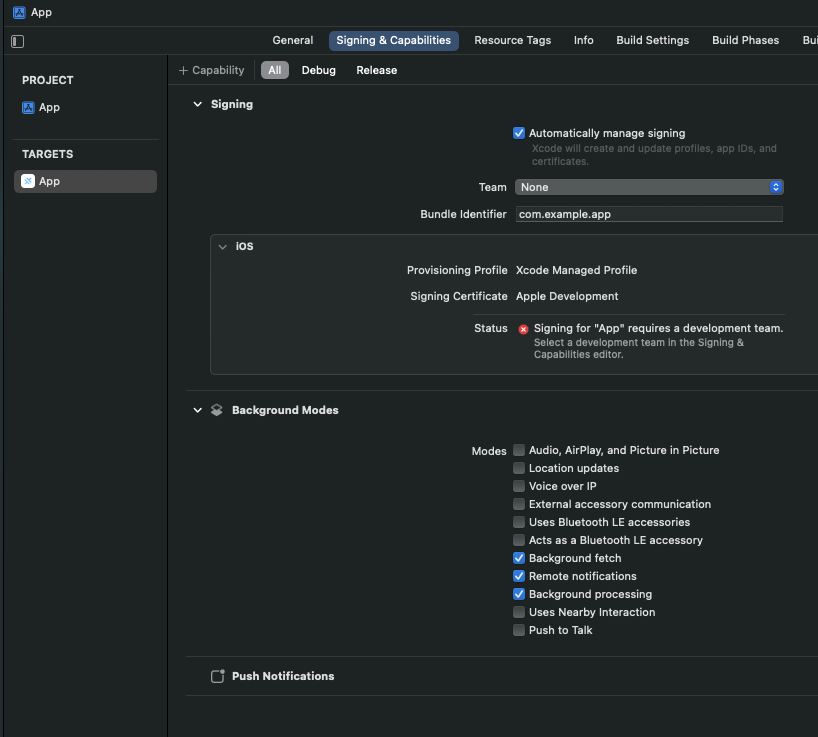
- Background Modes - Enable "Background fetch" and "Remote notifications"
- Push Notifications (required for background wake)
Your capabilities should look like this when complete:
Step 3: Configure AppDelegate.swift
[!NOTE] For now this will not compile. This is fine, we will fix in later steps
import UIKit
import Capacitor
import WatchConnectivity
import CapgoWatchSDK

@UIApplicationMain
class AppDelegate: UIResponder, UIApplicationDelegate {

    var window: UIWindow?

    func application(_ application: UIApplication, didFinishLaunchingWithOptions launchOptions: [UIApplication.LaunchOptionsKey: Any]?) -> Bool {
        // Initialize WatchConnectivity session
        if WCSession.isSupported() {
            WCSession.default.delegate = CapWatchSessionDelegate.shared
            WCSession.default.activate()
        }
        return true
    }

    // ... rest of your AppDelegate code
}
Step 4: Create the Watch App Target
Now create the watchOS companion app:
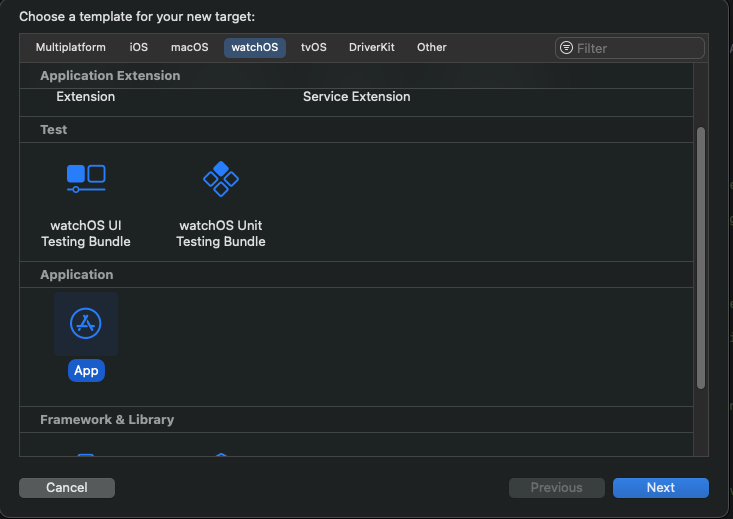
- In Xcode, go to File > New > Target
- Select watchOS tab
- Choose App and click Next
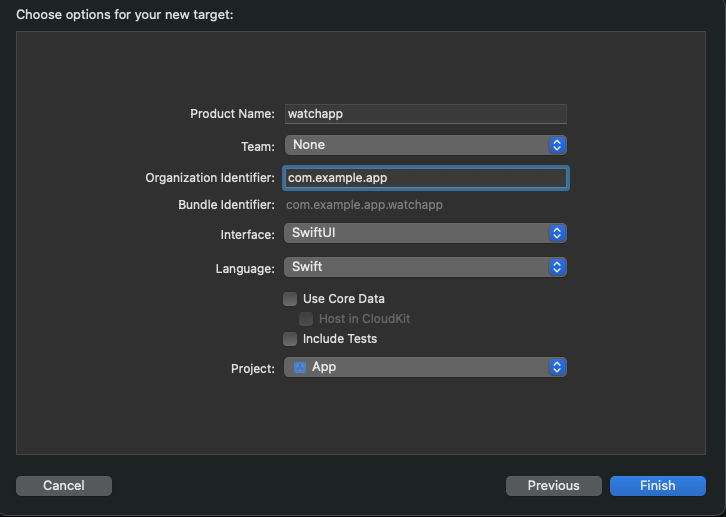
- Configure the watch app:
- Product Name: Your app name (e.g., "MyApp Watch")
- Bundle Identifier: Must follow the pattern
[your-app-bundle-id].watchkitapp- Example: If your app is
com.example.myapp, usecom.example.myapp.watchkitapp
- Example: If your app is
- Language: Swift
- User Interface: SwiftUI
Step 5: Add the CapgoWatchSDK Package
The watch app needs our SDK to communicate with the phone. Add it as a Swift Package:
- Select your project in the navigator (top level, blue icon)
- Go to Package Dependencies tab
- Click the + button to add a package
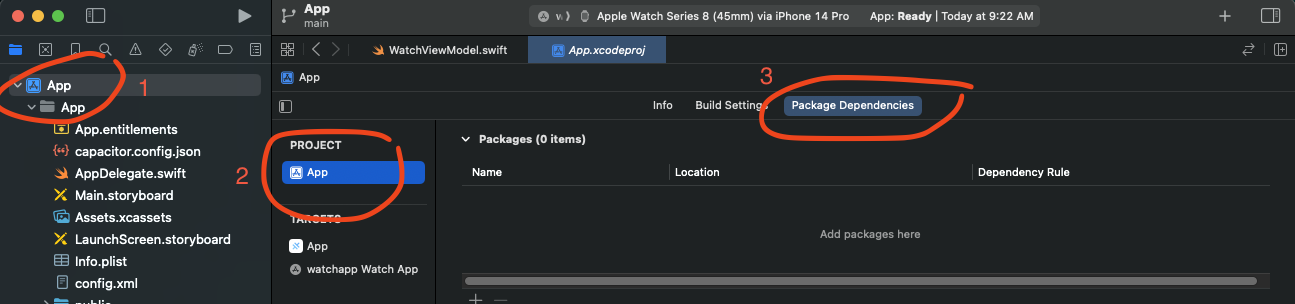
- Click on the plus button to add a package

- Click Add Package

- When prompted, select CapgoWatchSDK and add it to your Watch App target (not the main app)

After adding, your package dependencies should show the CapgoWatchSDK:

Step 6: Fix the build for main app
Right now, your main app is missing the CapgoWatchSDK. We need to add it to the main app.
- Select your project in the navigator (top level, blue icon)
- Go to your iOS app target
- Go to
general - Scroll to
Frameworks, Libraries, and Embedded Content - Click the plus button to add a framework

- Click on the
CapgoWatchSDKframework and clickAdd

Step 6: Configure the Watch App
Update your watch app's main file to initialize the connection:
MyAppWatch/MyAppWatchApp.swift:
import SwiftUI
import WatchConnectivity
import CapgoWatchSDK

@main
struct MyAppWatchApp: App {
    init() {
        // Activate the watch connector
        WatchConnector.shared.activate()
    }

    var body: some Scene {
        WindowGroup {
            ContentView()
        }
    }
}
MyAppWatch/ContentView.swift:
import SwiftUI
import CapgoWatchSDK

struct ContentView: View {
    @ObservedObject var connector = WatchConnector.shared

    var body: some View {
        VStack(spacing: 20) {
            // Connection status indicator
            HStack {
                Circle()
                    .fill(connector.isReachable ? Color.green : Color.red)
                    .frame(width: 12, height: 12)
                Text(connector.isReachable ? "Connected" : "Disconnected")
                    .font(.caption)
            }

            // Send message button
            Button("Send to Phone") {
                connector.sendMessage(["action": "buttonTapped", "timestamp": Date().timeIntervalSince1970]) { reply in
                    print("Phone replied: \(reply)")
                }
            }
            .disabled(!connector.isReachable)

            // Display received context
            if let context = connector.receivedContext {
                Text("Last update: \(context["status"] as? String ?? "none")")
                    .font(.caption2)
            }
        }
        .padding()
    }
}
Your watch app structure should look like this:
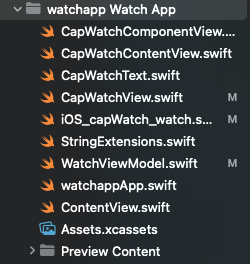
Step 7: Add Watch App Capabilities
The watch app also needs background capabilities:
- Select your Watch App target in Xcode
- Go to Signing & Capabilities tab
- Click + Capability
- Add Background Modes
- Enable Remote Notifications
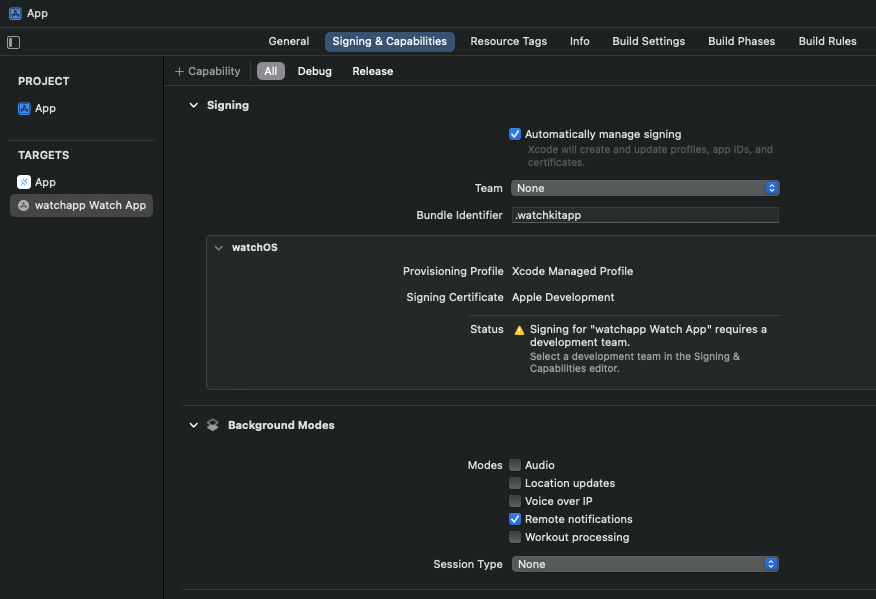
Step 8: Use the Plugin in Your Capacitor App
Now set up the JavaScript side in your Capacitor app:
import { Watch } from '@capgo/capacitor-watch';

// Check watch connectivity status
async function checkWatchStatus() {
  const info = await Watch.getInfo();
  console.log('Watch supported:', info.isSupported);
  console.log('Watch paired:', info.isPaired);
  console.log('Watch app installed:', info.isWatchAppInstalled);
  console.log('Watch reachable:', info.isReachable);
}

// Listen for messages from watch
Watch.addListener('messageReceived', (event) => {
  console.log('Message from watch:', event.message);
  // Handle the message (e.g., event.message.action === 'buttonTapped')
});

// Listen for messages that need a reply
Watch.addListener('messageReceivedWithReply', async (event) => {
  console.log('Watch asking:', event.message);

  // Send reply back to watch
  await Watch.replyToMessage({
    callbackId: event.callbackId,
    data: { response: 'acknowledged', processed: true }
  });
});

// Listen for connection changes
Watch.addListener('reachabilityChanged', (event) => {
  console.log('Watch reachable:', event.isReachable);
  // Update UI to show connection status
});

// Send data to watch (latest value wins)
async function updateWatchContext(data: Record<string, unknown>) {
  await Watch.updateApplicationContext({ context: data });
}

// Send message to watch (requires watch to be reachable)
async function sendMessageToWatch(data: Record<string, unknown>) {
  await Watch.sendMessage({ data });
}

// Queue data for reliable delivery (even when watch is offline)
async function queueDataForWatch(data: Record<string, unknown>) {
  await Watch.transferUserInfo({ userInfo: data });
}
Step 9: Build and Run
Use the target dropdown in Xcode to switch between building for your phone or watch:
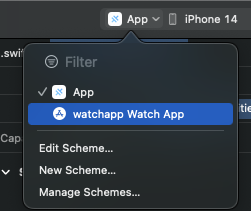
Build order:
- First, build and run the iOS App on your iPhone
- Then, build and run the Watch App on your Apple Watch
Important Notes:
- You must use real devices - simulators do not support WatchConnectivity
- Both apps must be running for bidirectional communication
- The watch app will show "Disconnected" until the phone app is active
Communication Methods
Choose the right method for your use case:
| Method | Use Case | Delivery | Watch Must Be Reachable |
|--------|----------|----------|-------------------------|
| sendMessage() | Real-time interaction | Immediate | Yes |
| updateApplicationContext() | Sync app state | Latest value only | No |
| transferUserInfo() | Important data | Queued, in order | No |
Example: Complete Communication Flow
import { Watch } from '@capgo/capacitor-watch';

class WatchService {
  private isReachable = false;

  async initialize() {
    // Check initial status
    const info = await Watch.getInfo();
    this.isReachable = info.isReachable;

    // Monitor reachability
    Watch.addListener('reachabilityChanged', (event) => {
      this.isReachable = event.isReachable;
    });

    // Handle incoming messages
    Watch.addListener('messageReceived', (event) => {
      this.handleWatchMessage(event.message);
    });

    // Handle request/reply messages
    Watch.addListener('messageReceivedWithReply', async (event) => {
      const reply = await this.processWatchRequest(event.message);
      await Watch.replyToMessage({
        callbackId: event.callbackId,
        data: reply
      });
    });
  }

  async syncAppState(state: Record<string, unknown>) {
    // Always works - queues if watch is unreachable
    await Watch.updateApplicationContext({ context: state });
  }

  async sendInteractiveMessage(data: Record<string, unknown>) {
    if (!this.isReachable) {
      console.log('Watch not reachable, queueing message');
      await Watch.transferUserInfo({ userInfo: data });
      return;
    }
    await Watch.sendMessage({ data });
  }

  private handleWatchMessage(message: Record<string, unknown>) {
    // Process message from watch
    console.log('Watch action:', message.action);
  }

  private async processWatchRequest(message: Record<string, unknown>) {
    // Process and return reply
    return { status: 'ok', timestamp: Date.now() };
  }
}
SwiftUI Watch App Examples
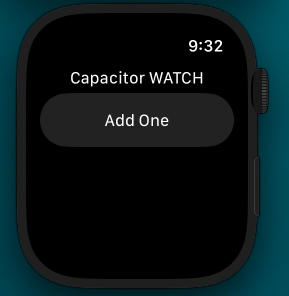
Basic Watch UI
Advanced Watch App with Data Display
import SwiftUI
import CapgoWatchSDK

struct ContentView: View {
    @ObservedObject var connector = WatchConnector.shared
    @State private var lastMessage = "No messages yet"

    var body: some View {
        ScrollView {
            VStack(spacing: 16) {
                // Status header
                StatusView(isConnected: connector.isReachable)

                Divider()

                // Action buttons
                Button("Request Data") {
                    connector.sendMessage(["action": "requestData"]) { reply in
                        if let status = reply["status"] as? String {
                            lastMessage = "Got: \(status)"
                        }
                    }
                }
                .buttonStyle(.borderedProminent)
                .disabled(!connector.isReachable)

                Button("Send Tap") {
                    connector.sendMessage(["action": "tap", "time": Date().timeIntervalSince1970])
                }
                .disabled(!connector.isReachable)

                Divider()

                // Message display
                Text(lastMessage)
                    .font(.caption)
                    .foregroundColor(.secondary)
            }
            .padding()
        }
    }
}

struct StatusView: View {
    let isConnected: Bool

    var body: some View {
        HStack {
            Image(systemName: isConnected ? "iphone.radiowaves.left.and.right" : "iphone.slash")
                .foregroundColor(isConnected ? .green : .red)
            Text(isConnected ? "Phone Connected" : "Phone Disconnected")
                .font(.caption)
        }
    }
}
API
sendMessage(...)updateApplicationContext(...)transferUserInfo(...)replyToMessage(...)getInfo()getPluginVersion()addListener('messageReceived', ...)addListener('messageReceivedWithReply', ...)addListener('applicationContextReceived', ...)addListener('userInfoReceived', ...)addListener('reachabilityChanged', ...)addListener('activationStateChanged', ...)removeAllListeners()- Interfaces
- Type Aliases
Watch / Wear OS communication plugin for Capacitor. Provides bidirectional messaging between the phone and a paired watch.
- iOS: uses Apple WatchConnectivity framework to communicate with Apple Watch.
- Android: uses Google Wear OS Data Layer API (play-services-wearable) to communicate with a Wear OS watch.
- Web: not supported; all methods throw or return safe defaults.
sendMessage(...)
sendMessage(options: SendMessageOptions) => Promise<void>Send an interactive message to the watch. The watch must be reachable for this to succeed. Use this for time-sensitive, interactive communication.
| Param | Type | Description |
| ------------- | ----------------------------------------------------------------- | --------------------- |
| options | SendMessageOptions | - The message options |
Since: 8.0.0
updateApplicationContext(...)
updateApplicationContext(options: UpdateContextOptions) => Promise<void>Update the application context shared with the watch. Only the latest context is kept - this overwrites any previous context. Use this for syncing app state that the watch needs to display.
| Param | Type | Description |
| ------------- | --------------------------------------------------------------------- | --------------------- |
| options | UpdateContextOptions | - The context options |
Since: 8.0.0
transferUserInfo(...)
transferUserInfo(options: TransferUserInfoOptions) => Promise<void>Transfer user info to the watch. Transfers are queued and delivered in order, even if the watch is not currently reachable. Use this for important data that must be delivered reliably.
| Param | Type | Description |
| ------------- | --------------------------------------------------------------------------- | ----------------------- |
| options | TransferUserInfoOptions | - The user info options |
Since: 8.0.0
replyToMessage(...)
replyToMessage(options: ReplyMessageOptions) => Promise<void>Reply to a message from the watch that requested a reply. Use this in response to the messageReceivedWithReply event.
| Param | Type | Description |
| ------------- | ------------------------------------------------------------------- | -------------------------------------------- |
| options | ReplyMessageOptions | - The reply options including the callbackId |
Since: 8.0.0
getInfo()
getInfo() => Promise<WatchInfo>Get information about the watch connectivity status.
Returns: Promise<WatchInfo>
Since: 8.0.0
getPluginVersion()
getPluginVersion() => Promise<{ version: string; }>Get the native Capacitor plugin version.
Returns: Promise<{ version: string; }>
Since: 8.0.0
addListener('messageReceived', ...)
addListener(eventName: 'messageReceived', listenerFunc: (event: MessageReceivedEvent) => void) => Promise<PluginListenerHandle>Listen for messages received from the watch.
| Param | Type | Description |
| ------------------ | ----------------------------------------------------------------------------------------- | ------------------- |
| eventName | 'messageReceived' | - The event name |
| listenerFunc | (event: MessageReceivedEvent) => void | - Callback function |
Returns: Promise<PluginListenerHandle>
Since: 8.0.0
addListener('messageReceivedWithReply', ...)
addListener(eventName: 'messageReceivedWithReply', listenerFunc: (event: MessageReceivedWithReplyEvent) => void) => Promise<PluginListenerHandle>Listen for messages from the watch that require a reply.
| Param | Type | Description |
| ------------------ | ----------------------------------------------------------------------------------------------------------- | ------------------- |
| eventName | 'messageReceivedWithReply' | - The event name |
| listenerFunc | (event: MessageReceivedWithReplyEvent) => void | - Callback function |
Returns: Promise<PluginListenerHandle>
Since: 8.0.0
addListener('applicationContextReceived', ...)
addListener(eventName: 'applicationContextReceived', listenerFunc: (event: ContextReceivedEvent) => void) => Promise<PluginListenerHandle>Listen for application context updates from the watch.
| Param | Type | Description |
| ------------------ | ----------------------------------------------------------------------------------------- | ------------------- |
| eventName | 'applicationContextReceived' | - The event name |
| listenerFunc | (event: ContextReceivedEvent) => void | - Callback function |
Returns: Promise<PluginListenerHandle>
Since: 8.0.0
addListener('userInfoReceived', ...)
addListener(eventName: 'userInfoReceived', listenerFunc: (event: UserInfoReceivedEvent) => void) => Promise<PluginListenerHandle>Listen for user info transfers from the watch.
| Param | Type | Description |
| ------------------ | ------------------------------------------------------------------------------------------- | ------------------- |
| eventName | 'userInfoReceived' | - The event name |
| listenerFunc | (event: UserInfoReceivedEvent) => void | - Callback function |
Returns: Promise<PluginListenerHandle>
Since: 8.0.0
addListener('reachabilityChanged', ...)
addListener(eventName: 'reachabilityChanged', listenerFunc: (event: ReachabilityChangedEvent) => void) => Promise<PluginListenerHandle>Listen for watch reachability changes.
| Param | Type | Description |
| ------------------ | ------------------------------------------------------------------------------------------------- | ------------------- |
| eventName | 'reachabilityChanged' | - The event name |
| listenerFunc | (event: ReachabilityChangedEvent) => void | - Callback function |
Returns: Promise<PluginListenerHandle>
Since: 8.0.0
addListener('activationStateChanged', ...)
addListener(eventName: 'activationStateChanged', listenerFunc: (event: ActivationStateChangedEvent) => void) => Promise<PluginListenerHandle>Listen for session activation state changes.
| Param | Type | Description |
| ------------------ | ------------------------------------------------------------------------------------------------------- | ------------------- |
| eventName | 'activationStateChanged' | - The event name |
| listenerFunc | (event: ActivationStateChangedEvent) => void | - Callback function |
Returns: Promise<PluginListenerHandle>
Since: 8.0.0
removeAllListeners()
removeAllListeners() => Promise<void>Remove all listeners for this plugin.
Since: 8.0.0
Interfaces
SendMessageOptions
Options for sending a message to the watch.
| Prop | Type | Description |
| ---------- | ------------------------------------------------------------- | --------------------------------------------------------------------------------------------------------- |
| data | WatchMessageData | The data to send to the watch. Must be serializable (string, number, boolean, arrays, or nested objects). |
UpdateContextOptions
Options for updating the application context.
| Prop | Type | Description |
| ------------- | ------------------------------------------------------------- | ----------------------------------------------------------------------------------------------------------- |
| context | WatchMessageData | The context data to sync with the watch. Only the latest context is kept - previous values are overwritten. |
TransferUserInfoOptions
Options for transferring user info.
| Prop | Type | Description |
| -------------- | ------------------------------------------------------------- | ---------------------------------------------------------------------------- |
| userInfo | WatchMessageData | The user info data to transfer. Transfers are queued and delivered in order. |
ReplyMessageOptions
Options for replying to a message from the watch.
| Prop | Type | Description |
| ---------------- | ------------------------------------------------------------- | --------------------------------------------------------------- |
| callbackId | string | The callback ID received in the messageReceivedWithReply event. |
| data | WatchMessageData | The reply data to send back to the watch. |
WatchInfo
Information about Watch / Wear OS connectivity status.
| Prop | Type | Description |
| ------------------------- | -------------------- | ------------------------------------------------------------------------------------------------------------------------------------------------------------------------------------------------------------------------------------------------------------- |
| isSupported | boolean | Whether the watch communication API is supported on this device. - iOS: false on iPad; true on iPhone when WatchConnectivity is available. - Android: true when Google Play Services with Wear OS support is available; false otherwise. - Web: always false. |
| isPaired | boolean | Whether a watch is currently paired/connected. - iOS: whether an Apple Watch is paired with this iPhone. - Android: whether at least one Wear OS node is currently connected. |
| isWatchAppInstalled | boolean | Whether the watch companion app is installed. - iOS: whether the paired Apple Watch has the companion app installed. - Android: whether at least one connected Wear OS node is reachable (used as a proxy). |
| isReachable | boolean | Whether the watch is currently reachable for immediate messaging. |
| activationState | number | The current session activation state. - iOS: 0 = notActivated, 1 = inactive, 2 = activated (WCSessionActivationState). - Android: 2 when a Wear OS node is connected, 0 otherwise. |
PluginListenerHandle
| Prop | Type |
| ------------ | ----------------------------------------- |
| remove | () => Promise<void> |
MessageReceivedEvent
Event data for received messages.
| Prop | Type | Description |
| ------------- | ------------------------------------------------------------- | ----------------------------------------- |
| message | WatchMessageData | The message data received from the watch. |
MessageReceivedWithReplyEvent
Event data for messages that require a reply.
| Prop | Type | Description |
| ---------------- | ------------------------------------------------------------- | ----------------------------------------------------------- |
| message | WatchMessageData | The message data received from the watch. |
| callbackId | string | The callback ID to use when replying with replyToMessage(). |
ContextReceivedEvent
Event data for application context updates.
| Prop | Type | Description |
| ------------- | ------------------------------------------------------------- | ----------------------------------------- |
| context | WatchMessageData | The context data received from the watch. |
UserInfoReceivedEvent
Event data for user info transfers.
| Prop | Type | Description |
| -------------- | ------------------------------------------------------------- | ------------------------------------------- |
| userInfo | WatchMessageData | The user info data received from the watch. |
ReachabilityChangedEvent
Event data for reachability changes.
| Prop | Type | Description |
| ----------------- | -------------------- | ----------------------------------- |
| isReachable | boolean | Whether the watch is now reachable. |
ActivationStateChangedEvent
Event data for activation state changes.
| Prop | Type | Description |
| ----------- | ------------------- | ----------------------------------------------------------------------- |
| state | number | The new activation state. 0 = notActivated, 1 = inactive, 2 = activated |
Type Aliases
WatchMessageData
Data that can be sent between iPhone and Apple Watch. Values must be serializable (string, number, boolean, arrays, or nested objects).
Record<string, unknown>
Record
Construct a type with a set of properties K of type T
{ [P in K]: T; }
Credits
Based on the enhanced WatchConnectivity implementation from CapacitorWatchEnhanced. Who was a fork of the offical CapacitorWatch