
@carbonid1/claude-statusline
v1.3.0
Published
A statusline for Claude Code showing model, context, rate limits with pace tracking, git info, and more

Maintainers
 carbonid1
Readme
claude-statusline
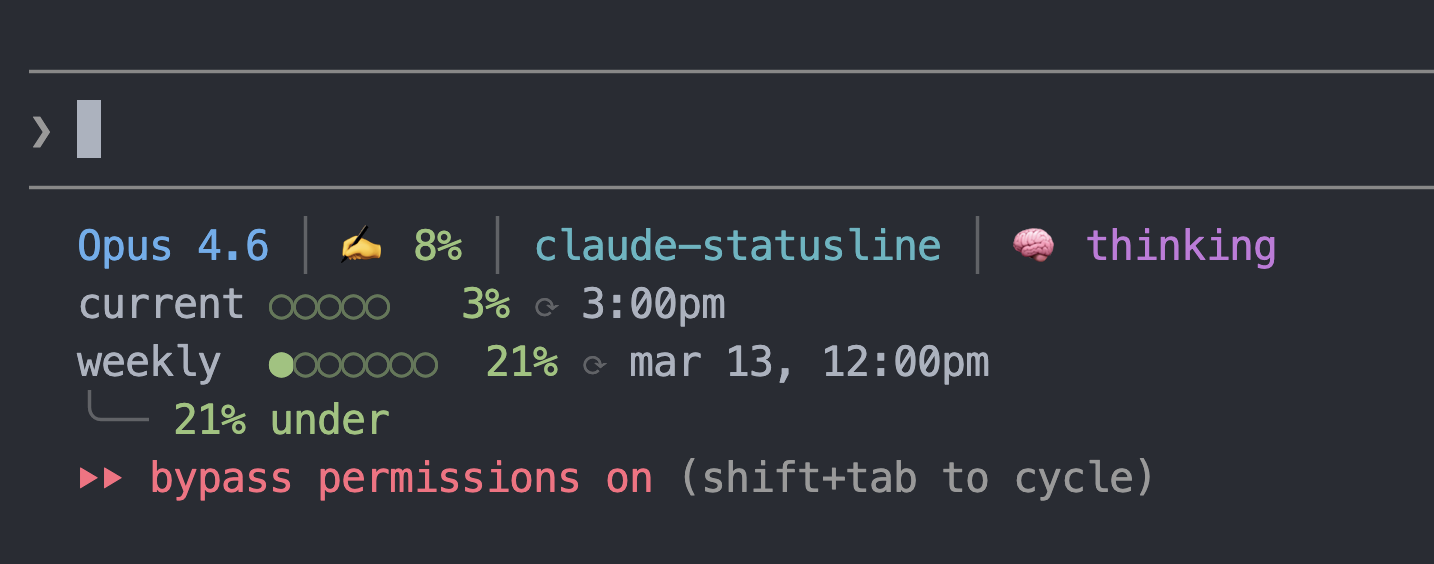
A statusline for Claude Code showing model info, context usage, effort level, rate limits with pace tracking, git branch, and session duration.
Atom One Dark color theme.
Features
- Model name and context window usage (color-coded)
- Current directory and git branch with dirty indicator
- Session timers (elapsed + active model time), cost (USD), and lines changed
- Effort level (
max/xhigh/high/ …) with thinking state (color-coded) - 5-hour and weekly rate limit bars with reset times
- Weekly pace indicator (under/on/over expected usage)
Install
npx @carbonid1/claude-statuslineBacks up your existing statusline (if any), copies the script to ~/.claude/statusline.sh, and configures Claude Code settings.
Requirements
- jq — JSON parsing
- git — branch info
On macOS:
brew install jqUninstall
npx @carbonid1/claude-statusline --uninstallRestores your previous statusline from backup if available.
Per-Project Statusline
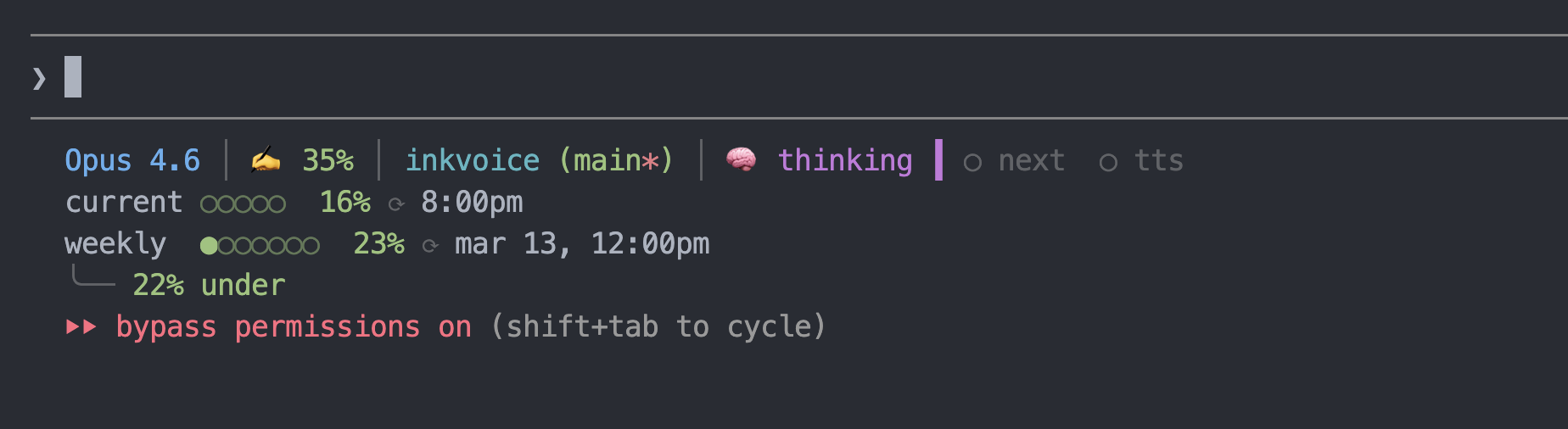
Individual repos can extend the global statusline with project-specific indicators (server ports, env checks, build status, etc.) by adding a decorator script.
- Create
.claude/statusline.shin your project:
#!/bin/bash
set -f
input=$(cat)

GLOBAL_SCRIPT="$HOME/.claude/statusline.sh"

if [ -x "$GLOBAL_SCRIPT" ]; then
    global_output=$("$GLOBAL_SCRIPT" <<< "$input")
else
    global_output="Claude"
fi

green='\033[38;2;152;195;121m'
magenta='\033[38;2;198;120;221m'
white='\033[38;2;171;178;191m'
dim='\033[2m'
reset='\033[0m'

# Check if your dev server is running
if lsof -i :3000 -sTCP:LISTEN >/dev/null 2>&1; then
    server="${green}●${reset} ${white}dev${reset}"
else
    server="${dim}○ dev${reset}"
fi

project=" ${magenta}┃${reset} ${server}"

first_line="${global_output%%$'\n'*}"
rest=""
if [[ "$global_output" == *$'\n'* ]]; then
    rest="${global_output#*$'\n'}"
fi

printf "%b%b" "$first_line" "$project"
[ -n "$rest" ] && printf "\n%b" "$rest"
exit 0- Make it executable and add a local settings override:
chmod +x .claude/statusline.sh// .claude/settings.local.json (gitignored — user-local)
{
"statusLine": {
"type": "command",
"command": ".claude/statusline.sh"
}
}The decorator runs the global script, captures its output, appends your project indicators to line 1, and passes the remaining lines (rate limits, etc.) through unchanged.
Credits
Originally inspired by @kamranahmedse/claude-statusline.
License
MIT