@catchmexz/alibabacloud-devops-mcp-server
v0.1.37
Published
MCP Server for using the alibabacloud-devops API: allows AI assistants to directly participate in development collaboration, helping teams optimize development processes and improve efficiency.
Downloads
60

Maintainers
 catchmexz
Readme
alibabacloud-devops-mcp-server
云效mcp-server工具为 AI 助手提供了与云效平台交互的能力,能够让 AI 助手可以读取项目中工作项的内容,在理解需求后自动编写代码,并提交代码合并请求。企业研发团队可以使用它协助代码审查、优化任务管理、完成构建、部署等任务,从而专注于更重要的创新和产品交付。
功能特性
alibabacloud-devops-mcp-server提供了以下功能,让AI助手能够:
- 代码仓库管理:查询代码仓库及其分支、创建分支
- 文件操作:创建、更新、删除和获取代码文件内容
- 代码评审:创建和管理代码评审流程
- 项目管理:搜索项目、获取项目详情
- 流水线管理:获取流水线详情、获取流水线列表、运行流水线、获取最近一次流水线运行信息、获取流水线运行实例、获取流水线运行实例列表、查询/运行流水线部署任务
- 制品仓库管理:查看制品仓库信息、查询制品信息、查看单个制品信息
- 应用交付:创建和管理部署单、应用、编排、变量组、模板、标签、全局变量和部署资源
工具列表
alibabacloud-devops-mcp-server集成了多种工具,包括:
组织管理
get_current_organization_Info: 获取当前用户所在组织信息get_user_organizations: 获取当前用户加入的组织列表get_organization_role: 获取组织角色信息get_organization_departments: 获取组织中的部门列表get_organization_department_info: 获取组织中某个部门的信息get_organization_department_ancestors: 获取组织中部门的上级部门get_organization_members: 获取组织成员列表get_organization_member_info: 获取组织成员信息get_organization_member_info_by_user_id: 通过用户ID获取组织成员信息search_organization_members: 搜索组织成员list_organization_roles: 列出组织角色get_organization_role: 获取组织角色信息
代码管理工具
create_branch: 创建分支delete_branch: 删除分支get_branch: 获取分支信息list_branches: 获取分支列表create_file: 创建文件delete_file: 删除文件get_file_blobs: 获取文件内容list_files: 查询文件树update_file: 更新文件内容create_change_request: 创建合并请求create_change_request_comment: 创建合并请求评论get_change_request: 查询合并请求list_change_request_patch_sets: 查询合并请求版本列表list_change_request: 查询合并请求列表list_change_request_comments: 查询合并请求评论列表get_compare: 代码比较get_repository: 获取仓库详情list_repositories: 获取仓库列表
项目管理工具
get_project: 获取项目详情search_projects: 搜索项目get_sprint: 获取迭代详情list_sprints: 获取项目中的迭代列表get_work_item: 获取工作项详情search_workitems: 搜索工作项get_work_item_types: 获取工作项类型create_work_item: 创建工作项list_all_work_item_types: 列出组织中所有工作项类型list_work_item_types: 列出项目空间中工作项类型get_work_item_type: 获取特定工作项类型的详细信息list_work_item_relation_work_item_types: 列出可关联到特定工作项的工作项类型get_work_item_type_field_config: 获取工作项类型的字段配置get_work_item_workflow: 获取工作项类型的工作流信息list_work_item_comments: 列出特定工作项的评论create_work_item_comment: 为特定工作项创建评论
流水线工具
get_pipeline- 获取流水线详情list_pipelines- 获取流水线列表smart_list_pipelines- 智能查询流水线(支持自然语言时间)create_pipeline_run- 运行流水线get_latest_pipeline_run- 获取最新运行信息get_pipeline_run- 获取运行详情list_pipeline_runs- 获取运行历史list_pipeline_jobs_by_category- 获取流水线任务list_pipeline_job_historys- 获取任务历史execute_pipeline_job_run- 手动运行任务get_pipeline_job_run_log- 获取任务日志list_service_connections- 获取服务连接列表create_pipeline_from_description: 根据自然语言描述生成流水线 YAML 并创建流水线update_pipeline: 更新流水线YAML内容
制品仓库工具
list_package_repositories: 查看制品仓库信息list_artifacts: 查询制品信息get_artifact: 查看单个制品信息
应用交付工具
create_change_order: [应用交付] 创建部署单list_change_order_versions: [应用交付] 查看部署单版本列表get_change_order: [应用交付] 读取部署单使用的物料和工单状态list_change_order_job_logs: [应用交付] 查询环境部署单日志find_task_operation_log: [应用交付] 查询部署任务执行日志,其中通常包含下游部署引擎的调度细节信息execute_job_action: [应用交付] 操作环境部署单list_change_orders_by_origin: [应用交付] 根据创建来源查询部署单list_applications: [应用交付] 分页获取组织中的应用列表get_application: [应用交付] 根据应用名获取应用详情create_application: [应用交付] 创建应用update_application: [应用交付] 更新应用get_latest_orchestration: [应用交付] 获取环境的最新编排list_app_orchestration: [应用交付] 列出应用编排create_app_orchestration: [应用交付] 创建应用编排delete_app_orchestration: [应用交付] 删除应用编排get_app_orchestration: [应用交付] 获取应用编排update_app_orchestration: [应用交付] 更新应用编排get_env_variable_groups: [应用交付] 获取环境的变量组create_variable_group: [应用交付] 创建变量组delete_variable_group: [应用交付] 删除变量组get_variable_group: [应用交付] 获取变量组update_variable_group: [应用交付] 更新变量组get_app_variable_groups: [应用交付] 获取应用的变量组get_app_variable_groups_revision: [应用交付] 获取应用变量组的版本search_app_templates: [应用交付] 搜索应用模板create_app_tag: [应用交付] 创建应用标签update_app_tag: [应用交付] 更新应用标签delete_app_tag: [应用交付] 删除应用标签search_app_tags: [应用交付] 搜索应用标签update_app_tag_bind: [应用交付] 更新应用标签绑定create_global_var: [应用交付] 创建全局变量组delete_global_var: [应用交付] 删除全局变量组get_global_var: [应用交付] 获取全局变量组update_global_var: [应用交付] 更新全局变量组list_global_vars: [应用交付] 列出全局变量组get_machine_deploy_log: [应用交付] 获取机器部署日志add_host_list_to_host_group: [应用交付] 添加主机列表到主机组add_host_list_to_deploy_group: [应用交付] 添加主机列表到部署组delete_host_list_from_deploy_group: [应用交付] 从部署组删除主机列表delete_host_list_from_host_group: [应用交付] 从主机组删除主机列表
用法
先决条件
node 版本 >= 18.0.0
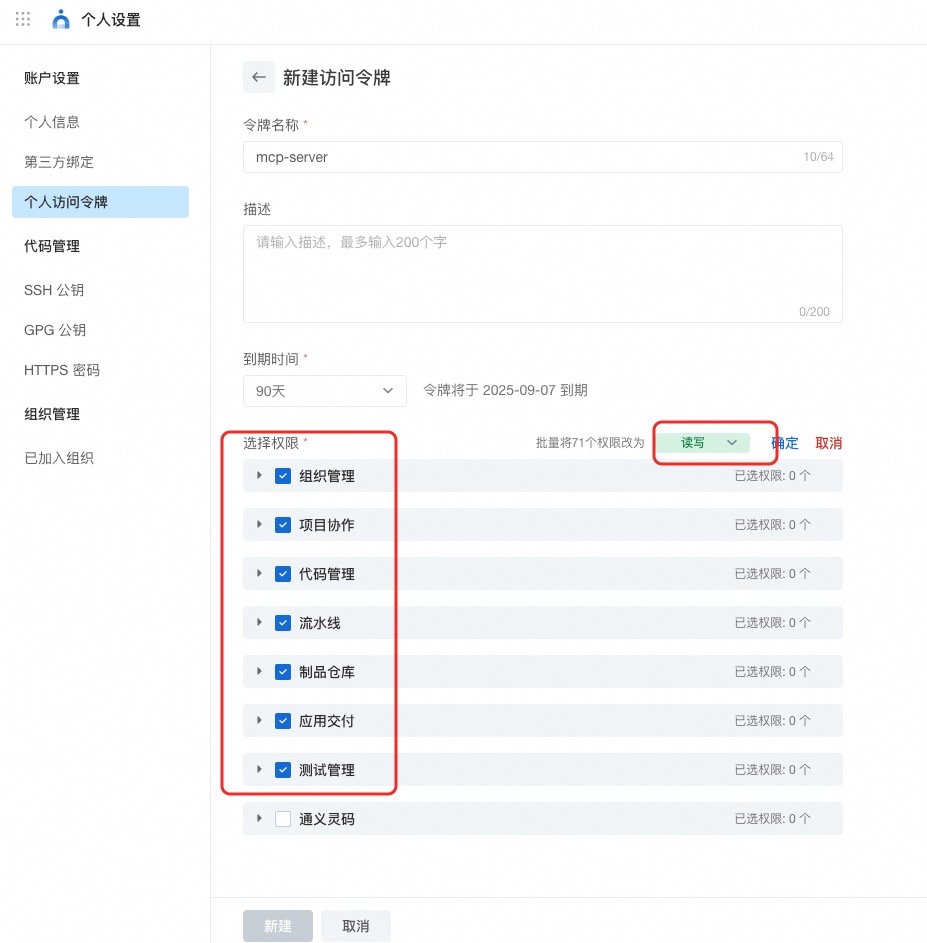
阿里云云效个人访问令牌,点击前往,授予组织管理、项目协作、代码管理、流水线、制品仓库、应用交付、测试管理下所有api的读写权限。令牌的到期时间注意选择一个长期有效的时间。
在 Smithery.ai 中使用云效 MCP 服务
云效 MCP 服务已部署到 Smithery.ai 中,可以按照下列命令安装使用 Smithery:
npx -y @smithery/cli install @aliyun/alibabacloud-devops-mcp-server --client claude通过 MCP市场 安装云效 MCP 服务
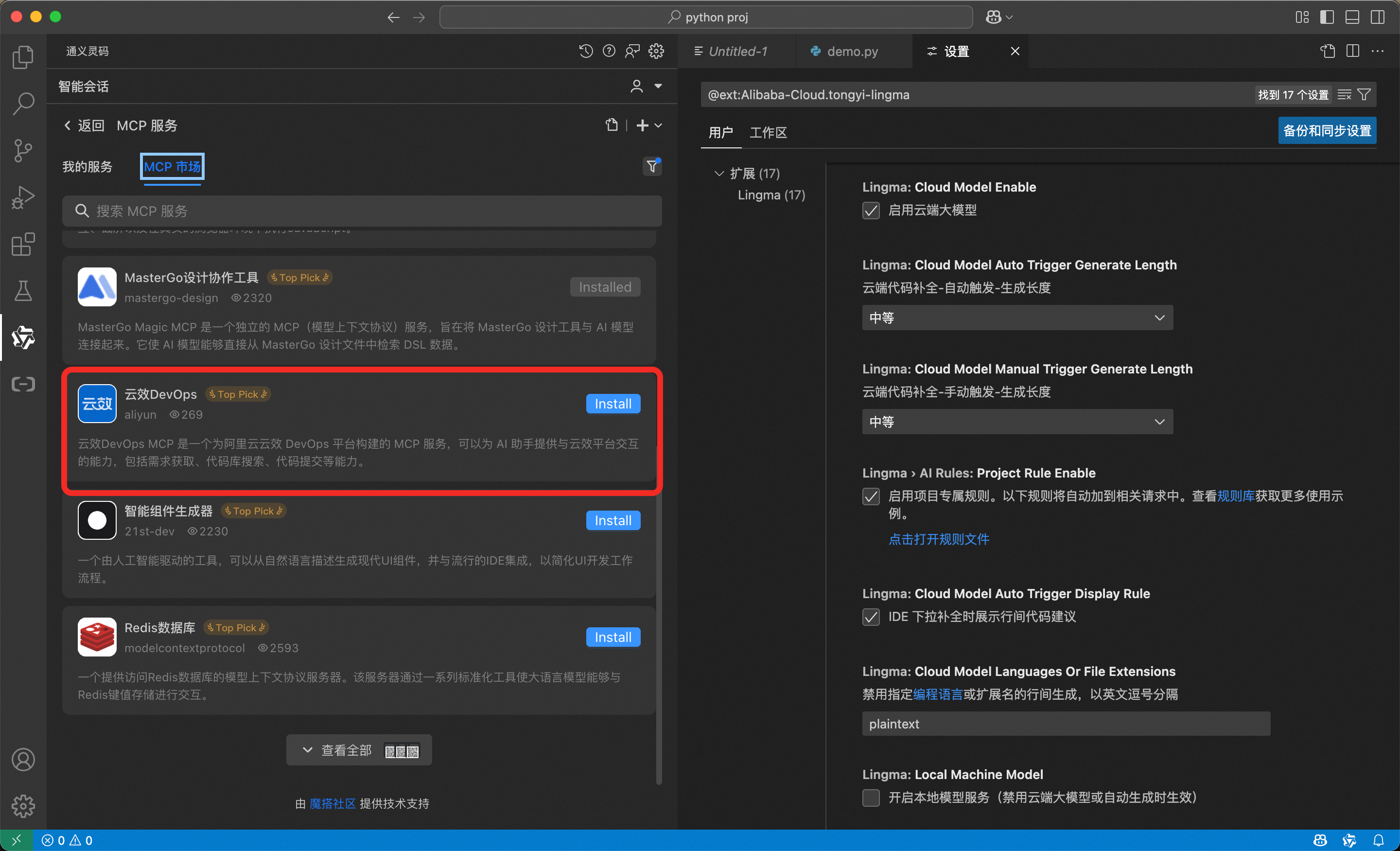
通义灵码内置的MCP市场中已经提供了云效的MCP服务,在通义灵码中进入MCP市场并且找到「云效DevOps」,直接安装即可。
在Cursor、Claude code/iFlow等终端中配置mcp server。通过npx的方式来运行mcp server。
{
  "mcpServers": {
    "yunxiao": {
      "command": "npx",
      "args": [
        "-y",
        "alibabacloud-devops-mcp-server"
      ],
      "env": {
        "YUNXIAO_ACCESS_TOKEN": "<YOUR_TOKEN>"
      }
    }
  }
}
通过 Docker 容器运行 MCP 服务器
1.Docker build
docker build -t alibabacloud/alibabacloud-devops-mcp-server .2.配置 MCP 服务器
{
  "mcpServers": {
    "yunxiao": {
      "command": "docker",
      "args": [
        "run",
        "-i",
        "--rm",
        "-e",
        "YUNXIAO_ACCESS_TOKEN",
        "alibabacloud/alibabacloud-devops-mcp-server"
      ],
      "env": {
        "YUNXIAO_ACCESS_TOKEN": "<YOUR_TOKEN>"
      }
    }
  }
}
联系我们
如有任何疑问或疑虑,请通过钉钉群联系我们:134400004101