
@cesarechazu/directus-extension-call-postgres-function
v1.0.0
Published
Directus custom operation that calls a PostgreSQL function with named parameters and normalizes the result.

Maintainers
 cesarechazu
Readme
Call PostgreSQL Function
Directus custom operation for Flows that calls a PostgreSQL function with named parameters and returns a consistent result shape.
Screenshot
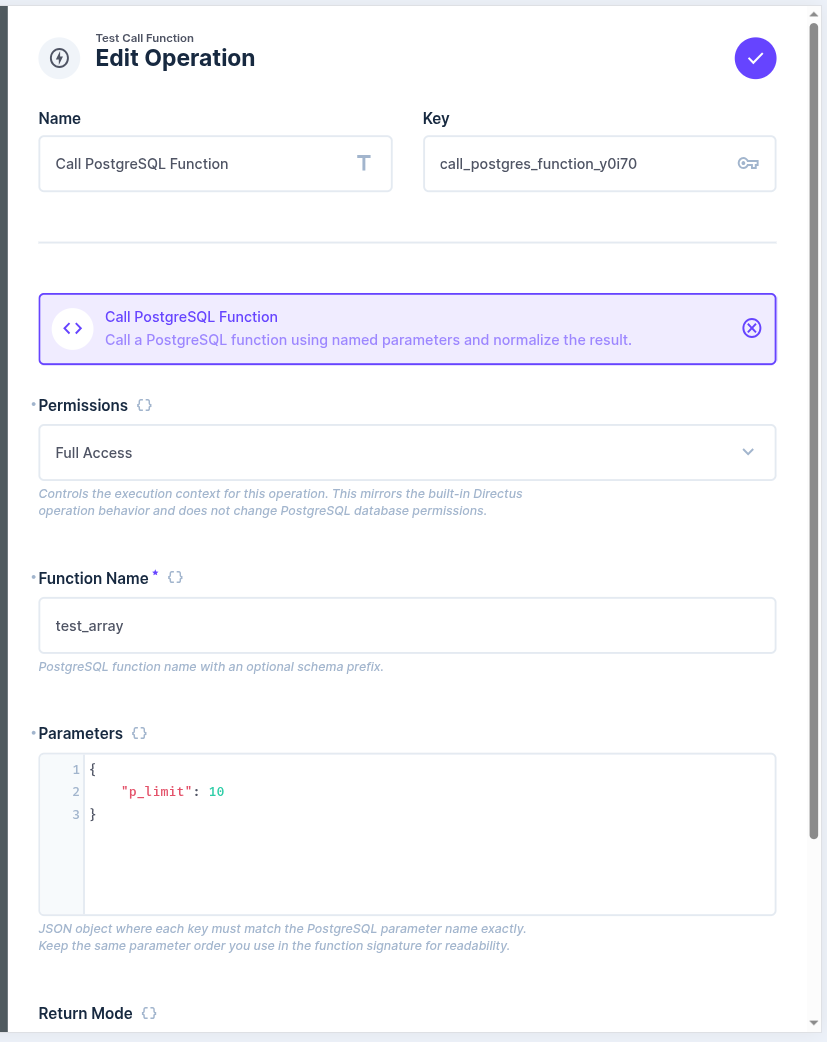
Features
- Calls PostgreSQL functions safely with bind parameters
- Supports named arguments only
- Can also call functions that read from PostgreSQL views and return the result
- Normalizes the result into a list-friendly structure
- Supports a
rawreturn mode when you need the original result - Rejects unsafe function and parameter names
Requirements
- Directus
^11.0.0 - PostgreSQL database
Install
npm install
npm run build
For local development:
npm run devTo link the extension into a Directus project:
npm run linkUsage
Add the operation to a Flow and configure:
Permissions: execution-context selector that follows the same accountability rules used by Directus native operations such as Read Data, Create Data, Update Data, and Delete DataFunction Name: PostgreSQL function name, with or without schemaParameters: JSON object where each key is a named PostgreSQL argumentReturn Mode:auto_listorraw
Example:
{
  "function_name": "obtener_impresiones_pendientes",
  "parameters": {
    "p_punto_venta_id": "{{$trigger.body.punto_venta_id}}",
    "p_limit": 1
  },
  "return_mode": "auto_list"
}
Options
Permissions
Optional. Default: From Trigger
This setting controls the flow accountability context used by the operation. It follows the same UX pattern used by Directus native operations for selecting execution context, but in this extension it does not grant or revoke PostgreSQL privileges and it does not map to collection permissions.
How it applies:
From Triggerkeeps the flow accountability inherited from the triggerFull Accessrequires an admin flow contextOther...requires the current flow role to match the provided role UUID
This is a validation layer at the operation level. It does not:
- read or write Directus collections
- evaluate Directus collection permissions
- create Directus activity entries by itself
- change PostgreSQL permissions
If you choose Other..., enter the role UUID directly in the same field.
Use this when you want the operation to reject execution unless the current flow accountability matches the configured level.
Function Name
Required.
Use a PostgreSQL function name with an optional schema prefix.
Examples:
my_functionpublic.my_functionapi.check_print
Parameters
Optional.
JSON object where each key is a named PostgreSQL parameter. Keep the parameter names exactly as they appear in the PostgreSQL function signature.
Example:
{
  "p_request_id": "{{$trigger.body.request_id}}",
  "p_user_id": "{{$accountability.user}}",
  "p_force": false
}
Return Mode
Optional. Default: auto_list
auto_listraw
auto_list always returns:
{
  "data": [],
  "meta": {
    "status": "OK",
    "count": 0
  }
}
Examples
The SQL snippets below are illustrative examples only. They are provided to show recommended usage patterns and do not represent a real database schema.
Function with multiple steps and ON CONFLICT
Use this pattern when the PostgreSQL function must perform an atomic business operation.
This example:
- upserts a customer snapshot
- writes an audit record
- returns the business result and leaves response normalization to the Directus operation
CREATE OR REPLACE FUNCTION public.upsert_customer_snapshot(
  p_customer_id uuid,
  p_snapshot jsonb,
  p_event_id uuid
)
RETURNS jsonb
LANGUAGE plpgsql
AS $$
DECLARE
  v_action text;
  v_result jsonb;
BEGIN
  INSERT INTO public.customer_snapshots (
    customer_id,
    snapshot,
    updated_at
  )
  VALUES (
    p_customer_id,
    p_snapshot,
    now()
  )
  ON CONFLICT (customer_id)
  DO UPDATE SET
    snapshot = EXCLUDED.snapshot,
    updated_at = now()
  RETURNING
    CASE WHEN xmax = 0 THEN 'created' ELSE 'updated' END
  INTO v_action;

  INSERT INTO public.customer_snapshot_audit (
    event_id,
    customer_id,
    action,
    payload,
    created_at
  )
  VALUES (
    p_event_id,
    p_customer_id,
    v_action,
    p_snapshot,
    now()
  );

  SELECT jsonb_build_object(
    'customer_id', p_customer_id,
    'action', v_action
  )
  INTO v_result;

  RETURN v_result;
END;
$$;
Flow configuration:
{
  "permissions": "$trigger",
  "function_name": "public.upsert_customer_snapshot",
  "parameters": {
    "p_customer_id": "{{$trigger.body.customer_id}}",
    "p_snapshot": "{{$trigger.body.snapshot}}",
    "p_event_id": "{{$trigger.body.event_id}}"
  },
  "return_mode": "auto_list"
}
Function that reads from a view
Use this pattern when the PostgreSQL function queries a view that already consolidates business logic that is difficult to reproduce cleanly with GraphQL alone.
CREATE OR REPLACE FUNCTION public.get_customer_activity(
  p_customer_id uuid
)
RETURNS jsonb
LANGUAGE plpgsql
AS $$
DECLARE
  v_result jsonb;
BEGIN
  SELECT COALESCE(jsonb_agg(to_jsonb(t)), '[]'::jsonb)
  INTO v_result
  FROM (
    SELECT
      customer_id,
      activity_type,
      reference_id,
      reference_number,
      amount,
      activity_status,
      occurred_at
    FROM public.v_customer_activity
    WHERE customer_id = p_customer_id
    ORDER BY occurred_at DESC
  ) t;

  RETURN v_result;
END;
$$;
The underlying view can combine data from multiple sources using SQL features such as:
UNION ALLacross different event sourcesINNER JOINandLEFT JOINto enrich the result- computed columns and derived statuses
- aggregate values or ranking functions
Example view structure:
CREATE OR REPLACE VIEW public.v_customer_activity AS
SELECT
  o.customer_id,
  'order' AS activity_type,
  o.id AS reference_id,
  o.order_number AS reference_number,
  o.total AS amount,
  CASE
    WHEN o.status = 'paid' THEN 'completed'
    WHEN o.status = 'pending' THEN 'pending'
    ELSE 'unknown'
  END AS activity_status,
  o.date_created AS occurred_at
FROM public.orders o

UNION ALL

SELECT
  p.customer_id,
  'payment' AS activity_type,
  p.id AS reference_id,
  p.payment_number AS reference_number,
  p.amount,
  'completed' AS activity_status,
  p.date_created AS occurred_at
FROM public.payments p;
Flow configuration:
{
  "permissions": "$trigger",
  "function_name": "public.get_customer_activity",
  "parameters": {
    "p_customer_id": "{{$trigger.body.customer_id}}"
  },
  "return_mode": "auto_list"
}
Development
npm run build
npm run validate
npm test
License
MIT