
@chamevo/mcp
v0.3.2
Published
MCP server for the Chamevo WordPress plugin — manage products, orders, print profiles, and pricing rules from Claude and other AI assistants

Maintainers
 radykal85
Readme
@chamevo/mcp
MCP (Model Context Protocol) server for the Chamevo WordPress plugin — manage products, orders, print profiles, pricing rules, and more from Claude and other AI assistants.
Prerequisites
Node.js ≥ 18
A running WordPress site with the Chamevo plugin active
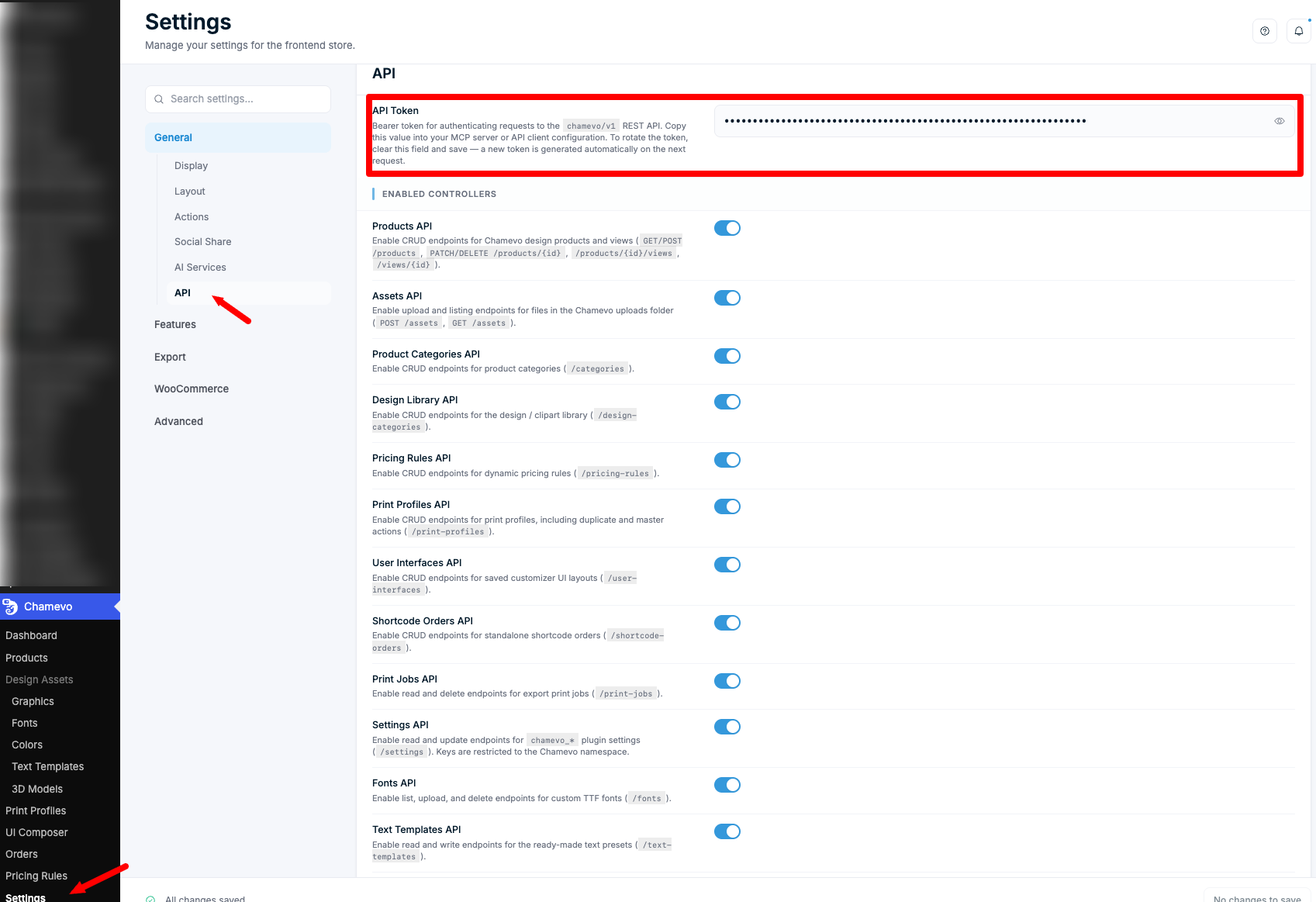
An API token from Chamevo → Settings → General → API in the WordPress admin (displayed read-only)
Quick start (Claude Desktop)
No install needed — npx fetches the package on demand. Add this block to your claude_desktop_config.json (found at ~/Library/Application Support/Claude/claude_desktop_config.json on macOS):
{
  "mcpServers": {
    "chamevo": {
      "command": "npx",
      "args": ["-y", "@chamevo/mcp"],
      "env": {
        "CHAMEVO_SITE_URL": "https://your-site.com",
        "CHAMEVO_API_TOKEN": "your_token_here"
      }
    }
  }
}
Restart Claude Desktop. The Chamevo tools will appear automatically.
Connecting other AI clients
The server speaks MCP over stdio, so any MCP-capable client that can launch a
local command works. They share the same config shape — an mcpServers entry with
command, args, and env:
{
  "mcpServers": {
    "chamevo": {
      "command": "npx",
      "args": ["-y", "@chamevo/mcp"],
      "env": {
        "CHAMEVO_SITE_URL": "https://your-site.com",
        "CHAMEVO_API_TOKEN": "your_token_here"
      }
    }
  }
}
Running an unpublished local build instead? Swap
command/argsfor"command": "node", "args": ["/absolute/path/to/chamevo-mcp/dist/index.js"].
Where each client expects that block:
| Client | Config location | Notes |
|---|---|---|
| Claude Desktop | claude_desktop_config.json | see above |
| Claude Code | .mcp.json (project) or the claude mcp add CLI | claude mcp add chamevo -e CHAMEVO_SITE_URL=… -e CHAMEVO_API_TOKEN=… -- npx -y @chamevo/mcp |
| Cursor | .cursor/mcp.json (project) or ~/.cursor/mcp.json (global) | same mcpServers shape |
| Windsurf | ~/.codeium/windsurf/mcp_config.json | same shape |
| VS Code (Copilot agent mode) | .vscode/mcp.json | uses a top-level "servers" key instead of "mcpServers" |
| Continue | ~/.continue/config.json (or config.yaml) | under mcpServers |
| Cline (VS Code) | MCP Servers panel → Configure MCP Servers | same shape |
| Zed | settings.json → context_servers | Zed-specific key; same command/args/env |
| Gemini CLI | ~/.gemini/settings.json → mcpServers, or gemini mcp add | same shape |
| LibreChat | librechat.yaml → mcpServers | supports stdio |
After saving, restart (or reload) the client — the Chamevo tools appear
automatically. Always set CHAMEVO_SITE_URL and CHAMEVO_API_TOKEN in the env
block. Any other MCP client that supports local stdio servers uses the same three
fields.
Remote-only clients (ChatGPT, browser apps)
Some clients — notably ChatGPT (Connectors / Developer Mode) — only connect to remote MCP servers over HTTP/SSE, not local stdio commands. To use Chamevo there, wrap this stdio server with a bridge that exposes an HTTP/SSE endpoint, then register that URL in the client:
# Option A — supergateway (Node). Env is inherited by the wrapped command.
CHAMEVO_SITE_URL=https://your-site.com CHAMEVO_API_TOKEN=your_token \
  npx -y supergateway --stdio "npx -y @chamevo/mcp" --port 8000

# Option B — mcp-proxy (Python)
CHAMEVO_SITE_URL=https://your-site.com CHAMEVO_API_TOKEN=your_token \
  mcp-proxy --sse-port 8000 -- npx -y @chamevo/mcp
Host the bridge somewhere reachable, behind HTTPS and your own access control — the API token lives in the bridge's environment, so anyone who can reach the bridge URL can drive your Chamevo install. Then add the bridge URL as a custom MCP connector in the client.
Development
Working from a clone of this repo instead of the published package:
git clone https://github.com/Chamevo/chamevo-mcp.git
cd chamevo-mcp
npm install
npm run build   # or: npm run dev (watch + rebuild on change)
Copy the example env file and fill in your values:
cp .env.example .envCHAMEVO_SITE_URL=https://your-site.com
CHAMEVO_API_TOKEN=your_token_hereThen run npm start, or point your MCP client at the local build:
"command": "node", "args": ["/absolute/path/to/chamevo-mcp/dist/index.js"].
REST API reference
All endpoints live under {CHAMEVO_SITE_URL}/wp-json/chamevo/v1 and require:
Authorization: Bearer <token>Products
GET /products
List design products.
| Query param | Type | Default | Description |
|---|---|---|---|
| page | integer | 1 | Page number |
| limit | integer | 20 | Items per page (max 100) |
| search | string | — | Filter by title |
| category_id | integer | — | Filter by category |
Response
{
  "success": true,
  "data": [ { "id": 1, "title": "Classic Mug", ... } ],
  "meta": { "page": 1, "limit": 20 }
}
POST /products
Create a new product.
Body (JSON)
{
  "title": "New Mug",
  "type": "catalog"
}
Alternatively, duplicate an existing product:
{ "duplicate_product_id": 3 }Or create from a template:
{ "template_id": 7 }Response 201
{ "success": true, "data": { "id": 42, "title": "New Mug" } }GET /products/{id}
Get a single product.
| Query param | Type | Default | Description |
|---|---|---|---|
| include_views | boolean | false | Embed views array in response |
PATCH /products/{id}
Update a product. Send only the fields to change.
Body (JSON)
{
  "title": "Renamed Mug",
  "thumbnail": "https://example.com/thumb.jpg",
  "sorted_views": [{ "id": 5 }, { "id": 3 }]
}
DELETE /products/{id}
Permanently delete a product and all its views.
Product views
GET /products/{id}/views
List all views (print sides/angles) for a product.
POST /products/{id}/views
Add a new view to a product.
Body (JSON)
{
  "title": "Back",
  "thumbnail": "https://example.com/back.png"
}
Response 201
{ "success": true, "data": { "id": 12, "product_id": 3 } }Views (standalone)
GET /views/{id}
Get a single view by ID.
PATCH /views/{id}
Update a view. Updatable fields: title, thumbnail, options, elements, product_id.
DELETE /views/{id}
Permanently delete a view.
Orders
Three order sources share these routes, selected by type:
| type | Source | Notes |
|---|---|---|
| wc | WooCommerce order | design data lives per order item — pass item_id |
| sc | Standalone shortcode order | the only deletable type |
| gf | Gravity Forms entry | {id} is the entry id |
An unknown type, or one whose integration is inactive, returns 400.
GET /orders
List orders that carry a Chamevo design, newest first.
| Query param | Type | Default | Description |
|---|---|---|---|
| type | string | wc | Order source (wc, sc, gf) |
| page | integer | 1 | Page number |
| limit | integer | 20 | Items per page (max 100) |
| search | string | — | Filter by customer, order number, or e-mail |
Rows are identical to the admin order list. Every order (or WooCommerce order
item) that already has a generated print file carries a print_file_url.
Response
{
  "success": true,
  "data": [
    { "id": 33, "created_date": "...", "customer_name": "...", "print_file_url": "https://…/33.pdf" }
  ],
  "meta": { "type": "sc", "page": 1, "limit": 20, "total": 26, "pages": 2 }
}
WooCommerce rows carry an order_items array instead — the design (and the
print_file_url) sits on the item:
{ "id": 3353, "order_items": [ { "id": 359, "print_file_url": "https://…/3353_359.pdf" } ] }GET /orders/{id}
Retrieve the customization data attached to an order.
| Query param | Type | Default | Description |
|---|---|---|---|
| type | string | wc | Order source (wc, sc, gf) |
| item_key | string | _fpd_data | WP post meta key storing the design data |
| item_id | integer | — | Specific order item ID (omit for all items) |
Response
{
  "success": true,
  "data": { "order_id": 100, "items": [ { ... } ] }
}
PATCH /orders/{id}
Update the customization data attached to an order.
Body (JSON)
{ "type": "wc", "item_id": 55, "order": { "...": "design data" } }WooCommerce stores design data per order item, so for
type: "wc"pass theitem_idto write to (or use the item id as{id}). Forsc/gfthe{id}is the order/entry id.
DELETE /orders/{id}
Delete a shortcode order.
| Query param | Type | Default | Description |
|---|---|---|---|
| type | string | sc | Only sc is accepted |
WooCommerce orders and Gravity Forms entries are owned by those plugins and must
be deleted there — any other type returns 400.
POST /orders/{id}/export
Generate a print-ready file from the order's stored design and return its URL. No canvas is involved — the design, fonts and file name are read from the order itself, so this is the API equivalent of the admin's Export panel.
Body (JSON) — all optional except item_id for WooCommerce:
| Field | Type | Default | Description |
|---|---|---|---|
| type | string | wc | Order source (wc, sc, gf) |
| item_id | integer | — | Required for wc — the order ITEM holding the design |
| output_format | string | Settings → Export | svg-pdf, png, jpeg, svg |
| dpi | integer | Settings → Export | Raster resolution |
| include_font_files | boolean | Settings → Export | Bundle the used fonts |
| summary_json | boolean | false | Add the PDF summary sheet |
Response 201
{
  "success": true,
  "data": {
    "file_url": "https://example.com/wp-content/uploads/chamevo/print_files/1784.../37.pdf",
    "file": "1784.../37.pdf",
    "print_job_id": "6a59d2ca6a54f",
    "order_id": 37,
    "order_type": "sc",
    "item_id": null
  }
}
On failure the export service's own diagnosis is preserved:
{
  "success": false,
  "message": "The export service encountered an error while processing this order.",
  "error": {
    "code": "SERVICE_ERROR",
    "detail": "Failed to load element \"base\": Failed to load image from URL: …",
    "fields": [],
    "status": 500
  }
}
The request blocks while the file renders (up to ~3 minutes) and counts against the licence's monthly order quota, exactly like an export triggered from the admin. Call it once per order and reuse the returned
file_url— the matching print job is also retrievable viaGET /print-jobs/{print_job_id}.The export service fetches every image in the design over the public internet. Designs referencing images on a host it cannot reach (a local dev domain, an IP-restricted site) fail with
SERVICE_ERROR.
System
GET /system
Discovery endpoint — returns plugin version, active integrations, content counts, and which optional controllers are enabled. Always available; call it first to adapt before other requests.
Response
{
  "success": true,
  "data": {
    "plugin": "Chamevo",
    "version": "2.2.0",
    "api_namespace": "chamevo/v1",
    "integrations": { "woocommerce": true, "gravity_forms": false, "elementor": false, "printful": true },
    "counts": { "products": 42, "templates": 7, "pricing_rules": 3, "print_profiles": 2, "...": 0 },
    "controllers": { "products": true, "assets": true, "settings": true, "...": true }
  }
}
Product categories
| Method & path | Description |
|---|---|
| GET /categories | List categories (?include_products=true to embed product IDs) |
| POST /categories | Create { "title": "Apparel" } |
| GET /categories/{id} | Single category |
| PATCH /categories/{id} | Rename { "title": ... } or set members { "products": [1,2,3] } |
| DELETE /categories/{id} | Delete the category (keeps its products) |
| POST /categories/{id}/clear | Remove all products from the category |
Design library (clipart)
Nested categories of ready-made graphics. Each carries options, thumbnail, ordered designs, and an optional parent_id.
| Method & path | Description |
|---|---|
| GET /design-categories | List (?only_roots, ?page, ?limit, ?search) |
| POST /design-categories | Create { "title", "options"?, "thumbnail"?, "designs"?, "parent_id"?, "order"? } |
| GET /design-categories/{id} | Category data + its designs |
| PATCH /design-categories/{id} | Update fields / re-parent / reorder |
| DELETE /design-categories/{id} | Delete the category and its designs |
Pricing rules
| Method & path | Description |
|---|---|
| GET /pricing-rules | List (?search, ?limit, ?offset, ?order_by) |
| POST /pricing-rules | Create { "name", "data": { ... } } |
| GET /pricing-rules/{id} | Single rule |
| PATCH /pricing-rules/{id} | Update { "name"?, "data"? } |
| DELETE /pricing-rules/{id} | Delete the rule |
Print profiles
{id} may be the literal master.
| Method & path | Description |
|---|---|
| GET /print-profiles | List (with total) |
| POST /print-profiles | Create { "name", "data"?, "is_master"? } |
| GET /print-profiles/{id} | Single profile (?include_data=true embeds the data blob) |
| PATCH /print-profiles/{id} | Update { "name"?, "data"?, "is_master"? } |
| DELETE /print-profiles/{id} | Delete the profile |
| POST /print-profiles/{id}/duplicate | Duplicate { "name": "Copy" } |
| POST /print-profiles/{id}/master | Set/clear master { "is_master": true } |
User interfaces (UI layouts)
{id} may be the literal default.
| Method & path | Description |
|---|---|
| GET /user-interfaces | List saved layouts |
| POST /user-interfaces | Create { "name", "data"?, "is_default"? } (clones default when data omitted) |
| GET /user-interfaces/{id} | Single layout (?include_data=true) |
| PATCH /user-interfaces/{id} | Update { "name"?, "data"?, "is_default"? } |
| DELETE /user-interfaces/{id} | Delete the layout |
Shortcode orders
| Method & path | Description |
|---|---|
| GET /shortcode-orders | List (?page, ?limit, ?include_data) — includes total |
| POST /shortcode-orders | Create { "customer_name"?, "customer_mail"?, "views": [...] } |
| GET /shortcode-orders/{id} | Single order |
| PATCH /shortcode-orders/{id} | Update { "views"?, "customer_name"?, "customer_mail"? } |
| DELETE /shortcode-orders/{id} | Delete the order |
Print jobs
{id} may be a numeric ID or a job GUID.
| Method & path | Description |
|---|---|
| GET /print-jobs | List (?status, ?limit, ?offset) |
| GET /print-jobs/{id} | Single job |
| DELETE /print-jobs/{id} | Delete the job |
Every job carries a resolved file_url — the downloadable print file, or null
while the job is still processing or has failed. Jobs are created by the export
pipeline (POST /orders/{id}/export, the storefront, the admin), never directly.
Text templates
The ready-made text presets a customer can drop onto a product.
They are stored as one list with no per-entry id, so a template is addressed
by its position (index) — and positions shift when one is created or deleted.
Re-read the list after either.
| Method & path | Description |
|---|---|
| GET /text-templates | List every template (each carries its index) |
| POST /text-templates | Append { "text", "font_family"?, "font_size"?, "text_align"? } |
| PUT /text-templates | Replace the whole list — { "templates": [...] } (reorder / bulk import) |
| GET /text-templates/{index} | One template |
| PATCH /text-templates/{index} | Update only the supplied fields |
| DELETE /text-templates/{index} | Remove it (later templates shift down) |
| Field | Type | Default | Notes |
|---|---|---|---|
| text | string | — | Required, non-empty |
| font_family | string | "" | Must be a font the site offers (GET /fonts) |
| font_size | integer | 16 | Positive |
| text_align | string | left | left, center, right |
Response
{
  "success": true,
  "data": [
    { "index": 0, "text": "Your Name Here", "font_family": "Roboto", "font_size": 24, "text_align": "center" }
  ],
  "meta": { "total": 1 }
}
The API shape above is flat, but the option stores each entry with its styling nested under
properties— and the storefront designer reads that option raw, so the nested shape is load-bearing. This endpoint owns the translation; writingchamevo_text_templatesthroughPATCH /settingswould flatten it and break the designer, so that key is refused there.
Color library
The site's unified color model (schema v2): named colors and the palettes built from them, shared by the designer, print profiles, and pricing.
| Method & path | Description |
|---|---|
| GET /color-library | The current library (+ meta.persisted) |
| PUT /color-library | Validate and save a whole library — replaces it |
| GET /color-library/usages?id={id}&type=color\|palette | Where a color/palette is referenced |
Response
{
  "success": true,
  "data": {
    "version": 2,
    "colors": [ { "id": "c-000000", "hex": "#000000", "name": "Black", "price": 10 } ],
    "palettes": [ { "id": "p-brand", "name": "Brand Colors", "colorIds": ["c-1abc9c", "c-3498db"] } ]
  },
  "meta": { "persisted": true, "version": 2 }
}
PUT replaces the model — anything omitted is deleted. Read first, change
what you need, send the full model back. Colors keep stable ids, so editing a
hex keeps every palette reference intact. A rejected model returns 400 with an
errors list and writes nothing:
{ "success": false, "message": "The color library could not be saved.", "errors": ["Duplicate color id \"a\"."] }Usages is the pre-delete check. It is honest about its own coverage —
productsChecked: false means product views could not be scanned, i.e.
unknown, not "unused":
{ "palettes": [ { "id": "p-shirt", "name": "Shirt Colors" } ],
  "printProfiles": [], "pickerPreset": false, "productsChecked": false, "products": [] }
Why this is not just a setting. The library lives in the
chamevo_color_libraryoption, but writing it there directly does not work: the reader only trusts a stored model carryingversion >= 2, so a raw write lands in the option and is then silently ignored — the model falls back to the legacy color config and your write is lost with no error. Saving through this endpoint is what validates, canonicalizes, stamps the version, and flushes the caches.PATCH /settingsrefuses the key for that reason.
Settings
All keys are restricted to the chamevo_ namespace.
| Method & path | Description |
|---|---|
| GET /settings | Flat searchable index of every setting (id, label, type, default, tab, section) |
| GET /settings/values?keys[]=chamevo_responsive | Current values for specific keys |
| GET /settings/groups/{tab} | Every option in a tab with its current value |
| PATCH /settings | Update { "chamevo_responsive": true, ... } (booleans stored as yes/no) |
Two keys are read-only here and return 400 on PATCH, because writing them
raw corrupts them silently — they have dedicated endpoints instead:
| Key | Use instead |
|---|---|
| chamevo_color_library | PUT /color-library |
| chamevo_text_templates | /text-templates |
Fonts
| Method & path | Description |
|---|---|
| GET /fonts | List font families and their variant URLs |
| POST /fonts | Upload a TTF (multipart/form-data: file, optional name) |
| DELETE /fonts/{name} | Delete a font family and all its variants |
Assets
GET /assets
List uploaded assets (images and PDFs) from the Chamevo uploads folder, sorted newest first.
| Query param | Type | Default | Description |
|---|---|---|---|
| page | integer | 1 | Page number |
| limit | integer | 20 | Items per page (max 100) |
Response
{
  "success": true,
  "data": [
    {
      "url": "https://example.com/wp-content/uploads/chamevo/uploads/2025/05/abc123.png",
      "filename": "abc123.png",
      "width": 1200,
      "height": 800,
      "size": 204800,
      "modified": 1746355200
    }
  ],
  "meta": { "page": 1, "limit": 20, "total": 47, "pages": 3 }
}
POST /assets
Upload an image (PNG, JPEG, SVG) or PDF. Send as multipart/form-data with a file field.
curl -X POST \
  -H "Authorization: Bearer <token>" \
  -F "file=@/path/to/image.png" \
  https://your-site.com/wp-json/chamevo/v1/assets
Response 201
{
  "success": true,
  "data": {
    "image_src": "https://example.com/wp-content/uploads/chamevo/uploads/2025/05/abc123.png",
    "filename": "abc123",
    "width": 1200,
    "height": 800,
    "warning": null
  }
}
File constraints:
- Allowed types: PNG, JPEG, SVG, PDF
- Maximum size: configured under Chamevo → Settings → Image Upload → Max file size (default 10 MB)
- SVG files are sanitized (malicious content stripped) before storage
- JPEG files are EXIF-rotation-corrected automatically
- Files are pushed to the configured storage backend (local, S3, or Dropbox)
Enabling / disabling controllers
Optional controllers can be toggled under Chamevo → Settings → General → API → Enabled Controllers in the WordPress admin. All default to enabled.
| Setting | Controller | Routes affected |
|---|---|---|
| Products API | ProductsController | /products, /views |
| Assets API | AssetsController | /assets |
| Product Categories API | CategoriesController | /categories |
| Design Library API | DesignCategoriesController | /design-categories |
| Pricing Rules API | PricingRulesController | /pricing-rules |
| Print Profiles API | PrintProfilesController | /print-profiles |
| User Interfaces API | UserInterfacesController | /user-interfaces |
| Shortcode Orders API | ShortcodeOrdersController | /shortcode-orders |
| Print Jobs API | PrintJobsController | /print-jobs |
| Settings API | SettingsController | /settings |
| Fonts API | FontsController | /fonts |
| Text Templates API | TextTemplatesController | /text-templates |
| Color Library API | ColorLibraryController | /color-library |
The Orders, Export (webhook), and System (/system) controllers are always enabled. Orders covers /orders — listing, reading, updating, deleting and POST /orders/{id}/export.
Token rotation
To rotate the API token, clear the field under Chamevo → Settings → General → API → API Token and save. A new token is generated automatically on the next API request.
MCP tools reference
70 tools across 15 domains.
A typical merchant workflow chains them: get_system_info → list_orders →
export_order → download the returned file_url.
System
| Tool | Description |
|---|---|
| get_system_info | Version, integrations, counts, enabled controllers — call first |
Products & views
| Tool | Description |
|---|---|
| list_products | Paginated product list |
| get_product | Single product by ID |
| create_product | Create blank, duplicate, or from template |
| update_product | Update title, thumbnail, options, view order |
| delete_product | Delete product and all views |
| list_product_views | Views for a product |
| add_product_view | Add a view to a product |
| get_view | Single view by ID |
| update_view | Update view fields or move to another product |
| delete_view | Delete a view |
Product categories
| Tool | Description |
|---|---|
| list_categories / get_category | List / get product categories |
| create_category / update_category / delete_category | Create / rename or set members / delete |
| clear_category | Remove all products from a category |
Design library
| Tool | Description |
|---|---|
| list_design_categories / get_design_category | List / get clipart categories + designs |
| create_design_category / update_design_category / delete_design_category | Manage clipart categories |
Pricing rules
| Tool | Description |
|---|---|
| list_pricing_rules / get_pricing_rule | List / get rules |
| create_pricing_rule / update_pricing_rule / delete_pricing_rule | Manage rules |
Print profiles
| Tool | Description |
|---|---|
| list_print_profiles / get_print_profile | List / get profiles (id may be master) |
| create_print_profile / update_print_profile / delete_print_profile | Manage profiles |
| duplicate_print_profile / set_print_profile_master | Duplicate / set or clear master |
User interfaces
| Tool | Description |
|---|---|
| list_user_interfaces / get_user_interface | List / get layouts (id may be default) |
| create_user_interface / update_user_interface / delete_user_interface | Manage layouts |
Orders
| Tool | Description |
|---|---|
| list_orders | Orders carrying a design (wc/sc/gf), with print_file_url |
| get_order | Customization data for an order |
| update_order | Update an order's design data |
| delete_order | Delete a shortcode order (sc only) |
| export_order | Generate a print-ready file and return its URL |
Shortcode orders
| Tool | Description |
|---|---|
| list_shortcode_orders / get_shortcode_order | List / get standalone orders |
| create_shortcode_order / update_shortcode_order / delete_shortcode_order | Manage orders |
Print jobs
| Tool | Description |
|---|---|
| list_print_jobs / get_print_job / delete_print_job | List / get / delete export jobs (ID or GUID) |
Assets & fonts
| Tool | Description |
|---|---|
| list_assets / upload_asset | List / upload images and PDFs |
| list_fonts / upload_font / delete_font | Manage custom TTF fonts |
Text templates
| Tool | Description |
|---|---|
| list_text_templates / get_text_template | List / get presets (addressed by index) |
| create_text_template / update_text_template / delete_text_template | Manage one preset |
| replace_text_templates | Replace the whole list (reorder / bulk import) |
Color library
| Tool | Description |
|---|---|
| get_color_library | Colors + palettes (read before saving) |
| save_color_library | Validate and save the whole model |
| get_color_library_usages | Where a color/palette is referenced — check before deleting |
Settings
| Tool | Description |
|---|---|
| list_settings | Searchable index of every chamevo_* setting |
| get_settings / get_settings_group | Read specific keys / a whole tab |
| update_settings | Update chamevo_* options (color library / text templates are refused — use their own tools) |
License
MIT © Chamevo