
@chenshunyu/proxy
v1.0.2
Published
`@chenshunyu/proxy` is a lightweight HTTP proxy server designed to help developers easily modify HTTP request headers for testing and debugging network requests.


Readme
@chenshunyu/proxy is a lightweight HTTP proxy server designed to help developers easily modify HTTP request headers for testing and debugging network requests.
Installation
Install @chenshunyu/proxy via npm:
npm i @chenshunyu/proxyUsage
Start the proxy server:
node node_modules/@chenshunyu/proxy --port 8080 --file headers.txtParameters
--port: Specifies the port number the proxy server listens on. Default is 8080.
--file: Specifies the path to the file containing request header information. The file format should be key-value pairs, one per line, for example:
GET /example/path HTTP/1.1
key1: value1
key2: value2
Getting the Request Header File
- Open the browser developer tools (usually by pressing F12 or right-clicking and selecting "Inspect").
- Go to the "Network" tab.
- Right-click any request and select "Copy" -> "Copy request headers".
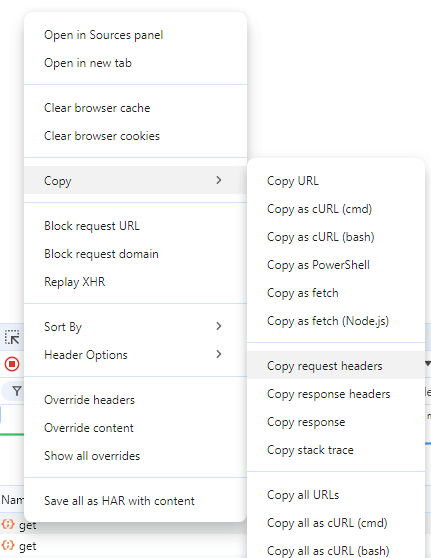
- Paste the copied content into a text file and save it as
headers.txt.
Request Expiration
When a request expires, you can continue using the proxy service by updating the headers.txt file.
Usage Security Recommendation
For security purposes, it's strongly recommended to add headers.txt to your .gitignore/.npmignore files. This prevents accidental exposure of sensitive headers (like cookies or tokens) in version control systems.
Example .gitignore entry:
+ # Ignore proxy header files
+ headers.txt
Example
Assume you have a file named headers.txt with the following content:
GET /example/path HTTP/1.1
User-Agent: Mozilla/5.0 (Windows NT 10.0; Win64; x64) AppleWebKit/537.36 (KHTML, like Gecko) Chrome/85.0.4183.121 Safari/537.36
Accept-Language: en-US,en;q=0.9
Cookie: session=abc123; user=JohnDoe
Host: example.com
Referer: https://example.com/login
X-CSRF-TOKEN: abcdef123456
Start the proxy server:
node node_modules/@chenshunyu/proxy --port 8080 --file headers.txtNow, the proxy server will run on port 8080 and use the request header information from the headers.txt file. If the request expires, update the headers.txt file.