
@choonkeat/agent-whiteboard
v0.3.3
Published
Turtle-graphics-inspired animated whiteboard for AI agents with hand-drawn aesthetics
Downloads
39

Maintainers
 choonkeat
Readme
Agent Whiteboard — The Humane Interface: How To Explain So Humans Will Listen
Turtle-graphics-inspired animated whiteboard for AI agents with hand-drawn aesthetics. An agent calls MCP tools to draw on a canvas that a human watches in real time, responding via a chat interface to advance or give feedback.
Built on cognitive principles: gradual reveal (chunking), viewer-controlled pacing, one concept per slide, and spatial consistency. Not just drawing—explaining in a way humans can actually understand.
Built with Rough.js for a sketchy, hand-drawn look and progressive arc-length animation for smooth drawing.
Demo
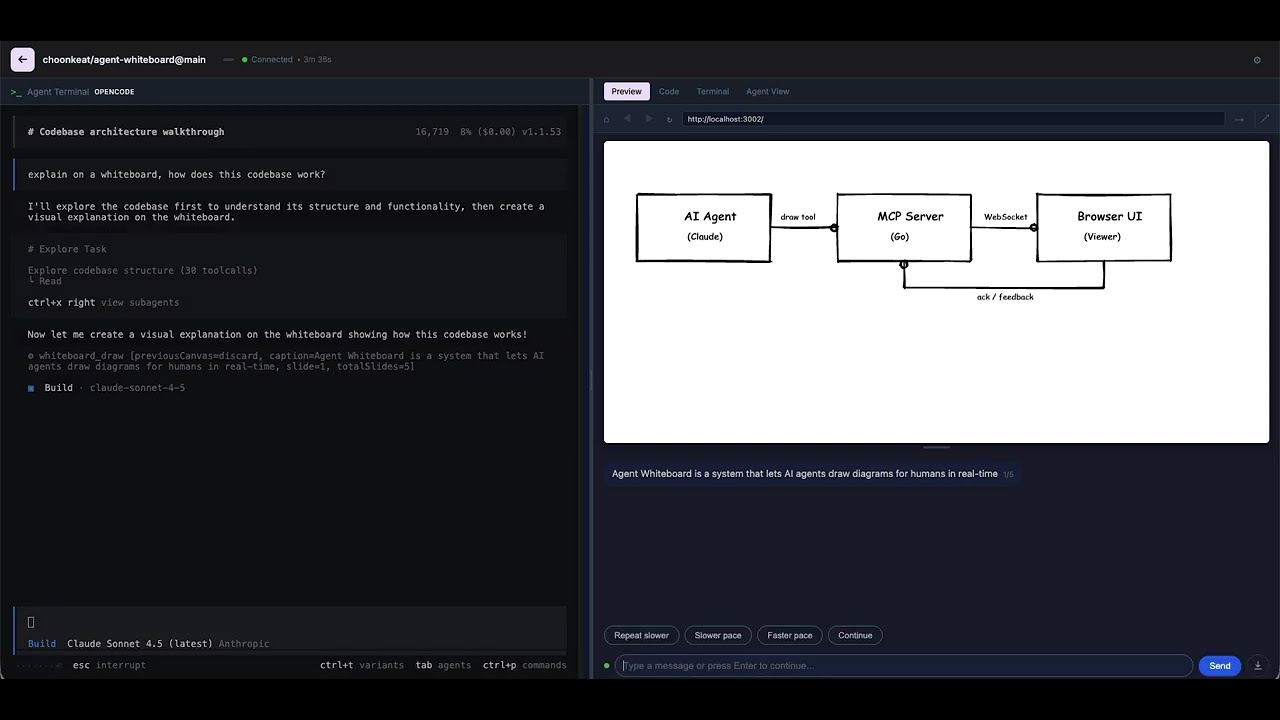
Watch an AI agent explain Agent Whiteboard using Agent Whiteboard itself—including finding and fixing a bug live!
Quick Start
1. Install into Claude Code (stdio + HTTP)
claude mcp add whiteboard -- npx --yes @choonkeat/agent-whiteboardTo use a fixed port for the browser UI (instead of a random ephemeral port), export PORT in your shell before launching Claude Code:
export PORT=3005Restart Claude Code, then verify with /mcp — you should see the draw and clear tools.
2. Connect via HTTP MCP (alternative)
The server always exposes an HTTP MCP endpoint. You can connect any MCP client to it:
claude mcp add --transport http whiteboard http://localhost:3005/mcp3. Standalone server (no stdio)
Run the server without stdio MCP — useful for hosting a shared whiteboard:
PORT=3005 npx --yes @choonkeat/agent-whiteboard --no-stdio-mcp4. Connect to a remote whiteboard
Point an agent at an existing whiteboard instance via WebSocket:
claude mcp add whiteboard -- npx --yes @choonkeat/agent-whiteboard --ws ws://host:3005/ws5. Uninstall
claude mcp remove whiteboardMCP Tools
draw — Draw on the whiteboard and wait for the viewer to respond.
{
  "caption": "A square",
  "instructions": [
    { "type": "forward", "distance": 100 },
    { "type": "turnRight", "angle": 90 },
    { "type": "forward", "distance": 100 },
    { "type": "turnRight", "angle": 90 },
    { "type": "forward", "distance": 100 },
    { "type": "turnRight", "angle": 90 },
    { "type": "forward", "distance": 100 }
  ]
}
clear — Reset the canvas.
MCP Resources
whiteboard://instructions — Full reference of all 16 instruction types. The agent can read this to learn the drawing API.
Instruction Reference
Canvas is 900 x 600 pixels. Origin (0,0) is top-left. Turtle starts at center (450, 300) heading up.
Movement
| type | params | description |
|------|--------|-------------|
| moveTo | x, y | Move to absolute position (no drawing) |
| lineTo | x, y | Draw line to (x, y) |
| forward | distance | Move forward in current heading |
| turnLeft | angle | Rotate counter-clockwise (degrees) |
| turnRight | angle | Rotate clockwise (degrees) |
Pen State
| type | params | description |
|------|--------|-------------|
| penUp | — | Lift pen (movement won't draw) |
| penDown | — | Lower pen (movement will draw) |
| setColor | color | CSS color string, e.g. "#ff0000" |
| setStrokeWidth | width | Stroke width in pixels |
Shapes
| type | params | description |
|------|--------|-------------|
| drawRect | x, y, width, height, fill? | Rectangle |
| drawCircle | x, y, radius, fill? | Circle |
| drawEllipse | x, y, width, height, fill? | Ellipse |
Text
| type | params | description |
|------|--------|-------------|
| writeText | text, x, y, fontSize?, font? | Text at absolute position |
| label | text, offsetX?, offsetY?, fontSize? | Text near turtle position |
Control
| type | params | description |
|------|--------|-------------|
| clear | — | Clear the canvas |
| wait | duration | Pause animation (milliseconds) |
Architecture
                          ┌─────────────────────────────────┐
                          │         Go Server                │
AI Agent ──stdio MCP──>   │                                 │
                          │   MCP Server (stdio + HTTP)     │
AI Agent ──HTTP MCP──>    │   POST /mcp                     │
                          │                                 │
                          │   Event Bus ──> /ws WebSocket ──┼──> Browser (chat UI)
                          │             <── ack             │<── viewer response
                          └─────────────────────────────────┘

AI Agent ──stdio MCP──> Go Server ──--ws──> Remote Whiteboard ──> Browser
The draw tool blocks until the viewer responds (or a 5-minute timeout). Viewers interact through a chat interface — captions appear as agent messages, and users can type responses, click pace chips, or press Enter to continue.
Flags
| Flag | Description |
|------|-------------|
| --no-stdio-mcp | Disable stdio MCP transport (HTTP MCP is always available) |
| --ws URL | Connect as WebSocket client to a remote whiteboard instance |
Environment Variables
| Variable | Description |
|----------|-------------|
| PORT | Fixed port for the HTTP server (default: random ephemeral port) |
Development
npm install

# Build the browser client (output goes to mcp-server-go/mcp-client-dist/)
npm run build:mcp-client

# Build the Go server (output goes to mcp-server-go/dist/)
cd mcp-server-go && make build

# Or cross-compile all platform binaries for npm distribution
bash scripts/build-platforms.sh
License
MIT