
@christophervr/pptx-viewer
v2.41.1
Published
Interactive installer for the pptx-viewer family of packages (React, Vue, Angular, Svelte, vanilla JS, the core engine, the MCP server). Also a drop-in for pptx-react-viewer: importing this package re-exports the React component.

Maintainers
 christophervr
Readme
@christophervr/pptx-viewer


Note: This package is also the interactive
npxinstaller for the whole pptx-viewer family. Runnpx @christophervr/pptx-viewer(no install needed) to pick React, Vue, Angular, Svelte, vanilla JS, the core engine, and/or the MCP server, and it installs the right package(s) or scaffolds a brand-new starter app for you. Jump to Thepptx-viewerCLI, in full at the bottom of this page.
A drop-in React component that turns a
.pptxfile into a fully interactive PowerPoint: view, edit, present, collaborate, and export, entirely in the browser. This package re-exportspptx-react-viewerdirectly, since React is this project's primary/flagship binding, so installing and importing@christophervr/pptx-viewerworks exactly like installingpptx-react-vieweron its own.

Slides render with real HTML/CSS (not <canvas>), so text stays crisp at any zoom, is selectable and screen-reader accessible, and every element is directly editable. The parsing/editing engine (pptx-viewer-core) is bundled in, so you install just one package.
▶️ Try the live demo · 📦 npm · 📖 Full docs · 🧩 Core SDK
Install
npm install @christophervr/pptx-viewerThen add the React peer dependencies your app uses (react / react-dom may be ^18.2 or ^19; both majors run the full pptx-react-viewer test suite in CI):
npm install react react-dom framer-motion lucide-react react-icons jspdf jszip fast-xml-parser i18next react-i18nextPrefer the
pptx-react-viewername directly in new React projects - it is the exact same component, one dependency lighter. Reach for@christophervr/pptx-viewerwhen you also want thenpxinstaller available, or when this is the name you (or your editor's autocomplete) already typed. Optional:three(3D models/charts, 3D SmartArt) andyjs/y-websocket/y-webrtc(real-time collaboration) are optional dependencies of the bundled engine, so npm installs them automatically when possible; the features degrade gracefully if they're absent.
Quick start
import { useState } from 'react';
import { PowerPointViewer } from '@christophervr/pptx-viewer';
// Not using Tailwind? Import the bundled stylesheet once at your app entry
// (styles ship under the real package name):
import 'pptx-react-viewer/styles';

export default function App() {
	const [content, setContent] = useState<Uint8Array | null>(null);

	// Load any .pptx as bytes (fetch, <input type="file">, drag-drop, …)
	const onPick = (e: React.ChangeEvent<HTMLInputElement>) =>
		e.target.files?.[0]?.arrayBuffer().then((buf) => setContent(new Uint8Array(buf)));

	return (
		<div style={{ height: '100vh' }}>
			{content ? (
				<PowerPointViewer content={content} canEdit />
			) : (
				<input type='file' accept='.pptx' onChange={onPick} />
			)}
		</div>
	);
}
The component fills its parent, so give the parent a height. That's the whole setup: open a file and you have a working viewer/editor.
To read the edited presentation back out as bytes, pass a ref and call getContent():
import { useRef } from 'react';
import { PowerPointViewer, type PowerPointViewerHandle } from '@christophervr/pptx-viewer';

const viewerRef = useRef<PowerPointViewerHandle>(null);

// <PowerPointViewer ref={viewerRef} content={content} canEdit />
const bytes = await viewerRef.current?.getContent(); // Uint8Array of a valid .pptx
Features
| Feature | Description | | ------------------ | -------------------------------------------------------------------------------------------------------------------------------------- | | View | Render shapes, text, images, tables, charts, SmartArt, connectors, media, ink, OLE objects, and 3D models with zoom | | Edit | Insert, move, resize, and delete elements; edit text inline; modify styles; manage slides | | Present | Fullscreen slideshow with animation presets, motion paths, transitions including morph, speaker notes, and presenter view with a timer | | Export | PNG/SVG/PDF/GIF/video/JSON slide export, save-as PPTX | | Collaborate | Real-time multi-user editing (powered by Yjs) with live presence, remote cursors, and user avatars | | Print | Print dialog with handout layouts and notes page formatting with overflow pagination | | Annotate | Pen/highlighter/laser pointer tools during presentations | | Find & Replace | Cross-slide text search with regex support | | Accessibility | Keyboard navigation, alt-text audit panel, screen reader support | | 3D | GLB/GLTF model rendering via Three.js, 3D surface charts, CSS 3D shape/text extrusion |
See the full docs for the complete API reference (props, ref handle, hooks), styling/theming, and localization guides - they apply to @christophervr/pptx-viewer exactly as written, since it re-exports the same component.
It's also a drop-in for pptx-react-viewer
@christophervr/pptx-viewer is the name most people search or guess first, so as well as being the npx installer described below, the package itself, imported as a library, re-exports pptx-react-viewer directly. Everything pptx-react-viewer exports (PowerPointViewer, Toolbar, SlideCanvas, theme helpers, and the rest) is re-exported from this package's root too, so the two names are interchangeable as a dependency. What differs is what you get from each command:
| You run/import | What you get |
| ---------------------------------------------- | ------------------------------------------------------------------------------------------ |
| npx @christophervr/pptx-viewer | The interactive installer/scaffolder (see below). It does not import the viewer component. |
| import ... from '@christophervr/pptx-viewer' | The React viewer component, re-exported from pptx-react-viewer. |
| import ... from 'pptx-react-viewer' directly | The exact same component, one dependency lighter (no installer code pulled in). |
If you're building for Vue, Angular, Svelte, or vanilla JS instead, use the matching package from the table below directly - the re-export here is React-only.
What it installs
| Target | Package | What you get |
| -------------- | -------------------------------------------------------------------------- | -------------------------------------------------------------------------- |
| React | pptx-react-viewer | View, edit, present, collaborate, and export .pptx files in React 18/19. |
| Vue | pptx-vue-viewer | The Vue 3.5+ counterpart, feature-equivalent to the React package. |
| Angular | pptx-angular-viewer | The Angular 19-22 counterpart, feature-equivalent to the React package. |
| Svelte | pptx-svelte-viewer | The Svelte 5 counterpart, built on the same shared engine. |
| Vanilla JS | pptx-vanilla-viewer | The zero-framework binding: plain DOM, one factory function. |
| Core only | pptx-viewer-core | The framework-agnostic parse/edit/save/convert SDK, no UI. |
| MCP server | pptx-viewer-mcp | PowerPoint editing tools exposed to AI agents (Claude, Cursor, ...). |
See the project README for the full monorepo overview, architecture, and a per-package documentation index.
License
Apache-2.0. Please keep the NOTICE file with redistributions.
The pptx-viewer CLI, in full
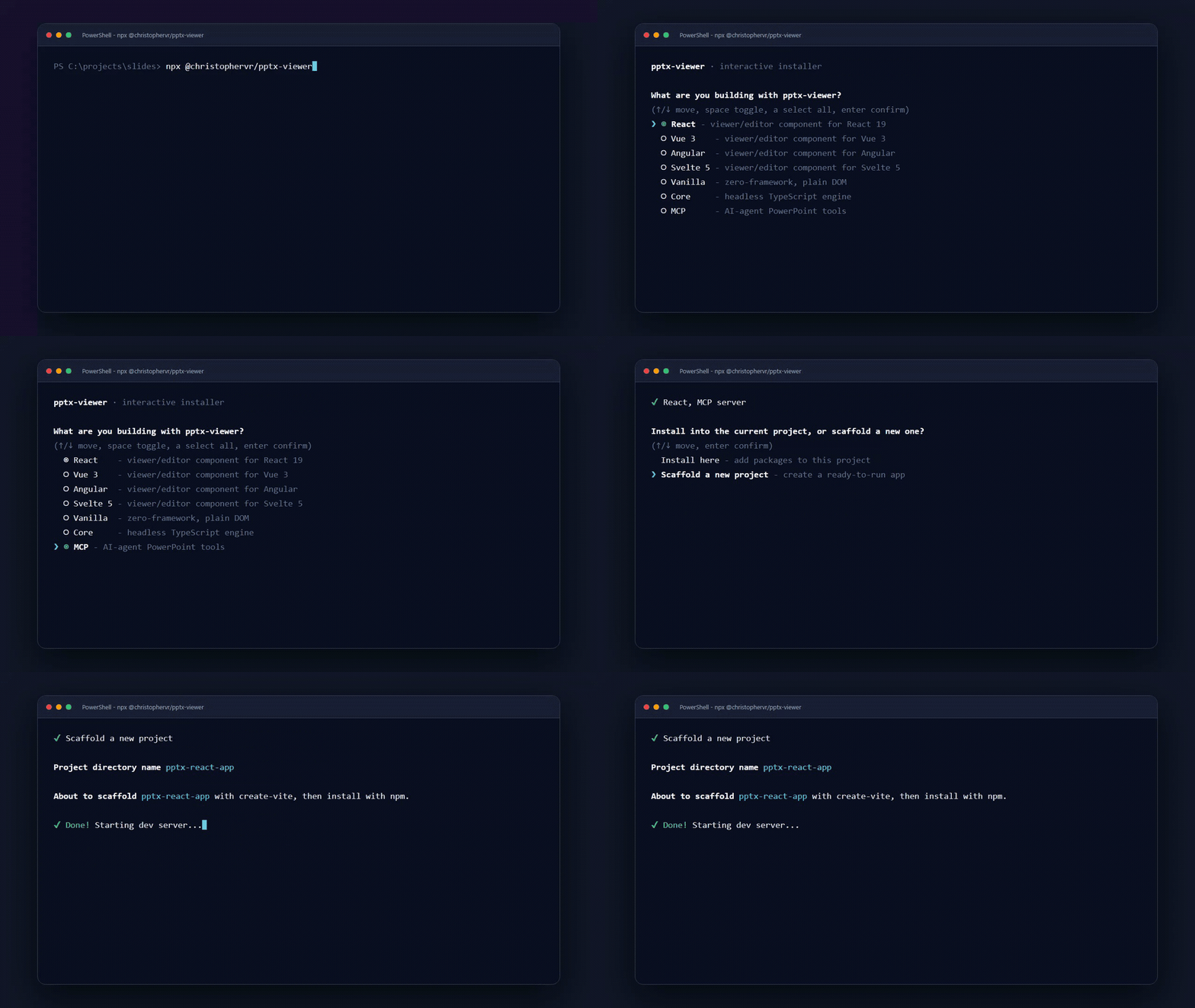
npx @christophervr/pptx-viewer@latest# or with Bun:
bunx @christophervr/pptx-viewer@latestRunning the package (rather than importing it) launches a zero-dependency interactive installer/scaffolder: an arrow-key checklist with coloured prompts, package-manager detection, and a compatibility check, before it touches anything. It ships as the pptx-viewer bin (dist/cli.mjs).
1. Pick what you're building
What are you building with pptx-viewer? (you can pick more than one)
(up/down move, space toggle, a select all, enter confirm)

> (*) React - pptx-react-viewer, a viewer/editor component for a React 18/19 app
  ( ) Vue - pptx-vue-viewer, a viewer/editor component for a Vue 3.5+ app
  ( ) Angular - pptx-angular-viewer, a viewer/editor component for an Angular 19-22 app
  ( ) Svelte - pptx-svelte-viewer, a viewer/editor component for a Svelte 5 app
  ( ) Vanilla JS - pptx-vanilla-viewer, zero-framework viewer/editor, plain DOM
  ( ) Core engine only - pptx-viewer-core, the framework-agnostic SDK, no UI
( ) MCP server - pptx-viewer-mcp, PowerPoint editing tools for AI agentsup/downmoves the cursor,spacetoggles a checkbox,aselects all ungrouped options,enterconfirms.- React, Vue, Angular, Svelte, and Vanilla JS are mutually exclusive. Picking more than one of them is rejected outright with
<A>, <B> can't be selected together; pick a single UI framework.- you can still combine at most one of them withcoreand/ormcpin the same run. - The
mcptarget is never installed as a dependency: sincepptx-viewer-mcpis meant to be launched on demand vianpx, picking it just prints the MCP client config JSON to paste into Claude Desktop, Claude Code, Cursor, or any other MCP client. - In a shell without raw keyboard input (piped stdin, some CI runners), the checklist automatically falls back to a plain numbered prompt: type one or more numbers separated by commas or spaces (e.g.
1,3), orall/a. - Colour and the Unicode glyphs shown above (rendered here in plain ASCII) auto-disable under
NO_COLOR, a non-TTY stdout, or - on Windows - a console that isn't Windows Terminal, ConEmu, VS Code's terminal, CI, orTERM=xterm-256color.
2. Compatibility check
If you picked React, Vue, Angular, or Svelte and a package.json already exists in the current directory, the CLI reads what's actually installed (or just declared) for react, vue, @angular/core, or svelte, and compares its major version against what the chosen viewer package requires - React needs ^18 or ^19, Vue needs ^3, Angular needs 19-22, Svelte needs ^5. If they don't match (say, react@18 in the project but the target needs react@^19), it prints a warning naming both versions and, in an interactive shell, asks "Continue anyway?" before installing anything; non-interactively it just warns and proceeds. Vanilla JS has no framework peer, so nothing is checked for it.
3. Install here, or scaffold a new project?
When exactly one UI framework is selected, an interactive session asks:
- Install here adds the package(s) to the project in the current directory. A
package.jsonmust already exist - runnpm init -yfirst if not. - Scaffold a new project bootstraps a brand-new starter app in its own folder using the framework's own official tool -
create-vitefor React/Vue/Svelte/Vanilla JS,@angular/clifor Angular - then overwrites the generated entry file (src/App.tsx,src/App.vue,src/App.svelte,src/main.ts, or Angular'ssrc/app/app.ts/app.component.ts) with a workingPowerPointViewerexample: open an existing.pptx, or build a blank deck and start editing right away, the same pattern as the live demos. It then installs the viewer package,pptx-viewer-core, and each framework's companion packages (i18n bindings, icon packs, etc.) with your detected package manager, asks whether to add real-time collaboration (yjs,y-websocket,y-webrtc; defaults to yes), asks the same for 3D rendering support when scaffolding Vanilla JS (three; defaults to yes - the other four frameworks already pull it in automatically as an optional dependency of their viewer package), and finally starts the new project's dev server automatically, mirroring whatcreate-vitedoes on its own. - Scaffolding the Angular target checks your Node.js version first -
@angular/cli@latestneeds Node.js 22.22.0+, 24.13.1+, or 26.0.0+ - and fails fast with an upgrade link before asking anything else.
Either way, it detects your package manager (bun, pnpm, yarn, or npm, from whichever lockfile is in the current directory, falling back to the manager that launched the command, then npm) and prints a ready-to-use quick-start snippet once it's done.
Non-interactive use
npx @christophervr/pptx-viewer --target react,mcp --yes            # skip both prompts
npx @christophervr/pptx-viewer --target mcp                        # just print the MCP client config
npx @christophervr/pptx-viewer --target react --scaffold --dir my-app --yes
npx @christophervr/pptx-viewer --pm pnpm                           # force a package manager instead of auto-detecting
| Flag | Meaning |
| ---------------- | ---------------------------------------------------------------------------------------------------------------------------------------------------- |
| --target <ids> | Comma-separated: react, vue, angular, svelte, vanilla, core, mcp. Skips the picker; the five UI bindings are still mutually exclusive. |
| --scaffold | Bootstrap a new project instead of installing here. Requires exactly one UI-binding target selected. |
| --dir <name> | Project directory name for --scaffold (default: pptx-<target>-app). |
| --pm <manager> | bun, pnpm, yarn, or npm. Skips auto-detection. |
| --yes, -y | Skip confirmation prompts, including the compatibility warning; optional prompts (e.g. collaboration) take their default answer. |
| --help, -h | Print usage and exit. |
Behaviour notes
- Running with no
--targetand no TTY at all (piped stdin, most CI runners) exits with an error telling you to pass--targetexplicitly instead of hanging on a prompt it can't draw. - Any unrecognised flag, unknown target id, or invalid
--pmvalue exits with a one-line error (✘ Error: ...) and a non-zero status instead of a stack trace. - Interrupting the interactive checklist with Ctrl-C exits with status
130. - Requires Node.js 18+ to run at all; see the Angular note above for its own, stricter minimum.