
@chuongtrh/html-to-pdf
v1.0.2
Published
Generate a simple invoice PDF from HTML using puppeteer & handlebars

Maintainers
 chuongtrh
Readme
html_to_pdf
Generate beautiful PDF invoices from HTML using Puppeteer & Handlebars.
Modern, flexible, and easy to use!
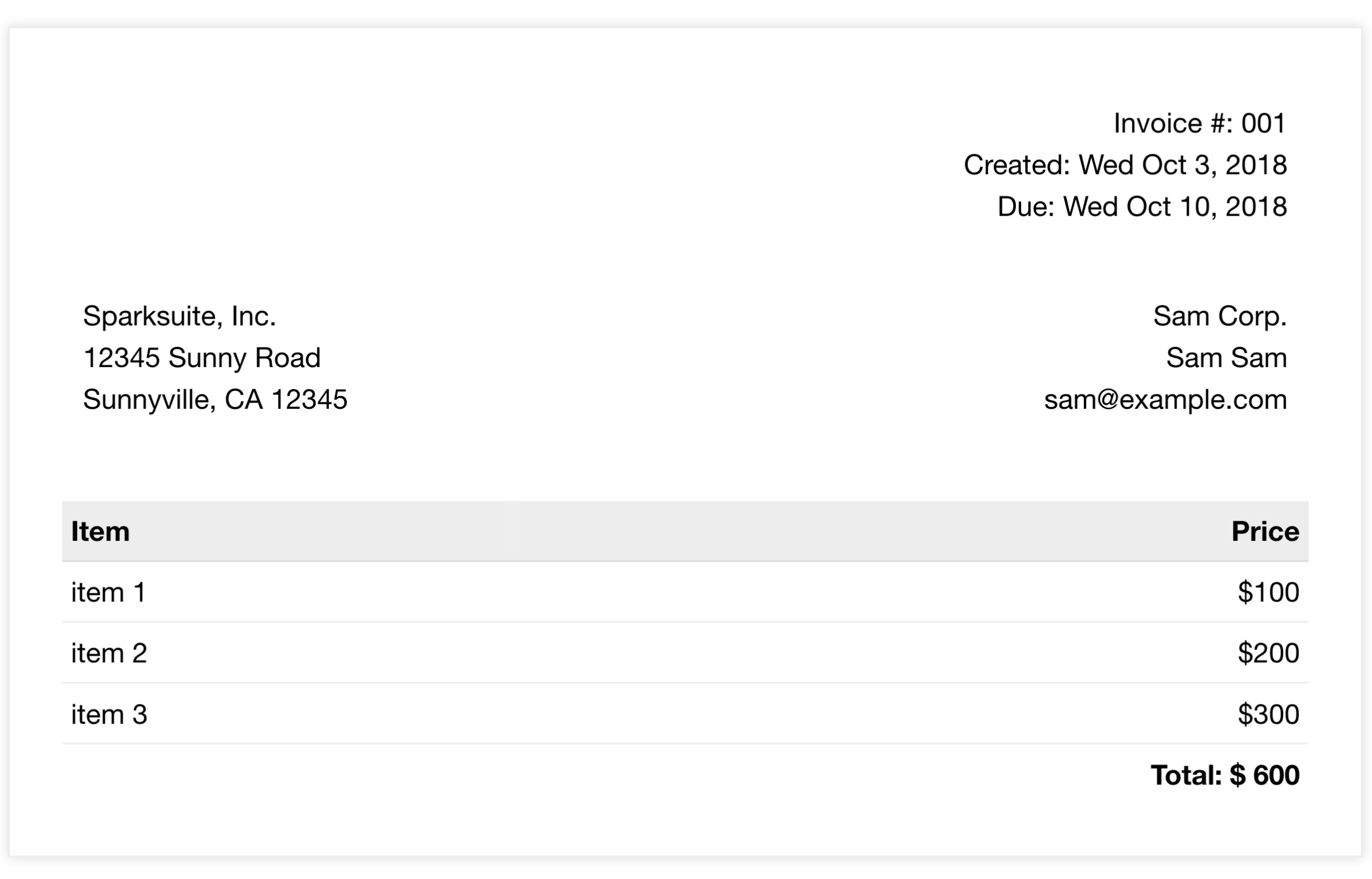
⭐ Features
- Modern rendering: Uses real Chrome engine for pixel-perfect PDFs
- Dynamic templates: Handlebars for easy data binding
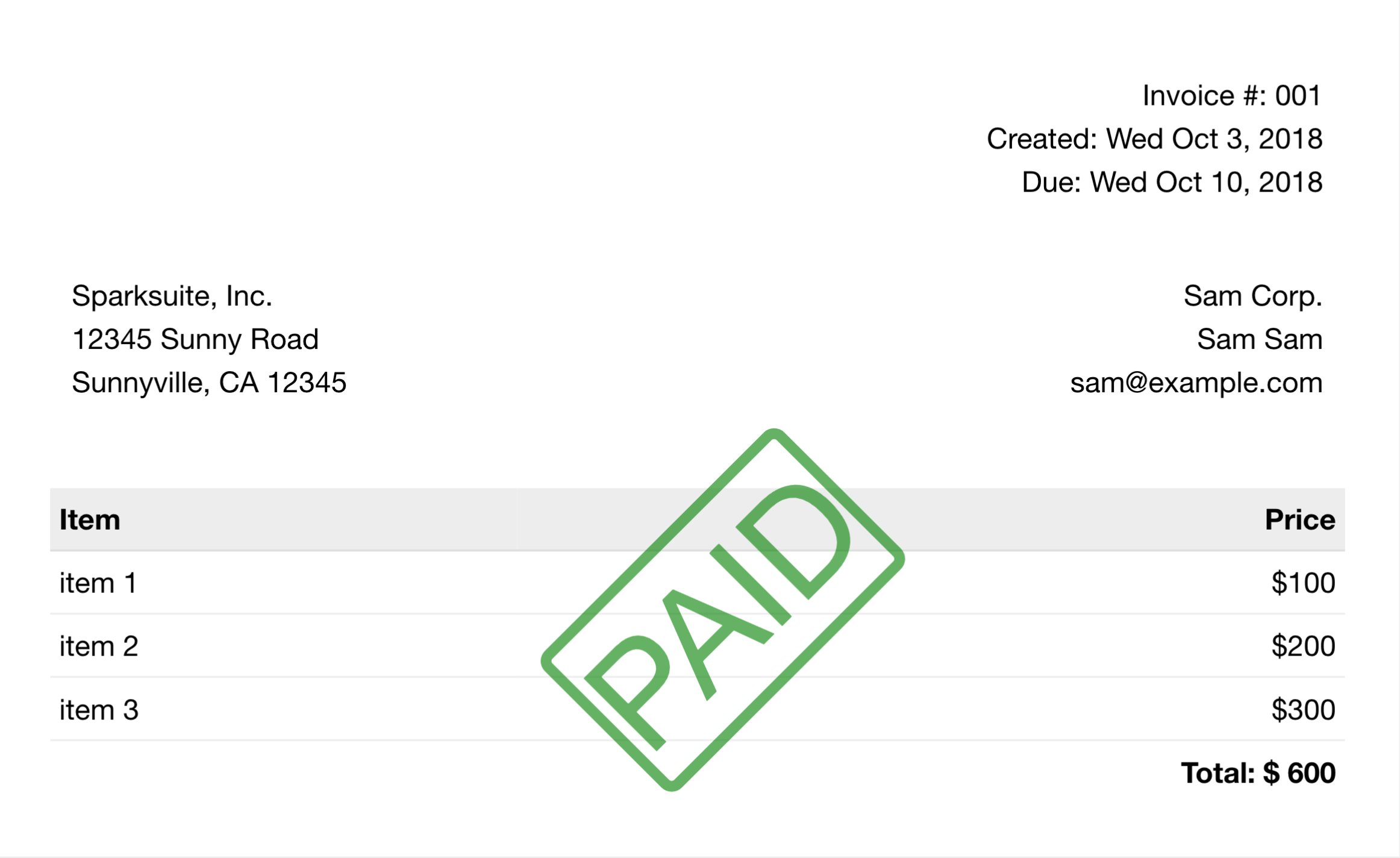
- Watermark/stamp support: Add "PAID" or custom stamps with a simple flag
- Full CSS/JS support: Works with modern HTML, CSS, and JavaScript
- Easy integration: Just a few lines of code to get started
🚀 Quick Start
- Install dependencies
npm install - Generate your first PDF
This will createnode example.jsinvoice.pdfin your project folder.
How It Works
- Prepare your HTML template (
invoice.html) - Bind your data using Handlebars
- Generate PDF with Puppeteer
Example Usage
index.js
const puppeteer = require("puppeteer");
const handlebars = require("handlebars");

module.exports.html_to_pdf = async ({ templateHtml, dataBinding, options }) => {
  const template = handlebars.compile(templateHtml);
  const finalHtml = encodeURIComponent(template(dataBinding));

  const browser = await puppeteer.launch({
    args: ["--no-sandbox"],
    headless: true,
  });
  const page = await browser.newPage();
  await page.goto(`data:text/html;charset=UTF-8,${finalHtml}`, {
    waitUntil: "networkidle0",
  });
  await page.pdf(options);
  await browser.close();
};
example.js
const fs = require("fs");
const path = require("path");
const { html_to_pdf } = require(".");

(async () => {
  const dataBinding = {
    items: [
      { name: "item 1", price: 100 },
      { name: "item 2", price: 200 },
      { name: "item 3", price: 300 },
    ],
    total: 600,
    isWatermark: true,
  };

  const templateHtml = fs.readFileSync(
    path.join(process.cwd(), "invoice.html"),
    "utf8"
  );

  const options = {
    format: "A4",
    headerTemplate: "<p></p>",
    footerTemplate: "<p></p>",
    displayHeaderFooter: false,
    margin: { top: "40px", bottom: "100px" },
    printBackground: true,
    path: "invoice.pdf",
  };

  await html_to_pdf({ templateHtml, dataBinding, options });

  console.log("Done: invoice.pdf is created!");
})();
💡 Watermark/Stamp Example
Add a "PAID" stamp using Handlebars:
{{#if isWatermark}}
  <div style="border-width: 6px; border-style: solid; border-color: #008000; border-radius: 8px; color: #008000; opacity:0.6; position: absolute; z-index: 1; left:40%; top:30%; font-size: 60pt; transform: rotate(-45deg); font-family: 'Helvetica Neue', 'Helvetica', Helvetica, Arial, sans-serif;">
    PAID
  </div>
{{/if}}
Set isWatermark: true in your data and run again!
🆚 Comparison: Puppeteer vs. wkhtmltopdf vs. dompdf
| Feature | Puppeteer (This Project) | wkhtmltopdf | dompdf (PHP) |
|------------------------|-------------------------|----------------------------|---------------------------|
| Language | Node.js | Standalone (CLI, C++) | PHP |
| Rendering Engine | Headless Chrome | WebKit | PHP-based HTML parser |
| CSS/JS Support | Full (modern browser) | Limited (older WebKit) | Limited (no JS) |
| JavaScript Execution | Yes | Partial | No |
| Template Engine | Handlebars (JS) | None (raw HTML) | None (raw HTML) |
| Custom Fonts | Yes | Yes | Yes |
| Page Features | Headers/Footers, Margins| Headers/Footers, Margins | Basic |
| Watermark/Stamp | Easy (template logic) | Possible (CSS/HTML) | Possible (CSS/HTML) |
| Installation | npm install puppeteer | Download binary | Composer (PHP) |
| Platform | Cross-platform | Cross-platform | Cross-platform |
| Output Format | PDF | PDF | PDF |
Pros & Cons
Puppeteer (This Project)
Pros:
- Accurate rendering (uses real Chrome engine)
- Full support for modern CSS and JavaScript
- Highly customizable with Node.js and Handlebars
- Easy watermark/stamp logic
- Active community and frequent updates
Cons:
- Requires Node.js environment
- Larger binary size due to Chromium
- Higher memory usage compared to simpler tools
wkhtmltopdf
Pros:
- Simple CLI usage, easy to integrate in scripts
- No programming language dependency
- Good for static HTML to PDF conversion
Cons:
- Uses outdated WebKit engine (limited CSS/JS support)
- JavaScript support is partial and sometimes buggy
- Less accurate rendering for modern web pages
dompdf
Pros:
- Native PHP solution, easy for PHP projects
- Simple to install via Composer
- Good for basic HTML/CSS to PDF
Cons:
- No JavaScript support
- Limited CSS support (no flexbox, grid, etc.)
- Rendering may differ from browsers
Summary:
Choose Puppeteer if you need modern web features, dynamic templates, or advanced PDF customization. Use wkhtmltopdf for simple CLI-based workflows, or dompdf for basic PHP-based PDF generation.
🙌 Contributing
Pull requests are welcome! For major changes, please open an issue first to discuss what you would like to change.
📣 Spread the Word
If you find this project useful, please ⭐ star the repo and share it with others!
License
html_to_pdf is available under the MIT license. See the LICENSE file for more info.