
@cjh0/cc-cli
v2.16.0
Published
Claude Code配置管理CLI工具

Maintainers
 cjh0
cjh0Readme
CC CLI - Claude Code 配置管理工具



一键切换 claude code / codex 配置的命令行工具。支持多站点、多 Token 管理,智能合并配置,WebDAV 云端备份,无需手动修改配置文件。
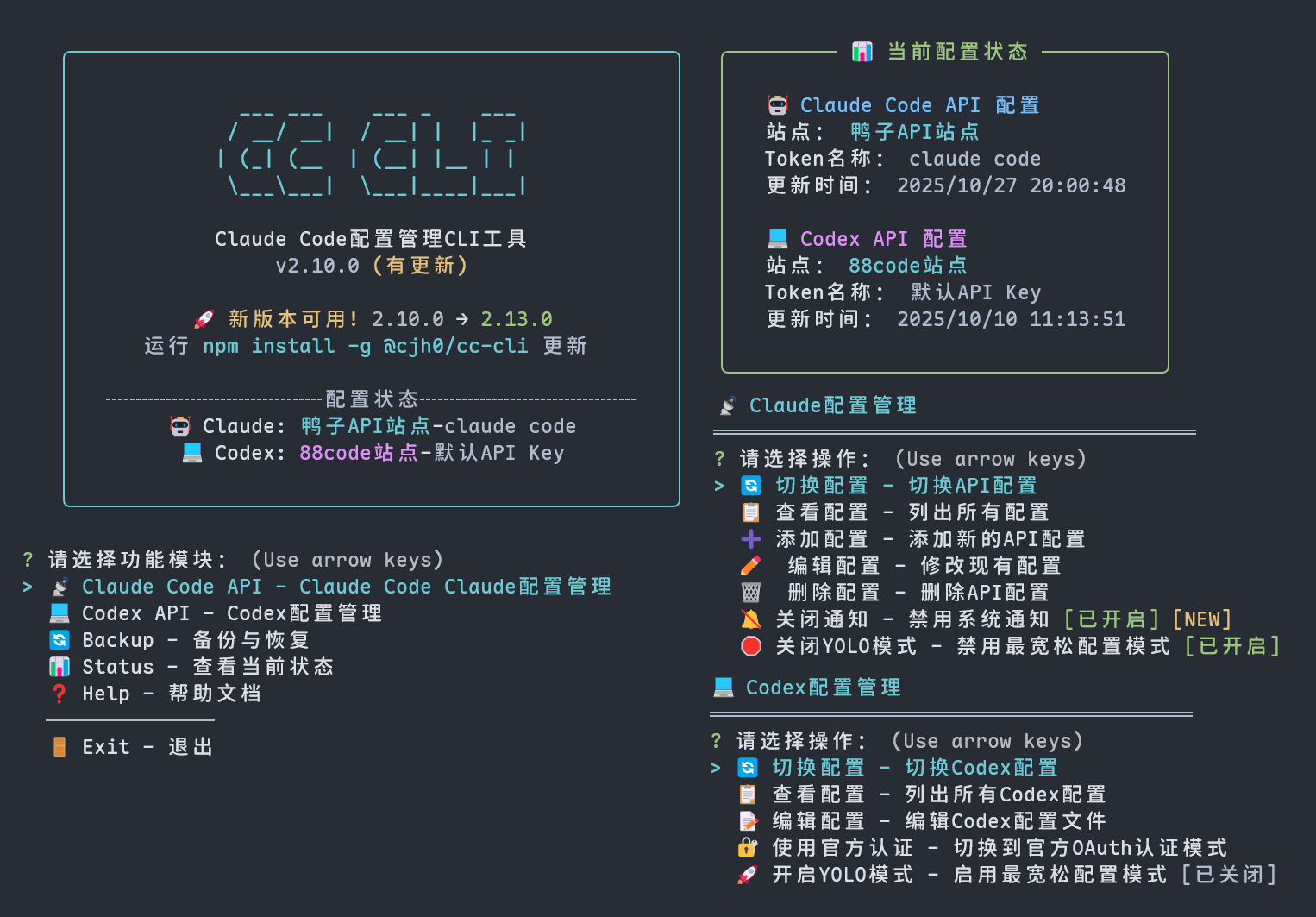
📸 界面预览

📑 目录
✨ 核心功能
- 🔄 一键切换 - 快速切换不同的 API 站点和 Token
- 📋 配置管理 - 查看、添加、删除 API 配置
- 🔗 智能合并 - 自动与 Claude Code 配置文件同步
- ⚙️ 完整支持 - 支持所有 Claude Code 配置项
- 💻 Codex 支持 - 管理 Claude Code Codex 配置(仅支持 Claude 模型),支持开启/关闭 YOLO 模式
- 🚀 YOLO 模式 - 为 Claude Code API 和 Codex 提供最宽松配置模式,无条件批准所有工具使用请求
- 🔔 智能通知 - Claude Code 响应完成、工具批准等事件时自动推送系统通知,避免长时间等待
- ☁️ WebDAV 备份 - 支持配置文件云端备份与恢复(坚果云、其他标准 WebDAV 等)
- CC-CLI 配置备份 - 📁.cc-cli 下 api_config.json 等等
- Claude Code 配置备份 - 📄 settings.json 📄 CLAUDE.md 📁 agents/ 📁 commands/
- Codex 备份 - 📄 config.toml 📄 auth.json 📄 AGENTS.md
📦 安装使用
# 全局安装
npm install -g @cjh0/cc-cli
🚀 使用方法
主要命令
# 启动交互式界面
cc
# 如果遇到命令冲突,使用备用命令
cc-cli

# Claude配置管理
cc api

# 快速切换 API 配置
cc apiuse

# 查看当前状态
cc status

# 查看帮助
cc --help
⚠️ 命令冲突解决:如果遇到 clang: error 错误,说明 cc 命令与系统的 C 编译器冲突,请使用 cc-cli 命令
📋 配置文件说明
智能配置合并
工具会自动将你选择的 API 配置与现有的 Claude Code/codex 设置合并,保留所有原有配置项,只更新 API 相关设置。
配置格式示例
{
  "sites": {
    "XX公益站": {
      "url": "https://api.example.com",
      "description": "同时支持Claude Code和Codex",
      "claude": {
        "env": {
          "ANTHROPIC_BASE_URL": "https://api.example.com",
          "ANTHROPIC_AUTH_TOKEN": {
            "主力Token": "sk-xxxxxxxxxxxxxx",
            "备用Token": "sk-yyyyyyyyyyyyyy"
          }
        }
      },
      "codex": {
        "OPENAI_API_KEY": "sk-xxxxxxxxxxxxxx",
        "model": "gpt-5",
        "model_reasoning_effort": "high",
        "model_providers": {
          "duckcoding": {
            "name": "duckcoding",
            "base_url": "https://jp.duckcoding.com/v1"
          }
        }
      }
    },
    // 具体看注释
    "XX公益站2": {
      "url": "https://api.demo.com", // (可选)站点的地址 免得忘记公益站点,后期会支持一键打开
      "description": "仅支持Claude Code API", // 随意 可不填
      // Claude Code API配置(最简配置,兼容官方大部分配置,会覆盖配置文件)
      "claude": {
        "env": {
          "ANTHROPIC_BASE_URL": "https://api.demo.com",
          // Token支持两种格式:
          // 1. 对象格式(支持多个token)
          "ANTHROPIC_AUTH_TOKEN": {
            "Token1": "sk-aaaaaaaaaaaaaaa",
            "Token2": "sk-bbbbbbbbbbbbbbb"
          }
          // 2. 字符串格式(单个token,自动命名为"默认Token")
          // "ANTHROPIC_AUTH_TOKEN": "sk-xxxxxxxxxxxxxx"
        }
      },
      // Codex API配置(最简配置,兼容官方大部分配置)
      "codex": {
        // API Key同样支持两种格式:
        // 1. 对象格式(支持多个API Key)
        "OPENAI_API_KEY": {
          "主要Key": "sk-xxxxxxxxxxxxxx",
          "测试Key": "sk-zzzzzzzzzzzzzzz"
        },
        // 2. 字符串格式(单个API Key,自动命名为"默认API Key")
        // "OPENAI_API_KEY": "sk-xxxxxxxxxxxxxx",
        "model": "gpt-5-code", // 使用Claude模型
        "model_reasoning_effort": "medium", // 推理强度:low/medium/high
        "model_providers": {
          "custom_provider": {
            "name": "custom_provider",
            "base_url": "https://api.demo.com/v1"
          }
        }
      }
    }
  }
}