
@ckeith26/claude-statusline
v2.2.1
Published
A width-adaptive status line for Claude Code with Catppuccin Macchiato theme

Maintainers
 ckeith26
Readme
claude-statusline



A width-adaptive status line for Claude Code that shows model, context usage, rate limits, git info, and extra usage budget. Automatically adjusts its layout based on available terminal width.

Install
npx @ckeith26/claude-statuslineBacks up your existing status line script and settings, copies the new script to ~/.claude/statusline.sh, and configures your Claude Code settings.
Requires jq for JSON parsing (curl and git are typically preinstalled):
brew install jq        # macOS
sudo apt install jq    # Debian/Ubuntu
Features
- Catppuccin Macchiato color theme
- Background-colored gauge bars (no Unicode width glitches)
- Git branch and diff stats (modified, added, deleted files)
- Context window usage with color-coded thresholds
- 5-hour and weekly rate limit tracking with reset times
- Extra usage budget shown as "$X left"
- Model name with context window size
- Project name with smart truncation for long names
- Multi-terminal-safe cached API calls (60s TTL, atomic writes, lock-based deduplication)
- Optional nightshift segment showing background agents, hidden unless any are running
Layouts
Adapts to terminal width automatically:
Full (wide terminals, 2 lines)
Project name, branch, diffs, full model name, context gauge bar, usage gauges with reset times, and extra budget.
Compact (narrower terminals, 2 lines)
Truncated project name, tiny model, context gauge bar, and abbreviated usage gauges.
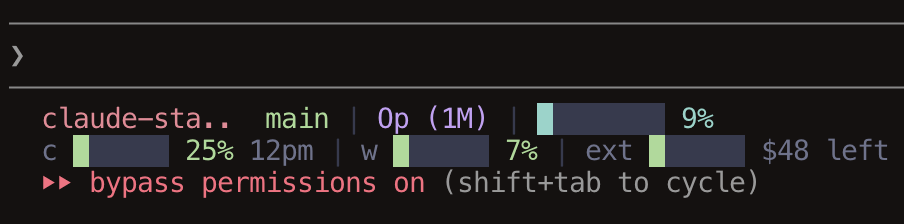
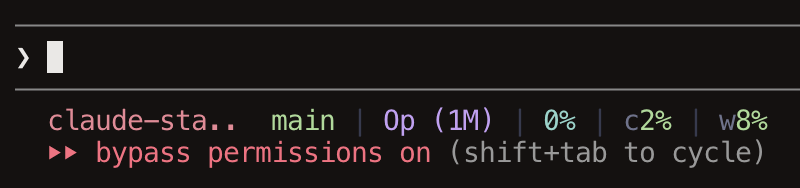
Narrow (small terminals, 1 line)
Short project name, tiny model, color-coded percentages with dividers.
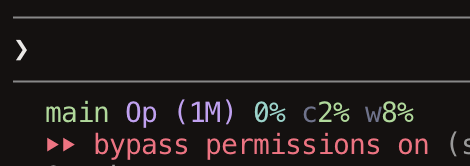
Ultracompact (smallest terminals, 1 line)
Branch, model, and percentages with no dividers.
Nightshift
If a project runs nightshift background agents, the status line appends a segment summarizing them:
ns >2 $279.85     two agents working, spend so far
ns !1 >1          one wants a decision, one working
ns x1 >1 $4.20    one crashed, one working
Counts and spend cover only unfinished agents. The segment is skipped entirely when a project has none, so it stays invisible if you do not use nightshift. Nothing needs to be installed for this: the status line only reads files, and their absence is the normal case.
Uninstall
npx @ckeith26/claude-statusline --uninstallRestores your previous status line script and settings from backup. If there was no previous status line, it removes the script and cleans up settings.
License
MIT