
@clawbackup-ai/clawbackup-plugin
v1.1.0
Published
Enhanced backup plugin - supports encryption, cloud storage, and cross-device recovery

Maintainers
 clawstate
Readme
ClawBackup
State Versioning for AI Agents


The Problem
AI agents continuously modify your environment:
- 📝 Memory updates
- ⚙️ State changes
- 📁 Workspace files
- 🔧 Configs
- 💾 Sessions
When an agent makes a mistake:
- ❌ Things break
- 💥 State becomes corrupted
- 😰 It's hard to go back
Unlike code, agent state has no version control.
The Solution
ClawBackup introduces:
State versioning for AI agents.
It records file changes made by agents and lets you:
- ⏪ Roll back in time
- 🔄 Restore sessions
- 🛡️ Recover environments
- 🚀 Move agents between machines
Think of it like:
Git + Time Machine for AI agents.
What You Can Do
With ClawBackup you can:
| Feature | Description | |---------|-------------| | ⏪ Time Travel | Roll back 5 minutes, 8 hours, or to any previous session | | 🔄 Session Restore | Recover broken agent state instantly | | 🚀 Cross-Machine Migration | Move agents across machines seamlessly | | 👀 Rollback Preview | See what will change before restoring |
It makes AI agent experimentation safe.
Example
Agent breaks the environment:
Agent modifies memory...
Agent updates config...
Agent writes incorrect state...
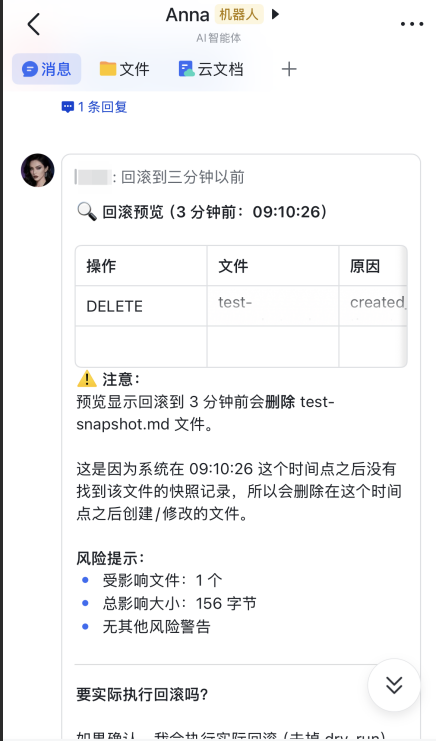
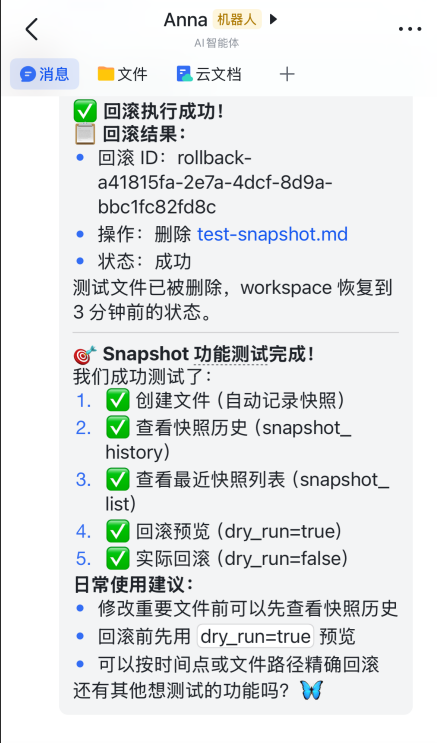
Option 1: Rollback via Conversation
User: Help me rollback to 10 minutes ago
Agent: [calls snapshot_rollback tool] Finding snapshots... Found snapshot_20240325_abc123
Agent: [shows rollback preview] Will restore 3 files...
User: Confirm rollback
Agent: [executes rollback] Environment restored
Conversation Rollback Example:
Option 2: Rollback via Command
# Preview rollback
openclaw clawbackup snapshot rollback <snapshot_id> --preview

# Execute rollback
openclaw clawbackup snapshot rollback <snapshot_id>
Environment restored.
✨ Features
Agent State Tracking
Tracks file changes caused by agents in real time. Includes:
- 📝 Memory updates
- ⚙️ State changes
- 📁 Workspace modifications
- 💾 Session data
Time Travel Rollback
Restore to:
- ⏪ Minutes ago
- ⏪ Hours ago
- ⏪ Previous sessions
Rollback Preview
See what will change before restoring. This prevents accidental data loss.
Secure Backup
AES-256 encrypted backups supported.
Cloud Sync
Supports S3 compatible storage:
- AWS S3
- Alibaba Cloud OSS
- Tencent Cloud COS
- MinIO
Large Backup Streaming
Efficient transfer without high memory usage.
🚀 Installation
# Install via OpenClaw CLI
openclaw plugins install @clawbackup-ai/clawbackup-plugin
Or install from source:
# Clone the repository
git clone https://github.com/ClawBackup-AI/ClawBackup.git
cd ClawBackup

# Install dependencies
npm install

# Build
npm run build

# Install as OpenClaw plugin
openclaw plugins install .
📖 Quick Start
# Initialize configuration
openclaw clawbackup init

# Create backup
openclaw clawbackup create

# List backups
openclaw clawbackup list

# Restore backup
openclaw clawbackup restore <backup_id>

# View status
openclaw clawbackup status
🤖 Using with Agent
ClawBackup registers the following tools that can be used directly through conversation with the OpenClaw Agent:
Available Tools
| Tool Name | Description |
|----------|------|
| backup_create | Create backup |
| backup_list | List all backups |
| backup_restore | Restore backup |
| backup_sync | Sync backup to remote storage |
| backup_delete | Delete backup |
| backup_verify | Verify backup integrity |
| backup_status | Get backup status overview |
| snapshot_status | Get snapshot status overview |
| snapshot_list | List snapshots |
| snapshot_rollback | Rollback to snapshot |
| snapshot_history | View file change history |
Usage Examples
Talk directly to the Agent, and it will automatically call the appropriate tools:
Create Backup:
User: Help me create a backup
Agent: [calls backup_create tool] Backup created, ID: backup_20240320_abc123

User: Create an encrypted backup with password mypassword
Agent: [calls backup_create tool, password: "mypassword"] Encrypted backup created

User: Create a backup with only config files
Agent: [calls backup_create tool] Config backup created
List Backups:
User: List all backups
Agent: [calls backup_list tool] Found 5 backups...

User: Show only the last 10 backups
Agent: [calls backup_list tool, limit: 10] ...

User: Show only ClawBackup backups
Agent: [calls backup_list tool, type: "clawbackup"] ...
Restore Backup:
User: Restore backup backup_20240320_abc123
Agent: [calls backup_restore tool] Restored to original location

User: Restore backup to ./restore directory
Agent: [calls backup_restore tool, target: "./restore"] Restored to ./restore

User: Restore backup backup_20240320_abc123 from S3
Agent: [calls backup_restore tool, from_remote: "backend_xxx"] Downloading from remote and restoring...
Sync to Cloud Storage:
User: Sync backup backup_20240320_abc123 to S3
Agent: [calls backup_sync tool] Synced to remote storage

User: Force sync backup to my-s3 backend
Agent: [calls backup_sync tool, storage: "my-s3", force: true] Force overwrite sync completed
Delete Backup:
User: Delete backup backup_20240320_abc123
Agent: [calls backup_delete tool] Backup deleted
Verify Backup:
User: Verify if backup backup_20240320_abc123 is complete
Agent: [calls backup_verify tool] Backup verification passed, data is intact
View Status:
User: View backup status
Agent: [calls backup_status tool] Total 5 backups, total size 1.2GB...
Snapshot Rollback:
User: View snapshot status
Agent: [calls snapshot_status tool] Total 3 sessions tracked, 15 files modified...

User: List recent snapshots
Agent: [calls snapshot_list tool] Found 5 snapshots...

User: Rollback to snapshot_20240325_abc123
Agent: [calls snapshot_rollback tool] Files restored to previous state

User: Show change history for src/index.ts
Agent: [calls snapshot_history tool] File was modified 3 times in session sess_xxx...
Tool Parameters Details
backup_create
| Parameter | Type | Required | Description |
|------|------|------|------|
| name | string | No | Backup name |
| password | string | No | Encryption password |
| storage | string | No | Storage backend ID |
backup_list
| Parameter | Type | Required | Description |
|------|------|------|------|
| type | string | No | Backup type: all, native, clawbackup |
| limit | number | No | Return count limit, default 50 |
backup_restore
| Parameter | Type | Required | Description |
|------|------|------|------|
| backup_id | string | Yes | Backup ID to restore |
| target | string | No | Restore target path |
| password | string | No | Decryption password |
backup_sync
| Parameter | Type | Required | Description |
|------|------|------|------|
| backup_id | string | Yes | Backup ID to sync |
| storage | string | No | Target storage backend ID |
| force | boolean | No | Force overwrite existing remote backup |
backup_delete
| Parameter | Type | Required | Description |
|------|------|------|------|
| backup_id | string | Yes | Backup ID to delete |
backup_verify
| Parameter | Type | Required | Description |
|------|------|------|------|
| backup_id | string | Yes | Backup ID to verify |
backup_status
No parameters.
snapshot_status
No parameters.
snapshot_list
| Parameter | Type | Required | Description |
|------|------|------|------|
| session_id | string | No | Filter by session ID |
| limit | number | No | Return count limit, default 50 |
snapshot_rollback
| Parameter | Type | Required | Description |
|------|------|------|------|
| snapshot_id | string | Yes | Snapshot ID to rollback to |
| preview | boolean | No | Show rollback preview without actually rolling back |
snapshot_history
| Parameter | Type | Required | Description |
|------|------|------|------|
| file_path | string | Yes | File path to view history for |
| session_id | string | No | Filter by session ID |
📚 Command Reference
openclaw clawbackup create [name]
Create backup.
openclaw clawbackup create [name] [options]Parameters:
| Parameter | Type | Description |
|------|------|------|
| name | string | Backup name (optional) |
Options:
| Option | Type | Description |
|------|------|------|
| --password <password> | string | Encryption password, backup will be encrypted when set |
| --storage <backend> | string | Storage backend ID, backup will be saved to this backend when specified |
| --output <path> | string | Output file path, custom backup file location |
| --no-workspace | boolean | Exclude workspace directory, backup config only |
| --only-config | boolean | Backup config files only |
| --workspace <path...> | string[] | Specify workspace directories (multiple allowed) |
| --dry-run | boolean | Analyze backup content only, do not actually write file |
| --json | boolean | JSON format output |
Examples:
# Create basic backup
openclaw clawbackup create

# Create named backup
openclaw clawbackup create my-backup

# Create encrypted backup
openclaw clawbackup create --password mypassword

# Backup config files only
openclaw clawbackup create --only-config

# Analyze backup content (without actually creating)
openclaw clawbackup create --dry-run

# Specify multiple workspace directories
openclaw clawbackup create --workspace ~/project1 --workspace ~/project2

# JSON format output
openclaw clawbackup create --json
openclaw clawbackup list
List all backups.
openclaw clawbackup list [options]Options:
| Option | Type | Description |
|------|------|------|
| --type <type> | string | Backup type filter: all (default), native, clawbackup |
| --limit <number> | number | Limit return count |
| --json | boolean | JSON format output |
Examples:
# List all backups
openclaw clawbackup list

# List only ClawBackup backups
openclaw clawbackup list --type clawbackup

# Limit to 10 results
openclaw clawbackup list --limit 10

# JSON format output
openclaw clawbackup list --json
openclaw clawbackup restore <id>
Restore backup.
openclaw clawbackup restore <id> [options]Parameters:
| Parameter | Type | Description |
|------|------|------|
| id | string | Backup ID (required) |
Options:
| Option | Type | Description |
|------|------|------|
| --target <path> | string | Restore target path, defaults to original location |
| --password <password> | string | Decryption password (required for encrypted backups) |
| --snapshot | boolean | Create snapshot of current directory before restore |
| --from-remote <backend> | string | Restore from remote storage, specify storage backend ID |
| --json | boolean | JSON format output |
Examples:
# Restore backup to original location
openclaw clawbackup restore backup_20240320_abc123

# Restore to specified path
openclaw clawbackup restore backup_20240320_abc123 --target ./restore

# Restore encrypted backup
openclaw clawbackup restore backup_20240320_abc123 --password mypassword

# Create snapshot before restore
openclaw clawbackup restore backup_20240320_abc123 --snapshot

# Restore from remote storage
openclaw clawbackup restore backup_20240320_abc123 --from-remote backend_18f3a2b

# Restore from remote to specified path
openclaw clawbackup restore backup_20240320_abc123 --from-remote backend_18f3a2b --target ./restore

# JSON format output
openclaw clawbackup restore backup_20240320_abc123 --json
openclaw clawbackup sync <id>
Sync backup to remote storage.
openclaw clawbackup sync <id> [options]Parameters:
| Parameter | Type | Description |
|------|------|------|
| id | string | Backup ID (required) |
Options:
| Option | Type | Description |
|------|------|------|
| --storage <backend> | string | Target storage backend ID, uses default backend if not specified |
| --force | boolean | Force overwrite existing remote backup |
| --json | boolean | JSON format output |
Examples:
# Sync to default storage backend
openclaw clawbackup sync backup_20240320_abc123

# Sync to specified storage backend
openclaw clawbackup sync backup_20240320_abc123 --storage backend_18f3a2b

# Force overwrite
openclaw clawbackup sync backup_20240320_abc123 --force

# JSON format output
openclaw clawbackup sync backup_20240320_abc123 --json
openclaw clawbackup delete <id>
Delete backup.
openclaw clawbackup delete <id> [options]Parameters:
| Parameter | Type | Description |
|------|------|------|
| id | string | Backup ID (required) |
Options:
| Option | Type | Description |
|------|------|------|
| --yes | boolean | Skip confirmation prompt |
| --json | boolean | JSON format output |
Examples:
# Delete backup (requires confirmation)
openclaw clawbackup delete backup_20240320_abc123

# Skip confirmation
openclaw clawbackup delete backup_20240320_abc123 --yes

# JSON format output
openclaw clawbackup delete backup_20240320_abc123 --json
openclaw clawbackup verify <id>
Verify backup integrity.
openclaw clawbackup verify <id> [options]Parameters:
| Parameter | Type | Description |
|------|------|------|
| id | string | Backup ID (required) |
Options:
| Option | Type | Description |
|------|------|------|
| --json | boolean | JSON format output |
Examples:
# Verify backup
openclaw clawbackup verify backup_20240320_abc123

# JSON format output
openclaw clawbackup verify backup_20240320_abc123 --json
openclaw clawbackup status
View backup status overview.
openclaw clawbackup status [options]Options:
| Option | Type | Description |
|------|------|------|
| --json | boolean | JSON format output |
Examples:
# View status
openclaw clawbackup status

# JSON format output
openclaw clawbackup status --json
openclaw clawbackup backends
Storage backend management.
openclaw clawbackup backends [command]Subcommands:
backends - List storage backends
openclaw clawbackup backendsOutput example:
Configured storage backends:

  [local] Local Storage (local)
      Path: default

Use 'clawbackup backends add' to add a new storage backend
Use 'clawbackup backends remove <id>' to remove a storage backend
backends add - Add storage backend
openclaw clawbackup backends addInteractive input:
- Storage type:
s3 - Display name: Custom name (e.g., My AWS S3)
- Endpoint: S3-compatible endpoint (e.g.,
https://s3.amazonaws.com) - Region: Region (e.g.,
us-east-1) - Bucket name: Bucket name
- Access Key ID: Access key ID
- Secret Access Key: Access key
- Storage prefix: Optional, storage path prefix
- Set as default: Whether to set as default storage backend
Supported Storage Services:
| Service | Endpoint Example | Region Example |
|------|----------|----------|
| AWS S3 | https://s3.amazonaws.com | us-east-1 |
| Alibaba Cloud OSS | https://oss-cn-hangzhou.aliyuncs.com | oss-cn-hangzhou |
| Tencent Cloud COS | https://cos.ap-guangzhou.myqcloud.com | ap-guangzhou |
| MinIO | http://localhost:9000 | us-east-1 |
backends remove <backendId> - Remove storage backend
openclaw clawbackup backends remove <backendId>Example:
openclaw clawbackup backends remove backend_18f3a2bopenclaw clawbackup init
Initialize ClawBackup configuration.
openclaw clawbackup initCreates default configuration directory and files.
openclaw clawbackup snapshot
Snapshot management for file change tracking and rollback.
openclaw clawbackup snapshot [command]Subcommands:
snapshot status - View snapshot status
openclaw clawbackup snapshot statusOutput example:
Snapshot Status:
  Total Sessions: 3
  Total Snapshots: 15
  Storage Used: 2.5 MB
  Oldest Event: 2024-03-25 10:30:00
snapshot list - List snapshots
openclaw clawbackup snapshot list [options]Options:
--session <id>- Filter by session ID--limit <number>- Limit results (default: 50)
snapshot rollback - Rollback to snapshot
openclaw clawbackup snapshot rollback <snapshot_id> [options]Options:
--preview- Show rollback preview without actually rolling back--json- JSON format output
Example:
# Preview rollback
openclaw clawbackup snapshot rollback snapshot_20240325_abc123 --preview

# Execute rollback
openclaw clawbackup snapshot rollback snapshot_20240325_abc123
snapshot cleanup - Cleanup old snapshots
openclaw clawbackup snapshot cleanup [options]Options:
--older-than <days>- Remove snapshots older than N days--dry-run- Show what would be cleaned up without actually deleting
💾 Storage Backend Configuration
Local Storage
Default storage backend, backups are saved in ~/.openclaw/clawbackups/ directory.
Snapshot Storage
Snapshot data and event logs are saved in ~/.openclaw/clawbackups/snapshots/ directory.
Storage Structure:
~/.openclaw/clawbackups/snapshots/
├── events/
│   └── events.jsonl          # Event log (append-only JSONL format)
└── snapshots/
    └── snapshot_<id>/
        └── files/
            ├── <hash1>       # File content (SHA256 hash as filename)
            └── <hash2>
Event Log Format: Each event is a JSON object with the following structure:
{
  "event_id": "evt_xxx",
  "session_id": "sess_xxx",
  "timestamp": 1711353600000,
  "file_path": "/path/to/file",
  "operation": "UPDATE",
  "snapshot_id": "snapshot_xxx",
  "content_hash": "sha256_hash"
}
Content Deduplication: Files with identical content share the same snapshot file, reducing storage usage.
S3 Compatible Storage
Supports AWS S3, Alibaba Cloud OSS, Tencent Cloud COS, MinIO, and other S3-compatible storage services.
Configuration Example (Alibaba Cloud OSS):
openclaw clawbackup backends addInput:
- Endpoint:
https://oss-cn-hangzhou.aliyuncs.com - Region:
oss-cn-hangzhou - Bucket:
my-backup-bucket - Access Key ID: Your AccessKey ID
- Secret Access Key: Your AccessKey Secret
Security Note:
Sensitive information (Access Key ID, Secret Access Key) is stored encrypted with AES-256-GCM. The encryption key is saved in ~/.openclaw/clawbackups/.encryption_key file.
You can specify the encryption key via environment variable CLAWBACKUP_ENCRYPTION_KEY.
📦 Backup Contents
ClawBackup backs up the following content:
| Content | Description |
|------|------|
| OpenClaw Configuration | ~/.openclaw/openclaw.json and related configs |
| Workspace | ~/.openclaw/workspace/ directory |
| Session Data | ~/.openclaw/sessions/ directory |
| Credentials | ~/.openclaw/credentials/ directory (optional) |
🔄 Workflow Examples
Daily Backup
# Create backup
openclaw clawbackup create daily-backup

# Sync to cloud storage
openclaw clawbackup sync <backup_id> --storage my-s3
Disaster Recovery
# View available backups
openclaw clawbackup list

# Restore from cloud storage
openclaw clawbackup restore <backup_id> --from-remote my-s3 --target ./recovery
Migrate to New Machine
# Machine A: Create backup and sync to cloud storage
openclaw clawbackup create migration-backup
openclaw clawbackup sync <backup_id> --storage my-s3

# Machine B: Restore from cloud storage
openclaw clawbackup restore <backup_id> --from-remote my-s3
⚙️ Configuration Files
Backup Index
Backup metadata is saved in ~/.openclaw/clawbackups/index.json.
Storage Backend Configuration
Storage backend configuration is saved in ~/.openclaw/clawbackends/backends.json.
Encryption Key
Encryption key is saved in ~/.openclaw/clawbackends/.encryption_key.
📝 Changelog
See CHANGELOG.md for version history and release notes.
📄 License
Apache License 2.0
See LICENSE for full license text.
Disclaimer
THIS SOFTWARE IS PROVIDED "AS IS", WITHOUT WARRANTY OF ANY KIND, EXPRESS OR IMPLIED. IN NO EVENT SHALL THE AUTHORS OR COPYRIGHT HOLDERS BE LIABLE FOR ANY CLAIM, DAMAGES OR OTHER LIABILITY ARISING FROM THE USE OF THIS SOFTWARE.
Important: This software handles data backup and recovery operations. Users are solely responsible for:
- Verifying backup integrity
- Testing restoration procedures
- Maintaining multiple backup copies
- Any data loss or corruption that may occur