
@clawdbuilder/jig-bedrock
v0.7.1
Published
Claude and other Bedrock models in Pi, signed in with your AWS profile: finds your models, keeps the prompt cache, renews SSO, shows spend.

Maintainers
 clawdbuilder
Readme
jig-bedrock
Claude and other Bedrock models in Pi, signed in with your AWS profile.
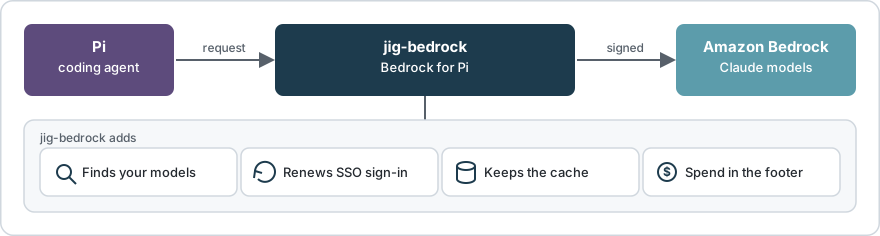
jig-bedrock between Pi and Bedrock: models, routes, sign-in, spend.
Why use it
- After a tool loads: 275 tokens written to the cache, not 34,463.
- Lists your account's Claude models; your team's application inference profiles may hold other models too.
- An expired SSO sign-in renews; the request is sent once more.
- Spend and budget in the footer.
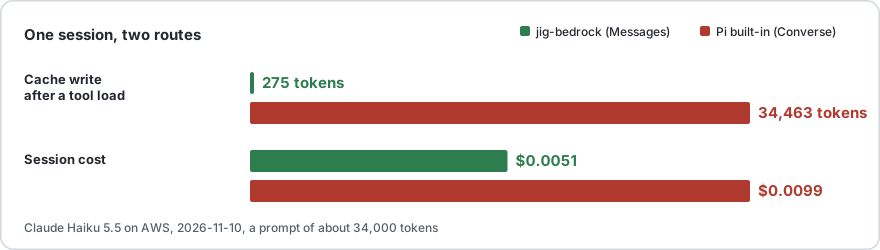
Measured on AWS on 2026-11-10: Claude Haiku 5.5, a prompt of about 34,000 tokens. Cache details.
Set up

Four steps; settings in Settings, checks in Commands.
You need: Node 22.19+, Pi 1.5 or later, AWS CLI v2, an AWS profile that can call Bedrock.
1. Install
pi install npm:@clawdbuilder/jig-bedrockUsing Jig? jig install npm:@clawdbuilder/jig-bedrock; then use jig wherever these steps say pi.
Done when pi list or jig list shows npm:@clawdbuilder/jig-bedrock.
2. Sign in
Run /login; choose Sign in with an API key, then Amazon Bedrock (jig-bedrock); it asks for no key.
How do you sign in to AWS?
→ An AWS profile that already works
  Create an IAM Identity Center (SSO) profile
  Create an IAM role profile
  Use the AWS credential chain (no profile)
  Use a Bedrock API key with Pi's own provider
Which AWS profile should Bedrock use?
→ my-profile
Which inference profiles should Bedrock list?
→ All AWS-defined Claude inference profiles
AWS regions for discovery (comma separated)
> us-east-1
Choose All AWS-defined Claude inference profiles for shared profiles, Inference profiles with a tag I name for team-tagged application inference profiles (admin: key and value), or Inference profiles I list by ARN or id for known ARNs.
Bedrock models loaded: 31. Choose one with /model.Pi then says in red that no default model is configured; step 3 picks one.
Done when the last line is Bedrock models loaded: with a number above 0.
3. Pick a model
Run /model, type sonnet-5-5, then Enter uses it for this session; Ctrl+S also keeps it as the default for every start.
> sonnet-5-5
→ claude-sonnet-5-5-global [jig-bedrock]
  claude-sonnet-5-5 [jig-bedrock]
  Model Name: Claude Sonnet 5.5 · global
A -global id lets AWS serve the request from any region; same model, same price (Model ids).
Done when the footer shows the chosen id and Nov $0.00.
4. Check
/bedrock doctor callThis sends one tiny request (a fraction of a cent).
Bedrock doctor
✓ Node 26.13.0
✓ AWS CLI 2.34.46
✓ Settings: ~/.pi/agent/bedrock.json
✓ AWS profile: my-profile (from /login)
✓ Sign-in: AWS answered
✓ Models: 31 found in us-east-1 (AWS-defined)
✓ Selected model: claude-sonnet-5-5 · Messages route
– Spend command: not set
✓ Request: Messages route · 0.9 s · cache read 0, wrote 120
Bedrock is ready.
Done when the last line is Bedrock is ready.
No AWS setup yet?
At /login, choose Create an IAM Identity Center (SSO) profile. It asks for seven values: the AWS profile name, SSO session name, start URL, SSO region, account ID, role name and profile region. Find them in your AWS access portal, or ask your AWS administrator.
Budget
/bedrock budget 200Nov $12.40 / $200; warning at 80%, error at 100%. Spend details; prompt cache.
Compared with Pi's built-in Bedrock provider
| | Pi built-in | jig-bedrock |
| ----------------------- | ------------------------- | ----------------------------------------------- |
| Install | Part of Pi | pi install |
| Sign-in | API key or environment | AWS profile: SSO, keys, role |
| Models | Pi's list, non-Claude too | Claude; others by application inference profile |
| Expired SSO sign-in | Request fails | Renewed, sent once more |
| Cache after a tool load | Rewritten | Kept on four Claude models |
| 1-hour cache | Claude 4.5 and later | Converse models only |
| Spend and budget | Not included | In the footer |
Several AWS profiles
Named presets show their models in /model, marked [jig-bedrock-<preset>]; New preset… (Presets menu) creates one. See Presets.
Commands
| Command | What it does |
| ------------------ | -------------------------------- |
| /bedrock | Opens the Bedrock menu. |
| /bedrock status | Profile, sign-in, models, spend. |
| /bedrock doctor | Checks; one next step. |
| /bedrock models | Models, route, price. |
| /bedrock refresh | Reads models now, any cache age. |
| /bedrock login | Renews the AWS sign-in. |
| /bedrock usage | Spend by model and period. |
| /bedrock spend | The same as usage. |
| /bedrock use | List or switch presets. |
/bedrock opens a menu with Status, Check setup, Test one request, Models, Refresh models, Sign in again, Presets, Settings, Spend, Budget and Help. Back goes up one menu; Escape closes it. Typed forms and /bedrock help stay for scripts and agents.
When something is wrong
| You see | Run |
| ---------------------------------- | ------------------ |
| Sign-in expired | /bedrock login |
| Access denied | /bedrock doctor |
| No models in /model | /bedrock refresh |
| A model is missing after an update | /bedrock models |
| The footer shows no amount | /bedrock usage |
Limits
- Linux/WSL tested. macOS: unit tests in CI, not run against real AWS. No native Windows.
- A Bedrock API key works through Pi's built-in provider, not this one.
- Spend counts this machine's Pi sessions unless
spendCommandis set. - The budget is a figure to compare with; it never blocks a request.
- Only SSO sign-ins, and a role over SSO, are renewed.
Update and uninstall
Update: pi update npm:@clawdbuilder/jig-bedrock, then /reload.
Remove: /logout, then /bedrock unset profile, then pi remove npm:@clawdbuilder/jig-bedrock. It leaves some files: Files on disk.
With Jig, jig update updates jig-bedrock (it is installed unpinned) and jig remove npm:@clawdbuilder/jig-bedrock removes it.
More detail
| Page | Read it when |
| ------------------------------------------ | ----------------------- |
| How it works | Routes and ids. |
| Settings | Edit bedrock.json. |
| Troubleshooting | A command fails. |
| Spend command | You set spendCommand. |
For an agent setting this up
- Run
pi install npm:@clawdbuilder/jig-bedrock. Done whenpi listshows it. - Ask the person which AWS profile to use. For an SSO profile, ask them to run
aws sso login --profile <name>in their terminal; a browser opens. Never read or print credentials. - Write
~/.pi/agent/bedrock.jsonas{"profile": "<name>", "regions": ["us-east-1"]}. Done whenpi -p "/bedrock settings"showsprofile: <name> (file). - Run
pi -p "/bedrock refresh". Done when it reports more than 0 models. - Run
pi -p --model jig-bedrock/claude-sonnet-5-5 "/bedrock doctor call"; it sends one tiny request. Done when the last line isBedrock is ready.If/bedrock refreshor/bedrock modelsdoes not list that id, use another non-Fable Claude model from it. A person does the same interactively with/login,/modeland/bedrock doctor call.
Bedrock doctor
✓ Node 26.13.0
✓ AWS CLI 2.34.46
✓ Settings: ~/.pi/agent/bedrock.json
✓ AWS profile: my-profile (from bedrock.json)
✓ Sign-in: AWS answered
✓ Models: 31 found in us-east-1 (AWS-defined)
✓ Selected model: claude-sonnet-5-5 · Messages route
– Spend command: not set
✓ Request: Messages route · 3.9 s · cache read 0, wrote 0
Bedrock is ready.
Licence
MIT.