
@clue_nidapp/form-core
v2.0.1-alpha.3
Published
线索通表单 SDK 为线索通表单组件核心逻辑SDK,包含表单从初始化到最终销毁全生命周期数据流转,仅作为核心逻辑的封装不侵入UI交互。目前该 SDK 支持 h5,lynx,字节小程序环境。使用该 SDK,开发者可以不依靠橙子建站,搭建自己的表单落地页。
Downloads
80


Keywords
Readme
线索通表单 SDK
线索通表单 SDK 为线索通表单组件核心逻辑SDK,包含表单从初始化到最终销毁全生命周期数据流转,仅作为核心逻辑的封装不侵入UI交互。目前该 SDK 支持 h5,lynx,字节小程序环境。使用该 SDK,开发者可以不依靠橙子建站,搭建自己的表单落地页。
安装
yarn add @clue_nidapp/form-core
# or
npm install @clue_nidapp/form-core
使用
step1 引入
需引入 sdk 本体和对应环境的网络请求插件,注意,表单 sdk 必须配合对应环境的网络请求插件使用
import { Core, FormOptions } from '@clue_nidapp/form-core/web';
import { API } from '@clue_nidapp/plugin-api-h5' // 引入网络请求插件
step2 引入 convertSDK
// 字节小程序环境
import convertSDK from '@clue_nidapp/mini-convert-sdk'
// h5 环境
import convertSDK from '@clue_nidapp/h5-convert-sdk'
step3 实例化 sdk
登录线索通,新建表单,并获取表单 instanceId advId 以及 clueAccountId
// 场景一:SDK 内部加载数据
let options:FormMetaData = {
  // formId是表单的instanceId
  data: { formId: 0, advId: 0, clueAccountId: 0 },
  // 注册插件,sdk 必须注册对应环境的网络请求插件后使用
  plugins: [new API()],
  externalSetting: {
    scenarioType: FormScenarioType // SDK接入场景,小程序为 25,h5 为 28,更多场景值可以查看 FormScenarioType
  }
};
const formCore = new Core(options, convertSDK);
初始化参数说明
| 字段 | 类型 | 说明 | |-----------------|--------|--------| | data | object | 表单归属信息 | | externalSetting | object | 额外配置 | | plugins | array | 插件 |
表单归属信息
| 字段 | 类型 | 说明 | |---------------|--------|---------| | formId | number | 表单id | | advId | number | 广告主账号id | | clueAccountId | number | 线索通账号id |
额外配置
| 字段 | 类型 | 说明 | |--------------------|------------------|----------------| | scenarioType | FormScenarioType | SDK接入场景,小程序为25 | | setting | object | 表单配置 |
表单配置
| 字段 | 类型 | 说明 | |-------------------------|---------|-------------------------------| | showTipsOnSubmitSuccess | boolean | 表单提交成功后是否由SDK控制弹窗交互事件,默认为true |
step4 使用 sdk
订阅
FormLifeCycleEvent.DetailReady方法,获取你在青鸟线索通上创建的表单的数据,然后用这些数据作为你的表单字段的默认值(如果你的表单字段是有默认值的场景)在你表单字段值修改时,调用
formCore.reportBehavior方法向 sdk 上报修改后的值(必须)调用
formCore.submitForm方法提交表单接收提交表单后的回调事件
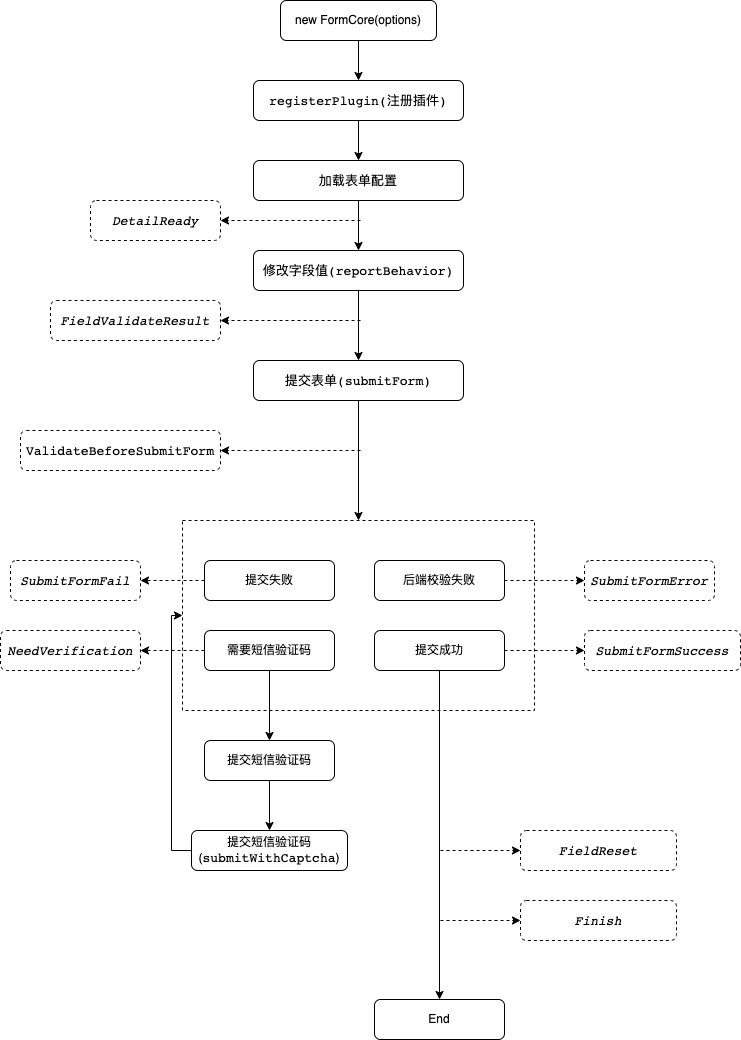
完整生命周期
以下方法挂载在 FormLifeCycleEvent 枚举上
| 常量名 | 常量值 | 描述 | 返回值类型 | 备注 |
|--------------------------|--------------------------|--------------------------------------|-----------------------------|----------|
| DetailReady | DetailReady | detail 加载成功,可能是 api 加载的,也可能外部直接传入 | data : FormCoreData | |
| FieldValidateResult | FieldValidateResult | 填写表单校验结果 | 详见 IFieldValidateResult | |
| ValidateBeforeSubmitForm | ValidateBeforeSubmitForm | 提交表单前校验结果 | 详见 IValidateResult | |
| SubmitFormSuccess | SubmitFormSuccess | 表单提交成功 | ||
| NeedSMSVerification | NeedSMSVerification | 提交表单后需要出短信验证码 | 详见 INeedSMSVerificationData | - |
| SubmitFormError | SubmitFormError | 提交错误,指有明确的业务错误含义(如参数不正确,或者唯一性校验不通过等) | 返回值同 AfterSubmitForm | 服务端校验失败 |
| SubmitFormFail | SubmitFormFail | 提交失败, 指提交没有送达服务端或者服务端异常,服务不可用 | 返回值同 AfterSubmitForm | 表单提交服务异常 |
| FieldReset | FieldReset | 表单字段值重置 | - | - |
| Finish | Finish | 表单提交流程结束 | - | - |
生命周期图
插件机制介绍
线索通表单 SDK 中只提供了一些基础能力,其余能力的扩展都是引入插件,注册插件来完成的。以网络请求插件为例
import { Core, FormOptions } from '@clue_nidapp/form-core/web';
import { API } from '@clue_nidapp/plugin-api-h5' // 引入网络请求插件
const options: FormOptions = {
  data: { formId: 0, advId: 0, clueAccountId: 0, },
  // 注册插件
  plugins: [new API()]
}
const formCore = new Core(
  options,
);
注册完成后,就可以使用 sdk 发送网络请求了
formCore.request.get(url, options).then((res) => {});官方插件列表
| 包名 | 说明 | 支持环境 | |----------------------------------------|---------------|---------------| | @clue_nidapp/plugin-api-mini | API 请求插件,必须注册 | 字节小程序 | | @clue_nidapp/plugin-api-lynx | API 请求插件,必须注册 | lynx | | @clue_nidapp/plugin-api-h5 | API 请求插件,必须注册 | h5 | | @clue_nidapp/plugin-bridge-h5 | 说明 | h5 | | @clue_nidapp/plugin-bridge-lynx | 说明 | lynx | | @clue_nidapp/plugin-autofiller-common | 表单自动填充插件 | h5 lynx | | @clue_nidapp/plugin-form-dealer-common | 获取优选经销商数据插件 | h5 lynx | | @clue_nidapp/plugin-form-dealer-mini | 获取优选经销商数据插件 | 字节小程序 | | @clue_nidapp/plugin-logger-common | 埋点上报插件 | h5 lynx 字节小程序 |
定制你的插件
我们允许使用方定制自己的插件,然后将其注册到表单 sdk 中使用。
插件的实现并不复杂,只需要实现抽象类 IPlugin 中的 plugIn 方法和
plugOff 方法即可
plugIn 方法是插件的注册方法,接收一个参数为表单 sdk 的实例,它将会在插件注册时触发
plugOff 方法是插件的销毁方法,它将在插件卸载时触发
import { IPlugin } from '@clue_nidapp/shared';
import { Core } from '@clue_nidapp/form-core';

export class Api implements IPlugin {
  name = 'your plugin name'

  public plugIn(coreInstance: Core) {
    // add your code
  }

  public plugOff() {
    // add your code
  }
}
实现完你的插件之后,将它注册到表单 sdk 即可,我们提供了两种方法来注册
方法一
在表单 sdk 实例化时就注册,这也是我们推荐的方法
const formCore = new Core({
  detailData: formData,
  // 注册插件
  plugins: [new API()]
}, convertSDK);
方法二
在表单 sdk 实例后注册,需要确保表单 sdk 实例化时不依赖这些插件,否则表单 sdk 会实例化失败
const formCore = new Core();
formCore.registerPlugin(new Plugin());
静态方法和实例上方法、属性
除去使用发布订阅方法调用 sdk 方法外,sdk 还提供了静态方法和普通方法,列表如下
| 名称 | 类型 | 参数 | 说明 | 示例 | |---------------------------|------|----------------------------------------|---------------------------------|-------------------------| | submitWithCaptcha | API | sms_ticket: string | 提交短信验证码 | - | | reportBehavior | API | data: IReportBehavior | 修改表单字段值 | - | | submitForm | API | submitType: ISubmitType | 提交表单 | - | | captchaVerificationFail | API | 无 | 验证码校验失败 | - | | on | API | eventName: string, callback?: Function | 注册@clue_nidapp/form-core SDK 事件 | 参考 EventEmitter 用法 | | emit | API | eventName: string, params: any | 触发@clue_nidapp/form-core SDK 事件 | 参考 EventEmitter 用法 | | addToCustomFields | API | arr: ICustomField[] | 修改自定义提交参数,key相同时值会覆盖 | - | | resetCustomFields | API | 无 | 重置自定义提交参数 | - |
ICustomField
interface ICustomField {
  k: string;
  v: any;
}
生命周期返回值及方法参数说明
表单detail加载成功返回值(FormCoreData)
| 字段 | 类型 | 描述 | |------------|---------------|----------| | elements | FEFormElement | 表单字段 | | submitText | string | 表单提交按钮文案 |
表单字段配置详情(FEFormElement)
| 字段 | 类型 | 描述 | |------------|---------------------------------|----------------| | id | number | 字段ID | | label | string | label | | type | FormElementType | 字段类型 | | required | boolean | 字段是否必填 | | dataSource | null/RadioCheckboxData/TreeData | 单选/多选/下拉字段选项配置 | | expand | object | 字段子类型等信息,简单字段无子类型,详见 FormElementExpand |
FormElementExpand
interface FormElementExpand {
  subType: FormElementExpandSubType; // 子类型
  fieldSubType: FormElementExpandFieldSubType; // 子类型
  dpaId: number;
  multiple: boolean; // 是否是多选组件
  optionNumber?: number; // 多选时有,多选最大数量
}

enum FormElementExpandSubType {
  carOneSelect = 1, // 汽车行业一级下拉
  carTwoSelect = 2, // 汽车行业二级下拉
  carDistributorSelect = 3, // 汽车行业经销商下拉
  carCustomSelect = 4, // 汽车行业经销商下拉 - 自定义csv上传
  carOptimizedRetailerSelect = 5, //汽车行业优选经销商
  carDcdSelect = 6, // 懂车帝下拉
}

enum FormElementExpandFieldSubType {
  default = 0,
  carOneSelect = 101, // 汽车行业一级下拉
  carTwoSelect = 102, // 汽车行业二级下拉
  carDistributorSelect = 103, // 汽车行业经销商下拉
  carCustomSelect = 104, // 汽车行业自定义下拉
  carOptimizedRetailerSelect = 105, // 汽车行业优选经销商
  intentionBuyCarCity = 106, // 企业号车云店意向城市优选
  carDcdSelect = 107, // 懂车帝下拉
  interactiveRadio = 111, // 对话表单对话选项
}
填写表单校验结果返回值(IFieldValidateResult)
| 字段 | 类型 | 描述 | |--------------------|----------------|--------| | fieldIdOrFieldType | number | 校验字段id | | result | ValidateResult | 校验结果 |
IValidateResult
| 字段 | 类型 | 说明 | |--------|-------------------------------------------|-----------------------| | valid | boolean | 校验是否通过 | | errors | { elementId: number, message: string } [] | 校验不通过时返回,未通过元素的错误原因数组 |
IAfterSubmitForm
| 字段 | 类型 | 说明 | |---------|----------|---------| | status | httpCode | 网络请求状态码 | | data | object | 返回数据 | | message | string | |
修改表单字段字入参(IReportBehavior)
| 字段 | 类型 | 说明 | |------------|---------------------|-------------------| | at | BehaviorEvent | actionType,用户行为 | | fid | number | element.id,字段ID | | et | FormElementType | element.type,字段类型 | | value | number/string/Array | 字段value | | ts | number | 上报时间戳, Date.now() | | useraction | boolean | 是否用户主动触发, true | | extra | object | 仅下拉字段需要传,详见demo |
用户行为(BehaviorEvent)
| 字段 | value | 说明 | |--------------|-------|-------------------| | field_focus | '01' | | | field_change | '02' | element.id,字段ID | | field_blur | '03' | element.type,字段类型 | | autofill | '06' | 使用历史|自动填充时 | | autounfill | '07' | 取消自动填充时调用 |
字段类型说明(FormElementType)
| 字段 | 枚举值 | 说明 | |-----|-----|-----| | 姓名 | 1 | | | 电话 | 2 | | | 邮箱 | 3 | | | 数字 | 4 | | | 性别 | 5 | | | 日期 | 6 | | | 城市 | 7 | | | 文本 | 8 | | | 多文本 | 9 | | | 下拉 | 10 | | | 单选 | 11 | | | 多选 | 12 | |
字段值说明
| 字段 | value类型 | eg | 说明 | |-----|----------|-------------------------------------------------------------------------------------------------------|-----| | 姓名 | string | '张一鸣' | | | 电话 | string | '18888888888' | | | 邮箱 | string | '[email protected]' | | | 数字 | number | 1 | | | 性别 | '男'/'女' | '男' | | | 日期 | string | '1971-01-01' | | | 城市 | cityCode | '100000' | | | 文本 | string | '' | | | 多文本 | string | '' | | | 下拉 | array | 单选:[['河北省'],['石家庄市'],['经销商a']],多选:[['河北省','石家庄市','经销商a'],['河北省','石家庄市','经销商b'],['河北省','石家庄市','经销商c']] | | | 单选 | string | '' | | | 多选 | string[] | ['a', 'b'] | |
字段默认值获取
单选
let defaultValue = '';
const defaultArray = element.dataSource.filter(({isDefault})=>isDefault).map(({name}) => name);
if(defaultArray.length > 0){
  defaultValue = defaultArray[0]
}
多选
const defaultValue = element.dataSource.filter(({isDefault})=>isDefault).map(({name}) => name);下拉
import { FEFormElement, BehaviorMap, getSelectLevelOptions, getSelectFieldDefaultValue, formatSelectFieldValue } from '@clue_nidapp/form-core';

// 获取下拉选项默认值数,据结构为TreeDataItem[][]
const selectItems = getSelectFieldDefaultValue(element.dataSource);
// 格式化默认值, 数据结构string[][]
const defaultValue = formatSelectFieldValue(selectItems);
Tips:下拉字段传值
下拉字段支持单选和多选两种格式,单选时每一级仅支持选择一个选项,多选时仅支持优选经销商进行多选(需要在青鸟线索通中进行配置)
代码示例
常见问题
Q: 表单提交后,能收到表单提交成功的回调,但是在飞鱼看不到提交的线索
A: 在测试时,如果短时间内多次提交,表单提交生成的线索极有可能被反作弊系统拦截,这种情况下线索不会进入到飞鱼,可以更换手机号、设备重新提交尝试,或在一定时间(一般为 24h)后再次尝试
Q: 在字节小程序中编译报错 TypeError: Converting circular structure to JSON / 在字节小程序中无法将 formCore 实例作为 props 传递给子组件
A: 小程序对 props 的序列化使用 JSON.parse,formCore 实例继承自 EventEmitter3 对象,是无法被这样序列化的,故而推荐使用 provide inject 来传递 formCore 实例