
@cmgmyr/hive
v1.6.0
Published
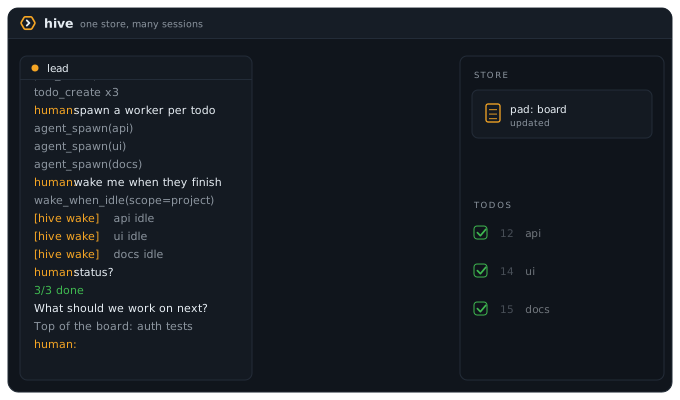
Run a crew of Claude Code and Codex workers from one lead session: visible tmux panes, exact state from hooks, one local SQLite store.

Maintainers
 cmgmyr
Readme
Run a crew of Claude Code and Codex workers from one lead session: visible tmux panes, exact state from hooks, one local SQLite store.
- Visible workers: each one is a real tmux pane you can read and type into.
- Exact state: workers report it through their own CLI's hooks, so nothing polls.
- One local SQLite store: no daemon, and nothing leaves your machine.
Install
Requirements: macOS, Node ^22.14.0 || >=23.6.0, Claude Code, and tmux for the agent tools. codex is optional, only needed if a project opts a worker into it; see docs/install.md.
npm install -g @cmgmyr/hive
hive setup           # pins the hive command to one interpreter, prints the MCP line
brew install tmux
claude mcp add --scope user hive -- "$(command -v node)" "$(npm root -g)/@cmgmyr/hive/dist/index.js"
ln -s "$(npm root -g)/@cmgmyr/hive/claude-plugin" ~/.claude/skills/hive   # optional: session-start kickoff
hive doctor          # verify: node, ABI, tmux, claude, database, hooks all green
Working from a clone instead? See docs/install.md.
Put ~/.local/bin on your PATH below your version manager's block. See Node version and the interpreter pin for why the order matters.
First run
Run cd ~/Code/your-project && hive. It is shorthand for hive lead, and it opens a lead window running Claude in this project's tmux session, with the lead session named after the project so your other Claude Code sessions can address it by that name; ask it to triage, and it reads the standing process and proposes work. Spawn workers with agent_spawn, and watch or take over any of them with tmux -CC attach -t hive-main (or plain tmux attach).
How it works
Each Claude Code session runs its own hive MCP server over stdio, and every instance reads and writes one SQLite database (WAL mode) at ~/.hive/hive.db, so every session sees the same state. There is no daemon and nothing leaves your machine. State is scoped to a project (a directory), resolved from the working directory; a lead spawns workers into tmux panes locked to that project.
Why not subagents?
| | Subagents | hive workers | |---|---|---| | Visibility | report at the end | live terminal you read and type into | | Persistence | vanish with the conversation | pads and todos outlive every session | | Lifetime | die with the parent | keep running when the lead detaches | | Scope | one session | several sessions, terminals, humans |
Hive workers can still use subagents. See Why not subagents? for the longer answer.
Running several projects
If you keep more than one project registered, hive queen starts a single lead that reads all of them. hive portfolio sorts them into waiting on you, stuck, moving and quiet, and hive next attaches you to the lead that needs you most. The queen writes into another project only through that project's lead, and hive records each write. The queen guide covers setup and limits.
Status
hive is a personal daily-driver tool, released low-key. It is single-user by design and dogfooded daily by its author on macOS. The test suite also runs on Linux in CI, but nobody drives hive there yet. Issues are welcome; for bigger changes, open a discussion first. See CONTRIBUTING.md. MIT licensed.
Docs
| Page | What's there |
|---|---|
| Architecture | Seven diagrams: process topology, module layering, spawn sequence, wake lifecycle, worker state, project scoping, store and server identity |
| Patterns | Standing trades, refused approaches, evidence standards, and guard shapes distilled from the project's own decisions and dead-ends |
| Concepts | Vocabulary, why not subagents, identity, the workflow, project scope, the shared store |
| Daily driver | A day with hive, starting a session, watching workers, wake-ups |
| The queen | One lead across every project: hive queen, the portfolio, hive next, its reach and audit trail |
| Commands | Every hive subcommand and what it does |
| Configuration | The HIVE_* environment variables |
| Profiles | Standing instructions across projects, the session-start plugin |
| Projects | hive init, hive.yml, automatic backups, pads and todos from the shell |
| Dashboard | The generated dashboard: enabling it, where it lives, what it shows |
| Install details | The interpreter pin, iTerm settings, the status line, MCP scope, codex workers, updating, uninstalling |
| Troubleshooting | Common errors and their fixes |
| Tools | The MCP tools: what each does and when to use it |
| tmux settings | Attach modes, pane options, and what to put in ~/.tmux.conf |
| Development | Building and testing hive itself |
Updating
Run hive upgrade for a global npm install, or hive upgrade --check to preview the commands without changing your install. In a git checkout, the default prints the recipe; hive upgrade --run executes it. Upgrade reports Claude Code and Codex registration repairs without editing their configs. Restart every session with hive loaded after the upgrade. See Updating and recovery.