
@codecell-germany/company-agent-wiki-skill
v0.1.5
Published
Context is king: agent-first local company knowledge workspace with metadata-first retrieval, Markdown as truth, SQLite-indexed front matter, Git-aware verification, and a shared agent skill installer.
Downloads
32


Readme
company-agent-wiki-skill
English
Purpose
Context is king.
company-agent-wiki-skill is an agent-first local company knowledge toolkit.
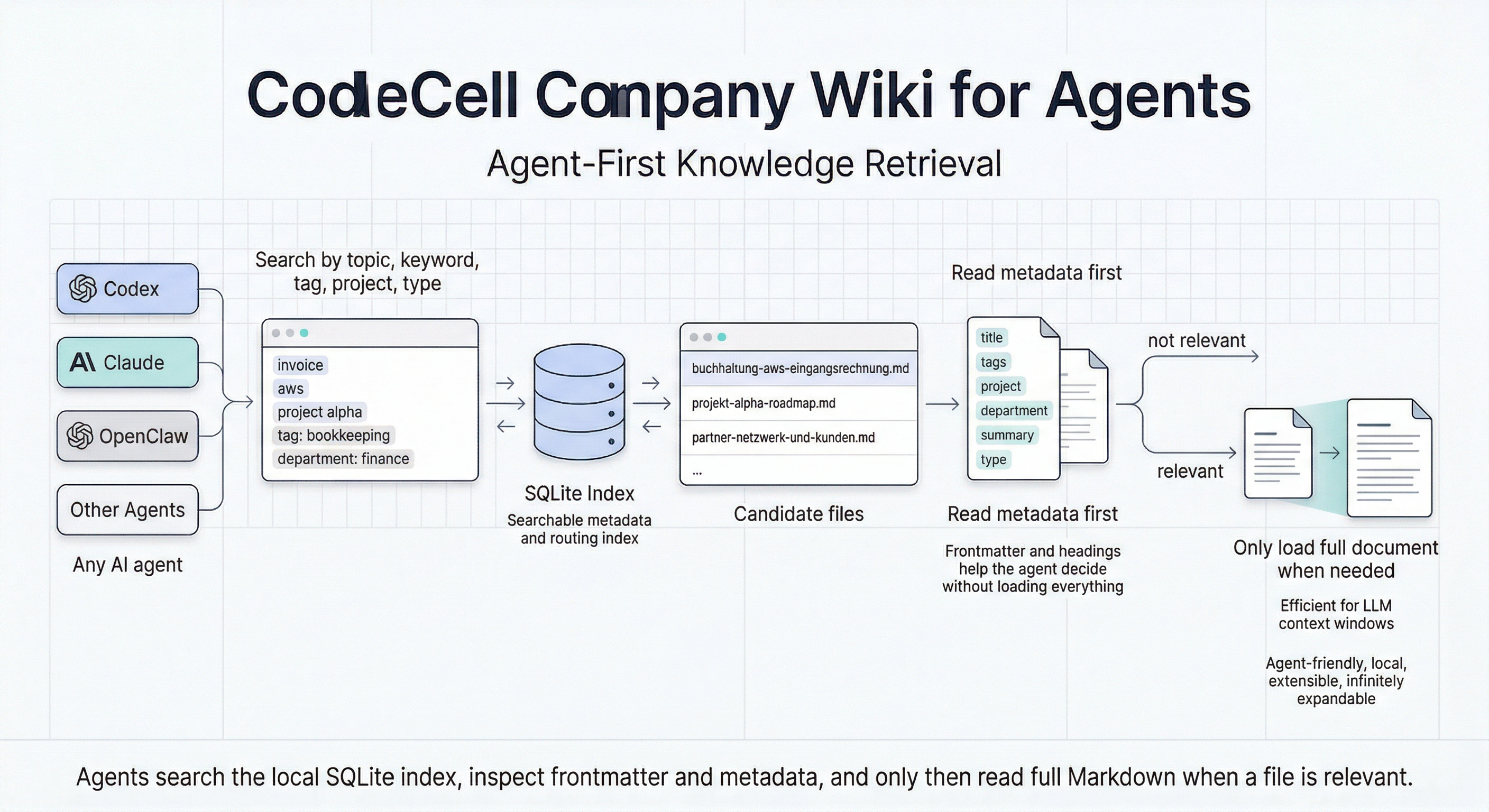
It ships as a real CLI plus a shared agent skill payload, so an agent can set up a private company wiki, verify the index state, search knowledge, inspect metadata and headings first, and only then load full Markdown when needed.
The shared install layout is meant to work across agent environments that understand the common ~/.agents skill home, including Codex through a compatibility shim and other skills.sh-style runtimes such as Claude Code or OpenClaw.
The product surface is the public CLI:
company-agent-wiki-clicompany-agent-wiki-skill
The skill explains how an agent should use that CLI safely. It is not a substitute implementation.
Current scope
- private local knowledge workspaces with Markdown as the source of truth
- a rebuildable local SQLite index for routing and section search
- metadata-first retrieval over filename, front matter and headings
- Git-backed history and diff workflows
- global per-user workspace discovery for later agents
- company-profile onboarding blueprints
- a read-only local web view
Product model
The core design is simple:
- Markdown stays human-readable and remains the source of truth
- SQLite is derived and rebuildable
- Git stays the audit and history layer
- the CLI is the real product surface for agents
The retrieval model is deliberately inspired by Anthropic's Agent Skills model with YAML front matter, progressive disclosure and filesystem-based loading: Anthropic Agent Skills Overview
The difference is the retrieval layer.
Here, front matter is not only stored in Markdown files, but also indexed and filterable through a local SQLite search layer.
route now also understands official alias fields, returns nearMisses when no strong match exists and can be inspected through route-debug or coverage.
Architecture visuals
Agentic knowledge ingestion

Agent-first knowledge retrieval
Installation
1. Install with one command
The preferred install path is:
npx -y -p @codecell-germany/company-agent-wiki-skill company-agent-wiki-skill install --forceThat installs:
- the shared skill payload into
~/.agents/skills/company-agent-wiki-cli - the shared runtime into
~/.agents/tools/company-agent-wiki-cli - the shared CLI shim into
~/.agents/bin/company-agent-wiki-cli - the Codex compatibility shim into
~/.codex/bin/company-agent-wiki-cli
The skill payload intentionally exists only once under ~/.agents/skills.
Codex gets a CLI compatibility shim, but not a second duplicate skill payload.
2. Verify the CLI
company-agent-wiki-cli --help
"$HOME/.agents/bin/company-agent-wiki-cli" --help
"$CODEX_HOME/bin/company-agent-wiki-cli" --help
"$HOME/.codex/bin/company-agent-wiki-cli" --help
For agent environments that use the shared ~/.agents home, the direct shim path is often the most reliable fallback.
In Codex, the compatibility shim under ~/.codex/bin also works.
3. Optional local repo workflow
If you are working inside this public implementation repo itself:
npm install
npm run build
node dist/installer.js install --force
Requirements
- Node.js
>= 20.10 - Git available in
PATH - a private local folder for the actual knowledge workspace
- optionally a private Git remote URL for that workspace
The private knowledge workspace must not be this public code repository. It may still be the current dedicated private folder in which you want to build the wiki.
The SQLite index lives inside the private workspace under .company-agent-wiki/index.sqlite.
It is intentionally kept out of Git by default because it is rebuildable, binary and noisy in diffs.
The workspace path can also be stored globally for other agents:
- macOS:
~/Library/Application Support/company-agent-wiki/workspaces.json - Windows:
%APPDATA%\company-agent-wiki\workspaces.json - Linux:
${XDG_CONFIG_HOME:-~/.config}/company-agent-wiki/workspaces.json
Quick start
Create or choose a private workspace and run:
company-agent-wiki-cli setup workspace \
  --workspace /absolute/path/to/private-company-knowledge \
  --git-init \
  --git-remote [email protected]:your-org/private-company-knowledge.git
Then:
company-agent-wiki-cli doctor --workspace /absolute/path/to/private-company-knowledge --json
company-agent-wiki-cli index rebuild --workspace /absolute/path/to/private-company-knowledge --json
company-agent-wiki-cli verify --workspace /absolute/path/to/private-company-knowledge --json
After that, start retrieval:
company-agent-wiki-cli search "reverse charge aws invoice" --workspace /absolute/path/to/private-company-knowledge --type process --department buchhaltung --auto-rebuild --json
company-agent-wiki-cli route "KI-Telefonassistent" --workspace /absolute/path/to/private-company-knowledge --type project --project alpha --auto-rebuild --json
company-agent-wiki-cli route-debug "Google Cloud Statement Beleggrundlage buchen" --workspace /absolute/path/to/private-company-knowledge --auto-rebuild --json
company-agent-wiki-cli coverage "Kfz-Steuer Bescheid Erstattung" --workspace /absolute/path/to/private-company-knowledge --auto-rebuild --json
company-agent-wiki-cli read --doc-id process.example --workspace /absolute/path/to/private-company-knowledge --metadata --headings --auto-rebuild --json
company-agent-wiki-cli read --doc-id process.example --workspace /absolute/path/to/private-company-knowledge --auto-rebuild
company-agent-wiki-cli serve --workspace /absolute/path/to/private-company-knowledge --port 4187 --auto-rebuild
By default setup workspace also creates starter Markdown files such as:
wiki-start-here.mdcompany-profile.mdorganisation-und-rollen.mdsysteme-und-tools.mdkernprozesse.mdprojekte-und-roadmap.mdglossar.md
Deterministic first-run order for agents
If a fresh agent receives this skill, the correct order is:
- Verify the CLI path:
company-agent-wiki-cli --help"$HOME/.agents/bin/company-agent-wiki-cli" --help"$CODEX_HOME/bin/company-agent-wiki-cli" --help"$HOME/.codex/bin/company-agent-wiki-cli" --help
- If no workspace exists yet, create one with
setup workspace. - If a workspace already exists, inspect or register it:
workspace current --jsonworkspace list --jsonworkspace register --workspace /absolute/path --default --json
- Run
doctor --json. - Run
index rebuild --json. - Run
verify --json. - Only then use
search,route,read,history,difforserve.
If the current shell is already inside a private workspace, runtime commands may omit --workspace.
If not, the CLI can fall back to the globally registered default workspace.
Retrieval workflow
This is the core agent workflow:
- Find candidate documents with
searchorroute. - Narrow candidates with front-matter filters such as
--type,--project,--department,--tag,--ownerand--system. - If
routehas no strong match, inspectnearMissesor runroute-debugfor token-level diagnostics. - Inspect only metadata and headings with
read --metadata --headings --auto-rebuild. - Load the full Markdown only when the candidate is clearly relevant.
Example:
company-agent-wiki-cli route "Projekt Alpha Budget" --workspace /absolute/path --type project --project alpha --auto-rebuild --json
company-agent-wiki-cli route-debug "Projekt Alpha Budget" --workspace /absolute/path --type project --project alpha --auto-rebuild --json
company-agent-wiki-cli read --workspace /absolute/path --doc-id canonical.projekt-alpha-roadmap --metadata --headings --auto-rebuild --json
company-agent-wiki-cli read --workspace /absolute/path --doc-id canonical.projekt-alpha-roadmap --auto-rebuild
Authoring workflow
For new company knowledge, use a descriptive filename plus strong front matter.
Recommended filename examples:
projekt-alpha-roadmap.mdbuchhaltung-aws-eingangsrechnung.mdvertrieb-lead-qualifizierung.md
Recommended front matter:
---
id: projects.alpha.roadmap
title: Projekt Alpha Roadmap
type: project
status: draft
tags:
  - projekt
  - alpha
description: Klare Kurzbeschreibung für Agenten, bevor der Volltext geladen wird.
summary: Roadmap und Entscheidungen für Projekt Alpha.
aliases:
  - alpha roadmap
  - projekt alpha budget
project: alpha
department: entwicklung
owners:
  - nikolas-gottschol
systems:
  - linear
---
Recommended authoring order:
- Create the Markdown file inside
knowledge/canonical/or another registered managed root. - Use a filename that roughly describes the real content.
- Set front matter including
id,description,summary,aliasesand the routing fields that matter. - If the content depends on external sources, document provenance, date and source type.
- Structure the file with clear
#,##and###headings. - Rebuild the index or use an
--auto-rebuildretrieval path. - Validate discoverability with
search,routeandread --metadata --headings --auto-rebuild. - If the document is structurally important, update the start page or thematic overview pages as well.
Company onboarding
You can also start the optional company-profile onboarding:
company-agent-wiki-cli onboarding company
company-agent-wiki-cli onboarding company --json
company-agent-wiki-cli onboarding company \
  --workspace /absolute/path/to/private-company-knowledge \
  --answers-file /absolute/path/to/company-onboarding-answers.json
company-agent-wiki-cli onboarding company \
  --workspace /absolute/path/to/private-company-knowledge \
  --answers-file /absolute/path/to/company-onboarding-answers.json \
  --execute
Without --execute, the CLI stays in preview mode.
With --execute, it writes draft starter Markdown into the managed root and rebuilds the index.
Concurrency
The SQLite index is intentionally local and rebuildable.
Parallel reads such as search, route, read, history and diff are a supported Phase-1 goal and should work across multiple agents.
Write paths such as index rebuild and onboarding apply are serialized per workspace through a local write lock, so concurrent writes queue behind the active writer instead of colliding.
Routing ergonomics
aliasesis the official front-matter field for alternate document names and audit phrasing.synonymsandsearch_termsare also accepted and folded into the same indexed alias set.routenow returns strong matches plusnearMisses, so agents get fallback candidates instead of a dead end.route-debugexplains which tokens matched in title, description, summary, aliases, tags, headings or path.coveragesummarizes whether a topic is strongly, partially or not yet documented.
What Phase 1 does not do
- it does not ingest e-mail, CRM, chat or meeting systems
- it does not write or edit knowledge through the web UI
- it does not push or publish Git commits automatically
- it does not treat the SQLite database as the truth
- it does not run an interactive prompt loop by itself; the agent still owns the conversation and answer-file creation
Documentation
- Architecture: knowledge/ARCHITECTURE.md
- Release checklist: knowledge/RELEASE_CHECKLIST.md
- Known limitations: knowledge/KNOWN_LIMITATIONS.md
- Skill entrypoint: skills/company-agent-wiki-cli/SKILL.md