
@codions/floating-contact-button
v0.1.3
Published
A lightweight, zero-dependency floating multi-channel contact button for any website. WhatsApp, Telegram, Instagram, Messenger, and more.
Downloads
22

Maintainers
 fabioassuncao
Readme
Floating Contact Button
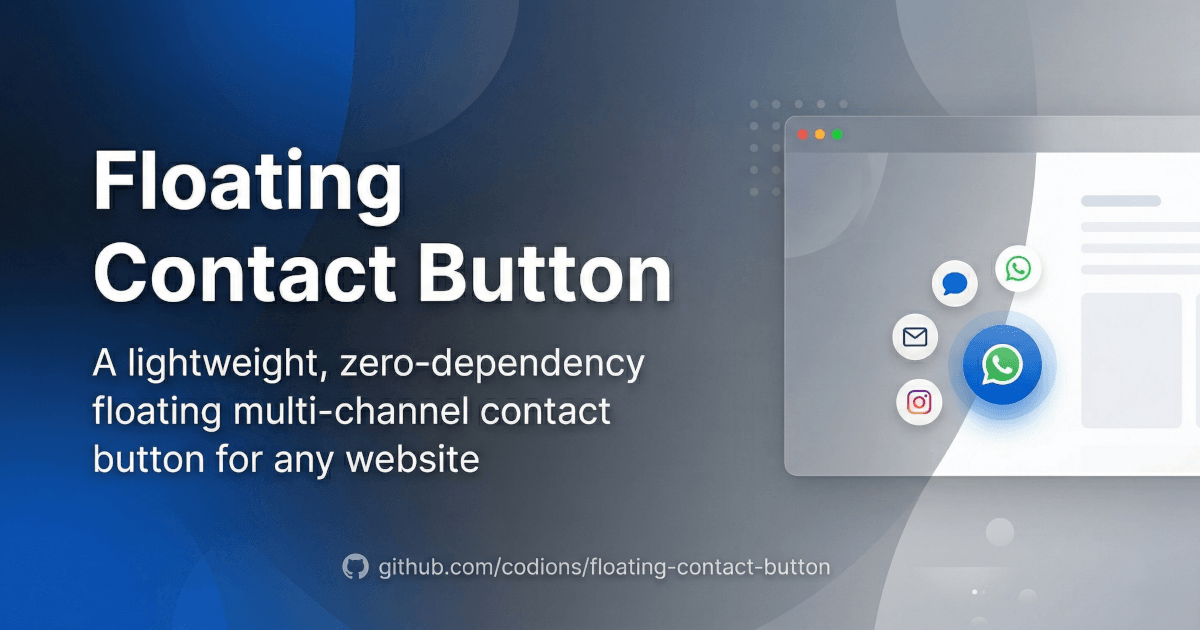
A lightweight, zero-dependency floating multi-channel contact button for any website. Built with TypeScript.
- Multi-channel: WhatsApp, Telegram, Instagram, Messenger, Email, Phone, SMS, and custom channels
- Zero dependencies — pure vanilla JavaScript
- Floating channel bar with staggered animations (horizontal or vertical)
- Single script tag setup via CDN or npm
- TypeScript support with full type definitions
- Customizable button shape, colors, icons, position, dark mode, and more
- Custom icons — use any image URL (PNG, WebP, SVG) or inline SVG per channel
- Accessible — ARIA labels, keyboard navigation, focus management
- Responsive — auto-switches to vertical on mobile
Install
npm install @codions/floating-contact-buttonOr via CDN:
<script src="https://cdn.jsdelivr.net/npm/@codions/floating-contact-button/dist/floating-contact.min.js"></script>Quick Start (WhatsApp Only)
Add one script tag with data- attributes for a single WhatsApp button:
<script
  src="https://cdn.jsdelivr.net/npm/@codions/floating-contact-button/dist/floating-contact.min.js"
  data-phone="5598991234567"
  data-popup-message="Hi! How can we help you?"
  data-position="right"
></script>
The button appears automatically. No extra code needed.
Multi-Channel Setup
For multiple contact channels with a floating channel bar:
<script src="https://cdn.jsdelivr.net/npm/@codions/floating-contact-button/dist/floating-contact.min.js"></script>
<script>
  const widget = FloatingContact.init({
    channels: [
      {
        id: 'whatsapp',
        label: 'WhatsApp',
        phone: '5598991234567',
        popupMessage: 'Hi! How can we help you?',
        action: { type: 'popup' },
      },
      {
        id: 'telegram',
        label: 'Telegram',
        action: { type: 'link', url: 'https://t.me/mybot' },
      },
      {
        id: 'phone',
        label: 'Phone',
        phone: '5598991234567',
        action: { type: 'link' },
      },
      {
        id: 'email',
        label: 'Email',
        action: { type: 'link', url: 'mailto:[email protected]' },
      },
    ],
    position: 'right',
    buttonShape: 'circle',
    notification: true,
    notificationMessage: 'Contact us!',
  });
</script>
npm / ES Modules
npm install @codions/floating-contact-buttonimport { FloatingContact } from '@codions/floating-contact-button';
const widget = FloatingContact.init({
channels: [
{ id: 'whatsapp', label: 'WhatsApp', phone: '5598991234567', action: { type: 'popup' } },
{ id: 'telegram', label: 'Telegram', action: { type: 'link', url: 'https://t.me/mybot' } },
],
});Built-in Channels
These channel IDs have built-in icons and colors. Just set the id and the rest is automatic:
| ID | Color | Description |
| --- | --- | --- |
| whatsapp | #25D366 | WhatsApp (supports phone and message fields) |
| telegram | #26A5E4 | Telegram |
| instagram | #E4405F | Instagram |
| messenger | #006AFF | Facebook Messenger |
| email | #D44638 | Email (mailto link) |
| phone | #34B7F1 | Phone call (supports phone field, auto-builds tel: link) |
| sms | #4CAF50 | SMS message |
| viber | #7360F2 | Viber |
| line | #00C300 | LINE |
| wechat | #09B83E | WeChat |
| tiktok | #000000 | TikTok |
| x | #000000 | X (Twitter) |
Channel Actions
Each channel requires an action object that defines what happens when the user clicks it. There are three types:
Link — Open a URL
Navigates to a URL when clicked. Works with CDN and JavaScript API.
{ id: 'telegram', label: 'Telegram', action: { type: 'link', url: 'https://t.me/mybot' } }For phone channels, you don't need to provide a URL — just set the phone field and the tel: link is built automatically:
{ id: 'phone', label: 'Phone', phone: '5598991234567', action: { type: 'link' } }Popup — Open a chat popup
Shows a chat-like popup inside the widget. Supports custom greeting, placeholder, header color, and send handler. Works with CDN and JavaScript API.
{
  id: 'whatsapp',
  label: 'WhatsApp',
  phone: '5598991234567',
  popupMessage: 'Hi! How can we help you?',
  action: { type: 'popup' },
}
Callback — Custom handler (JavaScript API only)
Executes a custom JavaScript function when the channel is clicked. Only available via the JavaScript API — functions cannot be serialized as HTML data- attributes.
{
  id: 'support',
  label: 'Support',
  color: '#6C5CE7',
  icon: 'email',
  action: {
    type: 'callback',
    handler: (channel) => {
      document.getElementById('contact-modal').showModal();
    },
  },
}
Channel Options
| Option | Type | Description |
| --- | --- | --- |
| id | string | Channel identifier (required) |
| label | string | Display label for tooltip and popup header (required) |
| color | string | Button background color (auto-filled for built-in types) |
| icon | string | SVG string, image URL (PNG, WebP, SVG), or built-in name (auto-filled for built-in types) |
| action | object | { type: 'link', url }, { type: 'popup' }, or { type: 'callback', handler } (required) |
| headerColor | string | Popup header background color (defaults to channel color) |
| popupMessage | string | Greeting message shown inside the popup |
| placeholder | string | Textarea placeholder text |
| onSend | function | Custom send handler: (message, channel) => void |
| phone | string | Phone number in international format (used by whatsapp and phone channels) |
| message | string | Pre-filled WhatsApp message |
Widget Options
| Option | Type | Default | Description |
| --- | --- | --- | --- |
| channels | ChannelConfig[] | — | Array of channel configurations (required) |
| position | string | 'right' | 'left' or 'right' |
| size | string | '60px' | Button size — applies to both main button and channel buttons (CSS value) |
| backgroundColor | string | '#6C5CE7' | Main button background color (multi-channel only; single channel uses channel color) |
| buttonIcon | string | chat icon | Main button icon: built-in name, SVG string, or image URL |
| buttonShape | string | 'circle' | Button shape for main and channel buttons: 'circle', 'rounded', or 'square' |
| borderRadius | string | '' | Custom border radius (CSS value). Overrides buttonShape when set |
| zIndex | number | 100 | CSS z-index |
| notification | boolean | false | Show notification badge |
| notificationMessage | string | '' | Tooltip text on button hover |
| darkMode | boolean \| 'auto' | false | Theme mode: true = dark, false = light, 'auto' = follows system preference |
| expandDirection | string | 'horizontal' | Channel bar direction: 'horizontal' or 'vertical' |
| autoOpenTimeout | number | 0 | Auto-open after N ms (0 = disabled) |
| container | string \| HTMLElement | 'body' | Container element or CSS selector |
Button Shape
Control the shape of all buttons (main + channel) with the buttonShape option:
// Circular buttons (default)
FloatingContact.init({ channels: [...], buttonShape: 'circle' });

// Rounded square buttons
FloatingContact.init({ channels: [...], buttonShape: 'rounded' });

// Square buttons
FloatingContact.init({ channels: [...], buttonShape: 'square' });

// Custom border radius
FloatingContact.init({ channels: [...], borderRadius: '16px' });
Via data attributes:
<script
  src="https://cdn.jsdelivr.net/npm/@codions/floating-contact-button/dist/floating-contact.min.js"
  data-channels='[...]'
  data-button-shape="rounded"
></script>
Custom Icons
Every channel supports custom icons via the icon field. You can use:
- Built-in name:
'whatsapp','telegram','email', etc. - Image URL: path to a PNG, WebP, or SVG file with transparent background
- Inline SVG: raw SVG string starting with
<svg
FloatingContact.init({
  channels: [
    // Built-in icon (automatic for known IDs)
    { id: 'whatsapp', label: 'WhatsApp', action: { type: 'popup' } },

    // Custom image URL
    {
      id: 'custom',
      label: 'Support',
      color: '#6C5CE7',
      icon: '/images/support-icon.png',
      action: { type: 'link', url: '/contact' },
    },

    // Inline SVG
    {
      id: 'custom',
      label: 'Chat',
      icon: '<svg viewBox="0 0 24 24">...</svg>',
      action: { type: 'popup' },
    },
  ],
});
Event Callbacks
Widget-level event hooks (different from the channel callback action type):
FloatingContact.init({
  channels: [/* ... */],
  onOpen: () => console.log('Channel bar opened'),
  onClose: () => console.log('Channel bar closed'),
  onChannelClick: (ch) => console.log('Channel clicked:', ch.id),
  onPopupOpen: (ch) => console.log('Popup opened:', ch.id),
  onPopupClose: () => console.log('Popup closed'),
});
Methods
| Method | Description |
| --- | --- |
| widget.open() | Open the channel bar (multi) or popup (single) |
| widget.close() | Close everything |
| widget.toggle() | Toggle open/close |
| widget.openPopup(channel) | Open popup for a specific channel |
| widget.closePopup() | Close the popup |
| widget.destroy() | Remove the widget from the DOM |
WhatsApp Shorthand
For backward compatibility or simple WhatsApp-only use:
FloatingContact.whatsapp({
  phone: '5598991234567',
  headerTitle: 'WhatsApp Chat',
  popupMessage: 'Hi! How can we help you?',
  position: 'right',
  buttonShape: 'circle',
  notification: true,
  notificationMessage: 'Chat with us!',
});
Data Attributes
Single-channel (WhatsApp)
Convert option names to data- attributes with kebab-case:
<script
  src="https://cdn.jsdelivr.net/npm/@codions/floating-contact-button/dist/floating-contact.min.js"
  data-phone="5598991234567"
  data-header-title="Talk to us"
  data-popup-message="Hello! How can we help?"
  data-position="left"
  data-button-shape="rounded"
  data-dark-mode="true"
  data-notification="true"
  data-notification-message="Need help?"
></script>
Multi-channel
Use data-channels with a JSON array:
<script
  src="https://cdn.jsdelivr.net/npm/@codions/floating-contact-button/dist/floating-contact.min.js"
  data-channels='[
    {"id":"whatsapp","label":"WhatsApp","phone":"5598991234567","action":{"type":"popup"},"popupMessage":"Hi!"},
    {"id":"phone","label":"Phone","phone":"5598991234567","action":{"type":"link"}},
    {"id":"email","label":"Email","action":{"type":"link","url":"mailto:[email protected]"}}
  ]'
  data-position="right"
  data-button-shape="circle"
></script>
Custom Styling
Override CSS custom properties or target the widget classes:
/* Button color and size */
.fc-widget {
  --fc-btn-bg: #E4405F;
  --fc-size: 56px;
}

/* Button shape (border radius) */
.fc-widget {
  --fc-btn-radius: 50%;       /* circle (default) */
  --fc-btn-radius: 12px;      /* rounded */
  --fc-btn-radius: 0;         /* square */
}

/* Override channel buttons independently */
.fc-widget {
  --fc-channel-size: 48px;    /* defaults to --fc-size */
  --fc-channel-radius: 8px;   /* defaults to --fc-btn-radius */
  --fc-channel-gap: 8px;
}

/* Custom popup width */
.fc-widget__popup {
  width: 380px;
}
Single Channel Mode
When only one channel is configured, the widget skips the channel bar and behaves like a simple floating button — clicking it directly triggers the channel's action (popup or link). The main button adopts the channel's color and icon automatically. No X morph animation in this mode.
Deploy to Cloudflare Pages
- Fork or clone this repository
- Connect it to Cloudflare Pages
- Set build configuration:
- Build command:
npm run build - Build output directory:
packages/docs/dist
- Build command:
Development
git clone https://github.com/codions/floating-contact-button.git
cd floating-contact-button
npm install
npm run dev          # Watch lib + docs dev server (concurrent)
npm run dev:lib      # Watch lib only (auto-rebuild on changes)
npm run dev:docs     # Docs + Playground dev server only
npm run build        # Production build (lib + docs)
npm run build:lib    # Production build (lib only)
npm run build:docs   # Production build (docs only)
License
MIT