
@configcat/sdk
v1.1.0
Published
ConfigCat is a configuration as a service that lets you manage your features and configurations without actually deploying new code.


Readme
ConfigCat SDK for JavaScript





ConfigCat SDK for JavaScript provides easy integration for your application to ConfigCat.
This repository hosts the modern ConfigCat SDK for JavaScript platforms. Unlike the legacy platform-specific packages, it provides a single, unified NPM package that supports multiple JS environments.
The new SDK combines and, thus, supersedes these packages:
The new SDK maintains strong backward compatibility, making it a drop-in replacement for the packages listed above. In most cases you just need to replace the old package with the new one and adjust the import specifiers, as shown here.
Getting started
1. Install and import package:
via NPM
First install the NPM package:
npm i @configcat/sdkThen import it into your application:
Frontend applications and Web Workers running in the browser:
import * as configcat from "@configcat/sdk/browser";Node.js backend applications:
import * as configcat from "@configcat/sdk/node";Deno backend applications:
import * as configcat from "npm:@configcat/sdk/deno";To make this work, you may need to enable the unstable-byonm feature or adjust your import map.
Bun backend applications:
import * as configcat from "@configcat/sdk/bun";Cloudflare Workers:
import * as configcat from "@configcat/sdk/cloudflare-worker";Extensions for Chromium-based browsers (Chrome, Edge, etc.):
import * as configcat from "@configcat/sdk/chromium-extension";
[!NOTE] Please note that subpath imports require your bundler to support the exports package.json field, introduced in Node.js v12.7. In the unlikely case of bundler compatibility issues, you can fall back to importing from the main entry point
@configcat/sdk. Basically, this is another entry point to the Node.js build, however, if your bundler recognizes the browser package.json field, it will also work in your browser applications seamlessly.
[!NOTE] For subpath imports to work in TypeScript, you must set the moduleResolution option to
node16,nodenextorbundlerin yourtsconfig.json. For TypeScript versions older than 4.7, where these options are not available, you need to fall back to module resolutionnodeand importing from the main entry point@configcat/sdk.
via CDN
Import the package directly from a CDN server into your application:
Frontend applications and Web Workers running in the browser:
<script type="text/javascript" src="https://cdn.jsdelivr.net/npm/@configcat/sdk@latest/dist/configcat.browser.umd.min.js"></script>or
<script type="module">
  import * as configcat from "https://cdn.jsdelivr.net/npm/@configcat/sdk@latest/dist/configcat.browser.esm.min.js";
</script>
Extensions for Chromium-based browsers (Chrome, Edge, etc.):
<script type="module">
  import * as configcat from "https://cdn.jsdelivr.net/npm/@configcat/sdk@latest/dist/configcat.chromium-extension.esm.min.js";
</script>
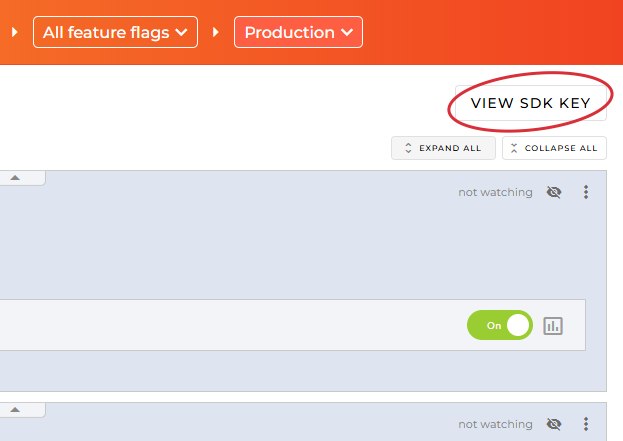
2. Go to the ConfigCat Dashboard to get your SDK Key:
3. Create a ConfigCat client instance:
const configCatClient = configcat.getClient("#YOUR-SDK-KEY#");[!NOTE] You can acquire singleton client instances for your SDK Keys using the
getClient("<sdkKey>")factory function. (However, please keep in mind that subsequent calls togetClient()with the same SDK Key return a shared client instance, which was set up by the first call.)
4. Get your setting value:
The async/await way:
const value = await configCatClient.getValueAsync('isMyAwesomeFeatureEnabled', false);

if (value) {
  do_the_new_thing();
} else {
  do_the_old_thing();
}
or the Promise way:
configCatClient.getValueAsync('isMyAwesomeFeatureEnabled', false)
  .then((value) => {
    if (value) {
      do_the_new_thing();
    } else {
      do_the_old_thing();
    }
  });
Getting user-specific setting values with targeting
This feature allows you to get different setting values for different users in your application by passing a User Object to getValueAsync().
Read more about targeting here.
const userObject = { identifier: "#USER-IDENTIFIER#" };
const value = await configCatClient.getValueAsync('isMyAwesomeFeatureEnabled', false, userObject);

if (value) {
  do_the_new_thing();
} else {
  do_the_old_thing();
}
Sample/demo apps
- Plain HTML + JS
- Plain HTML + JS using ECMAScript module system
- Plain HTML + TS running the SDK in a Web Worker
- Sample Angular web application
- Sample React web application
- Sample React Native application
- Sample Vue SSR web application
- Sample Node.js console application
- Sample Node.js console application using ECMAScript module system
- Sample Node.js console application using TypeScript
- Sample Node.js console application using TypeScript and ECMAScript module system
- Sample Node.js application using Express and Docker
- Sample Node.js application on how to get real time updates on feature flag changes
- Sample Deno console application
- Sample Bun console application
- Sample Cloudflare Worker
- Sample Chrome extension
Polling modes
The ConfigCat SDK supports 3 different polling strategies to fetch feature flags and settings from the ConfigCat CDN. Once the latest data is downloaded, it is stored in the cache, then the SDK uses the cached data to evaluate feature flags and settings. Read more about polling modes and how to use them at ConfigCat Docs.
Sensitive information handling
Frontend/mobile SDKs run in your users' browsers/devices. They download a config JSON file from ConfigCat's CDN servers. Since the SDK Key is included in the URL path of this file, your users can access both the SDK Key and the contents of the config JSON (including feature flag keys, feature flag values, targeting rules, percentage options, etc.)
However, the SDK Key provides read-only access: it only allows downloading your config JSON file, but it cannot be used to modify the corresponding config in your ConfigCat account.
If you want to prevent your users from accessing your SDK Key and the contents of your config JSON file, we recommend using the SDK in your backend services only. You can then provide a secure API endpoint for your frontend/mobile applications to evaluate feature flags and settings for your users.
Also, we suggest using confidential text comparators in the targeting rules of the feature flags and settings that are used in frontend/mobile SDKs.
Package content
Currently the @configcat/sdk NPM package includes the following builds of the library:
dist/configcat.browser.umd.min.js- for referencing the library in old browsers via a HTML<script>tag:- Uses the UMD bundle format.
- Targets ES5 and includes all required polyfills.
- TypeScript type definitions are not provided.
dist/configcat.browser.esm.min.js- for referencing the library in newer browsers via a HTML<script>tag:- Uses the standard ECMAScript module format.
- Targets ES2015 and includes all required polyfills.
- TypeScript type definitions are not provided.
dist/configcat.chromium-extension.esm.js- for referencing the library in Chromium-based browser extensions via a HTML<script>tag:- Uses the standard ECMAScript module format.
- Targets ES2017 and includes all required polyfills.
- TypeScript type definitions are not provided.
lib/cjs/- for old versions of Node.js and bundlers not supporting ES modules:- Uses the legacy CommonJS module format.
- Targets ES2017 and includes all required polyfills except for the
Promisefeature. - TypeScript type definitions are provided.
lib/esm/- for modern versions of Node.js, Deno, Bun and bundlers:- Uses the standard ECMAScript module format.
- Targets ES2017 and includes all required polyfills except for the
Promisefeature. - TypeScript type definitions are provided.
[!NOTE] Please note that the
libbuilds target a relatively new version of the ECMAScript standard. According to node.green, this is fully compatible with the supported Node.js versions. However, if you use a bundler and want to target browsers that have no ES2017 support, please make sure that your bundler is configured to downlevel the language syntax. If you want to go all the way down to ES5, then you will need to include a polyfill for thePromisefeature as well.
Platform compatibility
This SDK should be compatible with all modern, widely used JS runtimes (execution engines) and bundlers.
The SDK is tested against the following runtimes:
- @configcat/sdk/browser:
- Chrome (stable, latest, beta)
- Chromium (71.0.3556.0, 72.0.3626.0, 80.0.3987.0)
- Firefox (84.0, latest, latest-beta)
- Safari (latest)
- @configcat/sdk/bun:
- Bun (v1.1.0, latest stable) on Windows / Ubuntu / macOS
- @configcat/sdk/deno:
- Deno (v1.31, v1.46, latest stable) on Windows / Ubuntu / macOS
- @configcat/sdk/node:
- Node.js (v14.x, v16.x, v18.x, v20.x, v22.x, v24.x) on Windows / Ubuntu / macOS
- @configcat/sdk/cloudflare-worker:
- Workerd (2026-04-02)
- @configcat/sdk/chromium-extension:
- Chrome (stable, latest, beta)
- Chromium (72.0.3626.0, 80.0.3987.0)
The SDK is compatible with TypeScript v4.0.2 or newer. Earlier versions may work but those are not tested, thus, not supported officially.
These tests are running on each pull request, before each deploy, and on a daily basis.
You can view a sample run here.
[!NOTE] We strive to provide an extensive support for the various JS runtimes and build tools. If you still encounter an issue with the SDK on some platform, please open a GitHub issue or contact support.
Troubleshooting
Make sure you have the proper Node.js version installed
You might run into errors caused by the wrong version of Node.js. To make sure you are using the recommended Node.js version follow these steps.
- Have nvm (Node Version Manager - https://github.com/nvm-sh/nvm ) installed:
- Run
nvm install. This will install the compatible version of Node.js. - Run
nvm use. This will use the compatible version of Node.js.
Need help?
https://configcat.com/support
Contributing
Contributions are welcome. For more info please read the Contribution Guideline.
About ConfigCat
ConfigCat is a feature flag and configuration management service that lets you separate releases from deployments. You can turn your features ON/OFF using ConfigCat Dashboard even after they are deployed. ConfigCat lets you target specific groups of users based on region, email or any other custom user attribute.
ConfigCat is a hosted feature flag service. Manage feature toggles across frontend, backend, mobile, desktop apps. Alternative to LaunchDarkly. Management app + feature flag SDKs.