
@consilioweb/admin-nav
v0.11.0
Published
Payload CMS plugin — customizable admin sidebar navigation with drag & drop

Maintainers
 pown3d
Readme
About
@consilioweb/admin-nav — A fully customizable admin sidebar navigation plugin for Payload CMS 3. Drag & drop reordering, per-user preferences stored in the database, 70+ built-in SVG icons, nested sub-items, i18n support (FR/EN with multi-language labels), and a dedicated admin view to customize everything visually.
Overview
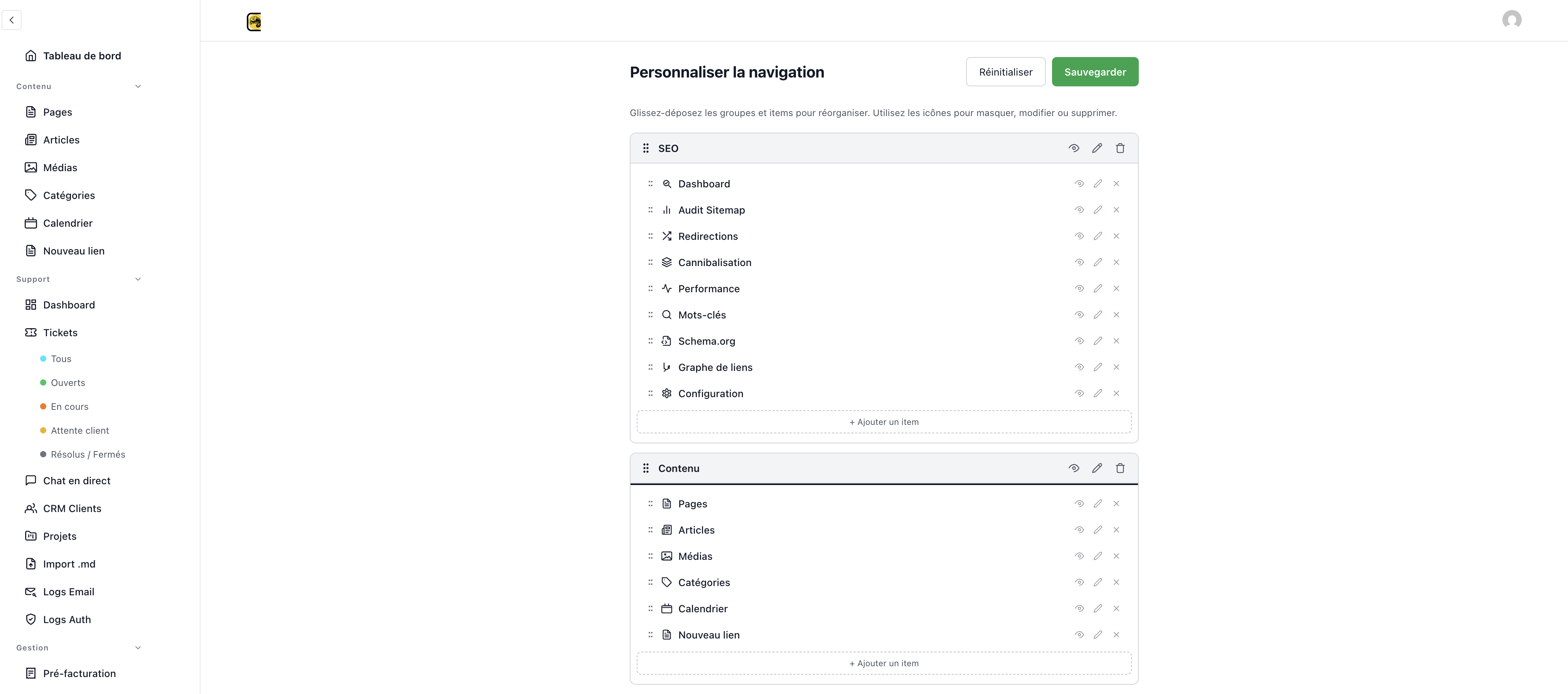
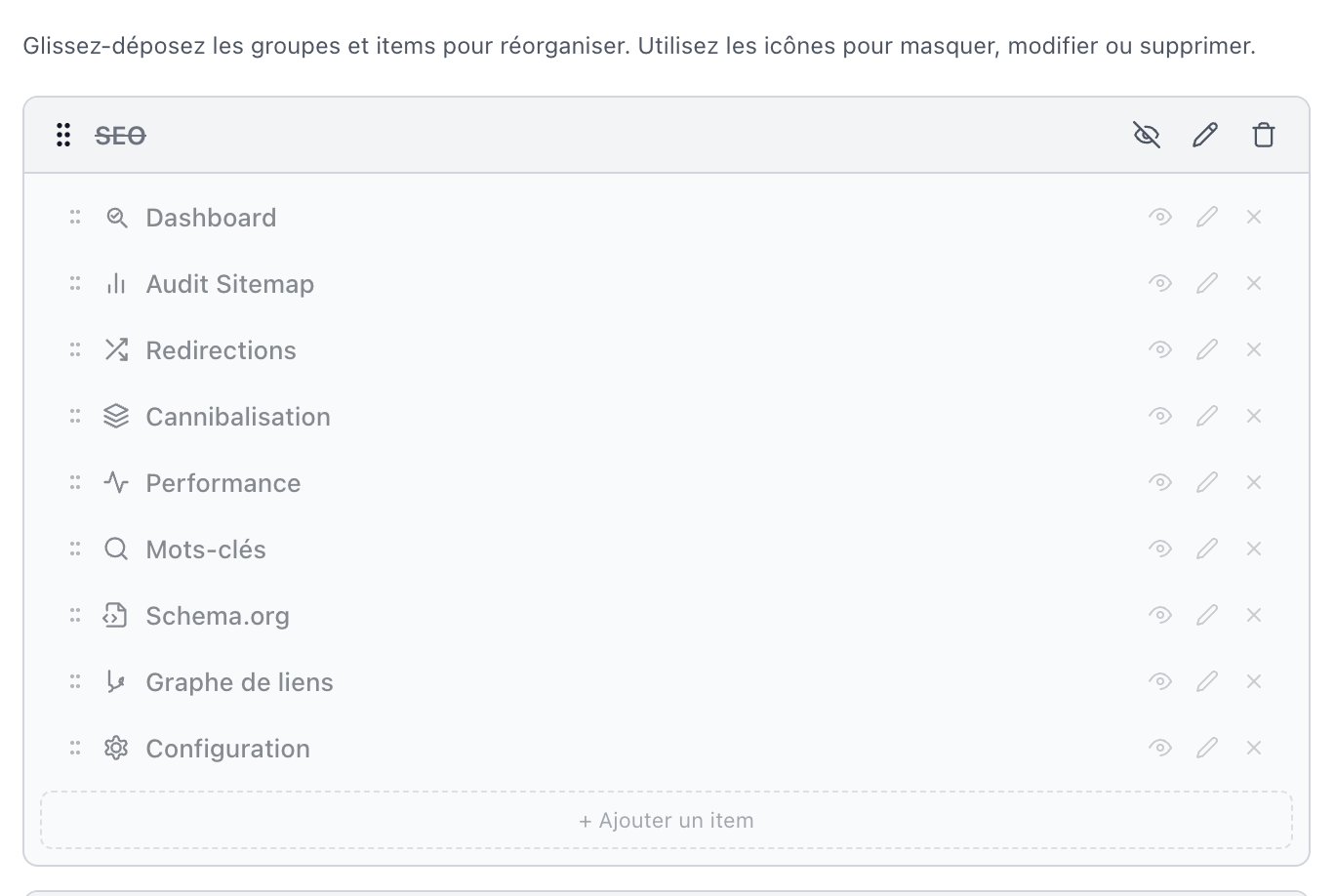
@consilioweb/admin-nav replaces the default Payload CMS admin sidebar with a fully customizable navigation system. Each admin user gets their own layout preferences, persisted in the database. The plugin provides a visual editor (/admin/nav-customizer) where users can drag & drop groups and items, toggle visibility, edit labels and icons, create custom entries, and organize nested sub-menus — all without touching code.
Screenshots
| Nav Customizer | Drag & Drop |
|:---:|:---:|
|  |
|  |
|
| Item Editor (with sub-menus) | Group Editor |
|:---:|:---:|
|  |
|  |
|
Table of Contents
- Features
- Installation
- Quick Start
- Zero-Config Mode
- Configuration
- Internationalization (i18n)
- Built-in Icons
- API Endpoints
- Components
- Package Exports
- Requirements
- Uninstall
- License
Features
Drag & Drop Navigation
Powered by @dnd-kit, the navigation supports:
- Group reordering — drag entire sections up and down
- Item reordering — move items within or across groups
- Touch & keyboard support — accessible on all devices
- Visual drag overlay — see what you're moving in real-time
Per-User Preferences
- Each admin user has their own navigation layout
- Preferences are stored in a dedicated Payload collection
- Changes persist across sessions and devices
- One-click reset to defaults
Visual Customization
- Show/hide any group or item
- Edit labels — rename anything in the sidebar
- Edit URLs — change where items link to
- Custom icons — pick from 70+ SVG icons or use color dots
- Create groups — add new sections to organize your nav
- Create items — add custom links to any group
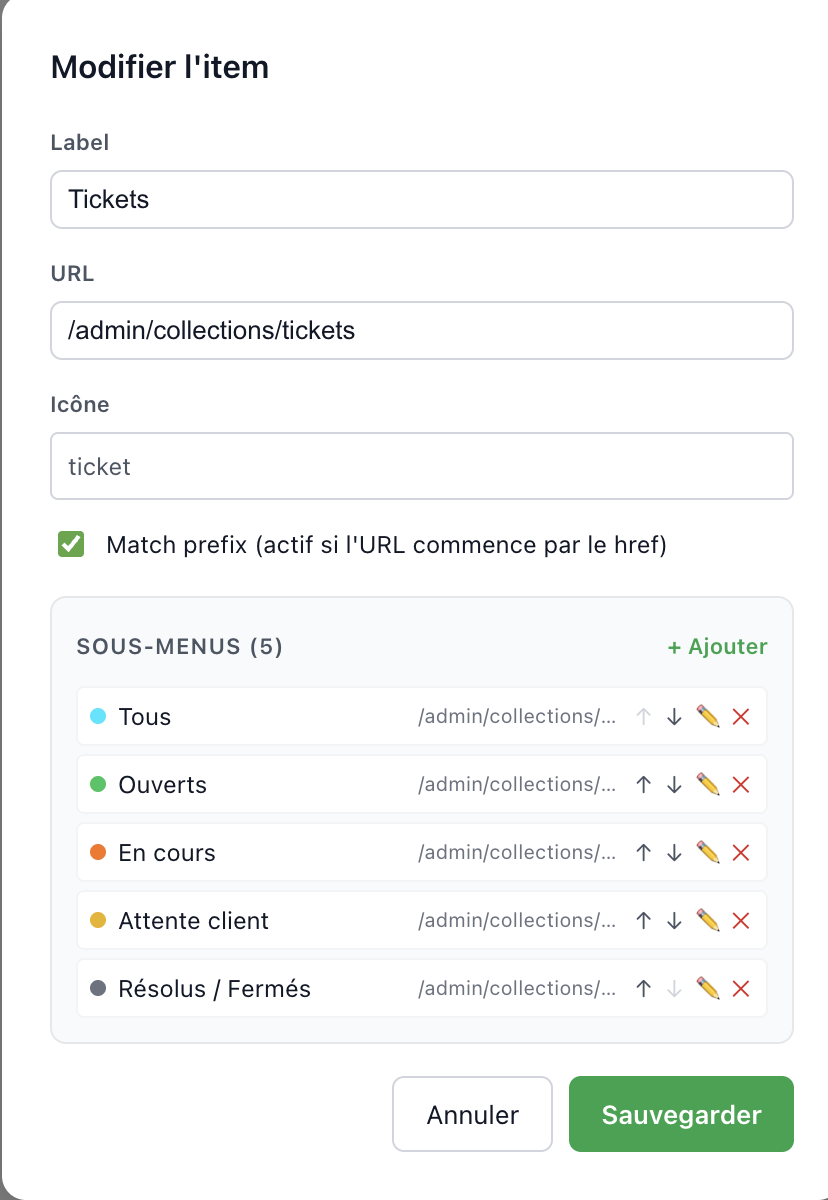
- Nested sub-items — create dropdown sub-menus with their own icons
- Collapse groups — set groups to start collapsed by default
70+ Built-in Icons
Inline SVG icons (Lucide-compatible, 24x24 viewBox) — zero external dependencies:
- Navigation — home, layout-dashboard, settings, menu, compass
- Content — file-text, newspaper, image, tag, calendar
- Support — ticket, message-square, users, shield-check, mail-search
- Management — receipt, briefcase, wallet, credit-card, truck
- Config — database, globe, palette, key, monitor
- SEO — search, trending-up, bar-chart, link, award
- Misc — heart, star, bell, zap, gift, rocket, and many more
Internationalization (i18n)
- UI translations — all plugin strings are translated (French & English included)
- Multi-language labels — nav item labels and group titles support
string | Record<string, string> - Toggle in editor — switch between single-language and multi-language mode per item
- Auto-detection — existing
Record<string, string>labels open in multi-lang mode automatically - Fallback chain — resolves: exact language → fallback language → first available value
- Extensible — follows Payload's
deepMergeSimplepattern, so you can override any translation key
Auto-Discovery (Zero-Config)
- No config needed — call
adminNavPlugin()with no arguments - Collections — grouped by
admin.group, hidden collections excluded - Globals — added to a "Configuration" group
- Custom views — detected and added to a "Views" group
- Smart icons — 40+ slug-to-icon mappings (fallback:
box) - Fully customizable — use
autoDiscoverNav()to generate a base, then modify
Instant Rendering
- Two-tier cache — module-level (survives SPA navigation) + sessionStorage (survives page reload)
- No loading flash — nav renders instantly on page transitions
- Background sync — always fetches fresh data from the server after rendering the cache
- SSR-safe — module cache is
nullon the server, matching client initial state (no hydration mismatch)
Admin View
The plugin adds a dedicated view at /admin/nav-customizer with:
- Full drag & drop interface
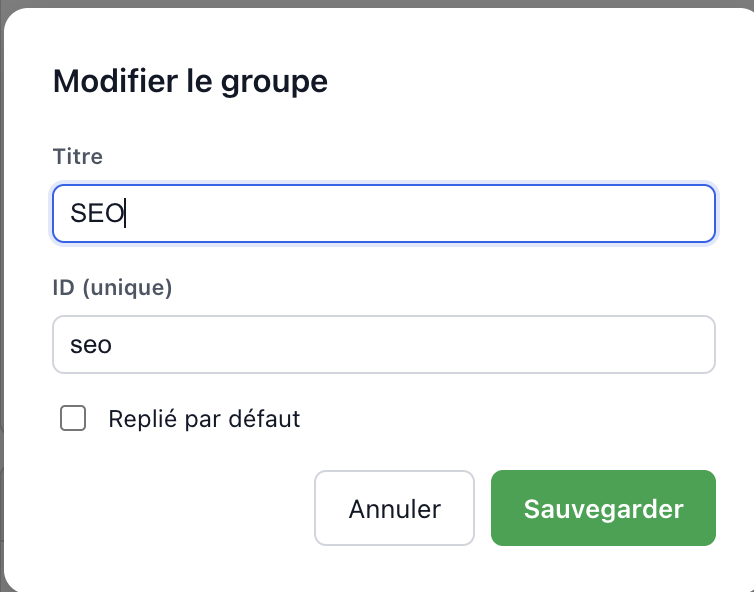
- Group editor modal (title, ID, collapse state)
- Item editor modal (label, URL, icon, prefix match, sub-items)
- Icon picker with search and color mode
- Toast notifications for save/reset feedback
- Responsive layout
Installation
pnpm add @consilioweb/admin-navOr with npm/yarn:
npm install @consilioweb/admin-nav
yarn add @consilioweb/admin-nav
Note:
@dnd-kitis bundled into the client bundle — you do not need to install it separately.
Peer Dependencies
| Package | Version | Required |
|---------|---------|----------|
| payload | ^3.0.0 | Yes |
| @payloadcms/next | ^3.0.0 | Optional (admin views) |
| @payloadcms/ui | ^3.0.0 | Optional (admin UI) |
| @payloadcms/translations | ^3.0.0 | Optional (i18n) |
| next | ^14.0.0 \|\| ^15.0.0 | Optional (admin UI) |
| react | ^18.0.0 \|\| ^19.0.0 | Optional (admin UI) |
| react-dom | ^18.0.0 \|\| ^19.0.0 | Optional (admin UI) |
Quick Start
Add the plugin to your payload.config.ts:
import { buildConfig } from 'payload'
import { adminNavPlugin } from '@consilioweb/admin-nav'

export default buildConfig({
  // ... your existing config
  plugins: [
    adminNavPlugin({
      defaultNav: [
        {
          id: 'content',
          title: 'Content',
          items: [
            { id: 'pages', href: '/admin/collections/pages', label: 'Pages', icon: 'file-text' },
            { id: 'posts', href: '/admin/collections/posts', label: 'Posts', icon: 'newspaper' },
            { id: 'media', href: '/admin/collections/media', label: 'Media', icon: 'image' },
          ],
        },
        {
          id: 'settings',
          title: 'Settings',
          items: [
            { id: 'users', href: '/admin/collections/users', label: 'Users', icon: 'users' },
            { id: 'settings', href: '/admin/globals/settings', label: 'Settings', icon: 'settings' },
          ],
        },
      ],
    }),
  ],
})
That's it. The plugin will automatically:
- Add a
admin-nav-preferencescollection to store per-user layouts - Register API endpoints under
/api/admin-nav/ - Inject the
AdminNavcomponent into the sidebar viabeforeNavLinks - Add the Nav Customizer view at
/admin/nav-customizer
Important: After installing, run
pnpm generate:importmapto register the new components.
Zero-Config Mode
If you don't provide a defaultNav, the plugin auto-discovers your Payload config and builds the navigation automatically:
import { adminNavPlugin } from '@consilioweb/admin-nav'

export default buildConfig({
  plugins: [
    adminNavPlugin(), // No config needed — collections, globals & views are auto-detected
  ],
})
Auto-discovery will:
- Group collections by their
admin.groupvalue (or "Collections" as fallback) - Add globals to a "Configuration" group
- Add custom admin views to a "Views" group
- Guess icons from 40+ slug mappings (e.g.
pages→file-text,users→users,media→image) - Skip hidden collections (
admin.hidden: true)
You can also use autoDiscoverNav programmatically to generate a base config, then customize it:
import { adminNavPlugin, autoDiscoverNav } from '@consilioweb/admin-nav'

const baseNav = autoDiscoverNav(config)
// Modify baseNav as needed...

export default buildConfig({
  plugins: [
    adminNavPlugin({ defaultNav: baseNav }),
  ],
})
Configuration
AdminNavPluginConfig
adminNavPlugin({
  defaultNav: [],                           // Optional — auto-discovered if omitted
  afterNav: [],                             // Component paths to render after the nav
  collectionSlug: 'admin-nav-preferences',  // Preferences collection slug
  userCollectionSlug: 'users',              // User collection for the relationship
  endpointBasePath: '/admin-nav',           // API endpoint prefix
  addCustomizerView: true,                  // Add /admin/nav-customizer view
  navComponentPath: undefined,              // Override AdminNav component path
})
| Option | Type | Default | Description |
|--------|------|---------|-------------|
| defaultNav | NavGroupConfig[] | Auto-découvert | Structure initiale de la sidebar. Si omis, le plugin auto-découvre les collections, globals et vues depuis la config Payload |
| afterNav | string[] | [] | Chemins de composants à afficher après la navigation |
| collectionSlug | string | 'admin-nav-preferences' | Slug de la collection pour le stockage des préférences |
| userCollectionSlug | string | 'users' | Slug de la collection utilisateurs pour la relation |
| endpointBasePath | string | '/admin-nav' | Chemin de base pour les endpoints API |
| addCustomizerView | boolean | true | Ajouter la vue admin Nav Customizer à /admin/nav-customizer |
| navComponentPath | string | '@consilioweb/admin-nav/client#AdminNav' | Surcharger le chemin du composant AdminNav (pour les installations file: ou link:) |
Types
LocalizedString
type LocalizedString = string | Record<string, string>Labels and titles accept either a plain string or a per-language record. Both are fully backward-compatible.
NavGroupConfig
interface NavGroupConfig {
  id: string                   // Unique group ID
  title: LocalizedString       // Section header label (string or per-language)
  items: NavItemConfig[]       // Items in this group
  visible?: boolean            // Whether the group is visible (default: true)
  defaultCollapsed?: boolean   // Start collapsed (default: false)
}
NavItemConfig
interface NavItemConfig {
  id: string                   // Unique item ID
  href: string                 // Admin URL path
  label: LocalizedString       // Display label (string or per-language)
  icon: string                 // Icon name or '#RRGGBB' for color dot
  matchPrefix?: boolean        // Activate on pathname.startsWith(href)
  children?: NavItemConfig[]   // Nested sub-items
  visible?: boolean            // Whether visible (default: true)
}
NavLayout
interface NavLayout {
  groups: NavGroupConfig[]  // Ordered list of groups
  version: number           // Schema version for future migrations
}
Advanced Example
adminNavPlugin({
  defaultNav: [
    {
      id: 'content',
      title: { fr: 'Contenu', en: 'Content' },  // Multi-language group title
      items: [
        { id: 'pages', href: '/admin/collections/pages', label: 'Pages', icon: 'file-text' },
        { id: 'posts', href: '/admin/collections/posts', label: { fr: 'Articles', en: 'Blog' }, icon: 'newspaper' },
        { id: 'media', href: '/admin/collections/media', label: { fr: 'Médias', en: 'Media' }, icon: 'image' },
      ],
    },
    {
      id: 'seo',
      title: 'SEO',  // Plain string still works
      defaultCollapsed: true,
      items: [
        { id: 'seo-dashboard', href: '/admin/seo', label: 'Dashboard', icon: 'trending-up', matchPrefix: true },
        { id: 'sitemap', href: '/admin/sitemap-audit', label: 'Sitemap', icon: 'globe' },
        { id: 'redirects', href: '/admin/redirects', label: 'Redirects', icon: 'corner-down-right' },
      ],
    },
    {
      id: 'support',
      title: 'Support',
      items: [
        {
          id: 'tickets',
          href: '/admin/collections/tickets',
          label: 'Tickets',
          icon: 'ticket',
          matchPrefix: true,
          children: [
            { id: 'open', href: '/admin/collections/tickets?status=open', label: 'Open', icon: '#EF4444' },
            { id: 'closed', href: '/admin/collections/tickets?status=closed', label: 'Closed', icon: '#22C55E' },
          ],
        },
      ],
    },
    {
      id: 'admin',
      title: 'Administration',
      items: [
        { id: 'users', href: '/admin/collections/users', label: 'Users', icon: 'users' },
        { id: 'nav-customizer', href: '/admin/nav-customizer', label: 'Customize Nav', icon: 'palette' },
      ],
    },
  ],
  // For file: or link: protocol installs, override the component path:
  // navComponentPath: '@/components/admin/AdminNavWrapper#AdminNav',
})
Internationalization (i18n)
Plugin UI Translations
The plugin ships with French and English translations for all UI strings (buttons, labels, toasts, confirmations, etc.). Translations are automatically merged into Payload's i18n system using deepMergeSimple.
All keys are namespaced under plugin-admin-nav:
t('plugin-admin-nav:save')      // "Sauvegarder" (FR) / "Save" (EN)
t('plugin-admin-nav:editItem')  // "Modifier l'item" (FR) / "Edit item" (EN)
To override or add a language, merge your translations in payload.config.ts:
import { buildConfig } from 'payload'

export default buildConfig({
  i18n: {
    translations: {
      de: {
        'plugin-admin-nav': {
          save: 'Speichern',
          cancel: 'Abbrechen',
          // ... override any key
        },
      },
    },
  },
})
Multi-Language Nav Labels
Item labels and group titles accept string | Record<string, string>:
adminNavPlugin({
  defaultNav: [
    {
      id: 'content',
      title: { fr: 'Contenu', en: 'Content' },  // Multi-language title
      items: [
        {
          id: 'pages',
          href: '/admin/collections/pages',
          label: { fr: 'Pages', en: 'Pages' },   // Multi-language label
          icon: 'file-text',
        },
        {
          id: 'posts',
          href: '/admin/collections/posts',
          label: 'Blog',                           // Simple string still works
          icon: 'newspaper',
        },
      ],
    },
  ],
})
The item and group editors include a Multi-lang toggle that lets users switch between single-language and multi-language mode. When a label is already a Record<string, string>, the editor opens in multi-lang mode automatically.
Utilities
import { resolveLabel, isMultiLang } from '@consilioweb/admin-nav'

// Resolve a label to the current language
resolveLabel({ fr: 'Pages', en: 'Pages' }, 'fr')        // 'Pages'
resolveLabel({ fr: 'Contenu', en: 'Content' }, 'en')    // 'Content'
resolveLabel('Simple string', 'fr')                       // 'Simple string'

// Type guard
isMultiLang({ fr: 'Oui', en: 'Yes' })  // true
isMultiLang('plain')                     // false
usePluginTranslation Hook
Type-safe wrapper around Payload's useTranslation that accepts plugin custom keys:
import { usePluginTranslation } from '@consilioweb/admin-nav/client'

function MyComponent() {
  const { t, i18n } = usePluginTranslation()
  return <span>{t('plugin-admin-nav:save')}</span>
}
Built-in Icons
The plugin includes 70+ inline SVG icons with zero external dependencies. All icons use a 24x24 viewBox and are Lucide-compatible.
Use any icon name in NavItemConfig.icon:
{ id: 'pages', href: '/admin/collections/pages', label: 'Pages', icon: 'file-text' }For color dots instead of icons, use a hex color:
{ id: 'urgent', href: '...', label: 'Urgent', icon: '#EF4444' }| Category | Icons |
|----------|-------|
| Navigation | home, layout-dashboard, settings, menu, compass, map, navigation |
| Content | file-text, newspaper, image, tag, calendar, bookmark, clipboard |
| Support | ticket, message-square, users, shield-check, mail-search, folder-kanban, file-up |
| Management | receipt, briefcase, wallet, credit-card, truck, package, shopping-cart |
| Config | database, globe, palette, key, monitor, server, cloud |
| SEO | search, trending-up, bar-chart, link, award, target, activity |
| Misc | heart, star, bell, zap, gift, rocket, flag, coffee, music, camera |
Programmatic Access
import { getIconNames, getIconPath, iconPaths } from '@consilioweb/admin-nav'

// Get all available icon names
const names = getIconNames() // ['home', 'file-text', ...]

// Get the SVG path data for an icon
const path = getIconPath('home') // 'M3 9l9-7 9 7v11a2...'

// Access the full registry
console.log(Object.keys(iconPaths).length) // 70+
API Endpoints
All endpoints are prefixed with the configured endpointBasePath (default: /admin-nav). All endpoints require an authenticated admin user.
| Method | Path | Description |
|--------|------|-------------|
| GET | /admin-nav/preferences | Get the current user's navigation preferences |
| PATCH | /admin-nav/preferences | Save the current user's navigation layout |
| DELETE | /admin-nav/preferences | Reset to default navigation |
| GET | /admin-nav/default-nav | Get the plugin's default nav config |
useNavPreferences Hook
For custom components that need to interact with nav preferences:
import { useNavPreferences } from '@consilioweb/admin-nav/client'

function MyComponent() {
  const { layout, isLoaded, isSaving, isCustom, save, reset, reload } = useNavPreferences()

  if (!isLoaded) return <p>Loading...</p>

  return (
    <div>
      <p>Groups: {layout.groups.length}</p>
      <p>Custom layout: {isCustom ? 'Yes' : 'No'}</p>
      <button onClick={reset}>Reset to defaults</button>
    </div>
  )
}
| Property | Type | Description |
|----------|------|-------------|
| layout | NavLayout | Current navigation layout (user's or default) |
| isLoaded | boolean | Whether preferences have been fetched |
| isSaving | boolean | Whether a save operation is in progress |
| isCustom | boolean | Whether the user has customized their nav |
| save | (layout: NavLayout) => Promise<void> | Save a new layout |
| reset | () => Promise<void> | Reset to default navigation |
| reload | () => Promise<void> | Reload preferences from server |
Caching Strategy
The hook uses a two-tier cache for instant rendering with zero flash:
Module-level cache — JavaScript variables at the module scope survive React component re-mounts during SPA navigation. The layout is available immediately in
useState(), so subsequent page navigations render the nav instantly with no loading state.sessionStorage cache — Persists across full page reloads. Read in
useEffect(post-hydration) to avoid React hydration mismatch errors.
On the server, module variables are always null, matching the empty initial state on the client — no hydration mismatch. After the first successful fetch, both caches are populated and all subsequent renders are instant.
Components
Client Components
| Component / Hook | Description |
|------------------|-------------|
| AdminNav | Main sidebar navigation component (injected via beforeNavLinks) |
| NavCustomizer | Full drag & drop editor for the navigation layout |
| SortableGroup | Draggable group component (used by NavCustomizer) |
| SortableItem | Draggable item component (used by NavCustomizer) |
| GroupEditor | Modal for editing group properties (with multi-lang toggle) |
| NavItemEditor | Modal for editing item properties, sub-items, and multi-lang labels |
| IconPicker | Icon selection dropdown with search and color mode |
| useNavPreferences | Hook for reading/saving nav preferences |
| usePluginTranslation | Type-safe i18n hook with plugin translation keys |
Server Views
| Component | Path | Description |
|-----------|------|-------------|
| NavCustomizerView | /admin/nav-customizer | Admin view wrapping the NavCustomizer in Payload's DefaultTemplate |
Package Exports
// Main entry — plugin, collection, endpoints, icons, types, i18n utilities
import {
  adminNavPlugin,
  autoDiscoverNav,
  createAdminNavPreferencesCollection,
  createGetPreferencesHandler,
  createSavePreferencesHandler,
  createResetPreferencesHandler,
  getIconNames,
  getIconPath,
  iconPaths,
  resolveLabel,
  isMultiLang,
} from '@consilioweb/admin-nav'
import type {
  NavItemConfig,
  NavGroupConfig,
  NavLayout,
  AdminNavPluginConfig,
  LocalizedString,
} from '@consilioweb/admin-nav'

// Client components — React components for Payload admin UI
import {
  AdminNav,
  NavCustomizer,
  SortableGroup,
  SortableItem,
  GroupEditor,
  NavItemEditor,
  IconPicker,
  useNavPreferences,
  usePluginTranslation,
  resolveLabel,
  isMultiLang,
} from '@consilioweb/admin-nav/client'
import type { PluginAdminNavTranslationKeys } from '@consilioweb/admin-nav/client'

// Server views — admin views wrapped in DefaultTemplate
import { NavCustomizerView } from '@consilioweb/admin-nav/views'
Requirements
- Node.js >= 18
- Payload CMS 3.x
- React 18.x or 19.x (for admin UI components)
- Database: Any Payload-supported adapter (SQLite, PostgreSQL, MongoDB)
Uninstall
- Remove the plugin from your
payload.config.ts - Uninstall the package:
pnpm remove @consilioweb/admin-nav- Regenerate the importmap:
pnpm generate:importmapData cleanup (optional)
The admin-nav-preferences collection data remains in your database after uninstall. To remove it:
SQLite:
DROP TABLE IF EXISTS admin_nav_preferences;PostgreSQL:
DROP TABLE IF EXISTS "admin-nav-preferences" CASCADE;MongoDB:
db.getCollection('admin-nav-preferences').drop()License
Author
Made with passion by ConsilioWEB