
@consilioweb/payload-admin-nav
v0.19.0
Published
Payload CMS plugin — customizable admin sidebar navigation with drag & drop
Downloads
401

Maintainers
 pown3d
Readme
@consilioweb/payload-admin-nav
A customizable admin sidebar for Payload CMS 3, with drag & drop reordering and per-user layouts stored in the database.



About
@consilioweb/payload-admin-nav replaces the default Payload admin sidebar with a navigation each
user can rearrange for themselves. The layout is persisted per user in a dedicated collection, and a
visual editor at /admin/nav-customizer lets them drag & drop groups and items, toggle visibility,
rename entries, swap icons and build nested sub-menus without touching code.
Given no configuration, it discovers your collections, globals and custom views and builds the
navigation on its own. Given a defaultNav, it uses yours. Either way the server filters out every
entry the current user has no read access to, so the sidebar never enumerates what the user cannot open.
Screenshots
| Nav Customizer | Drag & Drop |
|:---:|:---:|
| 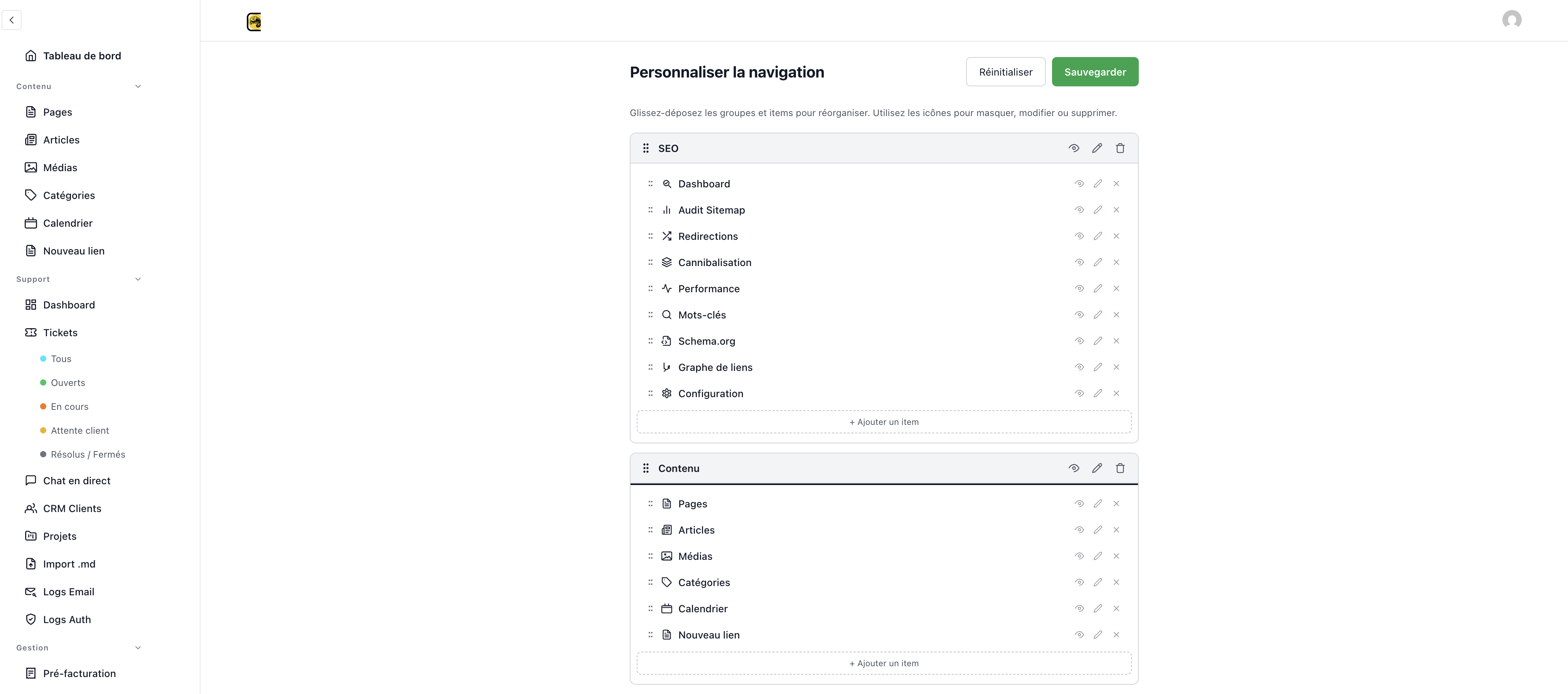 |
| 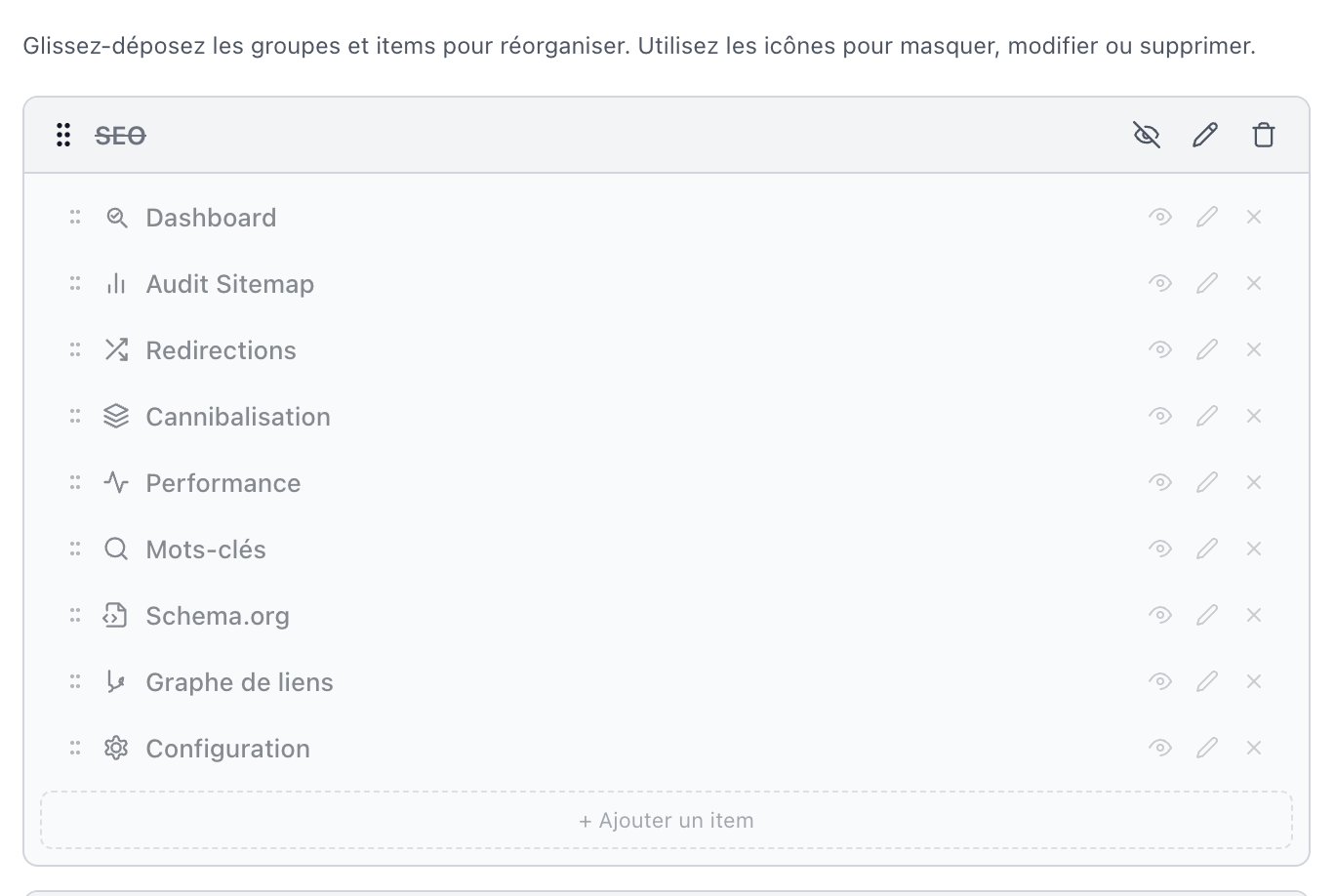 |
|
| Item Editor (with sub-menus) | Group Editor |
|:---:|:---:|
| 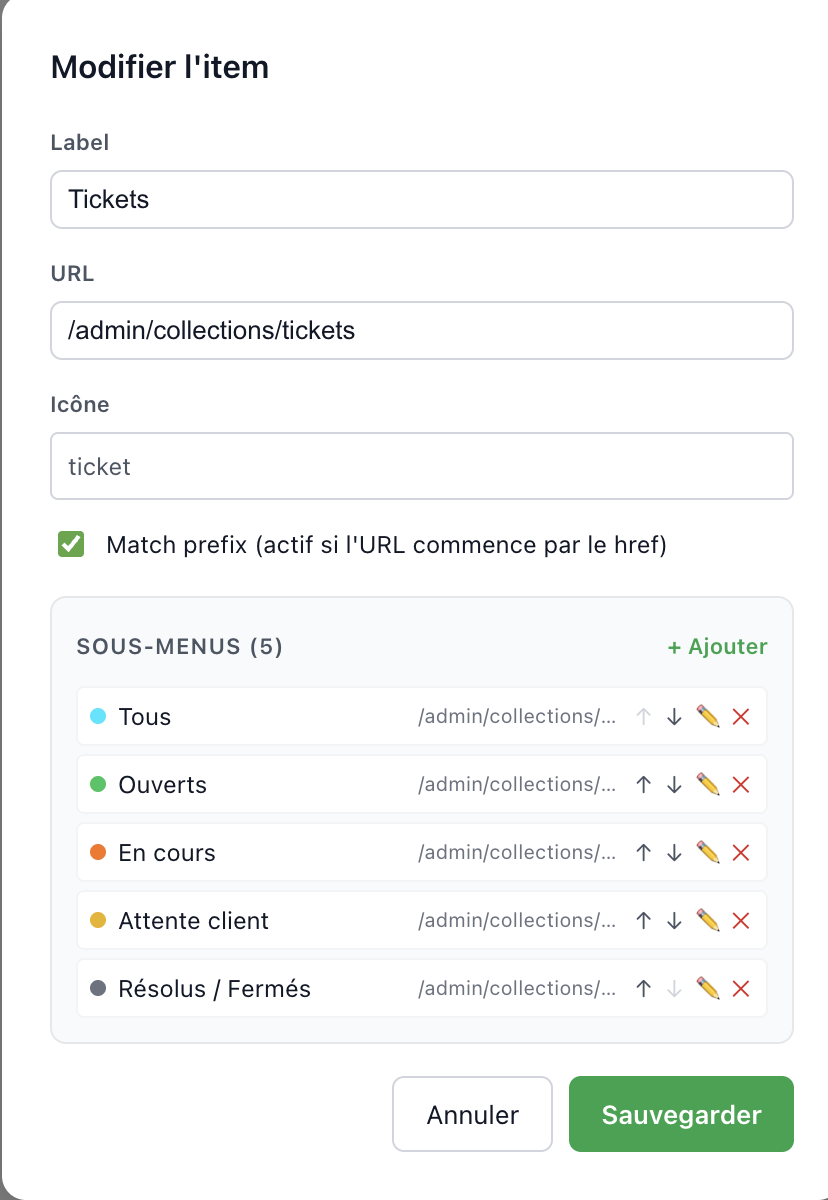 |
| 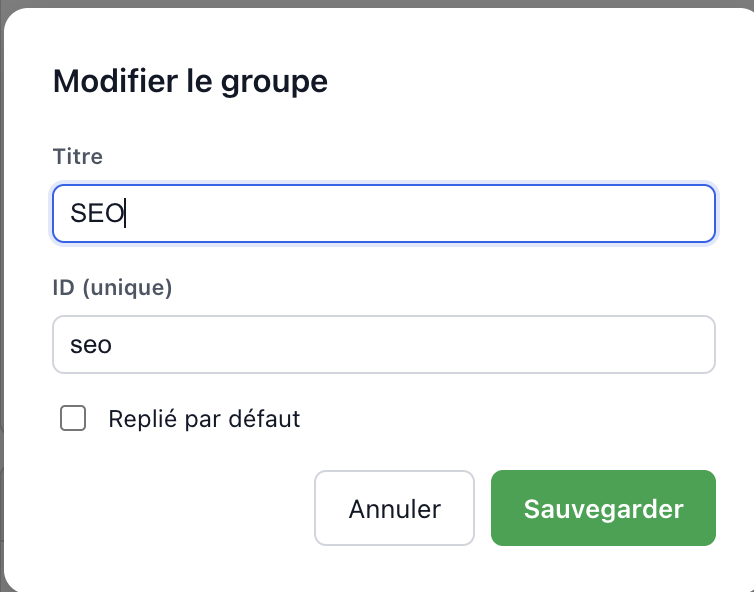 |
|
Table of Contents
- About
- Features
- Installation
- Quick Start
- Zero-Config Mode
- Configuration
- Types
- Live Badges
- Internationalization (i18n)
- Built-in Icons
- API Endpoints
- Collections
- Components and Hooks
- Package Exports
- Requirements
- Database and updates
- Upgrading
- Migration from
@consilioweb/admin-nav - Uninstall
- Support
- License
Features
Drag & Drop Navigation
Powered by @dnd-kit, bundled into the package:
- Group reordering — drag entire sections up and down
- Item reordering — move items within or across groups
- Touch & keyboard support
- Visual drag overlay — see what you are moving in real time
Per-User Preferences
- Each admin user has their own navigation layout
- Preferences are stored in a dedicated Payload collection
- Changes persist across sessions and devices
- One-click reset to defaults
- Collapsed groups are remembered per user
Collapsible Rail
- 72px icon-only rail — the toggle in the sidebar header swaps the full nav for a rail of icons; a chevron at the top of the rail brings the full nav back
- Persisted per browser, not per user — the state lives in
localStorageunderadmin-nav-rail-collapsed, unlike the layout itself, which is stored in the database - The host column follows —
html:has(.admin-nav--rail)overrides Payload's--nav-width, so the admin layout reflows instead of leaving an empty gutter - Indicators survive the collapse — active state is kept, a
liveitem keeps a green corner dot and a pending badge an amber one, and the user avatar stays pinned to the bottom with its availability popover - SSR-safe — the first render is always expanded and the stored value is applied after hydration, so there is no mismatch
Jump To
- A search field at the top of the sidebar filters items by label — a sub-item label counts as a match for its parent, and a group left with nothing to show disappears
Cmd+K/Ctrl+Kfocuses it from anywhere in the admin,Escclears and blurs it
Visual Customization
- Show/hide any group or item
- Edit labels — rename anything in the sidebar
- Edit URLs — change where items link to
- Custom icons — pick from 61 built-in SVG icons, or use a hex color dot
- Create groups and items — add sections and custom links
- Nested sub-items — one level of sub-menus, with their own icons
- Collapse groups — set groups to start collapsed by default
- Import / export — save a layout as JSON and load it back (files over 1 MB and layouts that fail validation are refused)
Permission-Aware
GET /default-navandGET /discovercompute the caller's permissions throughgetAccessResults()and drop every entry — sub-items included — whosehrefpoints at an/admin/collections/<slug>or/admin/globals/<slug>the user cannot read- A group left with no visible item disappears with its items
- Items pointing at custom routes, or at a slug that is not a registered collection or global, are left untouched
- All six endpoints are restricted to admin-panel users: the caller must belong to
config.admin.userand pass that collection'saccess.adminwhen one is declared - The
/admin/nav-customizerview applies that exact same rule before it renders anything. Payload does not gate custom admin views —RootPageskips itscanAccessAdminredirect as soon as the route matches a registered custom view — so every request carrying any validpayload-tokenreaches the view, including one from a front-office auth collection sharing the cookie. Anyone who is not an admin-panel user is sent toadmin.routes.unauthorizedinstead of receiving the admin shell and the full client config - The preferences collection applies the same rule on its own REST route: every operation requires
the caller to belong to
userCollectionSlug, so an account authenticated against another auth collection (customers, members) is refused even when its numeric id matches an administrator's - When permission computation fails (a host access function that throws), every entry pointing at a registered collection or global is hidden instead of shown, and the failure is logged
Auto-Discovery (Zero-Config)
- No config needed — call
adminNavPlugin()with no arguments - Collections grouped by their
admin.group, globals in aConfigurationgroup, custom views in aViewsgroup - Smart icons — 53 slug-to-icon mappings plus substring matching (fallback:
box) admin.hidden: trueentities are skipped;admin.custom.navHidden: trueones are added hidden (visible: false) so users can re-enable them in the customizer
i18n
- UI translations — every plugin string is translated in French and English
- Multi-language labels — item labels and group titles accept
string | Record<string, string> - Toggle in editor — switch between single-language and multi-language mode per item
- Fallback chain — exact language → fallback language → first available value
- Extensible — merged with Payload's
deepMergeSimple, so host translations win
Instant Rendering
- Two-tier cache — module-level (survives SPA navigation) +
sessionStorage(survives reload) - Cache TTL — 60 seconds, to skip redundant server fetches
- No loading flash — the nav renders immediately on page transitions
- SSR-safe — the module cache is
nullon the server, matching the client's initial state
CSS Architecture
- BEM naming — classes follow the
.admin-nav__element--modifierconvention - Custom properties — theming through
--admin-nav-*variables - StyleInjector — the stylesheet is injected at runtime by
AdminNav, no import required
Unsaved Changes Guard
beforeunload— warns when leaving the customizer with unsaved changes- Undo / redo — full history, atomic state updates through
useReducer
Installation
pnpm add @consilioweb/payload-admin-navOr with npm/yarn:
npm install @consilioweb/payload-admin-nav
yarn add @consilioweb/payload-admin-nav
@dnd-kitis bundled into the customizer build — you do not need to install it separately.
Peer Dependencies
| Package | Version | Required |
|---------|---------|----------|
| payload | ^3.79.1 | Yes |
| @payloadcms/ui | ^3.79.1 | Yes |
| @payloadcms/next | ^3.79.1 | Yes |
| next | ^15.4.11 \|\| ^16.0.0 | Yes |
| react | ^19.0.0 | Yes |
| react-dom | ^19.0.0 | Yes |
| @payloadcms/translations | ^3.79.1 | Optional (i18n) |
Any recent Payload 3 admin app already has all the required ones.
Why
3.79.1and not3.0.0? Payload releases below3.79.1are affected by a pre-authentication account takeover (GHSA-hp5w-3hxx-vmwf) and by an SQL injection. A plugin peer range that still accepted them told npm those installs were fine, which they are not. The@payloadcms/*packages ship in lockstep withpayload, so they carry the same floor.
Next.js 16 + Turbopack
On Next.js 16 with Turbopack (the default bundler), next build may fail with
createContext is not a function. This is a known Payload CMS issue
(#15429,
#14330), not specific to this plugin.
Add this to your admin page (src/app/(payload)/admin/[[...segments]]/page.tsx):
export const dynamic = 'force-dynamic'And list the @consilioweb/* packages in transpilePackages in next.config.ts:
transpilePackages: ['@consilioweb/payload-admin-nav', /* ...other @consilioweb packages */],Next.js 15 needs no workaround.
Quick Start
Add the plugin to your payload.config.ts:
import { buildConfig } from 'payload'
import { adminNavPlugin } from '@consilioweb/payload-admin-nav'

export default buildConfig({
  // ... your existing config
  plugins: [
    adminNavPlugin({
      defaultNav: [
        {
          id: 'content',
          title: 'Content',
          items: [
            { id: 'pages', href: '/admin/collections/pages', label: 'Pages', icon: 'file-text' },
            { id: 'posts', href: '/admin/collections/posts', label: 'Posts', icon: 'newspaper' },
            { id: 'media', href: '/admin/collections/media', label: 'Media', icon: 'image' },
          ],
        },
        {
          id: 'settings',
          title: 'Settings',
          items: [
            { id: 'users', href: '/admin/collections/users', label: 'Users', icon: 'users' },
            { id: 'site-settings', href: '/admin/globals/settings', label: 'Settings', icon: 'settings' },
          ],
        },
      ],
    }),
  ],
})
That is all. The plugin will:
- Add an
admin-nav-preferencescollection to store per-user layouts - Register the API endpoints under
/api/admin-nav/ - Inject the
AdminNavcomponent into the sidebar throughbeforeNavLinks - Add the Nav Customizer view at
/admin/nav-customizer
Important: after installing, run
pnpm generate:importmapto register the new components.
Zero-Config Mode
Without a defaultNav, the plugin auto-discovers your Payload config and builds the navigation:
import { adminNavPlugin } from '@consilioweb/payload-admin-nav'

export default buildConfig({
  plugins: [
    adminNavPlugin(), // collections, globals and custom views are auto-detected
  ],
})
Auto-discovery will:
- Group collections by their
admin.groupvalue (fallback group:Collections) - Add globals to a
Configurationgroup (or to their ownadmin.group) - Add custom admin views to a
Viewsgroup - Guess icons from 53 slug mappings and substring matches (
pages→file-text,users→users,media→image, …), falling back tobox - Skip collections and globals with
admin.hidden: true, and add those withadmin.custom.navHidden: trueas hidden items
autoDiscoverNav() is exported if you want to generate the base layout and change it. It takes the
Payload config, so it has to run once the config exists — inside a plugin of your own:
import type { Config, Plugin } from 'payload'
import { buildConfig } from 'payload'
import { adminNavPlugin, autoDiscoverNav } from '@consilioweb/payload-admin-nav'

const navPlugin: Plugin = (config: Config) => {
  const discovered = autoDiscoverNav(config)
  const defaultNav = discovered.filter((group) => group.id !== 'views')
  return adminNavPlugin({ defaultNav })(config)
}

export default buildConfig({
  plugins: [navPlugin],
})
Configuration
adminNavPlugin({
  defaultNav: [],                           // Optional — auto-discovered if omitted
  afterNav: [],                             // Component paths rendered after the nav
  collectionSlug: 'admin-nav-preferences',  // Preferences collection slug
  userCollectionSlug: 'users',              // User collection for the relationship
  endpointBasePath: '/admin-nav',           // API endpoint prefix — keep the default
  addCustomizerView: true,                  // Add the /admin/nav-customizer view
  navComponentPath: undefined,              // Override the AdminNav component path
  navFooterSlot: undefined,                 // Component path replacing the Customize button
  brand: undefined,                         // Sidebar header branding (host identity by default)
})
AdminNavPluginConfig
| Option | Type | Default | Description |
|--------|------|---------|-------------|
| defaultNav | NavGroupConfig[] | auto-discovered | Initial sidebar structure. When omitted, collections, globals and views are discovered from the Payload config |
| afterNav | string[] | [] | Component paths appended to admin.components.afterNavLinks |
| collectionSlug | string | 'admin-nav-preferences' | Slug of the preferences collection |
| userCollectionSlug | string | 'users' | User collection targeted by the user relationship |
| endpointBasePath | string | '/admin-nav' | Base path of the API endpoints. Keep the default — see the warning below |
| addCustomizerView | boolean | true | Register the Nav Customizer view at /admin/nav-customizer |
| navComponentPath | string | '@consilioweb/payload-admin-nav/client#AdminNav' | Override the beforeNavLinks component path — useful for file: / link: installs, where webpack RSC resolution needs a local wrapper re-exporting AdminNav |
| navFooterSlot | string | none | Payload component path rendered at the bottom of the nav, replacing the default Customize button |
| brand | AdminNavBrandConfig | host identity | Sidebar header (logo + wordmark) |
endpointBasePathonly moves the server routes. The bundledAdminNavfetches/api/admin-nav/default-navand/api/admin-nav/badgesat those literal paths, and both it and the customizer calluseNavPreferences()with no argument, which defaults to'/api/admin-nav'. Setting the option to anything else registers the endpoints elsewhere and the sidebar stops loading. Change it only alongside your own nav component (navComponentPath) that fetches the matching paths and passes the base touseNavPreferences(basePath).
AdminNavBrandConfig
| Option | Type | Default | Description |
|--------|------|---------|-------------|
| wordmark | string \| false | admin.meta.title, else admin.meta.titleSuffix (Payload's own - Payload default is discarded), else none | Text displayed next to the logo. false removes it |
| logoPath | string \| false | none — the built-in neutral glyph | Path to a logo component, imported by the browser at runtime, like navFooterSlot. It must be a path the browser can resolve (a URL, or an entry of the app's import map), not a Payload component path — those are resolved server-side by the importMap and never reach the client. On import failure the built-in glyph is shown |
adminNavPlugin({
  brand: { wordmark: 'Acme', logoPath: '/admin-assets/logo.js#default' },
})

// No header branding at all
adminNavPlugin({ brand: { wordmark: false, logoPath: false } })
The plugin never displays its author's name: with no
brandand no identity declared by the host, no brand block is rendered at all. The toggle that collapses the nav to the 72px rail is rendered either way.
Advanced Example
adminNavPlugin({
  defaultNav: [
    {
      id: 'content',
      title: { fr: 'Contenu', en: 'Content' },  // Multi-language group title
      items: [
        { id: 'pages', href: '/admin/collections/pages', label: 'Pages', icon: 'file-text' },
        { id: 'posts', href: '/admin/collections/posts', label: { fr: 'Articles', en: 'Blog' }, icon: 'newspaper' },
        { id: 'media', href: '/admin/collections/media', label: { fr: 'Médias', en: 'Media' }, icon: 'image' },
      ],
    },
    {
      id: 'seo',
      title: 'SEO',  // Plain string still works
      defaultCollapsed: true,
      items: [
        { id: 'seo-dashboard', href: '/admin/seo', label: 'Dashboard', icon: 'bar-chart-3', matchPrefix: true },
        { id: 'sitemap', href: '/admin/sitemap-audit', label: 'Sitemap', icon: 'sitemap' },
        { id: 'redirects', href: '/admin/redirects', label: 'Redirects', icon: 'shuffle' },
      ],
    },
    {
      id: 'support',
      title: 'Support',
      items: [
        {
          id: 'tickets',
          href: '/admin/collections/tickets',
          label: 'Tickets',
          icon: 'ticket',
          matchPrefix: true,
          children: [
            { id: 'open', href: '/admin/collections/tickets?status=open', label: 'Open', icon: '#EF4444' },
            { id: 'closed', href: '/admin/collections/tickets?status=closed', label: 'Closed', icon: '#22C55E' },
          ],
        },
      ],
    },
    {
      id: 'admin',
      title: 'Administration',
      items: [
        { id: 'users', href: '/admin/collections/users', label: 'Users', icon: 'users' },
        { id: 'nav-customizer', href: '/admin/nav-customizer', label: 'Customize Nav', icon: 'palette' },
      ],
    },
  ],
  // For file: or link: protocol installs, override the component path:
  // navComponentPath: '@/components/admin/AdminNavWrapper#AdminNav',
})
Types
LocalizedString
type LocalizedString = string | Record<string, string>Labels and titles accept either a plain string or a per-language record. Both are fully backward-compatible.
NavGroupConfig
interface NavGroupConfig {
  id: string                   // Unique group ID
  title: LocalizedString       // Section header label
  items: NavItemConfig[]       // Items in this group
  visible?: boolean            // Whether the group is visible (default: true)
  defaultCollapsed?: boolean   // Start collapsed (default: false)
  groupBadge?: NavBadgeFn      // Async counter shown next to the group title
}
NavItemConfig
interface NavItemConfig {
  id: string                   // Unique item ID
  href: string                 // Admin URL path
  label: LocalizedString       // Display label
  icon: string                 // Icon name, or '#RRGGBB' for a color dot
  matchPrefix?: boolean        // Activate on pathname.startsWith(href)
  children?: NavChildConfig[]  // Nested sub-items (one level)
  visible?: boolean            // Whether visible (default: true)
  live?: boolean               // Pulsing green dot next to the label
}
NavChildConfig
interface NavChildConfig extends Omit<NavItemConfig, 'children'> {
  childBadge?: NavBadgeFn      // Async counter shown next to the sub-item label
  alert?: boolean              // Render the badge pill in error color
}
NavLayout
interface NavLayout {
  groups: NavGroupConfig[]  // Ordered list of groups
  version: number           // Structural fingerprint used for preference migration
}
Live Badges
A group or a sub-item can carry an async resolver that produces a counter. Resolvers run
server-side, in parallel, through GET /admin-nav/badges. GET /admin-nav/default-nav reports
whether any resolver is declared through its hasBadges flag, and the client starts polling
/badges every 60 seconds only when that flag is true.
import type { NavBadgeFn } from '@consilioweb/payload-admin-nav'

const openTickets: NavBadgeFn = async (req) => {
  const { totalDocs } = await req.payload.count({
    collection: 'tickets',
    where: { status: { equals: 'open' } },
  })
  return totalDocs
}

adminNavPlugin({
  defaultNav: [
    {
      id: 'support',
      title: 'Support',
      groupBadge: openTickets,
      items: [
        {
          id: 'tickets',
          href: '/admin/collections/tickets',
          label: 'Tickets',
          icon: 'ticket',
          children: [
            {
              id: 'tickets-open',
              href: '/admin/collections/tickets?status=open',
              label: 'Open',
              icon: '#EF4444',
              childBadge: openTickets,
              alert: true,
            },
          ],
        },
      ],
    },
  ],
})
A resolver returning null/undefined, or throwing, produces no badge instead of breaking the nav.
Negative or non-integer values are clamped. Keep each resolver to one fast query — the response time
of the endpoint is that of its slowest resolver.
Internationalization (i18n)
Plugin UI Translations
The plugin ships French and English translations for its UI strings. They are merged into Payload's
i18n system with deepMergeSimple, host translations taking precedence.
All keys are namespaced under plugin-admin-nav:
t('plugin-admin-nav:save')      // "Sauvegarder" (FR) / "Save" (EN)
t('plugin-admin-nav:editItem')  // "Modifier l'item" (FR) / "Edit item" (EN)
To override a key or add a language, merge your own translations in payload.config.ts:
import { buildConfig } from 'payload'

export default buildConfig({
  i18n: {
    translations: {
      de: {
        'plugin-admin-nav': {
          save: 'Speichern',
          cancel: 'Abbrechen',
          // ... override any key
        },
      },
    },
  },
})
Multi-Language Nav Labels
Item labels and group titles accept string | Record<string, string>:
adminNavPlugin({
  defaultNav: [
    {
      id: 'content',
      title: { fr: 'Contenu', en: 'Content' },  // Multi-language title
      items: [
        {
          id: 'pages',
          href: '/admin/collections/pages',
          label: { fr: 'Pages', en: 'Pages' },   // Multi-language label
          icon: 'file-text',
        },
        {
          id: 'posts',
          href: '/admin/collections/posts',
          label: 'Blog',                          // Simple string still works
          icon: 'newspaper',
        },
      ],
    },
  ],
})
The item and group editors include a Multi-lang toggle. When a label is already a
Record<string, string>, the editor opens in multi-lang mode automatically.
Utilities
import { resolveLabel, isMultiLang } from '@consilioweb/payload-admin-nav'

// Resolve a label to the current language — lang → fallback → first value → ''
resolveLabel({ fr: 'Pages', en: 'Pages' }, 'fr')          // 'Pages'
resolveLabel({ fr: 'Contenu', en: 'Content' }, 'en')      // 'Content'
resolveLabel({ de: 'Inhalt' }, 'en', 'de')                // 'Inhalt'
resolveLabel('Simple string', 'fr')                       // 'Simple string'

// Type guard
isMultiLang({ fr: 'Oui', en: 'Yes' })  // true
isMultiLang('plain')                   // false
usePluginTranslation Hook
Typed wrapper around Payload's useTranslation that knows the plugin's keys:
import { usePluginTranslation } from '@consilioweb/payload-admin-nav/client'

function MyComponent() {
  const { t, i18n } = usePluginTranslation()
  return <span>{t('plugin-admin-nav:save')}</span>
}
Built-in Icons
The plugin ships 61 inline SVG icons with no external dependency. All use a 24x24 viewBox and are
Lucide-compatible. Use any name in NavItemConfig.icon:
{ id: 'pages', href: '/admin/collections/pages', label: 'Pages', icon: 'file-text' }For a color dot instead of an icon, use a hex color:
{ id: 'urgent', href: '/admin/collections/tickets?priority=high', label: 'Urgent', icon: '#EF4444' }This table is the exact content of the registry (
src/icons.ts). Any other name — including Lucide icons not listed here — renders theboxfallback and logs a warning outside production.
| Category | Icons |
|----------|-------|
| Navigation & Layout (3) | home, layout-dashboard, settings |
| Content (5) | file-text, newspaper, image, tag, calendar |
| Support (7) | ticket, message-square, users, folder-kanban, file-up, mail-search, shield-check |
| Management (4) | receipt, clock, mail, clipboard-list |
| Configuration (3) | panel-top, panel-bottom, user-cog |
| SEO (9) | search-check, bar-chart-3, shuffle, layers, activity, search, file-code-2, git-branch, spell-check |
| Misc (22) | plus, minus, x, check, chevron-down, chevron-right, grip-vertical, eye, eye-off, pencil, trash-2, save, rotate-ccw, move, palette, box, star, heart, zap, globe, link, external-link |
| Maintenance & Tools (8) | wrench, bell, history, gauge, target, sitemap, webhook, code |
Programmatic Access
import { getIconNames, getIconPath, iconPaths } from '@consilioweb/payload-admin-nav'

const names = getIconNames()        // ['home', 'layout-dashboard', ...]
const path = getIconPath('home')    // SVG path data
Object.keys(iconPaths).length       // 61
API Endpoints
All endpoints are prefixed with the configured endpointBasePath (default: /admin-nav, the only
value the bundled client works with — see AdminNavPluginConfig) and are
served under /api. Every one of them runs the same guard first: an unauthenticated request gets
401, and a request authenticated against a collection other than config.admin.user — or failing
that collection's access.admin — gets 403. Each is rate-limited per user.
| Method | Path | Access | Rate limit | Description |
|--------|------|--------|-----------|-------------|
| GET | /admin-nav/preferences | admin user | 60 / min | Return the current user's stored navLayout, version and collapsedGroups (navLayout: null when the user never customized anything) |
| PATCH | /admin-nav/preferences | admin user | 30 / min | Save the current user's layout |
| DELETE | /admin-nav/preferences | admin user | 30 / min | Delete the stored layout and fall back to the default |
| GET | /admin-nav/default-nav | admin user | 60 / min | Default nav (permission-filtered), nav version, afterNav, basePath, hasBadges (whether any badge resolver is declared), navFooterSlot, resolved brand |
| GET | /admin-nav/discover | admin user | 30 / min | Auto-discovery run against the final runtime config (permission-filtered) |
| GET | /admin-nav/badges | admin user | 120 / min | Resolve every groupBadge / childBadge and return { groups, children } |
PATCH /admin-nav/preferences validation
A body is refused with 413 when its announced Content-Length exceeds 256 KB, and with 400 when:
navLayouthas nogroupsarray- more than 50 groups, or more than 100 items in a group, or more than 50 children on an entry
- an item or child is missing
href,labeloricon, or has an unusable type (hrefandiconmust be strings;labelaccepts a string or a per-language object) - nesting goes deeper than items → children
- an
idexceeds 100 characters, alabel200, anicon50 - an
hrefis not a safe relative path —javascript:,data:,vbscript:,//evil.com,/\evil.comand their tab/newline-obfuscated variants are rejected
The same href rule is exported as isSafeHref() and is applied by the customizer's JSON import and
by NavItemEditor.
Collections
| Slug | Role | Access |
|------|------|--------|
| admin-nav-preferences (configurable) | One row per user: user, navLayout (JSON), collapsedGroups (JSON), version | Every operation requires the caller to belong to userCollectionSlug; read / update / delete are then restricted to the row whose user is the requester. user is set server-side and is not writable from a request. navLayout and collapsedGroups are validated on write with the same rules as the PATCH endpoint. Hidden from the admin UI (admin.hidden: true) |
Components and Hooks
Client (/client)
| Export | Description |
|--------|-------------|
| AdminNav | The sidebar itself, injected through beforeNavLinks, behind a render boundary (see below) |
| GroupEditor | Modal for editing group properties (with multi-lang toggle) |
| NavItemEditor | Modal for editing an item, its sub-items and its multi-lang labels |
| IconPicker | Icon dropdown with search and color mode |
| NavUserProfile | User block rendered at the bottom of the nav |
| NavFooterSlot | Loader for the component declared in navFooterSlot |
| useNavPreferences | Hook reading and saving the nav preferences |
| usePluginTranslation | Typed i18n hook carrying the plugin translation keys |
NavCustomizer, SortableGroup and SortableItem are deliberately not re-exported from
/client: they pull in @dnd-kit, whose createContext crashes when Turbopack evaluates the barrel
in an SSR context. They are reached only through the views entry.
Render boundary
AdminNav renders on every page of the admin panel, and Payload mounts it straight from the
import map — so the plugin cannot be given an ancestor error boundary and carries its own instead.
A render error inside the sidebar therefore removes the plugin's sidebar and leaves Payload's own
navigation working, rather than taking the page down; the error is logged to the console with the
component name. /admin/nav-customizer is wrapped the same way, with a visible notice instead,
since that page has nothing else to show.
This covers render errors only, which is all a React boundary ever catches. The sidebar's own
network calls (/preferences, /default-nav, /badges) are guarded at the call site, where a
rejected promise actually lands.
Server views (/views)
| Export | Path | Description |
|--------|------|-------------|
| NavCustomizerView | /admin/nav-customizer | Admin view wrapping the customizer in Payload's DefaultTemplate, behind a render boundary |
useNavPreferences
import { useNavPreferences } from '@consilioweb/payload-admin-nav/client'

function MyComponent() {
  const { layout, isLoaded, isCustom, reset } = useNavPreferences()

  if (!isLoaded) return <p>Loading…</p>

  return (
    <div>
      <p>Groups: {layout.length}</p>
      <p>Custom layout: {isCustom ? 'Yes' : 'No'}</p>
      <button onClick={reset}>Reset to defaults</button>
    </div>
  )
}
| Property | Type | Description |
|----------|------|-------------|
| layout | NavGroupConfig[] | Current navigation layout (the user's, or the default one) |
| isLoaded | boolean | Whether preferences have been fetched |
| isSaving | boolean | Whether a save or reset is in progress |
| isCustom | boolean | Whether the layout differs from the default |
| save | (groups: NavGroupConfig[]) => Promise<boolean> | Persist a layout. Returns false when nothing was written — including when the nav version could not be resolved |
| reset | () => Promise<boolean> | Delete the stored layout and go back to the default |
| reload | () => Promise<void> | Re-fetch preferences from the server |
| collapsedGroups | string[] | IDs of the groups collapsed by this user |
| setCollapsedGroups | (groups: string[]) => void | Update them (debounced save to the server) |
save() and reset() return a boolean: check it before showing a success state.
The hook takes two optional arguments — useNavPreferences(basePath = '/api/admin-nav', ownerKey = null).
basePath— the/api-prefixed base of the plugin endpoints. Pass it only if you changedendpointBasePath, which also requires replacing the bundled nav component (seeAdminNavPluginConfig).ownerKey— the viewer the cache belongs to. Build it withcacheOwnerKey(user)fromuseAuth(); the bundled components already do. Left out, the hook caches nothing and fetches on every mount, because an unowned cache entry could not be refused to the next account signing in from the same tab.
import { useAuth } from '@payloadcms/ui'
import { cacheOwnerKey, useNavPreferences } from '@consilioweb/payload-admin-nav/client'

const { user } = useAuth()
const { layout } = useNavPreferences('/api/admin-nav', cacheOwnerKey(user))
Caching Strategy
The hook uses a two-tier cache for instant rendering with no flash:
- Module-level cache — module-scope variables survive component re-mounts during SPA
navigation, so the layout is available immediately in
useState(). sessionStoragecache — survives a full page reload. It is read inuseEffect(post-hydration) to avoid a hydration mismatch.
On the server the module variables are always null, matching the client's initial state. After the
first successful fetch both caches are populated, and a fetch is skipped entirely while the cache is
younger than 60 seconds.
Both tiers are stamped with the viewer they were filled for (ownerKey) and are neither read nor
reused by anybody else. Neither tier is scoped to a Payload session — sessionStorage lives as long
as the tab, the module variables as long as the JS context, and logging out then back in is a
same-tab client-side navigation — so without that stamp the next account would inherit the previous
one's sidebar and its permission-filtered defaultNav, with the 60-second freshness window
preventing any fetch from correcting it. What comes out of the cache is also re-checked with the
same rules the fetch applies, so a layout stored before those rules existed is not rendered from
cache either.
Package Exports
The package is ESM-only (type: module). There is no CommonJS build: require() will fail at
resolution — use import.
| Subpath | Exposes | Environment |
|---------|---------|-------------|
| . | Plugin, auto-discovery, collection factory, endpoint handlers, icons, utilities, types | Server |
| ./client | React components and hooks for the admin UI | Client |
| ./views | Admin views wrapped in Payload's DefaultTemplate | Server (RSC) |
| ./styles, ./styles.css | The raw stylesheet (src/styles/admin-nav.css), for apps that prefer importing it rather than relying on the runtime injector | Any bundler |
// Main entry
import {
  adminNavPlugin,
  autoDiscoverNav,
  createAdminNavPreferencesCollection,
  createGetPreferencesHandler,
  createSavePreferencesHandler,
  createResetPreferencesHandler,
  createBadgesHandler,
  getIconNames,
  getIconPath,
  iconPaths,
  resolveLabel,
  isMultiLang,
  isSafeHref,
  computeNavFingerprint,
  dedupeNavItems,
} from '@consilioweb/payload-admin-nav'
import type {
  LocalizedString,
  NavItemConfig,
  NavChildConfig,
  NavGroupConfig,
  NavLayout,
  NavBadgeFn,
  NavBadgesPayload,
  AdminNavPluginConfig,
  AdminNavBrandConfig,
} from '@consilioweb/payload-admin-nav'

// Client components
import {
  AdminNav,
  GroupEditor,
  NavItemEditor,
  IconPicker,
  NavUserProfile,
  NavFooterSlot,
  useNavPreferences,
  usePluginTranslation,
  resolveLabel,
  isMultiLang,
  isSafeHref,
} from '@consilioweb/payload-admin-nav/client'
import type { PluginAdminNavTranslationKeys } from '@consilioweb/payload-admin-nav/client'

// Server views
import { NavCustomizerView } from '@consilioweb/payload-admin-nav/views'
Requirements
| | Version |
|---|---|
| Node.js | ^18.20.2 \|\| >=20.9.0 |
| Payload CMS | ^3.79.1 |
| Next.js | ^15.4.11 \|\| ^16.0.0 |
| React / React DOM | ^19.0.0 |
| Database | Any Payload-supported adapter (SQLite, PostgreSQL, MongoDB) |
React 18, Next 14, Next 15.0–15.4.10 and Payload below 3.79.1 are no longer supported:
installing on them raises an ERESOLVE / peer warning.
Database and updates
This plugin adds a collection to your Payload config; it does not own your schema. Payload has no
way for a plugin to ship migrations — payload migrate reads a single directory, the host app's
payload.db.migrationDir — so generating and running the DDL is your app's job, exactly as it is for
your own collections.
- In development,
pushsyncs the schema automatically; nothing else to do. - In production, run
payload migrate:createthenpayload migrate— neverpush. It is skipped as soon asNODE_ENV=production, and mixing a pushed schema with migrations makes Drizzle warn about data loss. - Every release states in its Upgrading section whether it changes the schema. To date none has.
Upgrading
No schema change. No migration to generate for any release of this plugin so far: the
admin-nav-preferences collection has had the same four fields — user, navLayout,
collapsedGroups, version — since 0.12.1. Everything below is behaviour, access rules and data.
0.17.x → 0.18.0
peerDependenciesnow require Payload^3.79.1(was^3.0.0) forpayload,@payloadcms/next,@payloadcms/uiand the optional@payloadcms/translations. Upgrade the host; check what it actually resolves withpnpm why payload, not what the manifest asks for./admin/nav-customizernow applies the same gate as the endpoints. Accounts on a second auth collection, and admin-collection members whomaccess.adminrefuses, are redirected to the host's unauthorized view. Nothing to repair in the database: what leaked was read access, and the customizer's writes have gone throughPATCH /preferencessince0.16.0.NavCustomizerViewis now anasyncserver component. A wrapper that re-exported it typed asReact.FC<AdminViewServerProps>no longer typechecks.
0.16.x → 0.17.0
This is the release with data to audit. Two write paths were open before it, and the fix closes them without cleaning up what went through:
- The preferences collection was reachable on its auto-generated REST route by any authenticated
account, on any auth collection, and its
userfield was writable from the request. A row could therefore be created on somebody else's behalf — and,userbeingunique, squat the index so that person could never save their own preferences again. navLayoutandcollapsedGroupswere stored unvalidated on that same route. The rules now run as fieldvalidatetoo, but only on the value a request actually sets: an untouched legacy value is left alone and neutralised at render time by the read-side sanitizer. So a stored row can render as something other than what it holds, or not render at all, with no signal anywhere.
Run the audit below once after upgrading.
Auditing existing preference rows
# From the root of your Payload app. Reports only, writes nothing.
npx admin-nav-audit-preferences

# Same run, applying the repairs it listed
npx admin-nav-audit-preferences --fix
| Reported | What it means | What --fix does |
|---|---|---|
| foreign-owner | The row's user points at no document in your admin auth collection | Deletes the row |
| no-owner | The row has no user at all | Deletes the row |
| duplicate-owner | Several rows claim the same owner — the unique index is not enforced here | Nothing. Deleting the wrong twin destroys a real layout; decide by hand |
| layout-rejected | Nothing in navLayout.groups survives the read-side check: that user silently gets the default nav | Clears navLayout |
| layout-filtered | What the row stores is not what renders — entries or keys are dropped on the way out | Rewrites navLayout.groups to what already renders |
| layout-invalid | The stored layout is one the current validator refuses, so its owner can no longer save a change to that field | Rewrites it to the sanitized equivalent, or clears it when nothing usable is left |
| collapsed-invalid | collapsedGroups holds non-strings or is over the cap | Keeps the valid entries |
It runs through the host's own payload CLI, so it picks up your .env and your
payload.config.ts. Pass --collection=<slug> if you renamed preferencesSlug, and
PAYLOAD_CONFIG_PATH if your config is not where Payload's resolver looks. npx
admin-nav-audit-preferences --help lists everything.
Migration from @consilioweb/admin-nav
This package was renamed from @consilioweb/admin-nav to @consilioweb/payload-admin-nav.
Automatic migration (recommended):
npx @consilioweb/migrateThis updates your package.json and all imports automatically.
Manual migration:
npm uninstall @consilioweb/admin-nav
npm install @consilioweb/payload-admin-nav
Then update your imports:
- import { adminNavPlugin } from '@consilioweb/admin-nav'
+ import { adminNavPlugin } from '@consilioweb/payload-admin-nav'
Uninstall
- Remove the plugin from your
payload.config.ts - Uninstall the package:
pnpm remove @consilioweb/payload-admin-nav- Regenerate the importmap:
pnpm generate:importmapData cleanup (optional)
The admin-nav-preferences data stays in your database after uninstall. To remove it:
SQLite:
DROP TABLE IF EXISTS admin_nav_preferences;PostgreSQL:
DROP TABLE IF EXISTS "admin-nav-preferences" CASCADE;MongoDB:
db.getCollection('admin-nav-preferences').drop()Support
- Issues and feature requests: github.com/pOwn3d/payload-nav-studio/issues
- Changelog: CHANGELOG.md
- If this plugin saves you time: buy me a coffee