
@contextgate/mcp
v1.0.0
Published
Official MCP server for ContextGate (https://www.contextgate.ai) — configure your MCP connections once, use them in Claude Code, Claude Desktop, VS Code, and Cursor. Build governed sub-agents from chat, share a workspace database across them, and get PII

Maintainers
 contextgate
Readme
@contextgate/mcp
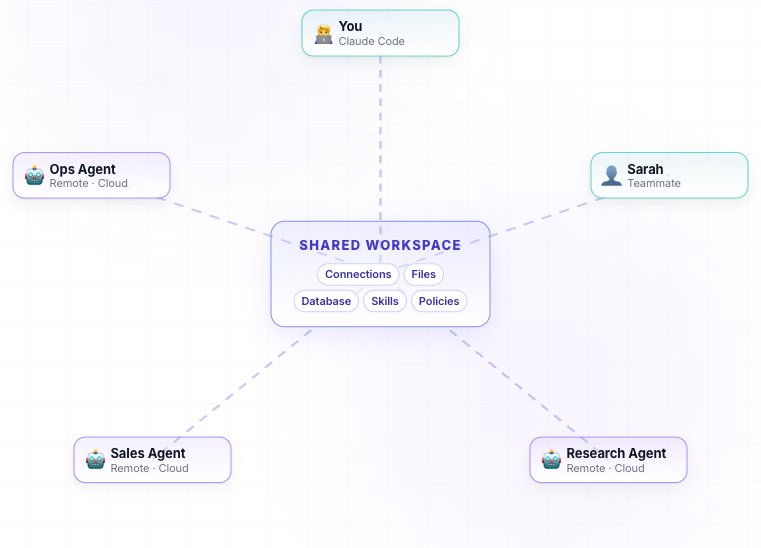
The official MCP server for ContextGate — one install, one workspace, every editor.
Why developers use it
🔌 Configure your MCP servers once, not per editor. ContextGate holds a single set of connections (GitHub, Slack, Linear, Postgres, your custom MCP server, anything via Composio's 2,000+ apps) at the workspace level. Install
@contextgate/mcpinto Claude Code, Cursor, Claude Desktop, and VS Code, and they all reach the same tools with the same credentials. Rotate a token in one place; every editor inherits the rotation.🤖 Build sub-agents from inside the chat. Ask Claude to "create me a
release-notes-writersub-agent with read-only GitHub and our changelog repo" —@contextgate/mcpcreates a real governed agent (model + toolbox + system prompt + policies) and the parent chat can call it like a tool. No YAML, no separate dashboards.🧠 Shared workspace memory across agents. Every workspace ships with its own DuckLake/DuckDB database. One agent's output (a report, a parsed dataset, a JSON blob) becomes another agent's input via a real SQL table — not a scratch file. Federate to S3 / GCS / Azure Blob / R2 via external tables.
🚀 The agent you built locally runs in the cloud too. Sub-agents created from your editor are first-class workspace resources; the same agent can be exposed as its own MCP endpoint, triggered by cron/webhook, or invoked by a teammate from their editor — without re-onboarding.
🛡 Guardrails come for free. PII redaction, custom regex blockers, LLM-based governance checks (e.g. "block requests that try to exfiltrate customer data"), and audit logging apply to every call your agent makes — even when you're just hacking locally.
Website: https://www.contextgate.ai
Source: https://github.com/contextgate/enterprise/tree/main/packages/mcp-cli
What is ContextGate?
ContextGate is an Agent Governance Platform. It sits between your AI agents and the tools/data they use, and enforces the rules your organization actually cares about:
- Policies — PII redaction (names, emails, card numbers…), custom regex patterns, allow/deny rules, LLM-based governance checks (e.g. "block requests that try to exfiltrate customer data").
- Toolboxes — curated bundles of tools. You decide which connections (GitHub, Slack, Postgres, browser, internal MCP servers, …) any given agent can actually reach. The same agent can use different toolboxes in different contexts.
- Governed models (agents) — a model + a toolbox + a system prompt + policies, deployed as a single governed endpoint. Audit-logged, rate-limited, attributable to the workspace.
- Connections — every external system you want agents to touch (a Composio app, a custom MCP server, a data source) is registered once at the workspace level and reused.
- Shared workspace database — every workspace ships with its own analytical database (DuckDB + DuckLake on PostgreSQL + Parquet) that all agents can read and write. Run
execute_sql, ingest data withimport_data, federate to S3 / GCS / Azure Blob / R2 via external tables, and roll back with snapshot time-travel. - Triggers, skills, runs — schedule agents on a cron or webhook, attach reusable skills, and read back full run history with redacted I/O.
This package — @contextgate/mcp — is the local control plane you install on your laptop so an MCP-aware host (Claude Code, etc.) can inspect and configure the above from inside its chat session.
Sign up or learn more at https://www.contextgate.ai.
Sub-agents: give Claude a team
Inside a chat session you can ask Claude to spin up a governed sub-agent — a model + a toolbox + a system prompt + policies, all created in one tool call (create_agent). The sub-agent is a real workspace resource: it has its own audit trail, its own rate limit, its own connections, and can be invoked as a tool from the parent chat with query_governed_model. Examples:
- "Create a
release-notes-writersub-agent that has read-only access to GitHub and our changelog repo, with a PII-redaction policy." - "Ask the
release-notes-writersub-agent to draft notes forv1.4.2."
Sub-agents are first-class — they can be triggered by cron/webhook, exposed as their own MCP endpoint to other tools, or queried inline. The parent agent doesn't see the sub-agent's raw outputs unless you let it; everything is policy-checked at the boundary.
Built-in tool categories
Every governed agent ships with four built-in tool categories that are enabled by default and can be toggled per-agent with set_system_tool_categories:
| Category | What it includes |
|---|---|
| file_management | Read/write/list/search files inside the workspace file store, attach files to runs and agents |
| databases | Query the shared DuckLake/DuckDB workspace database, list/describe tables, run SQL, ingest data |
| browser | Spawn a headless browser session, navigate, click, fill forms, take screenshots, read content |
| view_run_history | Inspect prior agent runs (with redactions still applied), follow up on past decisions |
In addition, every MCP server you connect (GitHub, Slack, Linear, your own custom servers, Composio's 2,000+ apps, …) shows up alongside these built-ins — the agent picks tools across categories as a single flat list, but you keep per-category control over what's enabled.
Quick Start
npx @contextgate/mcp installThis will:
- Ask for your email and open the signup page
- Verify your API key
- Auto-configure your MCP host (Claude Code, Claude Desktop, VS Code, Cursor)
How It Works
The CLI runs a local MCP server that forwards JSON-RPC calls to your ContextGate workspace:
Claude Code → stdio → contextgate-mcp → HTTPS → ContextGate API → Your ToolsEvery tool call is policy-checked (PII redaction, blocking patterns, governance checks), audit-logged, and attributable. Your raw credentials never leave your workspace.
Commands
| Command | Description |
|---------|-------------|
| contextgate-mcp install | Set up auth and configure your MCP host |
| contextgate-mcp serve | Start the MCP server (called by the host) |
| contextgate-mcp switch [target] | Switch workspaces — interactive, or pass a name / id / 1-based index |
| contextgate-mcp status | Show the configured workspace and connectivity |
Inside a chat, the LLM can also call the switch_workspace tool directly — no CLI or restart needed.
Manual Configuration
If you'd rather edit your MCP config yourself, add this to ~/.claude/mcp.json (or the equivalent for your host):
{
  "mcpServers": {
    "contextgate": {
      "command": "npx",
      "args": ["@contextgate/mcp", "serve"],
      "env": {
        "CONTEXTGATE_API_KEY": "cgk_your_key_here",
        "CONTEXTGATE_WORKSPACE_ID": "your-workspace-id"
      }
    }
  }
}
Environment Variables
| Variable | Description |
|----------|-------------|
| CONTEXTGATE_API_KEY | Your workspace API key (cgk_...) |
| CONTEXTGATE_WORKSPACE_ID | Your workspace ID |
| CONTEXTGATE_API_URL | API endpoint (default: https://api.contextgate.ai) |
Config Files
- ContextGate config:
~/.config/contextgate/config.json - Claude Code config:
~/.claude/mcp.json
Links
- ContextGate — https://www.contextgate.ai
- Documentation — https://www.contextgate.ai/cli
- Issues — https://github.com/contextgate/enterprise/issues