
@convex-dev/workos-authkit
v0.2.9
Published
A WorkOS AuthKit component for Convex.
Downloads
95,614


Readme
Convex WorkOS AuthKit

This component is the official way to integrate WorkOS AuthKit authentication with your Convex project.
Features:
- Sync user data from WorkOS to your Convex database reliably and durably.
- Respond to events with Convex functions.
- Backfill existing WorkOS users when adding the component to an existing app.
See example for a demo of how to incorporate this component into your application.
Open a GitHub issue with any feedback or bugs you find.
Prerequisites
Follow the Convex WorkOS AuthKit guide to set up a working project with WorkOS AuthKit.
Then follow the steps below to set up user data syncing and event handling.
Configure webhooks
User data syncing requires webhooks to be configured in your WorkOS project.
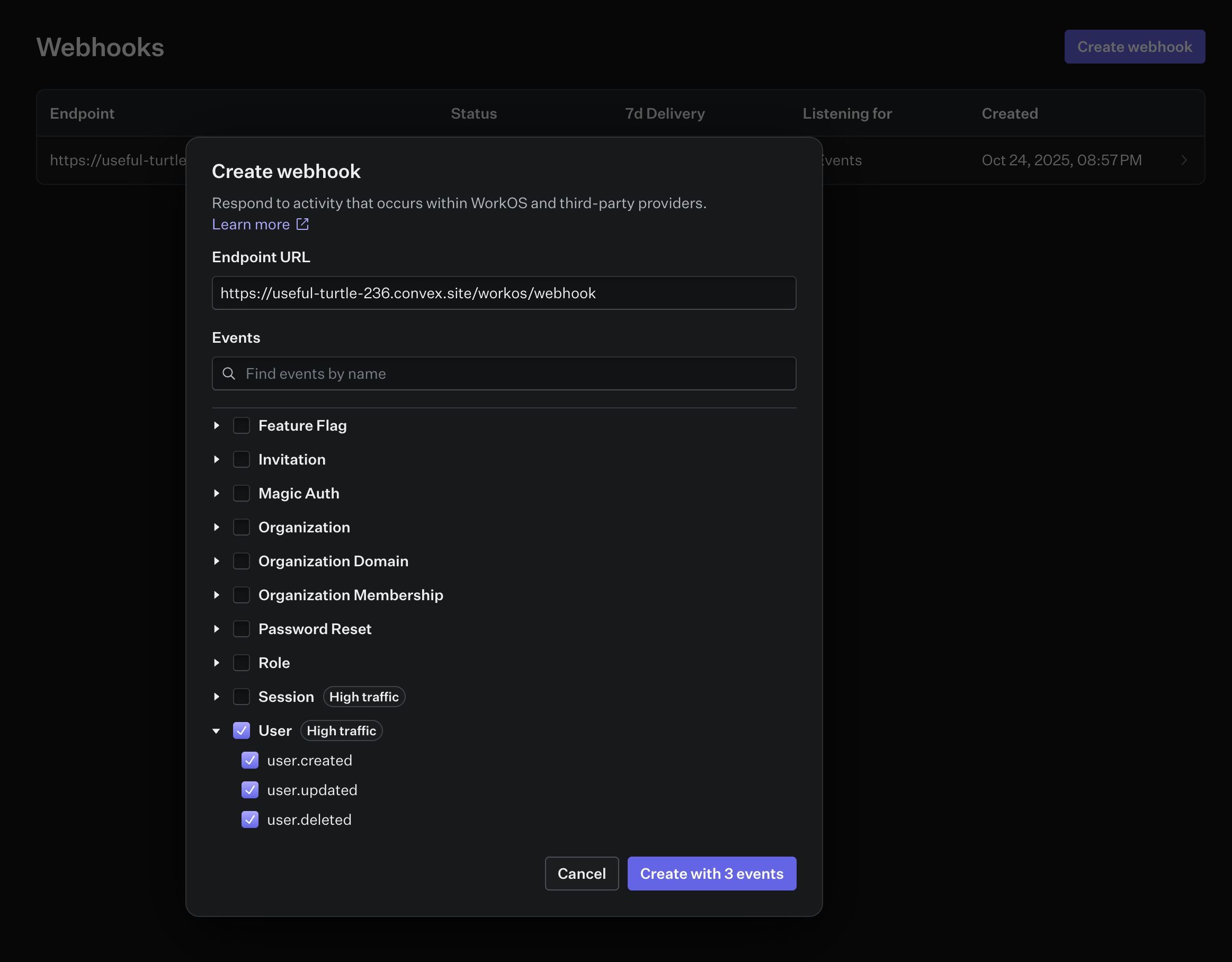
Select Webhooks from the left sidebar in your WorkOS project, and create a new webhook with the following settings:
- Endpoint URL:
https://<your-convex-deployment>.convex.site/workos/webhook - Events:
user.created,user.updated,user.deleted
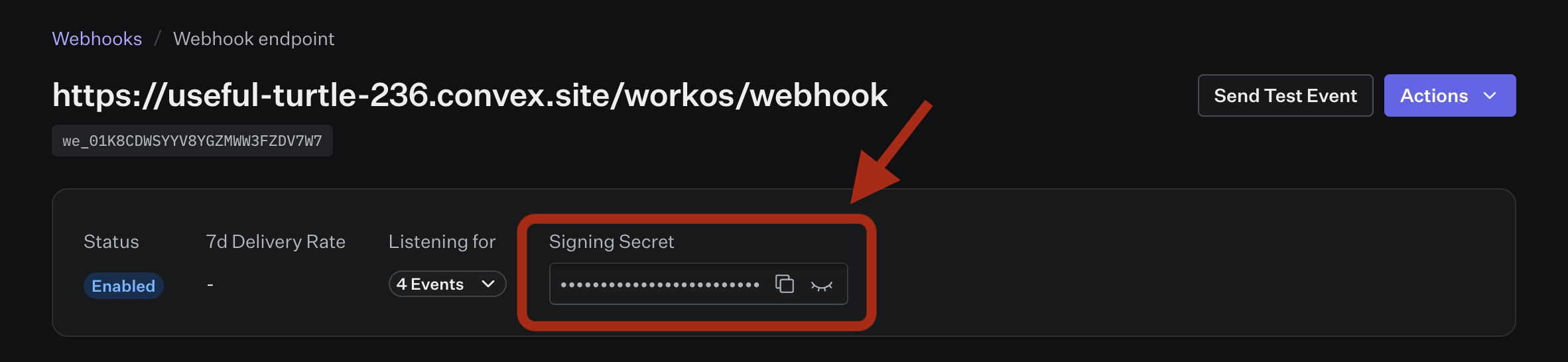
Copy the webhook secret and add it to your environment variables as
WORKOS_WEBHOOK_SECRET.
npx convex env set WORKOS_WEBHOOK_SECRET=<your-webhook-secret>Installation
First, add @convex-dev/workos-authkit to your Convex project:
npm install @convex-dev/workos-authkitThen, install the component within your convex/convex.config.ts file:
// convex/convex.config.ts
import workOSAuthKit from "@convex-dev/workos-authkit/convex.config";
import { defineApp } from "convex/server";

const app = defineApp();
app.use(workOSAuthKit);
export default app;
Create a Convex AuthKit client within your convex/ folder, and point it
to the installed component:
// convex/auth.ts
import { AuthKit } from "@convex-dev/workos-authkit";
import { components } from "./_generated/api";
import type { DataModel } from "./_generated/dataModel";

export const authKit = new AuthKit<DataModel>(components.workOSAuthKit);
Finally, register component webhook routes in convex/http.ts:
import { httpRouter } from "convex/server";
import { authKit } from "./auth";

const http = httpRouter();
authKit.registerRoutes(http);
export default http;
Custom domain
If you've configured a custom WorkOS authentication API domain, pass it as apiHostname when constructing the AuthKit client. This routes the WorkOS SDK through your domain and updates the JWT issuer and JWKS URLs to match.
// convex/auth.ts
export const authKit = new AuthKit<DataModel>(components.workOSAuthKit, {
  apiHostname: "auth.example.com",
});
Usage
User create/update/delete in WorkOS will be automatically synced by the component.
Use the getAuthUser component method to get the current authenticated user
object:
export const getCurrentUser = query({
  args: {},
  handler: async (ctx, _args) => {
    const user = await authKit.getAuthUser(ctx);
    return user;
  },
});
Events
The AuthKit component can be configured to handle events from WorkOS. This is useful for running code when a user is created, updated, or deleted in WorkOS, or in response to any other provided event.
By default the component will handle the following events:
user.createduser.updateduser.deleted
// convex/auth.ts
import { AuthKit, type AuthFunctions } from "@convex-dev/workos-authkit";
import { components, internal } from "./_generated/api";
import type { DataModel } from "./_generated/dataModel";

// Get a typed object of internal Convex functions exported by this file
const authFunctions: AuthFunctions = internal.auth;

const authKit = new AuthKit<DataModel>(components.workOSAuthKit, {
  authFunctions,
});

// create `authKitEvent` as a named export
export const { authKitEvent } = authKit.events({
  "user.created": async (ctx, event) => {
    // ctx is a mutation context and event.data is typed
    await ctx.db.insert("todoLists", {
      name: `${event.data.firstName}'s Todo List`,
      userId: event.data.id,
    });
  },
});
Additional event types
The component can handle any WorkOS event type. WorkOS docs provides a complete
list of events. To handle additional event types,
they must be selected in your webhook configuration and added to your AuthKit
component configuration via the additionalEventTypes option.
// convex/auth.ts
import { AuthKit, type AuthFunctions } from "@convex-dev/workos-authkit";
import { components, internal } from "./_generated/api";
import type { DataModel } from "./_generated/dataModel";

const authFunctions: AuthFunctions = internal.auth;

const authKit = new AuthKit<DataModel>(components.workOSAuthKit, {
  authFunctions,
  additionalEventTypes: ["session.created", "session.revoked"],
});

export const { authKitEvent } = authKit.events({
  "session.created": async (ctx, event) => {
    // do something with the session data
  },
  "session.revoked": async (ctx, event) => {
    // do something with the session data
  },
});
User data
Most apps will need to control their user schema and be able to query directly against a users table. The AuthKit component has it's own user table with user data from WorkOS. You can think of this as auth metadata for your users, but you'll likely want to extend this with additional data from your app.
A common pattern for this is to create your own users table with a reference to the AuthKit user table, using the user events to do any necessary syncing.
// convex/auth.ts
import { AuthKit, type AuthFunctions } from "@convex-dev/workos-authkit";
import { components, internal } from "./_generated/api";
import type { DataModel } from "./_generated/dataModel";

const authFunctions: AuthFunctions = internal.auth;

const authKit = new AuthKit<DataModel>(components.workOSAuthKit, {
  authFunctions,
});

export const { authKitEvent } = authKit.events({
  "user.created": async (ctx, event) => {
    await ctx.db.insert("users", {
      authId: event.data.id,
      email: event.data.email,
      name: `${event.data.firstName} ${event.data.lastName}`,
    });
  },
  "user.updated": async (ctx, event) => {
    const user = await ctx.db
      .query("users")
      .withIndex("authId", (q) => q.eq("authId", event.data.id))
      .unique();
    if (!user) {
      console.warn(`User not found: ${event.data.id}`);
      return;
    }
    await ctx.db.patch(user._id, {
      email: event.data.email,
      name: `${event.data.firstName} ${event.data.lastName}`,
    });
  },
  "user.deleted": async (ctx, event) => {
    const user = await ctx.db
      .query("users")
      .withIndex("authId", (q) => q.eq("authId", event.data.id))
      .unique();
    if (!user) {
      console.warn(`User not found: ${event.data.id}`);
      return;
    }
    await ctx.db.delete(user._id);
  },

  // Handle any event type
  "session.created": async (ctx, event) => {
    console.log("onCreateSession", event);
  },
});
Backfilling existing users
If you're adding this component to an app that already has users in WorkOS, you
can backfill them into the component's user table. The backfill also fires
user.created event handlers, so your app's own tables get populated too.
Export the backfill utility from your auth file:
// convex/auth.ts
export const { backfillUsers } = authKit.utils();
Then trigger it from the CLI or the Convex dashboard:
npx convex run auth:backfillUsersThe backfill processes users oldest-first. It's idempotent - if interrupted, just run it again and it will skip users that are already synced.
Actions
The AuthKit component can be configured to handle actions from WorkOS. Actions allow you to block user registration or authentication based on your own logic. Read more about actions in the WorkOS docs.
Configuration
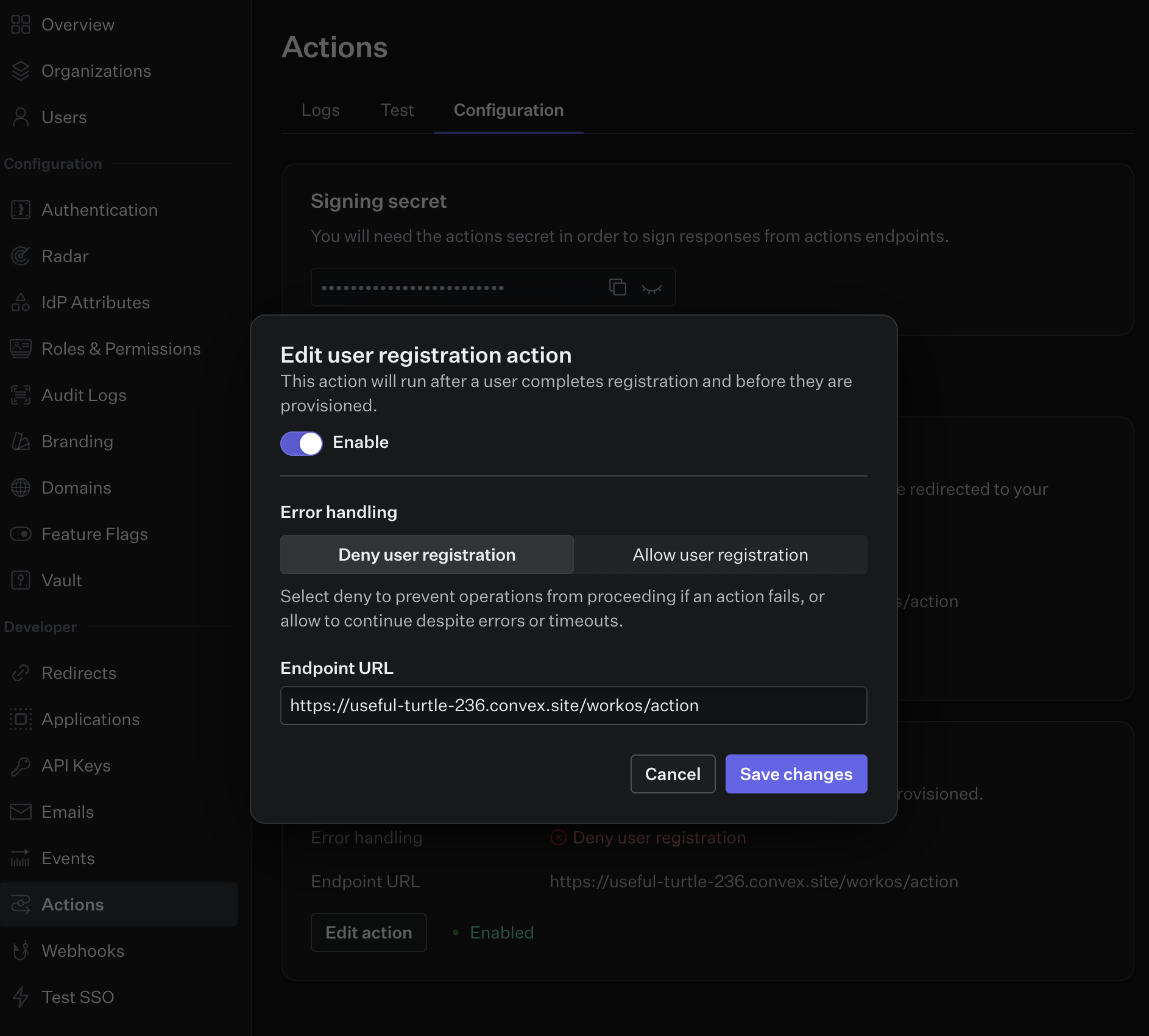
- Configure actions in your WorkOS dashboard.
- Set the endpoint URL for your action(s) to
https://<your-convex-deployment>.convex.site/workos/action - Copy the action signing secret from the dashboard and set it in your
environment variables as
WORKOS_ACTION_SECRET.
Usage
Action handlers are defined using the actions method on the AuthKit component.
AuthKit actions must return a response payload that allows or denies the action,
so a response object is provided to the action handler with allow and deny
methods.
// convex/auth.ts
import { AuthKit, type AuthFunctions } from "@convex-dev/workos-authkit";
import { components, internal } from "./_generated/api";
import type { DataModel } from "./_generated/dataModel";

const authFunctions: AuthFunctions = internal.auth;

const authKit = new AuthKit<DataModel>(components.workOSAuthKit, {
  authFunctions,
});

export const { authKitAction } = authKit.actions({
  authentication: async (_ctx, _action, response) => {
    return response.allow();
  },
  userRegistration: async (_ctx, action, response) => {
    if (action.userData.email.endsWith("@gmail.com")) {
      return response.deny("Gmail accounts are not allowed");
    }
    return response.allow();
  },
});