
@cosmintrica/culinary-assets
v0.5.0
Published
200 transparent culinary illustrations: individual PNG/WebP and optional WebP sprites. CC0 artwork, MIT code.

Maintainers
 cosmintrica
Readme
Culinary Assets
Live Catalog: cosmintrica.github.io/culinary-assets | Install & License | npm Package | Download v0.5.0
200 transparent culinary illustrations. PNG + WebP + optional sprites. CC0 artwork.
Ingredients, vegetables, fruit, pantry staples, cookware, utensils and appliances in a consistent coral-and-mint visual direction. Designed for recipe apps, kitchen inventories, onboarding, educational projects and prototypes.
AI-generated artwork, visually reviewed and exported with transparent backgrounds. No runtime dependencies, no install scripts, no required attribution for artwork. See provenance and limitations.
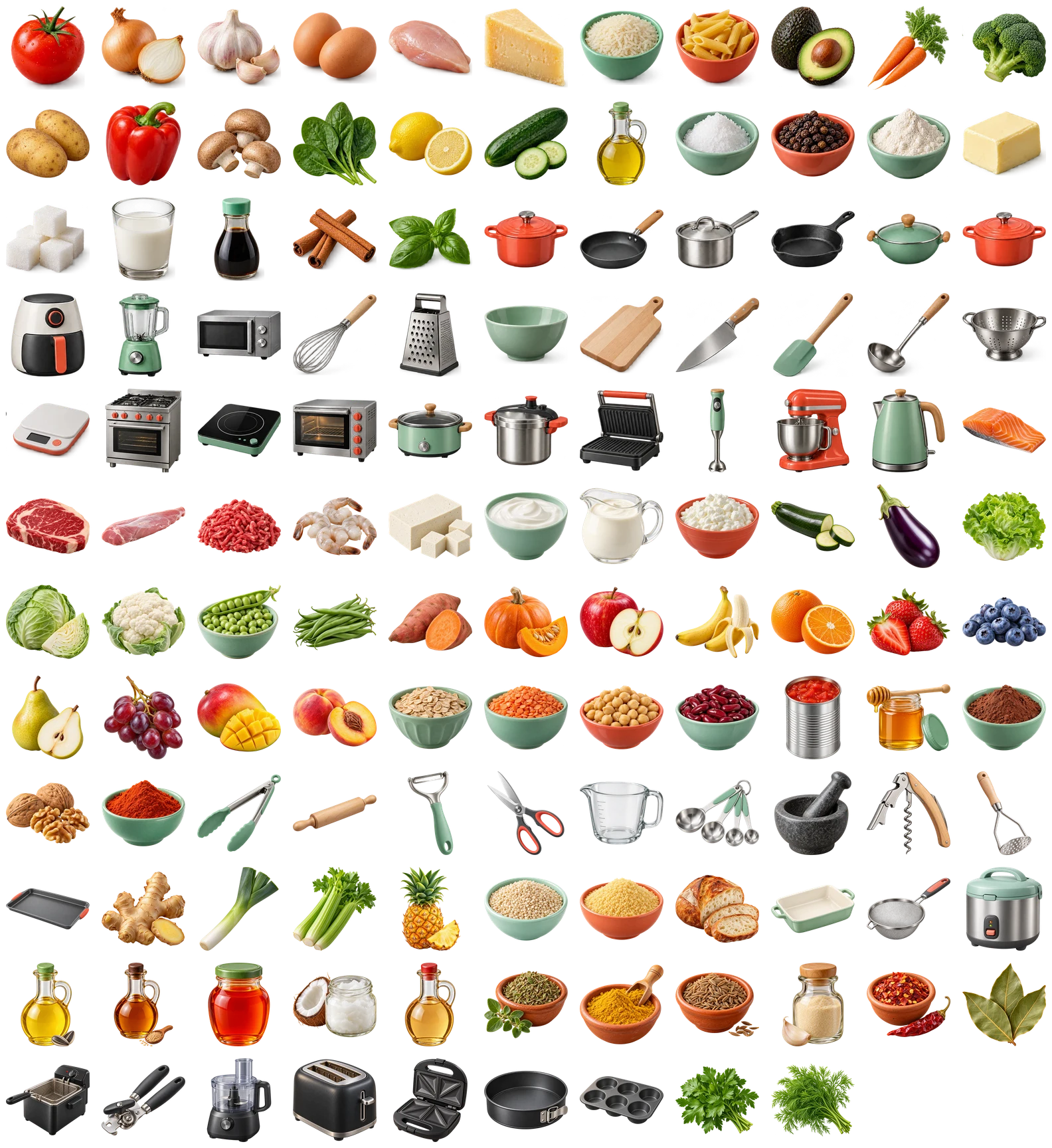
| Ingredients | Produce & fruit | Pantry staples | Cookware | Utensils | Appliances | | --- | --- | --- | --- | --- | --- | | 19 | 68 | 60 | 13 | 22 | 18 |
New in 0.5.0: 70 individual illustrations, including thyme, lovage, more herbs,
fruit, vegetables, nuts, seeds and kitchen tools. Bowl-free mounds of rice, salt,
sugar, flour and spices have new IDs such as rice_pile and salt_pile;
the original rice and salt images remain unchanged. Caraway and cumin, and
white and black sesame, are separate subjects.
The optional typed sprite API introduced in 0.4.0 now includes all 200 subjects in transparent 1x/2x WebP atlases. Existing IDs, individual file paths, sprite tile coordinates and web/native exports remain compatible.
Use the live catalog to search,
preview against light/dark backgrounds and download individual assets. For
offline use, download/clone the repository and open index.html in a browser.
No local server is needed. The public catalog is hosted on GitHub Pages.
Install
Install from the public npm registry. No npm account, token or Git installation is needed to use the package.
npm install @cosmintrica/culinary-assets
# or
pnpm add @cosmintrica/culinary-assets
For an exact version, add @0.5.0 to the package name. Commit your lockfile for
reproducible builds. The package ships ready-to-use exports; users do not need
Sharp or a build step.
The tagged GitHub source remains an alternative (requires Git):
npm install github:cosmintrica/culinary-assets#v0.5.0To use a local checkout:
npm install /absolute/path/to/culinary-assetsWeb / React / Vite
Import just the files you use. This is the most portable option and avoids including the whole collection in your application bundle.
import tomato from '@cosmintrica/culinary-assets/webp/tomato.webp';

export function Ingredient() {
  return <img src={tomato} width={80} height={80} alt="Tomato" />;
}
For a dynamic gallery, the web entry provides URLs and bilingual metadata:
import { assets, catalog, getAsset } from '@cosmintrica/culinary-assets';

const tomato = getAsset('tomato');
// tomato.src: WebP URL; tomato.pngSrc: PNG URL
// tomato.alt.en / tomato.alt.ro: accessible labels
// catalog: 200 metadata entries; assets: lookup by stable ID
The web entry uses new URL(..., import.meta.url), supported by modern client
bundlers. Some SSR frameworks may need static file imports or copying files to
their public directory; do not use Node file: URLs as browser URLs. Plain HTML
can reference copied assets directly, with no JavaScript library.
Optional Web Sprites
Individual imports remain the default. For a dense icon grid, opt into one atlas request through a separate entry; the main package does not load it.
import {
  spriteUrl, sprite2xUrl, sprites, spriteWidth, spriteHeight, tileSize,
} from '@cosmintrica/culinary-assets/sprite';

const { x, y } = sprites.tomato;
// { x: 0, y: 0, width: 128, height: 128 }
const displaySize = 64;
const scale = displaySize / tileSize;

<span role="img" aria-label="Tomato" style={{
  display: 'inline-block', width: displaySize, height: displaySize,
  backgroundImage: `url("${spriteUrl}")`,
  backgroundRepeat: 'no-repeat',
  backgroundPosition: `${-x * scale}px ${-y * scale}px`,
  backgroundSize: `${spriteWidth * scale}px ${spriteHeight * scale}px`,
}} />
Tiles are 128px on a 1664 x 2048 atlas. For sharper rendering, use
sprite2xUrl (3328 x 4096) with the same CSS geometry. The 2x image doubles
physical pixels, not the logical coordinates. Individual exports stay 512px.
The smaller default avoids a huge decoded 512px-per-subject atlas on mobile.
Binary imports also work with compatible bundlers:
@cosmintrica/culinary-assets/sprite/culinary.webp and
@cosmintrica/culinary-assets/sprite/[email protected].
@cosmintrica/culinary-assets/sprite/atlas.json provides dimensions and coordinates.
SSR code should use static image imports or public URLs, not Node file: URLs.
For React Native, prefer the individual PNGs below rather than CSS sprites.
Expo / React Native
PNG is the conservative cross-platform format. Static asset imports are
processed by Metro and work with native Image on iOS and Android:
import { Image } from 'react-native';

const tomato = require('@cosmintrica/culinary-assets/png/tomato.png');

export function Ingredient() {
  return <Image source={tomato} style={{ width: 80, height: 80 }}
    resizeMode="contain" accessibilityLabel="Tomato" />;
}
Or use the native collection, which uses explicit static require() calls:
import { nativeAssets } from '@cosmintrica/culinary-assets/native';

<Image source={nativeAssets.air_fryer} style={{ width: 96, height: 96 }} />
The native collection includes all 200 PNGs in the bundle. Prefer individual imports for a smaller app. Native rendering still needs verification in your own development build; an asset package does not guarantee every device's layout or image decoder behavior.
Files and Categories
assets/png/andassets/webp/: individual transparent 512 x 512 canvases.catalog.json: stable IDs, EN/RO labels, category, dimensions and asset paths.assets/sprite/: optional transparent atlases and coordinate manifest.dist/: committed web/native/sprite exports and TypeScript declarations.sources/: original atlases, 146 individual source images, crop regions and generation briefs.docs/previews/: contact sheets for the six categories.index.html: searchable, offline-capable visual catalog.
Categories: ingredients, produce, staples, cookware, utensils,
appliances. Every subject has separate PNG and WebP files: 400 individual images.
The 512px exports include padding. The original 54 subjects may be upscaled from
smaller atlas cells; the 146 additions use individual high-resolution sources
(at least 1179px on the shorter edge). These are
raster illustrations, not infinitely scalable SVG icons.
License
Artwork and metadata: CC0 1.0. Copy, modify, redistribute and use commercially under CC0, without required attribution. Attribution is appreciated, not mandatory. Official CC0 terms.
Software, examples and documentation: MIT. Preserve the copyright and permission notice when distributing software copies.
CC0 applies to rights the contributor may hold, not trademarks, patents or third-party rights. AI-generated material may have different copyright status depending on jurisdiction. Assets are provided as-is without warranties. The Scrappy Chef logo and wordmarks are not included or licensed here.
Contribute / Rebuild
npm install
npm run build
npm test
npm run verify:package
Building uses Sharp only as a development dependency. Source changes must be accompanied by rebuilt files, visual review on light/dark backgrounds and passing tests. See contribution guidelines. Installation from GitHub does not run the build automatically.
Security
See SECURITY.md for the reporting process, release controls and remaining limitations. CI tests the real packed installation and compares all 400 individual images and both optional atlases using SHA-256. External scores are not security certifications.
Creator
Created by Cosmin Trică. Website · GitHub · LinkedIn.