
@couchbaselabs/topology-ui
v1.3.0
Published
Packaged Couchbase topology renderer preserving the original browser output and dependencies.
Downloads
1,319

Maintainers
 tayebchlyah
Readme
JavaScript Couchbase Topology UI Viewer
Couchbase Topology UI Viewer is a JavaScript library for rendering Couchbase cluster, mobile, and bucket topology details in the browser.
The package is designed to be safe to embed inside host applications that already ship their own CSS frameworks or content styling, including Vuetify apps, CMS platforms, and documentation sites. Load the packaged stylesheet once, call renderTopology(...), and no host-specific compatibility CSS should be necessary.
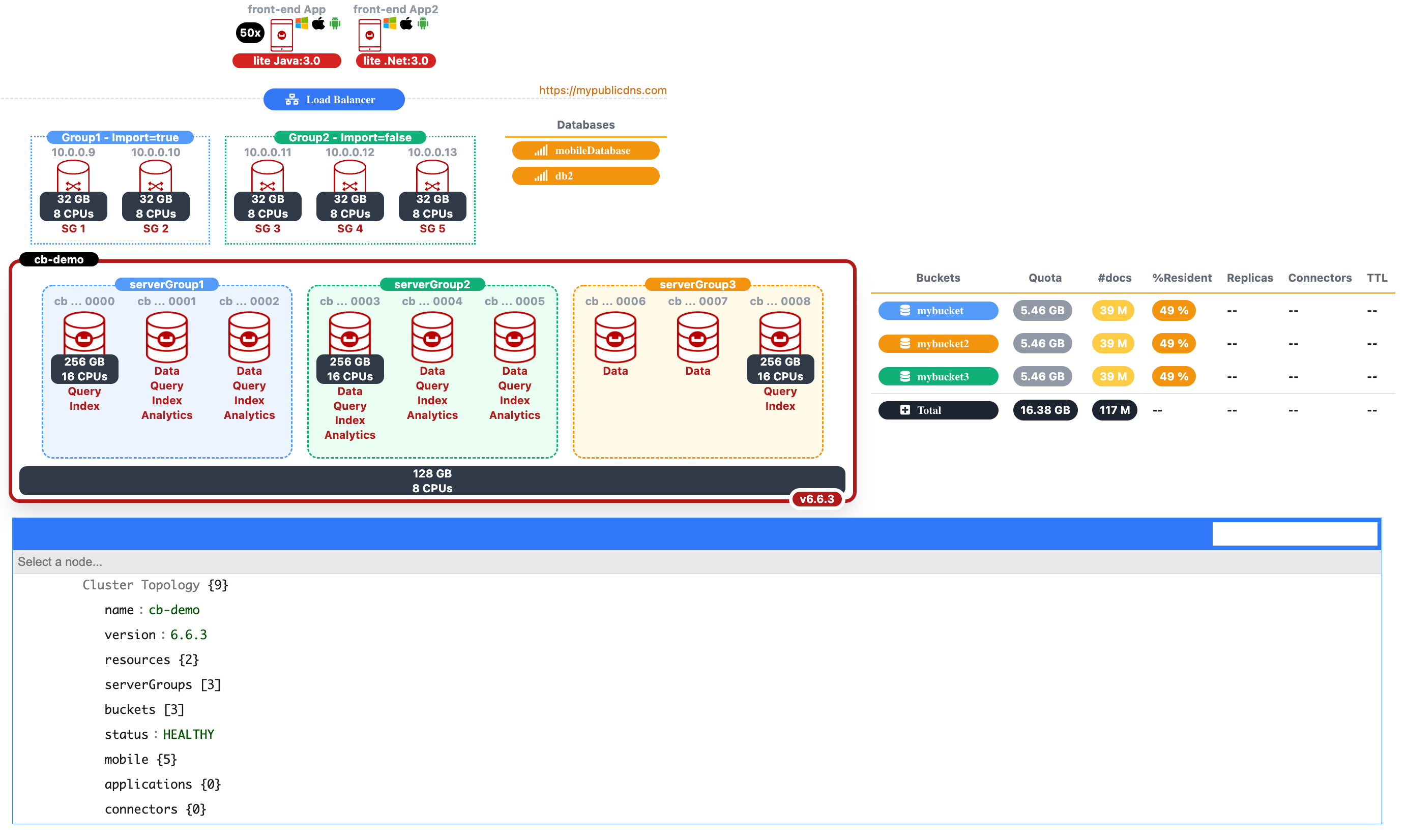
Get Started
Installation
npm install @couchbaselabs/topology-uiFor developers working from this repository, npm install also runs the package prepare step and generates the bundled stylesheet in dist/.
Stylesheet
For bundlers, import the published stylesheet subpath:
import "@couchbaselabs/topology-ui/styles.css";For a plain HTML page, load the packaged CSS file directly from the installed package or from a copied asset bundle:
<!DOCTYPE html>
<html lang="en">
<head>
    <meta charset="UTF-8">
    <title>Couchbase Info CSS</title>
    <link href="./node_modules/@couchbaselabs/topology-ui/dist/topology-ui.css" rel="stylesheet"/>
    <!-- jsoneditor v9.7.3 -->
    <link href="https://cdnjs.cloudflare.com/ajax/libs/jsoneditor/9.7.3/jsoneditor.min.css" rel="stylesheet" type="text/css">
    <script src="https://cdnjs.cloudflare.com/ajax/libs/jsoneditor/9.7.3/jsoneditor.min.js"></script>
</head>
The package bundles the required Tailwind-generated rules and Font Awesome icon styles into dist/topology-ui.css, so consumers do not need to add Tailwind CSS or Font Awesome separately.
- The stylesheet is scoped to the renderer root,
.cb-topology-renderer. - Internal renderer classes are library-owned and prefixed, so host utility classes like
flex,px-6,py-1,text-right, and similar framework helpers do not collide with the topology markup. - The default package CSS is the only stylesheet consumers should need.
jsoneditoris not included and remains demo-only.
Use As A Dependency
const topologyUi = require("@couchbaselabs/topology-ui");

const data = {
  ... topology data here ...
};

const html = topologyUi.renderTopology(data);
renderTopology() returns markup wrapped in the library root container (.cb-topology-renderer), and the packaged stylesheet targets only that rendered topology block.
Or if you already have a DOM element:
const topologyUi = require("@couchbaselabs/topology-ui");

const content = document.getElementById("display");
topologyUi.create_cluster(content, data);
If the topology source comes as a JSON string or a JavaScript object literal string:
const topologyUi = require("@couchbaselabs/topology-ui");

const data = topologyUi.parseTopologySource(rawInput);
const html = topologyUi.renderTopology(data);
The packaged renderer preserves the public JavaScript API and visual output while emitting host-safe, namespaced internal classes. By default image references resolve to images/... relative to the page. In npm-based apps you will usually copy node_modules/@couchbaselabs/topology-ui/images into your public assets and override that path with assetRoot:
const html = topologyUi.renderTopology(data, { assetRoot: "/assets/topology-ui/images" });Best-practice usage is still simple: install the package, load one stylesheet, and render the returned HTML.
import "@couchbaselabs/topology-ui/styles.css";Figures and quality
Every displayed memory, CPU, bucket quota, document count, resident ratio, and replica count is a figure. Supply a plain number as before, or include quality information:
{ value: 7, unit: "GB", status: "partial", reason: "2 nodes unreachable" }renderTopology() and mountTopology() accept renderFigure. The renderer calls it for every figure. The default output is a cb-tu-figure span with data-status and aria-description. Missing or failed data renders as —. Partial data renders with a ~ prefix, for example ~7 GB. Existing topology colors stay unchanged. The Total row leaves Resident, Replicas, and TTL empty. This avoids invented values and keeps quality visible without adding color semantics.
const html = topologyUi.renderTopology(data, {
  renderFigure: (figure) => `<strong>${figure.value}</strong>`
});
Use normalizeFigure(value, unit) and defaultRenderFigure(figure) from the package when a host needs the same figure contract outside the topology renderer.
In an embedded host application you can load that stylesheet once and inject the returned HTML directly:
const topologyUi = require("@couchbaselabs/topology-ui");

const container = document.getElementById("display");
container.innerHTML = topologyUi.renderTopology(data);
Topology Viewer
<head>
    <meta charset="UTF-8">
    <title>Couchbase Info CSS</title>
    <link href="./node_modules/@couchbaselabs/topology-ui/dist/topology-ui.css" rel="stylesheet">
    ...
</head>
<body>
<div class="container">
    <main class="container-fluid">
        <div class="row justify-content-center">
            <div id="display" class="flex justify-content-center">
                <!-- cluster topology display would be here -->
            </div>
        </div>
          ....
    </main>
</div>
<script>
    var data =
        {
				... topology data here ...
        }
    let content = document.getElementById("display");
    topologyUi.create_cluster(content, data);
</script>
</body>
Data Structure
let data = {
name: "cb-demo",
version: "6.6.3",
resources: {
memory: "128",
cpus: "8"
},
serverGroups: [
{
name: "serverGroup1",
nodes: [
{
name: "cb-demo0000",
resources: {
memory: "256",
cpus: "16"
},
services: [
"Query",
"Index"
],
status: "HEALTHY"
},
{
name: "cb-demo0001",
services: [
"Data",
"Query",
"Index",
"Analytics"
],
status: "HEALTHY"
},
{
name: "cb-demo0002",
services: [
"Data",
"Query",
"Index",
"Analytics"
],
status: "HEALTHY"
}
],
status: "HEALTHY"
},
{
name: "serverGroup2",
nodes: [
{
name: "cb-demo0003",
resources: {
memory: "256",
cpus: "16"
},
services: [
"Data",
"Query",
"Index",
"Analytics"
],
status: "HEALTHY"
},
{
name: "cb-demo0004",
services: [
"Data",
"Query",
"Index",
"Analytics"
],
status: "HEALTHY"
},
{
name: "cb-demo0005",
services: [
"Data",
"Query",
"Index",
"Analytics"
],
status: "HEALTHY"
}
],
status: "HEALTHY"
},
{
name: "serverGroup3",
nodes: [
{
name: "cb-demo0006",
services: [
"Data"
],
status: "HEALTHY"
},
{
name: "cb-demo0007",
services: [
"Data",
],
status: "HEALTHY"
},
{
name: "cb-demo0008",
services: [
"Query",
"Index"
],
resources: {
memory: "256",
cpus: "16"
},
status: "HEALTHY"
}
],
status: "HEALTHY"
}
],
buckets: [
{ name: "mybucket", type: "couchbase", quota: 5590, documents: 39000000, replicas:1, ratio: 49,
scopes: [{ name: "scope1",
collections:[{name: "collection1"} ]}],
connectors: ["mobile","kafka", "elastic", "spark"]
}
{ name: "mybucket2", type: "ephemeral", quota: 5590, documents: 39000000, ratio: 32, replicas:1
scopes: [{ name: "scope1", documents: 39000000,
collections:[{name: "collection1", documents: 39000000}]}],
connectors: ["mobile","kafka", "elastic"]
},
{ name: "mybucket3", type: "magma", quota: 5590, replicas:1, documents: 39000000, ratio: 75,
scopes: [{ name: "scope1", documents: 34000000},
{ name: "scope2", documents: 5000000,
collections:[{name: "collection1", documents: 5000000}]}
],
connectors: ["mobile","kafka", "elastic"]}
],
status: "HEALTHY",
mobile: {
version: "2.8.3",
resources: {
memory: 32,
cpus: 8
},
groups : [{
name:"Group1 - Import=true",
instances: [
{
nodeIp: "10.0.0.9",
name: "SG 1",
resources: {
memory: 32,
cpus: 8
}
},
{
nodeIp: "10.0.0.10",
name: "SG 2",
resources: {
memory: 32,
cpus: 8
}
}]
},
{
name:"Group2 - Import=false",
instances: [
{
nodeIp: "10.0.0.11",
name: "SG 3",
resources: {
memory: 32,
cpus: 8
}
},
{
nodeIp: "10.0.0.12",
name: "SG 4",
resources: {
memory: 32,
cpus: 8
}
},
{
nodeIp: "10.0.0.13",
name: "SG 5",
resources: {
memory: 32,
cpus: 8
}
}]
}],
databases: [{name: "mobileDatabase" },{name: "db2" }],
publicAddress: "https://mypublicdns.com",
clients: [{ name:"front-end App", versions: ["3.0"], os:["windows","ios","android"], language: "Java", total:50},{ name:"front-end App2", versions: ["3.0"], os:["windows","ios","android"], language: ".Net"}]
},
applications: {},
connectors: {}
};Data Structure Properties
- name: display name of the cluster
- version: cluster version
- resources: If all/majority of nodes have the same hardware (cpu/memory) you can fill the resources at the cluster level instead of individual nodes.
{
  memory: "128",
  cpus: "8"
}
- serverGroups: Array of Server Groups. Each Server Group contains the information of the Server Group name, list of nodes and status.
[
{
                    name: "serverGroup1",
                    nodes: [
                        {
                            name: "cb-demo0000",
                            resources: {
                                memory: "256",
                                cpus: "16"
                            },
                            services: [
                                "Query",
                                "Index"
                            ],
                            status: "HEALTHY"
                        },
                        ...
                    ],
                    status: "HEALTHY"
                },
                {
                    name: "serverGroup2",
                    ...
                }
            ]
Limiting nodes per line with nodesPerLine
By default all nodes inside a server group render on a single line and wrap only when the container runs out of width. Set the optional cluster-level nodesPerLine field (positive integer) to cap how many nodes appear on each line. Each server group chunks its nodes independently — the last line may be shorter.
{
    name: "cb-demo",
    nodesPerLine: 3,
    serverGroups: [ ... ]
}
Example: 9 nodes with nodesPerLine: 3 → 3 rows of 3. With nodesPerLine: 2 → 4 rows of 2 plus a final row of 1. Omit the field (or set 0 / a non-integer) to keep the original wrap behavior.
Bucket columns
The bucket grid renders quota, documents, ratio, replicas, eviction, connectors and ttl, in that order, after the bucket name.
A column renders only when at least one bucket carries that field. A topology whose buckets declare no connectors and no ttl shows neither column, and the grid narrows to fit. A field that is present but whose figure value is null keeps its column: a measured value the source did not answer stays visible as missing, while a field the caller never set is not modelled at all.
eviction is a string field. The cell drops the suffix every row repeats, so value_only renders as value and full_eviction renders as full. Any other value renders as reported. Like every other cell it goes through the figure contract, so it accepts a plain string or a figure with quality.
buckets: [
    { name: "mybucket", quota: 5590, documents: 39000000, replicas: 1, ratio: 49, eviction: "value_only" }
]
Scope and collection rows follow the same visible columns, so their document counts stay under #docs whatever the grid width.
Host names
Node names and mobile instance addresses are shortened to fit their tile. A fully qualified name loses its domain suffix first, because every node in a cluster shares it, then the remaining label is middle-elided: svc-dqis-node-001.29fep4zxmeuizhpc.cloud.couchbase.com renders as sv ... -001. An IPv4 address keeps its shape and is elided from the middle: 10.156.192.8 renders as 10 ... 92.8.
Grouping identical nodes with total
When a Server Group or Sync Gateway Group contains many identical nodes, listing them one by one makes the diagram tall and noisy. Set the total property on a node (or Sync Gateway instance) to render a single visual that represents total identical nodes. The renderer draws the node once with a small stacked-card effect behind it and a black Nx label on the left.
The field is optional. Omit it (or set total <= 1) to keep the original one-node-per-entry rendering.
{
    name: "cb-demo0003",
    resources: { memory: "256", cpus: "16" },
    services: ["Data"],
    status: "HEALTHY",
    total: 20
}
The same field works for Sync Gateway instances:
{
    nodeIp: "10.0.0.9",
    name: "SG 1",
    resources: { memory: 32, cpus: 8 },
    total: 5
}- buckets: Array of Buckets. You can define
ephemeral,couchbaseandmagmabucket types. The default value iftypeproperty is missing iscouchbase. Optionally, you can display the list of scopes and collections per scope. Another optional property among others, isconnectorsthat would accept the following enum values:mobile,kafka,elastic,spark

             buckets: [
                { name: "mybucket", type: "couchbase", quota: 5590, documents: 39000000, replicas:1, ratio: 49,
                   scopes: [{ name: "scope1",
                              collections:[{name: "collection1"} ]}],
                   connectors: ["mobile","kafka", "elastic", "spark"]
                }
                { name: "mybucket2", type: "ephemeral", quota: 5590, documents: 39000000, ratio: 32, replicas:1
                   scopes: [{ name: "scope1", documents: 39000000,
                         collections:[{name: "collection1", documents: 39000000}]}],
                         connectors: ["mobile","kafka", "elastic"]
                },
                { name: "mybucket3", type: "magma", quota: 5590, replicas:1, documents: 39000000, ratio: 75,
                  scopes: [{ name: "scope1", documents: 34000000},
                           { name: "scope2", documents: 5000000,
                                collections:[{name: "collection1", documents: 5000000}]}
                          ],
                  connectors: ["mobile","kafka", "elastic"]}
              ]
Note: Information at the bucket/scope/collections level is optional.
status: Status of the cluster.
mobile: Sync Gateway and Couchbase Lite topology information
 mobile: {
             version: "2.8.3",
                groups : [{
                    name:"Group1 - Import=true",
                    instances: [
                        {
                            nodeIp: "10.0.0.9",
                            name: "SG 1",
                            resources: {
                                memory: 32,
                                cpus: 8
                            }
                        },
                        ...]
                   },
                   {
                        name:"Group2 - Import=false",
                        instances: [
                            {
                                nodeIp: "10.0.0.11",
                                name: "SG 3"
                            },
                            ... ]
                   }],
                databases: [{name: "mobileDatabase" },
                            {name: "db2" }],
                publicAddress: "https://mypublicdns.com",
                clients: [{ name:"front-end App", versions: ["3.0"], os:["windows","ios","android"], language: "Java", total:50},
                          { name:"front-end App2", versions: ["3.0"], os:["windows","ios","android"], language: ".Net"}]
}Applications: TBD
Connectors: TBD
Topologies Samples:
3 Nodes with Data, Query and Index Services with homogenous cpu/memory resources
9 Nodes distributed accross 3 Server Group And non homogenous cpu/memory resources
mobile - 2 Sync Gateway Groups, 3 data and 2 query/index nodes
mobile - 2 Clients Couchbase Lite languages, 2 groups of 5 Sync Gateways and 3 server groups