
@cremich/personalize
v0.0.1-alpha.6
Published
Amazon Personalize Construct Library for CDK
Downloads
28

Maintainers
 cremich
Readme
👋 Welcome to the Amazon Personalize CDK Construct Library





This Construct Library provides L2 constructs for resources to build your own recommendation engine based on Amazon Personalize using the AWS Cloud Development Kit (CDK).
🪄 About Amazon Personalize
As part of the AI Services, Amazon Personalize is a managed service to provide personalization and recommendations based on the same technology used at Amazon.com. Using Amazon Personalize you will get convenient APIs you can use to solve a specific personalization and recommendation business problem.
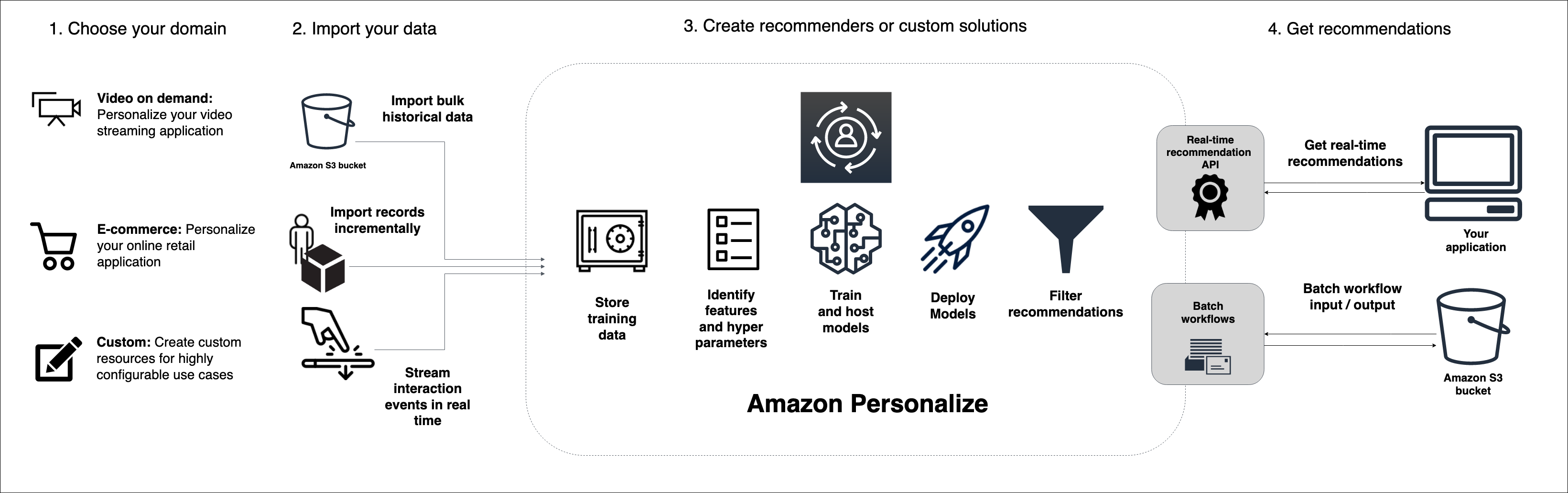 Source: https://docs.aws.amazon.com/personalize/latest/dg/how-it-works.html
Amazon Personalize is a fully managed service. It generates highly relevant recommendations using deep learning techniques. It build custom and private ML models using your own data.
🚀 Getting started
This Construct Library requires the AWS CDK v2. Please follow the installation to install the AWS CDK.
Installation
The Amazon Personalize CDK Library is available for Typescript based CDK applications and can be added as a dependency within your application using the following command:
npm install @cremich/personalize🎉 Usage
Getting started
In order to create your recommendation engine, you start by provisioning either a custom or domain specific Dataset Group. Once you create your Dataset Group, you can add the required datasets by calling for example
addInteractionsDataset().addItemsDataset().addUsersDataset().
This will create a new dataset within your Dataset Group with a default schema depending on the domain and dataset type combination. For a detailed description of the default dataset schemas, please review the official Amazon Personalize documentation.
import { DatasetGroup } from "@cremich/personalize";
import { PersonalizeDomain } from "@cremich/personalize/lib/types";

const dsg = new DatasetGroup(this, "vod", {
  name: "vod-dataset-group",
  domain: PersonalizeDomain.VIDEO_ON_DEMAND,
});

dsg.addInteractionsDataset();
If you want to use a custom or external defined dataset schema, you can set the ARN of your schema while adding the dataset to your dataset Group.
import { DatasetGroup } from "@cremich/personalize";
import { PersonalizeDomain } from "@cremich/personalize/lib/types";

const dsg = new DatasetGroup(this, "vod", {
  name: "vod-dataset-group",
  domain: PersonalizeDomain.VIDEO_ON_DEMAND,
});

dsg.addInteractionsDataset(
  "arn:aws:personalize:eu-central-1:1234567890:schema/my-external-schema"
);