
@creuto/react-native-image-uploader
v0.1.1
Published
Powerful, customizable React Native image picker, camera capture, preview, reordering, validation, and local compression library for iOS and Android. High-performance alternative to react-native-image-crop-picker and expo-image-picker.

Maintainers
 creuto
Keywords
Readme
@creuto/react-native-image-uploader
The ultimate production-grade React Native image picker, camera capture, preview, reordering, validation, and preparation library for iOS and Android.
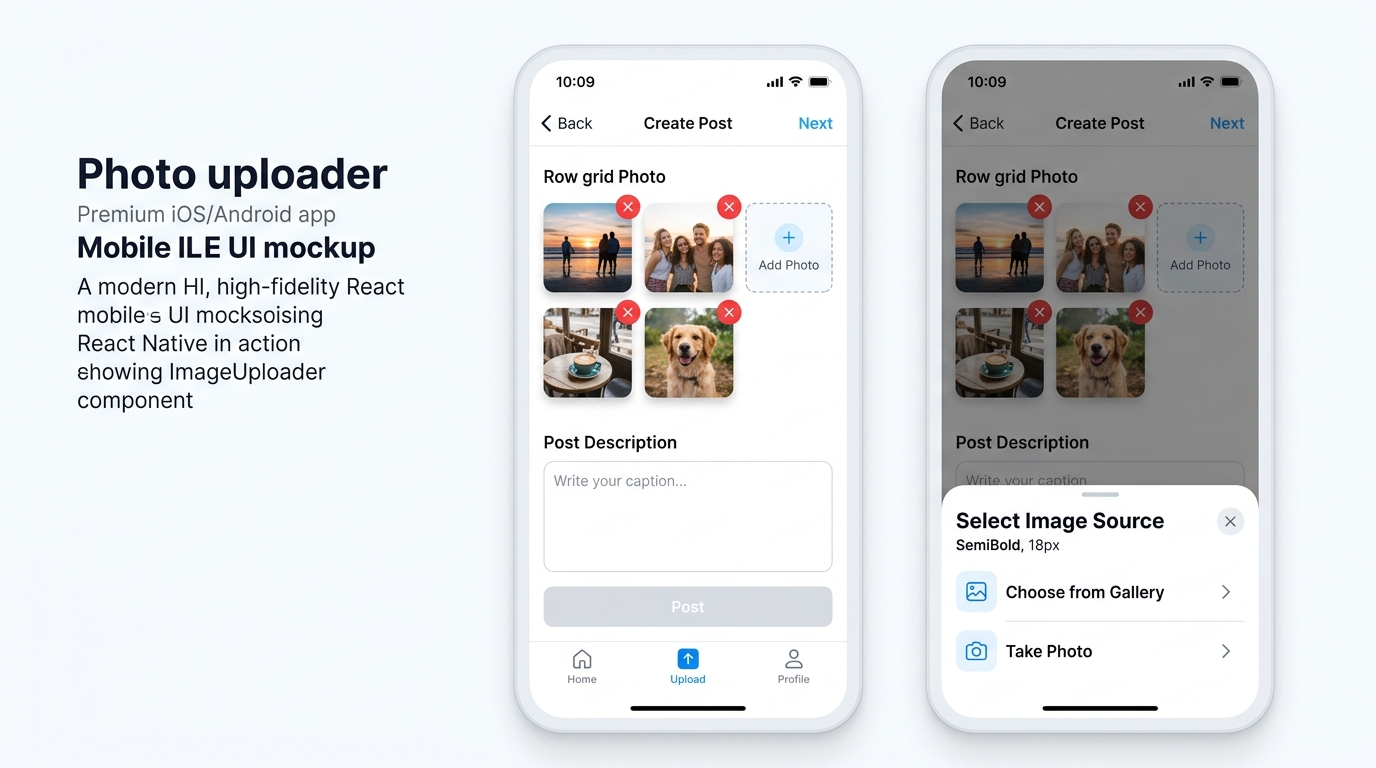
@creuto/react-native-image-uploader provides an all-in-one, highly customizable solution for selecting photos from the device gallery or capturing photos with the camera, displaying responsive thumbnail previews, validating image sizes and file types, and compressing images locally.
Zero backend vendor lock-in. Works seamlessly with any API, server, GraphQL, AWS S3, Cloudinary, Firebase, Supabase, or custom backend.
Why Choose @creuto/react-native-image-uploader?
| Feature | @creuto/react-native-image-uploader | react-native-image-crop-picker | expo-image-picker |
| :--- | :---: | :---: | :---: |
| Built-in Preview UI Grid | Yes | No | No |
| Integrated Image Removal | Yes | No | No |
| Image Reordering Support | Yes | No | No |
| Local Validation (Size, Types, Dims) | Yes | Partial | No |
| Camera & Gallery Picker | Yes | Yes | Yes |
| Local Compression | Yes | Yes | Yes |
| Accessible Screen-Reader Ready | Yes | No | Partial |
| Zero Backend Lock-in | 100% Local | 100% Local | 100% Local |
| Strict TypeScript Declarations | Native | Community | Community |
Key Features
- Photo Gallery and Camera Selection: Single or multi-image selection from device gallery or native camera.
- Thumbnail Preview Grid: Ready-to-use thumbnail previews with remove buttons.
- Position Reordering: Move images left/right or reorder array positions easily.
- Comprehensive Local Validation:
maxImages: Enforce maximum allowed photo count.maxFileSize: Limit file size in bytes (e.g. 5 MB).allowedTypes: Filter by MIME type (JPEG, PNG, WebP, GIF, HEIC).maxWidthandmaxHeight: Validate image resolution dimensions.customValidator: Async or sync custom validation logic.
- Configurable Compression: Compress images locally on-device using
compressionQuality. - Flexible Styling and Custom Render Props: Customize built-in components or replace with your own UI elements.
- Full Accessibility: Built with
accessibilityRole,accessibilityLabel, and WCAG compliant touch targets. - Standalone Programmatic API: Use
pickImages(),pickImage(),takePhoto(), andvalidateImage()directly in utility code.
Installation
npm install @creuto/react-native-image-uploader react-native-image-picker
# or with yarn
yarn add @creuto/react-native-image-uploader react-native-image-picker
Peer Dependencies
Ensure react-native-image-picker is present in your project:
"peerDependencies": {
  "react": ">=17.0.0",
  "react-native": ">=0.68.0",
  "react-native-image-picker": ">=4.0.0"
}
Platform Configuration
iOS Configuration (ios/YourAppName/Info.plist)
Add the required permissions to your Info.plist:
<!-- Photo Library Usage -->
<key>NSPhotoLibraryUsageDescription</key>
<string>This app requires access to your photo library to let you select photos for upload.</string>

<!-- Camera Usage -->
<key>NSCameraUsageDescription</key>
<string>This app requires access to your camera to capture new photos for upload.</string>
Then install Cocoapods:
cd ios && pod install && cd ..Android Configuration (android/app/src/main/AndroidManifest.xml)
Add permissions to AndroidManifest.xml:
<uses-permission android:name="android.permission.CAMERA" />
<uses-permission android:name="android.permission.READ_MEDIA_IMAGES" />
<uses-permission android:name="android.permission.READ_EXTERNAL_STORAGE" android:maxSdkVersion="32" />
<uses-permission android:name="android.permission.WRITE_EXTERNAL_STORAGE" android:maxSdkVersion="32" />
Quick Start Example
import React, { useState } from 'react';
import { View, StyleSheet, Button, Alert } from 'react-native';
import { ImageUploader, SelectedImage } from '@creuto/react-native-image-uploader';

export default function CreatePostScreen() {
  const [images, setImages] = useState<SelectedImage[]>([]);

  const handlePublish = async () => {
    const formData = new FormData();
    images.forEach((image) => {
      formData.append('images', {
        uri: image.uri,
        name: image.fileName || image.name,
        type: image.type || 'image/jpeg',
      } as any);
    });

    // Post to your application API
    await fetch('https://api.yourdomain.com/posts', {
      method: 'POST',
      body: formData,
    });

    Alert.alert('Success', 'Post published successfully!');
  };

  return (
    <View style={styles.container}>
      <ImageUploader
        images={images}
        onChange={setImages}
        maxImages={5}
        maxFileSize={5 * 1024 * 1024} // 5 MB
        allowedTypes={['image/jpeg', 'image/png', 'image/webp']}
        compressionQuality={0.8}
        source="both"
        allowReorder
      />

      <Button
        title="Publish Post"
        onPress={handlePublish}
        disabled={images.length === 0}
      />
    </View>
  );
}

const styles = StyleSheet.create({
  container: {
    padding: 16,
  },
});
Component API Documentation
<ImageUploader /> Props
| Prop | Type | Default | Description |
| :--- | :--- | :--- | :--- |
| images | SelectedImage[] | undefined | Controlled images array. |
| defaultImages | SelectedImage[] | [] | Initial images array for uncontrolled usage. |
| onChange | (images: SelectedImage[]) => void | undefined | Triggered when selected images change. |
| onSelect | (images: SelectedImage[]) => void | undefined | Triggered when new images are added. |
| onRemove | (image: SelectedImage, index: number) => void | undefined | Triggered when an image is removed. |
| onError | (error: ImageUploaderError) => void | undefined | Fired when validation or picking fails. |
| onPermissionDenied | (source: ImagePickerSource) => void | undefined | Fired when camera/gallery permission is denied. |
| source | 'gallery' \| 'camera' \| 'both' | 'both' | Source selector type. |
| maxImages | number | undefined | Maximum count of images allowed. |
| maxFileSize | number | undefined | Maximum file size limit in bytes. |
| allowedTypes | string[] | undefined | Array of allowed MIME types (e.g. ['image/jpeg', 'image/png']). |
| maxWidth | number | undefined | Maximum allowed width in pixels. |
| maxHeight | number | undefined | Maximum allowed height in pixels. |
| compressionQuality | number | 0.8 | Compression quality scale from 0.0 to 1.0. |
| allowReorder | boolean | false | Enables position move buttons on thumbnails. |
| disabled | boolean | false | Disables picker interactions. |
| containerStyle | StyleProp<ViewStyle> | undefined | Container container style. |
| imageStyle | StyleProp<ImageStyle> | undefined | Thumbnail image style. |
| thumbnailStyle | StyleProp<ViewStyle> | undefined | Thumbnail card container style. |
| addButtonStyle | StyleProp<ViewStyle> | undefined | Add photo button style. |
| removeButtonStyle | StyleProp<ViewStyle> | undefined | Remove button style. |
| renderAddButton | (props: RenderAddButtonProps) => ReactNode | undefined | Custom render function for add button. |
| renderImage | (props: RenderImageProps) => ReactNode | undefined | Custom render function for image preview. |
| renderRemoveButton | (props: RenderRemoveButtonProps) => ReactNode | undefined | Custom render function for remove button. |
| renderError | (props: RenderErrorProps) => ReactNode | undefined | Custom render function for error banner. |
Programmatic Utility API
Need to launch pickers without the UI component? Use exported utility functions:
import { pickImages, pickImage, takePhoto, validateImage } from '@creuto/react-native-image-uploader';

// Pick multiple images from gallery
const photos = await pickImages({
  maxImages: 4,
  maxFileSize: 5 * 1024 * 1024,
  quality: 0.8,
});

// Take a single picture using camera
const photo = await takePhoto({
  maxWidth: 1920,
  maxHeight: 1080,
  quality: 0.9,
});

// Validate image object programmatically
const validationError = await validateImage(photo, {
  allowedTypes: ['image/jpeg', 'image/png'],
});
Standardized Error Handling
Errors are typed instances of ImageUploaderError:
export type ImageUploaderErrorCode =
  | 'IMAGE_LIMIT_EXCEEDED'
  | 'FILE_TOO_LARGE'
  | 'INVALID_FILE_TYPE'
  | 'INVALID_IMAGE_DIMENSIONS'
  | 'PERMISSION_DENIED'
  | 'CAMERA_UNAVAILABLE'
  | 'PICKER_CANCELLED'
  | 'COMPRESSION_FAILED'
  | 'UNKNOWN_ERROR';
Testing and Quality Assurance
# Typecheck TypeScript declarations
npm run typecheck

# ESLint and Prettier checks
npm run lint
npm run format:check

# Run Jest unit tests
npm test

# Build production distribution bundle
npm run build
License
MIT License © Creuto