
@crow281/mui-locale-autocomplete
v1.0.0
Published
A widget library built over Material UI providing extensions of Autocomplete designed to support selecting a locale.
Downloads
10

Maintainers
 crow281
Readme
mui-locale-autocomplete
Introduction
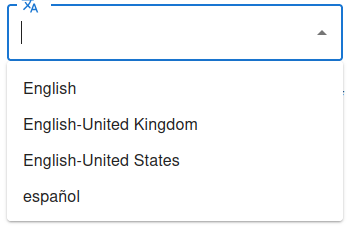
A widget library built over Material UI providing extensions of Autocomplete designed to support selecting a locale.
You can access the github project here.
Installation
Get @crow281/mui-locale-autocomplete from NPM:
npm i --save @crow281/mui-locale-autocomplete@crow281/mui-locale-autocomplete is also dependent on Material UI and Material Icons as peer dependencies:
npm i --save @mui/icons-material @mui/material @emotion/styled @emotion/reactIf you want to be able to use I18nextAutocomplete, you will need to install react-i18next and i18next:
npm i --save react-i18next i18nextDocumentation
The API documentation is available here.
Demo
The sample project is here.
You can view a live demo here.
Sample Code
Here are some quick samples to show you how the widgets can be used.
LocaleAutocomplete
LocaleAutocomplete is a basic class in need of setup.
import { LocaleAutocomplete } from "@crow281/mui-locale-autocomplete";
import { useState } from "react";

/**
 * Displays LocaleAutocomplete in action.
 */
export function LocaleAutocompleteDemo(): JSX.Element {
    //Currently selected locale.
    const [selectedLocale, setSelectedLocale] = useState("Null");

    //List of locales user can pick from.
    const locales: Intl.Locale[] = [
        new Intl.Locale("en"),
        new Intl.Locale("en-GB"),
        new Intl.Locale("en-US"),
        new Intl.Locale("es"),
    ];

    //Function called whenever locale is changed.
    const onChange = (
        event: React.SyntheticEvent<Element, Event>,
        value: Intl.Locale | null,
    ): void => {
        //Records string value of locale.
        let localeString: string;

        //Update currently selected locale.
        //If a locale was selected.
        if (value) {
            //Convert to string.
            localeString = value.baseName;

            //If nothing was selected.
        } else {
            //Tell user selected locale is null.
            localeString = "Null";
        }

        //Update the selected locale.
        setSelectedLocale(localeString);
    };

    return (
        <div>
            <LocaleAutocomplete options={locales} onChange={onChange} />
            <div>Selected Locale: {selectedLocale}</div>
        </div>
    );
}
I18nextAutocomplete
I18nextAutocomplete automatically binds to I18next, so just putting the element where it is needed is enough.
import { I18nextAutocomplete } from "@crow281/mui-locale-autocomplete";
import { useTranslation } from "react-i18next";

/**
 *
 * @returns
 * Widget demonstrating I18nextAutocomplete
 */
export function I18nextAutocompleteDemo() {
    //Fetch localization.
    const { t, i18n } = useTranslation();

    return (
        <div>
            <I18nextAutocomplete />
            <br />
            <div
                style={{
                    textAlign: "left",
                }}
            >
                Selected Locale: {i18n.language}
            </div>
            <table
                style={{
                    border: "1px solid black",
                }}
            >
                <thead>
                    <tr>
                        <th>Localization Key</th>
                        <th>Translated Value</th>
                    </tr>
                </thead>
                <tbody>
                    <tr>
                        <td>"example.goodbye"</td>
                        <td>{t("example.goodbye")}</td>
                    </tr>
                    <tr>
                        <td>"example.goodDay"</td>
                        <td>{t("example.goodDay")}</td>
                    </tr>
                    <tr>
                        <td>"example.helloWorld"</td>
                        <td>{t("example.helloWorld")}</td>
                    </tr>
                </tbody>
            </table>
        </div>
    );
}