
@ctxwise/ai-sdk-docling
v0.2.0
Published
Vercel AI SDK middleware that turns chat attachments (PDF, Office, images, scans) into LLM-ready text and images with docling-serve, using vision only where OCR is not confident

Maintainers
 uditkumar01
Readme
ai-sdk-docling
Chat attachments any LLM can read. Vercel AI SDK middleware that parses PDFs, scans, Office files and images with docling, and sends the vision model only what OCR can't read.


Quick start · Examples · How it works · Configuration · Results · Server · Contributing
Features
- Every attachment works. PDF, scans, DOCX/DOC, PPTX/PPT, XLSX/XLS, ODF, RTF, EPUB, HTML, CSV, images, plain text. OpenAI's provider throws on anything but PDFs and images; here every file becomes parts the model accepts.
- OCR for text, vision for the rest. Docling reads layout, text and tables; charts and photos go to the model as images; only pages docling reads unreliably (by its own per-page confidence) go as page images.
- Structure kept. Tables as Markdown with merged headers, slide numbers, speaker notes, sheet names, and the data behind PowerPoint and Excel charts.
- Any model setup. One vision model, or a separate
visionModelthat reads images into text for a main model. - Production-minded. Parse cache keyed by content hash, file/page/time limits, no server-side URL fetching (SSRF), sanitized names, safe error notes, CPU-only self-hosted docling.
- Measured. Tuned on OmniDocBench; compared with docling alone, PyMuPDF4LLM and MarkItDown.
| 88 hard pages (handwriting, tables, charts, layouts) | This project | docling alone | PyMuPDF4LLM | MarkItDown + OCR | |---|---|---|---|---| | Text error (lower is better) | 0.112 | 0.171 | 0.311 | 0.166 | | Table accuracy, TEDS (higher is better) | 79.1 | 68.6 | 35.0 | 0.0 | | Pages sent to an LLM | 40% | 0% | 0% | 100% |
Quick start
1. Install
npm install @ctxwise/ai-sdk-docling # peer dependencies: ai@7, @ai-sdk/provider@42. Start the docling server: ctxwise/docling-serve, docling-serve plus the endpoint this package calls. It never calls an LLM; its key only protects the server:
docker run -d -p 127.0.0.1:5001:5001 -e DOCLING_SERVE_API_KEY=<your key> \
  -e DOCLING_SERVE_MAX_SYNC_WAIT=1800 ghcr.io/ctxwise/docling-serve:latest
Sizing, scaling and production settings: deployment guide.
3. Wrap your model once, at module scope (the parse cache is shared across requests), and use it anywhere
you'd use the plain model: streamText, generateText, a useChat route:
import { openai } from '@ai-sdk/openai';
import { wrapLanguageModel } from 'ai';
import { doclingAttachments } from '@ctxwise/ai-sdk-docling';

export const model = wrapLanguageModel({
  model: openai('gpt-5-mini'),
  middleware: doclingAttachments({ url: process.env.DOCLING_URL!, apiKey: process.env.DOCLING_API_KEY }),
});
Pass experimental_download: noServerDownloads on each call so the AI SDK never fetches user-supplied URLs from
your server. Complete routes and scripts are under Examples.
Examples
Runnable, type-checked examples live in examples/. The most common setups:
// app/api/chat/route.ts
import { openai } from '@ai-sdk/openai';
import { convertToModelMessages, streamText, wrapLanguageModel, type UIMessage } from 'ai';
import { doclingAttachments, noServerDownloads } from '@ctxwise/ai-sdk-docling';

const model = wrapLanguageModel({
  model: openai('gpt-5-mini'),
  middleware: doclingAttachments({ url: process.env.DOCLING_URL!, apiKey: process.env.DOCLING_API_KEY }),
});

export const maxDuration = 300;

export async function POST(req: Request) {
  const { messages }: { messages: UIMessage[] } = await req.json();
  return streamText({
    model,
    messages: await convertToModelMessages(messages),
    experimental_download: noServerDownloads, // never fetch user-supplied URLs server-side (SSRF)
  }).toUIMessageStreamResponse();
}
// app/page.tsx: a standard useChat page; files are sent as data URLs
'use client';
import { useChat } from '@ai-sdk/react';
import { useState } from 'react';
export default function Chat() {
const { messages, sendMessage } = useChat();
const [files, setFiles] = useState<FileList | undefined>();
const [input, setInput] = useState('');
return (
<form onSubmit={(e) => { e.preventDefault(); sendMessage({ text: input, files }); setInput(''); setFiles(undefined); }}>
{messages.map((m) => <div key={m.id}>{m.parts.map((p, i) => (p.type === 'text' ? <p key={i}>{p.text}</p> : null))}</div>)}
<input type="file" multiple onChange={(e) => setFiles(e.target.files ?? undefined)} />
<input value={input} onChange={(e) => setInput(e.target.value)} placeholder="Ask about your files" />
</form>
);
}import { readFile } from 'node:fs/promises';
import { mediaTypeOf, noServerDownloads } from '@ctxwise/ai-sdk-docling';
import { generateText } from 'ai';
const { text } = await generateText({
model, // wrapped as above
experimental_download: noServerDownloads,
messages: [{
role: 'user',
content: [
{ type: 'text', text: 'Summarize this contract and list every deadline.' },
{ type: 'file', data: await readFile('contract.docx'), filename: 'contract.docx',
mediaType: mediaTypeOf('contract.docx') }, // no browser supplies it on the server
],
}],
});import { generateText, jsonSchema, Output } from 'ai';
const { output } = await generateText({
model,
output: Output.object({
schema: jsonSchema<{ figures: { label: string; period: string; value: number }[] }>({
type: 'object',
required: ['figures'],
properties: {
figures: {
type: 'array',
items: {
type: 'object',
required: ['label', 'period', 'value'],
properties: { label: { type: 'string' }, period: { type: 'string' }, value: { type: 'number' } },
},
},
},
}),
}),
messages: [{ role: 'user', content: [
{ type: 'text', text: 'Extract every reported figure.' },
{ type: 'file', data: await readFile('q2.xlsx'), filename: 'q2.xlsx',
mediaType: 'application/vnd.openxmlformats-officedocument.spreadsheetml.sheet' },
] }],
});const model = wrapLanguageModel({
model: openai('gpt-5'),
middleware: doclingAttachments({
url: process.env.DOCLING_URL!,
apiKey: process.env.DOCLING_API_KEY,
visionModel: openai('gpt-5-mini'),
}),
});import { createServer } from 'node:http';
createServer(async (req, res) => {
let body = '';
for await (const chunk of req) body += chunk;
const { messages } = JSON.parse(body);
streamText({ model, messages: await convertToModelMessages(messages), experimental_download: noServerDownloads })
.pipeUIMessageStreamToResponse(res);
}).listen(3000);import { convertWithDocling } from '@ctxwise/ai-sdk-docling';
const { parts, confidence } = await convertWithDocling(await readFile('scan.pdf'), 'scan.pdf', {
url: 'http://127.0.0.1:5001',
apiKey: process.env.DOCLING_API_KEY,
timeoutMs: 600_000,
options: { minConfidence: 0 }, // text only, no page images
});
const markdown = parts.map((p) => (p.type === 'text' ? p.text : '[image]')).join('\n\n');How it works
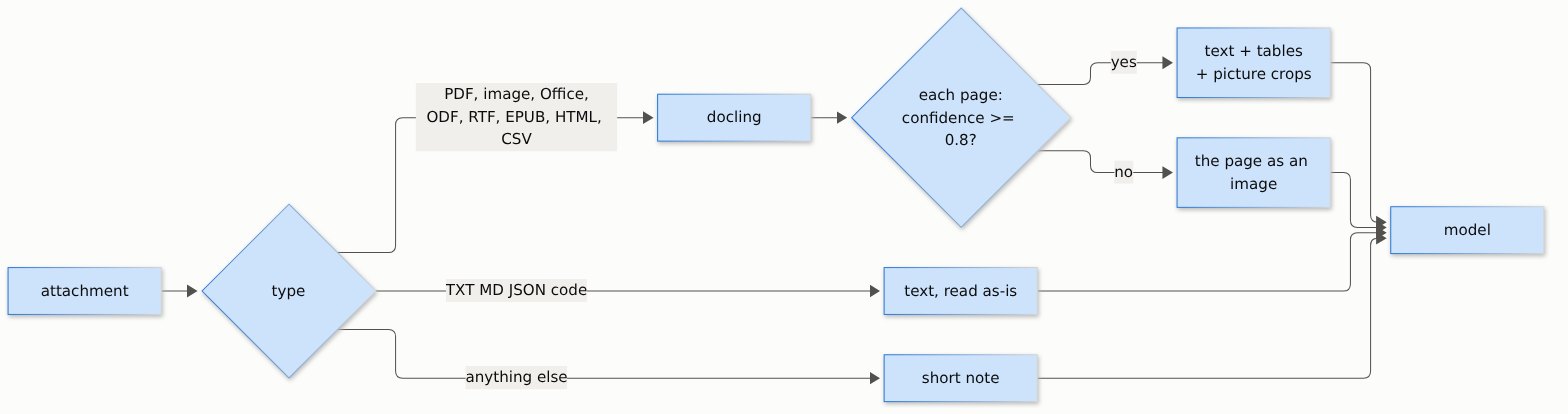
The default is a hybrid, decided page by page:
- Docling reads every page: layout, reading order, text, tables (as Markdown, merged headers kept).
- Pictures go to the vision model as images. Docling crops each chart, diagram, photo or map, labels its type and attaches its caption and the text it read inside it, so a chart arrives with its exact numbers in writing. Logos and icons are dropped; photos go at low detail (cheap), charts at full detail.
- Pages docling reads unreliably go as images. Docling scores each page (OCR + layout, 0-1). Below
minConfidence(0.8), as with handwriting or bad scans, that page goes to the model as an image instead of docling's text. Only that page: the rest of the document stays text. If every page is low, the original PDF goes instead.
Each attachment is wrapped as <document name="..." confidence="0.86"> (the worst page's score), so the model knows
where each file starts and how far to trust its text. A mixed PDF (one clean page, one handwritten page) arrives as:
<document name="mixed.pdf" confidence="0.79">
[page 1, confidence 0.94]
Here is what Docling delivers today: ...   <- docling text
[page 2, confidence 0.79]
<image/png part>                           <- the page image, for the vision model
</document>
Parsed documents are cached by content hash: chat history re-sends every attachment each turn, but each file is parsed once.
Choosing models
One model (default). The model you pass to streamText receives the text and the images and reads both. It
must accept images (and PDFs, for the all-pages-low fallback). With gpt-5-mini this is the best setup measured.
A separate vision model. Set visionModel and the middleware sends every image and fallback page to that model
first, and replaces it with the model's transcription. The model in streamText then receives text only:
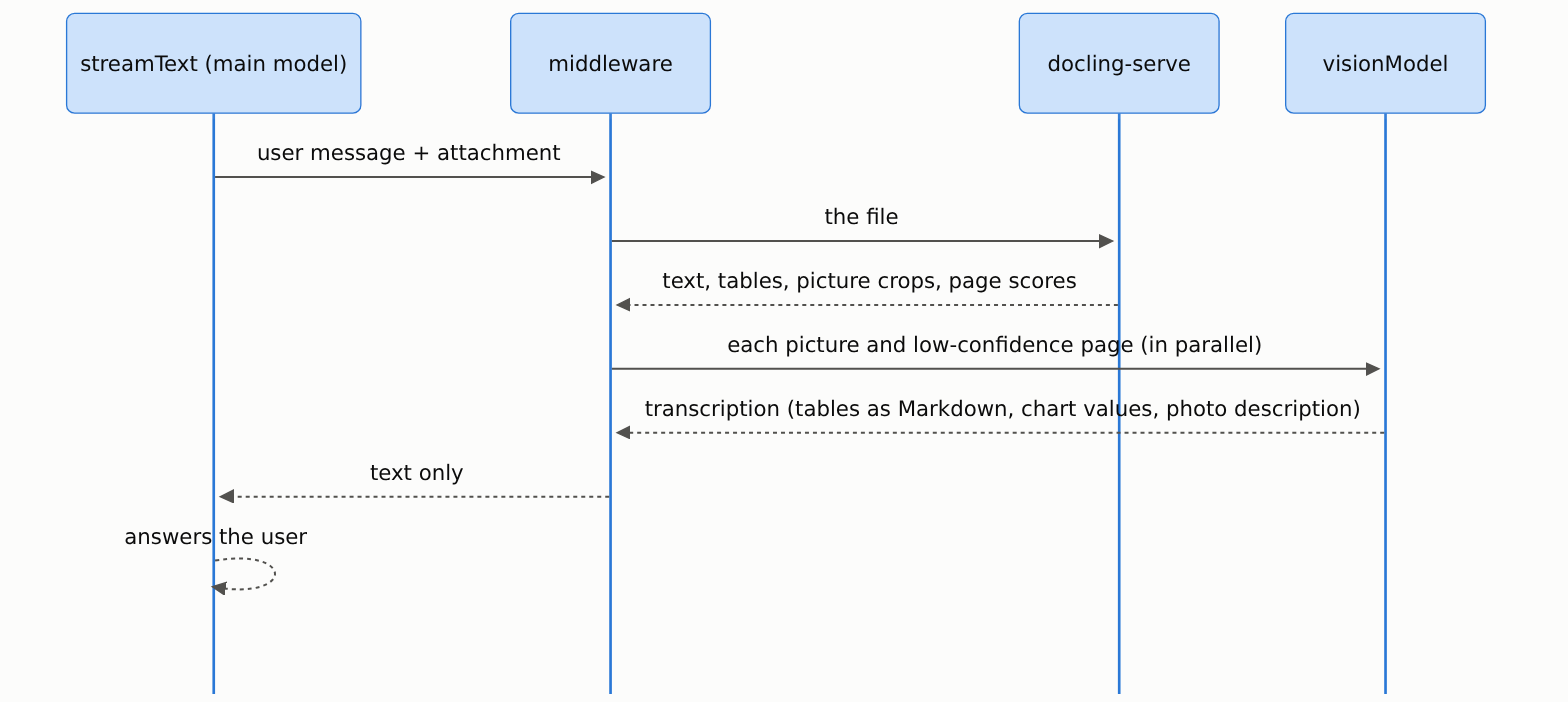
const model = wrapLanguageModel({
  model: openai('gpt-5'),                       // main model: reasoning and the answer; sees text only
  middleware: doclingAttachments({
    url: process.env.DOCLING_URL!,
    apiKey: process.env.DOCLING_API_KEY,
    visionModel: openai('gpt-5-mini'),          // reads images and low-confidence pages into text
  }),
});

streamText({ model, messages }); // unchanged
Any two AI SDK models work, from any providers; the main model can even be text-only. Use it when:
- the main model is expensive: image tokens are billed at the vision model's price instead, or
- the main model can't read images or PDFs at all.
Trade-offs: the main model reads a description of each picture instead of seeing it, and one extra model call is
made per image (in parallel, cached by content hash, so history turns cost nothing). Pick a capable vision model:
on the hard pages gpt-5-mini scored 0.168 text error, gpt-5-nano 0.503, worse than docling alone. The
instruction it gets is visionPrompt.
When the main model is gpt-5-mini, don't set visionModel: it reads the images itself, for less.
Presets
import { doclingAttachments, Mode } from '@ctxwise/ai-sdk-docling';

const base = { url: process.env.DOCLING_URL!, apiKey: process.env.DOCLING_API_KEY };

doclingAttachments(base);                                                // hybrid (default)
doclingAttachments({ ...base, pdf: Mode.Pages, images: Mode.Pages });    // page mode
doclingAttachments({ ...base, minConfidence: 0, maxImages: 0 });         // docling text only
doclingAttachments({ ...base, pdf: Mode.Native, images: Mode.Native });  // no docling for PDFs and images
| Preset | Text error | Reading order | Tables (TEDS) | Input tokens / page | Use when | |---|---|---|---|---|---| | Hybrid (default) | 0.112 | 0.242 | 79.1 | ~2.2K | general use: best text at 40% of pages as images | | Page mode | 0.111 | 0.217 | 86.3 | ~3.8K | tables and complex layouts matter most | | Docling text only | 0.171 | 0.349 | 68.6 | ~1.1K | lowest cost; pictures become caption lines | | Native | none | none | none | provider's | trusted digital PDFs, speed first; Office files still use docling |
Measured on the 88 hard pages with gpt-5-mini. In page mode every PDF page and image goes as an image, plus
docling's text on dense pages without tables (vision alone misreads small print). A photo uploaded on its own always
reaches the model, whatever the preset.
Configuration
doclingAttachments(options): only url is required.
What goes where
| Option | Default | |
|---|---|---|
| pdf | 'docling' | 'docling' hybrid · 'pages' page images · 'native' the provider reads the PDF |
| images | 'docling' | the same three modes for image attachments |
| minConfidence | 0.8 | pages below this docling confidence go as images; 0 = never |
| visionModel | unset | a separate model that turns images into text (Choosing models) |
| visionPrompt | built-in | its instruction: exact text and tables, chart values, short photo description |
Pictures
| Option | Default | |
|---|---|---|
| maxImages | 10 | pictures per document: charts, diagrams and tables first, photos last; the rest become a caption line |
| imageDetail | 'low' | detail for photos, signatures and stamps; charts, tables and pages always full detail |
| pictureTextChars | 600 | text docling read inside a chart or diagram, sent next to it; 0 = off |
| skipClasses | ['logo', 'icon'] | picture types never sent |
| minImagePx | 48 | smaller pictures are dropped |
Limits
| Option | Default | |
|---|---|---|
| maxFileBytes | 50 MB | larger files pass through (PDF, images) or get a note |
| maxPages | 100 | pages parsed per document; the model is told when a document was cut |
| maxPageImages | 20 | page images per document; later pages go as text |
| maxTextChars | 200,000 | cap for plain-text attachments |
| denseChars | 3000 | page mode: pages with more text than this also get docling's text |
| timeoutMs | 15 min | per document, including docling's queue |
| cacheMB | 256 | in-process cache of parsed documents |
File types and docling
| Option | Default | |
|---|---|---|
| nativeTypes | OPENAI_NATIVE_TYPES | media types the model accepts as-is (PDF, PNG, JPEG, WEBP, GIF) |
| doclingTypes | DOCLING_TYPES | media types docling parses, mapped to the extension docling needs |
| plainTextTypes | isPlainTextType | media types read as plain text |
| doclingOptions | unset | extra docling-serve options, e.g. { ocr_lang: ['en', 'de'] } |
| fetchUrls | false | download http(s) file URLs server-side (off: SSRF risk) |
| onError | console.warn | receives parse errors; the model only gets a generic note |
Every default is exported as DEFAULTS, and the type tables as DOCLING_TYPES, OPENAI_NATIVE_TYPES and
isPlainTextType, so they can be extended rather than copied:
import { DOCLING_TYPES, doclingAttachments, isPlainTextType, OPENAI_NATIVE_TYPES } from '@ctxwise/ai-sdk-docling';

doclingAttachments({
  ...base,
  maxFileBytes: 20 * 2 ** 20,
  maxPages: 30,
  maxImages: 5,
  // a model that also reads audio: pass it through
  nativeTypes: [...OPENAI_NATIVE_TYPES, 'audio/wav'],
  // don't parse HTML; read it as plain text instead
  doclingTypes: Object.fromEntries(Object.entries(DOCLING_TYPES).filter(([t]) => t !== 'text/html')),
  plainTextTypes: (t) => isPlainTextType(t) || t === 'application/x-ndjson',
  doclingOptions: { ocr_lang: ['en', 'de'] },
});

// a model that reads images but not PDFs: PDFs are always parsed; low-confidence pages go as page images
doclingAttachments({ ...base, nativeTypes: ['image/png', 'image/jpeg', 'image/webp', 'image/gif'] });
Fixed values have named constants, so nothing is typed as a bare string: Mode, ImageDetail, PictureClass,
OcrPreset and TableMode (e.g. pdf: Mode.Pages, skipClasses: [PictureClass.Logo]).
mediaTypeOf(filename) gives the media type for files read on the server, and convertWithDocling is the typed
docling-serve client for use without a model.
Supported documents
| Format | The model receives |
|---|---|
| PDF | text + tables + picture crops; low-confidence pages as images; all pages low: the original PDF |
| PNG, JPEG, WEBP | text + picture crops; low confidence (e.g. a photo): the original image |
| GIF | the original image (docling doesn't read GIF) |
| TIFF, BMP, multi-page TIFF | one PNG per page |
| Word (DOCX, DOC) | Markdown, lists, tables with merged cells, pictures, page header/footer once |
| PowerPoint (PPTX, PPT) | [slide N] markers, bullets, tables, speaker notes, chart data as tables, pictures |
| Excel (XLSX, XLS) | ## Sheet: name + a table per data block, chart data as tables |
| OpenDocument (ODT, ODS, ODP), RTF, EPUB, HTML, CSV, AsciiDoc | Markdown, tables |
| Plain text: text/*, JSON, XML, YAML, TOML, code | the text itself, up to maxTextChars |
| Anything else (audio, video, email, archives) | a one-line note, so the request never fails |
DOC, PPT, XLS and RTF go through LibreOffice, which the docling server image includes.
DOCX: headings, tables and embedded pictures in reading order:
<document name="report.docx">
## Quarterly Report

Revenue grew 12% to 4.2M. The CEO is pictured below.

[image 1 (photograph)]
<image/png part, 104 KB>
Figure 1: Alan Turing, founder.

|Region|Sales|
|-|-|
|EU|1.9M|
|US|2.3M|
</document>
PPTX: slide numbers, speaker notes, the chart's own data:
[slide 1]
# Roadmap 2026
Product planning
Notes: Speaker note: open with the Q3 numbers.
...
[slide 4]
# Sales chart
[chart (bar chart)]
||Sales|
|-|-|
|North|42|
|South|17|
XLSX: sheet names, tables, chart data:
<document name="sales.xlsx">
## Sheet: Sales
|Region|Q1|Q2|
|-|-|-|
|EU|1900000|2100000|
[chart (bar chart): Revenue chart]
...
## Sheet: Notes
|Figures in USD, unaudited.|
</document>
Scanned PDF, confident (0.86): OCR text with the photos as image parts:
<document name="scan.pdf" confidence="0.86">
## Alan Turing

Alan Mathison Turing (23 June 1912 to 7 June 1954) was an English mathematician, computer scientist ...
<image/png part, 104 KB>
Born ... 23 June 1912 Maida Vale, London, England ...
</document>
Photo: nothing to extract (confidence 0.00), so the model gets the image itself:
<document name="person.png" confidence="0.00">
<image/png part, 104 KB>
</document>
Chart inside a PDF: the picture plus the numbers docling read in it:
[image 3 (line chart): Figure 5: Prediction performance ... | text in image: 70 | mAP 0.50:0.95 | 65 | ... | % of DocLayNet training set | 20 | 40 | 60 | 80 | 100]
<image/png part>
Unsupported type:
[attachment "clip.mp4": this file type (video/mp4) can't be read]Pictures of people: vision models describe people but won't identify them from their face. The caption and the surrounding text carry the name, so they are always placed next to the image.
Results
On opendataloader-bench (200 documents), the server's docling text alone, before any vision model, scores 0.888 overall, above published docling (0.882), with the biggest gain on tables (0.921 vs 0.887).
On 88 hard OmniDocBench pages (handwriting, tables, charts, irregular layouts, newspapers), read by gpt-5-mini,
the default routing has the lowest text error (0.112) while sending 40% of pages to the model as images. Charts,
per-page-type results, how the thresholds were chosen, and the comparison with PyMuPDF4LLM and MarkItDown are in
the server's quality report.
Running the docling server
The server is ctxwise/docling-serve: CPU only, about 7 s per page on 4 vCPU / 16 GB. Its deployment guide covers sizing, scaling out behind a load balancer, timeouts and security.
On the app side: the parse cache is in-process (cacheMB); with several app instances, move it to Redis or blob
storage keyed by the same sha256. The middleware never downloads user-supplied URLs (pass noServerDownloads so the
AI SDK doesn't either), sanitizes file names, and never shows internal errors to the model.
Limitations
- Docling on CPU takes seconds per page; long documents are cut at
maxPages. - Confidence is per page, not per picture: pictures always go to the model as images.
- The 0.8 threshold was calibrated on single pages; multi-page documents are routed page by page.
- Academic papers are a weak spot: some score just under 0.8 and go to vision, which reads them worse than docling did (0.15 vs 0.04 text error).
- Audio, video and email are out of scope (the model gets a note).
Contributing
Issues and pull requests are welcome; see CONTRIBUTING.md for setup, tests, commit style and how to benchmark routing changes. Please report security issues privately (SECURITY.md). This project follows a code of conduct; changes are listed in CHANGELOG.md.
Acknowledgements
Built on docling and docling-serve, the Vercel AI SDK, and evaluated with OmniDocBench.