
@cutos/cli
v1.1.2
Published
CUTOS command line tools for Capability, Provider and LWA development.


Readme
@cutos/cli
CUTOS command line tools for Capability, Provider and LWA development.
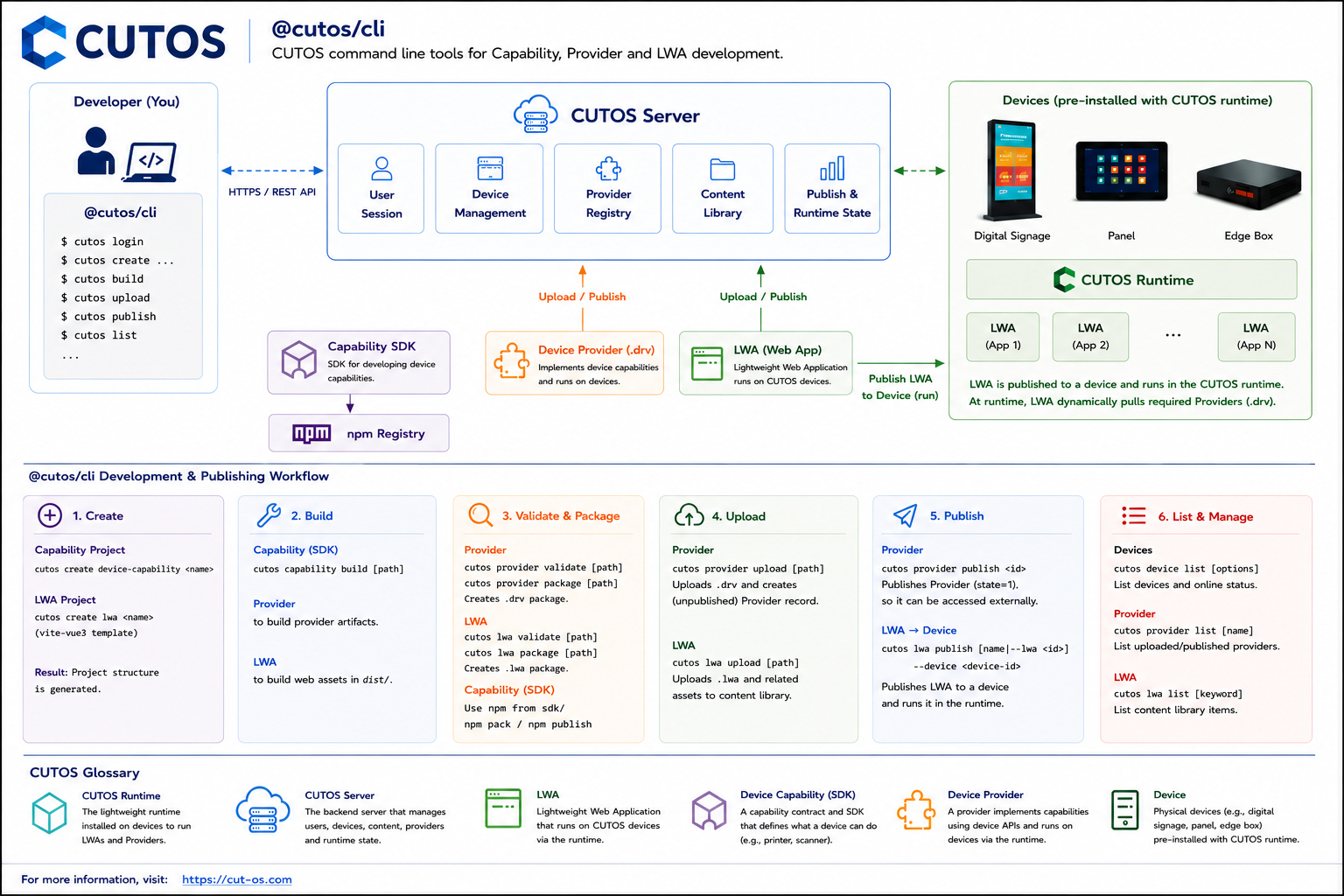
Install
npm install -g @cutos/cliOr install it in a project and prefix commands with npx:
npm install --save-dev @cutos/cli
npx cutos --version
During local development:
npm install
npm run build
node dist/index.js --help
Commands
cutos --help
cutos --version
cutos login --username <username>
cutos device list
cutos create lwa <name>
cutos create lwa <name> --template vite-vue2-js
cutos create device-capability <name>
cutos capability build [path]
cutos provider build [path]
cutos provider validate [path]
cutos provider package [path]
cutos provider upload [path]
cutos provider list [name]
cutos provider publish <id>
cutos lwa build [path]
cutos lwa publish [name] --device <device-id>
cutos lwa list [name]
cutos lwa package [path]
cutos lwa upload [path]
cutos lwa validate [path]
cutos create device-capability creates a CUTOS 4.0 Device Capability project containing one npm SDK and one Server Provider:
cutos create device-capability printer
cd printer
npm install

cd sdk
cutos capability build
npm pack
npm publish

cd ../provider
cutos provider build
cutos login --username office
cutos provider upload
cutos provider list device-printer-provider
cutos provider publish <id>
The command uses <name> as the raw deviceType. Core derives capability.device.<name>, while the generated Provider manifest uses device-<name> for compatibility with CUTOS Server.
The generated SDK package is named @cutos/device-<name>. The default Provider package is device-<name>-provider; concrete implementations can append a vendor or model identifier such as device-<name>-provider-r17.
cutos capability build treats capability.contract.ts as the editable source of truth. It regenerates capability.contract.json, the SDK and Provider types, and provider/config.json, then builds only the Capability SDK in sdk/. The SDK package version must match the Capability Contract version.
Capability SDK packaging and publishing use the native npm workflow from the sdk/ directory so npm continues to manage registry configuration and authentication:
cd sdk
npm pack
npm publish
cutos provider validate accepts either a Capability project directory, its provider/ directory, or a packaged .drv file. cutos provider package creates provider/release/<provider-name>-v<version>.drv.
cutos provider upload without a path validates the current Provider, creates a fresh .drv in provider/release/, checks metadata with POST /driver/check, uploads the package through POST /file, and creates an unpublished Provider record through POST /driver. It returns the Provider id with state=0.
cutos provider list [name] lists uploaded and published Provider records and displays their id, version, type, state, and platform. The name argument is a server keyword filter, not an exact match, so hello can also match hello-device. Use the full Provider name for a narrower result and --all to fetch every page.
cutos provider publish <id> calls PUT /driver/{id}/publish and changes the uploaded Provider to state=1. Uploaded Providers are private by default, and both commands use the session saved by cutos login.
cutos create lwa creates a project from the official vite-vue3 template by default:
cutos create lwa my-lwa
cd my-lwa
npm install
cutos lwa build

cutos login --username office
cutos lwa upload
cutos lwa list my-lwa
cutos device list --online
cutos lwa publish --device <device-id>
Use cutos create lwa my-lwa --template vite-vue3 to select the default Vue 3 + TypeScript template explicitly, or cutos create lwa my-lwa --template vite-vue2-js for Vue 2.7 + JavaScript. cutos lwa upload uploads the freshly built .lwa; device list supplies the target id used by lwa publish.
cutos lwa validate supports:
- A build output directory such as
dist/. - A packaged
.lwazip archive.
When [path] is omitted, the CLI validates ./dist if it exists, otherwise it validates the current directory.
The validator follows docs/CUTOS-LWA-Package-Spec-v0.md.
The official vite-vue3 and vite-vue2-js LWA templates are bundled in this package, so cutos create lwa works after npm installation.
cutos lwa build runs the target project's npm run build:app, validates dist/, and creates release/<config.name>-v<config.version>.lwa. The dist/ directory contains only runnable Web assets; release/ contains publishable LWA packages.
cutos lwa publish publishes an uploaded LWA to a CUTOS device/sign. The device id is the ID shown by cutos device list. When [name] is omitted, it reads public/config.json and publishes the latest exact-name version for config.name. Use --lwa with the id shown by cutos lwa list when you need to publish an exact LWA.
cutos lwa publish --device 1433
cutos lwa publish my-lwa --device 1433
cutos lwa publish --lwa 3048 --device 1433
cutos lwa publish --device 1433 --dry-run
cutos lwa publish --device 1433 --draft-only
--dry-run resolves the target LWA and device without changing server state. --draft-only sets the LWA as the device draft program without publishing it to the runtime. Full publish requires the target device to be online.
cutos lwa list [keyword] lists uploaded LWA content from the CUTOS content library. The keyword is passed directly to the CUTOS Server fuzzy search, so demo can match multiple Demo applications. When [keyword] is omitted, the command reads public/config.json and uses config.name as the search keyword. Use --all-names to list without a name filter.
cutos lwa list
cutos lwa list my-lwa
cutos lwa list my-lwa --all
cutos lwa list --all-names
cutos lwa package validates a build directory and creates the .lwa package in the sibling release/ directory. When [path] is omitted, it packages ./dist.
cutos login calls the CUTOS Server POST /user/session API and saves the returned session to ~/.cutos/config.json.
The default server is https://cut-os.com/rest/sv.
cutos login --username admin
cutos login --server http://host/rest/sv --username admin
For automation:
echo "$CUTOS_PASSWORD" | cutos login --server http://host/rest/sv --username admin --password-stdincutos device list lists CUTOS devices visible to the current account. In the current server API, this command reads device/sign rather than device/box. It shows device id, device name, and online/offline status.
cutos device list
cutos device list --online
cutos device list --offline
cutos device list --key lobby
cutos device list --all
cutos lwa upload validates the package, creates a CUTOS content record, uploads thumbnail.png when present, and uploads the .lwa file with CLI progress output. It uses OSS upload automatically for CLOUD servers and the multipart content upload API for local servers.
cutos lwa upload
cutos lwa upload release/my-lwa-v1.0.0.lwa
cutos lwa upload --folder-id 12 --name my-lwa-v1.0.0
cutos lwa upload --upload-mode oss
Planned Commands
cutos lwa dev