npm package discovery and stats viewer.

Discover Tips

  • General search

    [free text search, go nuts!]

  • Package details

    pkg:[package-name]

  • User packages

    @[username]

Sponsor

Optimize Toolset

I’ve always been into building performant and accessible sites, but lately I’ve been taking it extremely seriously. So much so that I’ve been building a tool to help me optimize and monitor the sites that I build to make sure that I’m making an attempt to offer the best experience to those who visit them. If you’re into performant, accessible and SEO friendly sites, you might like it too! You can check it out at Optimize Toolset.

About

Hi, 👋, I’m Ryan Hefner  and I built this site for me, and you! The goal of this site was to provide an easy way for me to check the stats on my npm packages, both for prioritizing issues and updates, and to give me a little kick in the pants to keep up on stuff.

As I was building it, I realized that I was actually using the tool to build the tool, and figured I might as well put this out there and hopefully others will find it to be a fast and useful way to search and browse npm packages as I have.

If you’re interested in other things I’m working on, follow me on Twitter or check out the open source projects I’ve been publishing on GitHub.

I am also working on a Twitter bot for this site to tweet the most popular, newest, random packages from npm. Please follow that account now and it will start sending out packages soon–ish.

Open Software & Tools

This site wouldn’t be possible without the immense generosity and tireless efforts from the people who make contributions to the world and share their work via open source initiatives. Thank you 🙏

© 2026 – Pkg Stats / Ryan Hefner

@cyco77/pptb-plugin-documentation-generator

v0.3.0

Published

A Power Platform Toolbox tool to show plugin details and generate documentation.

Readme

Plugin Documentation Generator

Screenshots

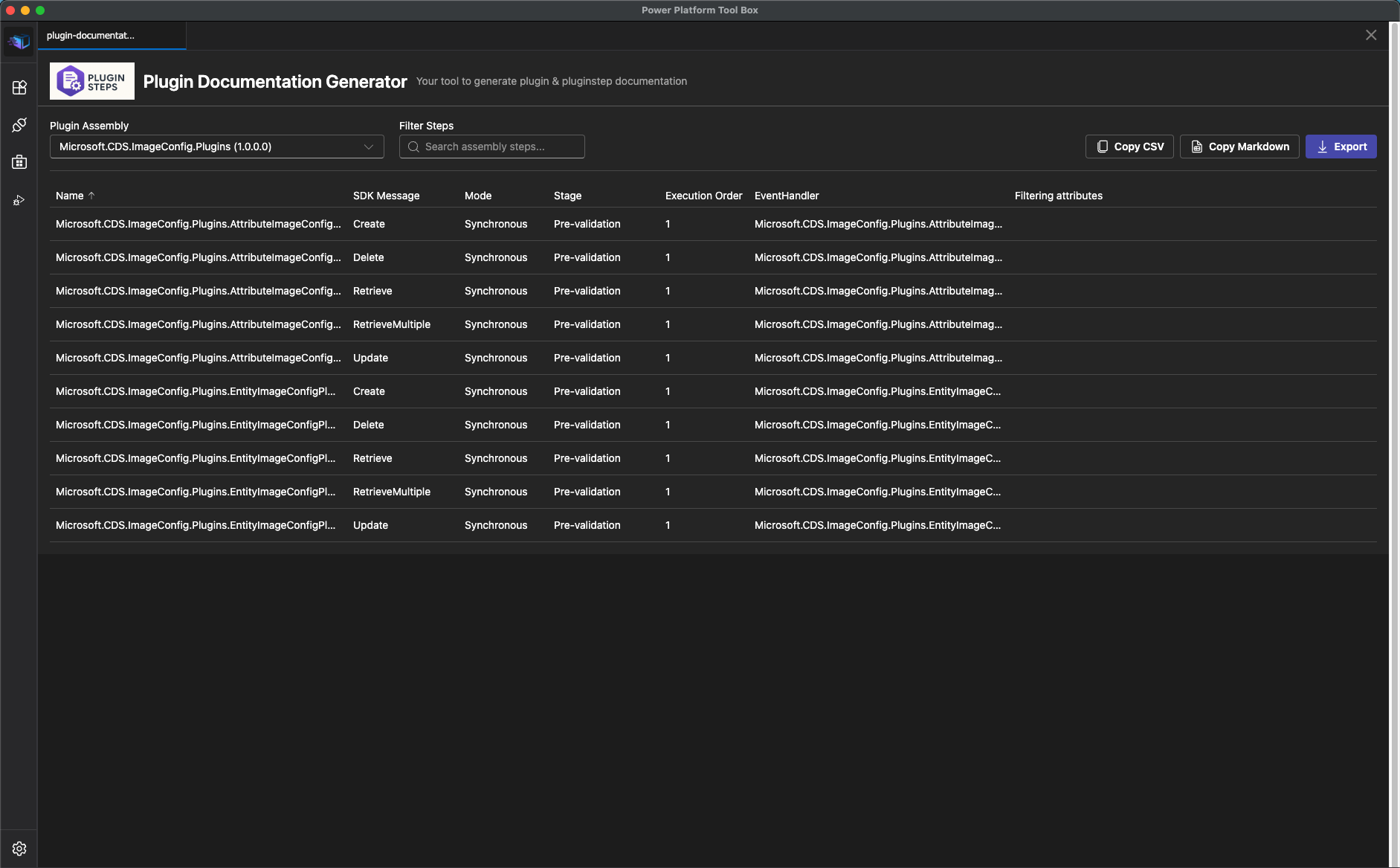
Dark Theme

Plugin Documentation Generator - Dark Theme

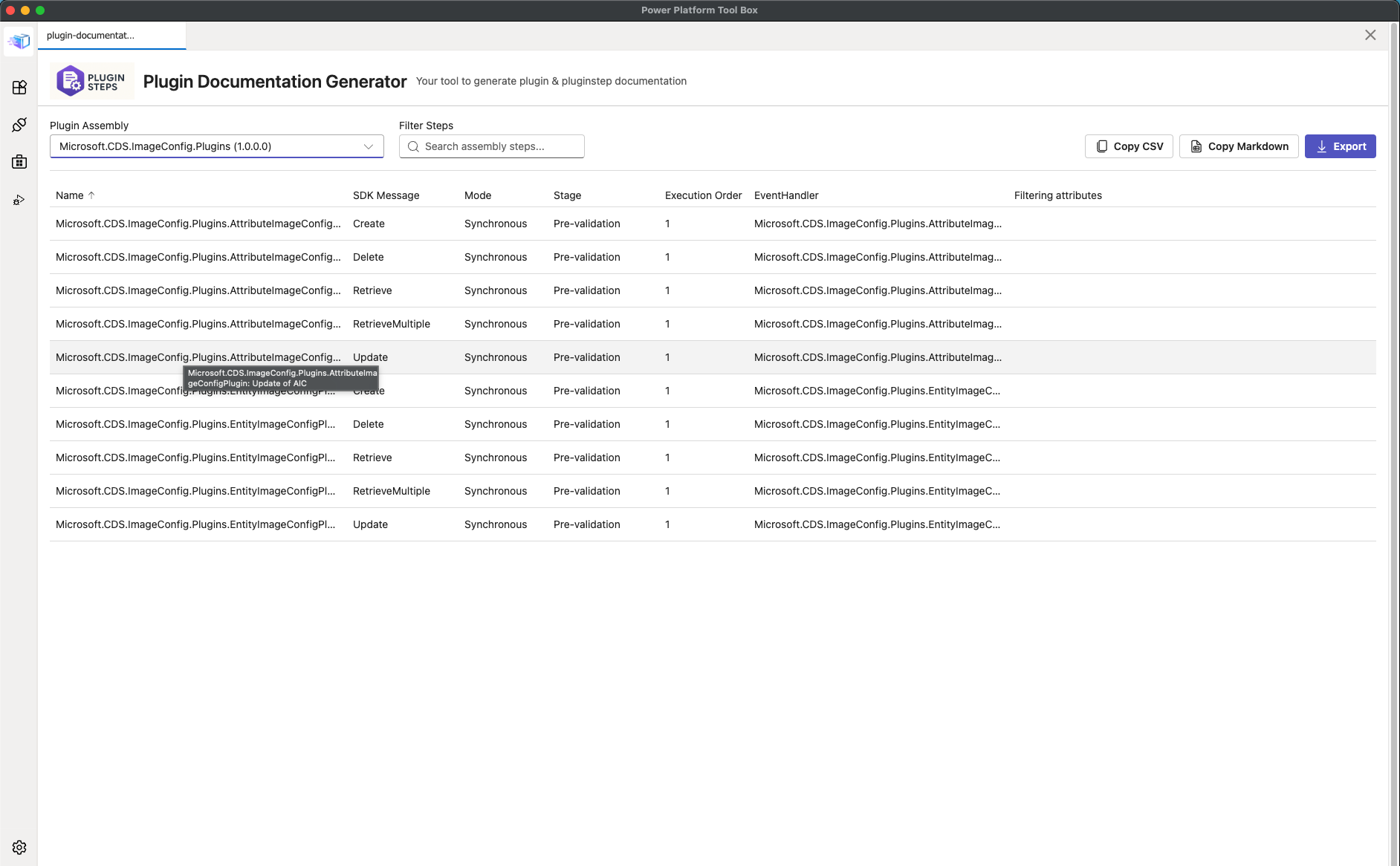
Light Theme

Plugin Documentation Generator - Light Theme

Features

Core Capabilities

  • 🔌 Plugin Assembly Browser - View all plugin assemblies in your Dynamics 365 environment
  • 📋 Plugin Step Details - Display detailed information about SDK message processing steps
  • 🔍 Advanced Filtering - Filter assemblies by name and search steps by any property
  • 📊 Sortable Data Grid - Sort plugin steps by any column with resizable columns
  • 📤 Multiple Export Formats:
    • CSV file export
    • Copy to clipboard as CSV
    • Copy to clipboard as Markdown table
  • 📢 Visual Notifications - Toast notifications for all operations
  • 📝 Event Logging - Track all operations and API calls in real-time
  • 🎨 Theme Support - Automatic light/dark theme switching based on PPTB settings

Technical Stack

  • ✅ React 18 with TypeScript
  • ✅ Fluent UI React Components for consistent Microsoft design
  • ✅ Vite for fast development and optimized builds
  • ✅ Power Platform Toolbox API integration
  • ✅ Dataverse API for querying plugin data
  • ✅ Custom hooks for state management
  • ✅ Centralized logging service
  • ✅ Hot Module Replacement (HMR) for development

Structure

pptb-plugin-documentation-generator/
├── src/
│   ├── components/
│   │   ├── AssemblySteps.tsx      # Data grid for plugin steps
│   │   ├── EventLog.tsx           # Real-time event log display
│   │   ├── Filter.tsx             # Assembly and text filtering
│   │   ├── Overview.tsx           # Main container component
│   │   └── ToolBar.tsx            # Action buttons toolbar
│   ├── hooks/
│   │   ├── useConnection.ts       # Dataverse connection management
│   │   ├── useEventLog.ts         # Event logging hook
│   │   └── useToolboxEvents.ts    # PPTB event subscription
│   ├── mappers/
│   │   ├── pluginAssemblyMapper.ts      # Map API responses to models
│   │   └── pluginAssemblyStepMapper.ts  # Map step data to models
│   ├── services/
│   │   ├── dataverseService.ts    # Dataverse API queries
│   │   └── loggerService.ts       # Centralized logging singleton
│   ├── types/
│   │   ├── pluginAssembly.ts      # Plugin assembly type definitions
│   │   └── pluginAssemblyStep.ts  # Plugin step type definitions
│   ├── utils/
│   │   └── exportUtils.ts         # Export and clipboard utilities
│   ├── App.tsx                    # Main application component
│   ├── main.tsx                   # Entry point
│   └── index.css                  # Global styling
├── dist/                          # Build output
├── index.html
├── package.json
├── tsconfig.json
└── vite.config.ts

Installation

Prerequisites

  • Node.js >= 18.0.0
  • npm or yarn
  • Power Platform Toolbox installed

Setup

  1. Clone the repository:
git clone <repository-url>
cd pptb-plugin-documentation-generator
  1. Install dependencies:
npm install

Development

Development Server

Start development server with HMR:

npm run dev

The tool will be available at http://localhost:5173

Watch Mode

Build the tool in watch mode for continuous updates:

npm run watch

Production Build

Build the optimized production version:

npm run build

The output will be in the dist/ directory.

Preview Build

Preview the production build locally:

npm run preview

Usage

In Power Platform Toolbox

  1. Build the tool:

    npm run build
  2. Package the tool (creates npm-shrinkwrap.json):

    npm run finalize-package
  3. Install in Power Platform Toolbox using the PPTB interface

  4. Connect to a Dataverse environment

  5. Launch the plugin to view assemblies and steps

User Interface

Filter Section

  • Plugin Assembly Dropdown: Select an assembly to view its steps
  • Filter Steps SearchBox: Real-time search across all step properties (name, SDK message, mode, stage, rank, event handler, filtering attributes)

Action Buttons

  • Export CSV: Download plugin steps as a CSV file
  • Copy CSV: Copy steps to clipboard in CSV format
  • Copy Markdown: Copy steps to clipboard as a formatted Markdown table

Data Grid

  • Click column headers to sort
  • Drag column borders to resize
  • View tooltips on hover for full text content

Event Log

  • Monitor all operations and API calls
  • Color-coded log levels (info, success, warning, error)
  • Auto-scrolls to show latest entries

API Usage

The tool demonstrates various Power Platform Toolbox and Dataverse API features:

Connection Management

// Get current connection
const connection = await window.toolboxAPI.getConnection();
console.log(connection.connectionUrl);

// Listen for connection changes
window.toolboxAPI.onToolboxEvent((event, payload) => {
  if (event === "connection:updated") {
    // Refresh data with new connection
  }
});

Dataverse Queries

// Query plugin assemblies
const assemblies = await window.dataverseAPI.executeQuery(
  `pluginassemblies?$select=name,version,pluginassemblyid&$filter=...`
);

// Query SDK message processing steps
const steps = await window.dataverseAPI.executeQuery(
  `sdkmessageprocessingsteps?$select=...&$filter=...&$expand=...`
);

Notifications

await window.toolboxAPI.utils.showNotification({
  title: "Export Successful",
  body: "Exported 15 plugin assembly steps",
  type: "success",
  duration: 3000,
});

File Operations

// Save file
await window.toolboxAPI.utils.saveFile("plugin_steps.csv", csvContent);

// Copy to clipboard
await window.toolboxAPI.utils.copyToClipboard(content);

Theme Management

// Get current theme
const theme = await window.toolboxAPI.utils.getCurrentTheme();
// Returns 'light' or 'dark'

// Listen for theme changes
window.toolboxAPI.onToolboxEvent((event) => {
  if (event === "settings:updated") {
    updateThemeBasedOnSettings();
  }
});

Event Subscription

// Subscribe to all PPTB events
window.toolboxAPI.onToolboxEvent((event, payload) => {
  console.log("Event:", event);
  console.log("Data:", payload.data);

  // Handle specific events
  switch (event) {
    case "connection:created":
    case "connection:updated":
      refreshConnection();
      break;
    case "connection:deleted":
      clearData();
      break;
  }
});

Architecture

Custom Hooks

  • useConnection: Manages Dataverse connection state and refresh logic
  • useToolboxEvents: Subscribes to PPTB events and handles callbacks
  • useEventLog: Manages event log state and logger service integration

Services

  • loggerService: Singleton service for centralized logging with callback pattern

    • Methods: info(), success(), warning(), error()
    • Eliminates prop drilling for logging across components
  • dataverseService: Handles all Dataverse API queries

    • Queries plugin assemblies and SDK message processing steps
    • Maps raw API responses to typed models

Export Utilities

  • exportPluginAssemblyStepsToCSV: Export to file
  • copyPluginAssemblyStepsAsCSV: Copy CSV to clipboard
  • copyPluginAssemblyStepsAsMarkdown: Copy Markdown table to clipboard

All export functions support optional notifications for user feedback.

Type Safety

Full TypeScript coverage with:

  • Interface definitions for all data models
  • Type-safe API responses
  • Strongly typed component props
  • PPTB API types from @pptb/types package

Configuration

Vite Build Configuration

The tool uses a custom Vite configuration for PPTB compatibility:

  • IIFE format: Bundles as Immediately Invoked Function Expression for iframe compatibility
  • Single bundle: Uses inlineDynamicImports to avoid module loading issues with file:// URLs
  • HTML transformation: Custom plugin removes type="module" and moves scripts to end of body
  • Chunk size limit: Set to 1000 kB to accommodate Fluent UI bundle size

Data Models

PluginAssembly

{
  pluginassemblyid: string;
  name: string;
  version: string;
}

PluginAssemblyStep

{
  id: string;
  name: string;
  sdkMessage: string;
  mode: string; // Sync/Async
  stage: string; // PreValidation/PreOperation/PostOperation
  rank: number; // Execution order
  eventHandler: string; // Full type name
  filteringattributes: string;
}

Troubleshooting

Build Issues

If you encounter chunk size warnings:

  • The tool uses IIFE format which requires a single bundle
  • Chunk size limit is configured in vite.config.ts
  • This is expected for Fluent UI components

Connection Issues

  • Ensure you're connected to a Dataverse environment in PPTB
  • Check the Event Log for connection-related errors
  • Verify permissions to read plugin assembly data

Theme Not Updating

  • The tool automatically syncs with PPTB theme settings
  • Check console for theme update events
  • Verify PPTB version supports theme API

Contributing

Contributions are welcome! Please:

  1. Fork the repository
  2. Create a feature branch
  3. Make your changes with appropriate TypeScript types
  4. Test the build process
  5. Submit a pull request

GitHub Actions

The project includes automated CI/CD workflows:

CI Workflow (.github/workflows/ci.yml)

Runs on every push and pull request to main and develop branches:

  • Build and Test:

    • Tests on Node.js 18.x and 20.x
    • TypeScript type checking
    • Build verification
    • Uploads build artifacts
  • Lint Check:

    • Runs ESLint if configured
    • Validates code quality
  • Security Audit:

    • Checks for npm package vulnerabilities
    • Fails on critical vulnerabilities
    • Warns on high-severity issues
  • Package Validation:

    • Validates package.json structure
    • Creates npm-shrinkwrap.json
    • Verifies all required fields

Release Workflow (.github/workflows/release.yml)

Triggered when pushing a version tag (e.g., v1.0.0):

  • Builds the project
  • Creates distribution packages (tar.gz and zip)
  • Creates GitHub release with auto-generated notes
  • Attaches build artifacts to release

To create a release:

# Update version in package.json
npm version patch  # or minor, major

# Push with tags
git push origin main --tags

License

MIT - See LICENSE file for details

Author

Lars Hildebrandt