@cyco77/pptb-user-security-utility
v0.6.0
Published
A Power Platform Toolbox tool to show user & team security easily.
Maintainers
Readme
User & Team Security Documentation Generator

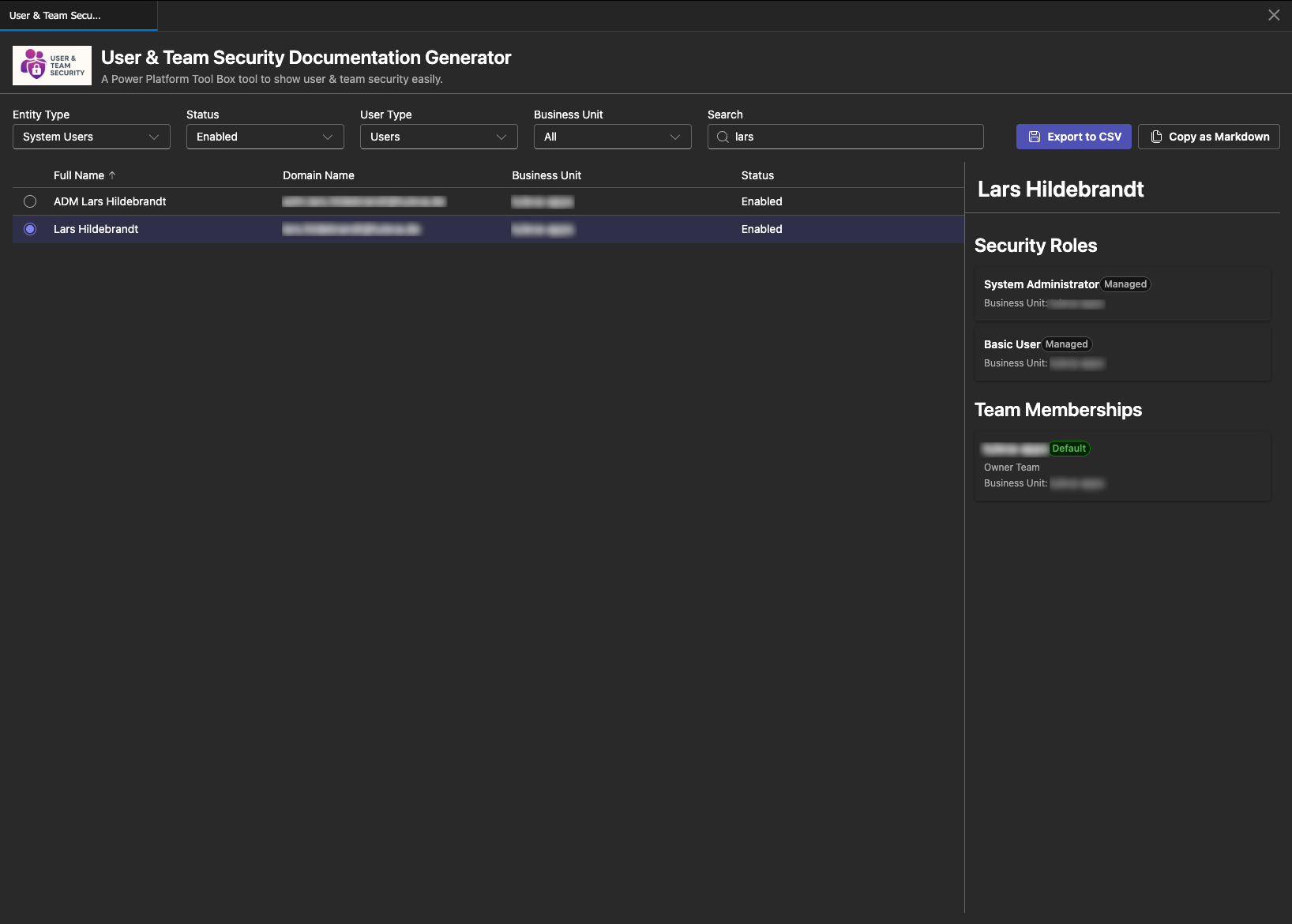
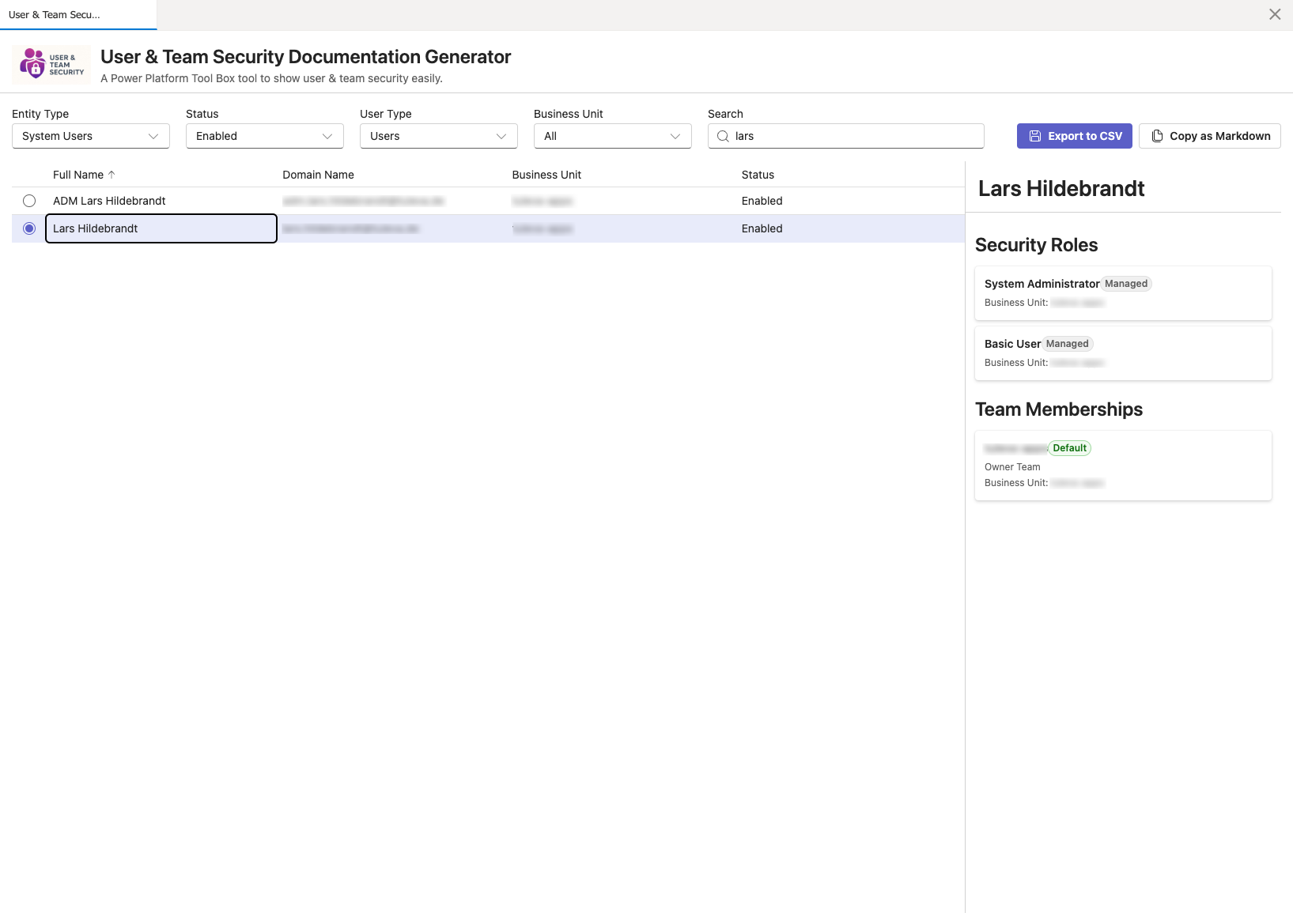
Screenshots
Dark Theme

Light Theme

Features
Core Capabilities
- 👥 User & Team Browser - View all system users and teams in your Dynamics 365 environment
- 🔐 Security Role Details - Display directly assigned security roles for users and teams
- 👔 Team Membership - View all team memberships for system users
- 👥 Team Members - View all system users assigned to a selected team
- 📬 Queue Memberships - View all queue assignments for system users
- 🔍 Advanced Filtering:
- Filter by entity type (System Users / Teams)
- Filter users by status (All / Enabled / Disabled)
- Filter users by type (All / Users / Applications) - defaults to regular users
- Filter by business unit
- Real-time text search across names and domains
- Filter team members in the details panel
- 📊 Interactive Data Grid:
- Single-row selection to view details
- Sortable columns with default sorting by name
- Resizable columns for both users and teams
- Tooltips on hover for full text content
- 📱 Detail Side Panel - Displays selected user/team with:
- All directly assigned security roles with managed status indicators
- Team memberships (for users) with team type and default team badges
- Team members (for teams) with searchable/filterable list
- Queue memberships (for users) with queue type information
- Business unit information
- 📤 Multiple Export Formats:
- CSV Matrix Export - Roles, teams, and queues as columns, users as rows, 'X' marks assignments
- Markdown Export - Copy formatted documentation to clipboard with full details
- UTF-8 encoding with BOM for proper character support (German umlauts, etc.)
- Windows-style line endings for better Excel compatibility
- 📢 Visual Notifications - Toast notifications for successful exports and errors
- 🎨 Theme Support - Automatic light/dark theme switching based on PPTB settings
Technical Stack
- ✅ user-security-utility/
├── src/
│ ├── components/
│ │ ├── DataGridView.tsx # Data grid for users/teams with selection
│ │ ├── Filter.tsx # Entity type, status, user type, and business unit filtering
│ │ ├── Overview.tsx # Main container component with export functionality
│ │ └── SecurityRolesPanel.tsx # Side panel displaying roles and team memberships
│ ├── hooks/
│ │ ├── useConnection.ts # Dataverse connection management
│ │ ├── useToolboxAPI.ts # Toolbox API hook
│ │ └── useToolboxEvents.ts # PPTB event subscription
│ ├── services/
│ │ ├── dataverseService.ts # Dataverse API queries for users, teams, and roles
│ │ └── loggerService.ts # Centralized logging singleton
│ ├── types/
│ │ ├── systemUser.ts # System user type definitions
│ │ ├── team.ts # Team type definitions
│ │ ├── securityRole.ts # Security role type definitions
│ │ └── queue.ts # Queue type definitions
│ ├── App.tsx # Main application component
│ ├── main.tsx # Entry point
│ └── index.css # Global styling
├── icon/ # Application icons
├── screenshots/ # Screenshots for documentationep data to models
├── index.html
├── package.json
├── tsconfig.json
└── vite.config.ts
Installation
Prerequisites
- Node.js >= 18.0.0
- npm oruser-security-utility
- Power Platform Toolbox installed
Setup
- Clone the repository:
git clone <repository-url>
cd pptb-plugin-documentation-generator- Install dependencies:
npm installDevelopment
Development Server
Start development server with HMR:
npm run devThe tool will be available at http://localhost:5173
Watch Mode
Build the tool in watch mode for continuous updates:
npm run watchProduction Build
Build the optimized production version:
npm run buildThe output will be in the dist/ directory.
Preview Build
Preview the production build locally:
npm run previewUsage
In Power Platform Toolbox
Build the tool:
npm run buildPackage the tool (creates npm-shrinkwrap.json): tool to view users and teams
User Interface
Filter Section
- Entity Type Dropdown (150px width): Switch between System Users and Teams
- Status Filter (150px width, Users only): All / Enabled / Disabled
- User Type Filter (150px width, Users only): All / Users / Applications (defaults to Users)
- Business Unit Dropdown (200px width): Filter by business unit
- Search Box (350px width): Real-time search across user/team names, domain names, and business units
Export Buttons (Users only)
- Export to CSV: Downloads a matrix-style CSV where:
- Rows represent users
- Columns represent security roles, team memberships, and queue memberships
- 'X' marks indicate assignments
- Includes user details (name, domain, business unit, status)
- UTF-8 BOM encoding for proper character support
- Comma-delimited with Windows line endings
- Copy as Markdown: Copies detailed report to clipboard with:
- Hierarchical structure per user
- Security roles with managed status and business unit
- Team memberships with type and default indicators
- Queue memberships with queue type information
Data Grid
- Click any row to select and view details
- Selected row is highlighted
- Click column headers to sort (default: sorted by name)
- Drag column borders to resize
- Hover over cells for full text tooltips
- Supports both System Users and Teams views
- Column sizing is reset when switching between entity types
Security Details Panel
Appears on the right when a user or team is selected:
- Header: Shows user/team name
- Security Roles Section: Lists all directly assigned security roles with:
- Role name
- "Managed" badge for managed roles
- Business unit information
- Team Memberships Section (Users only): Lists all team memberships with:
- Team name
- Team type (Owner/Access)
- "Default" badge for default teams
- Business unit information
- Queue Memberships Section (Users only): Lists all queue assignments with:
- Queue name
- Queue type (Private/Public/Unknown)
- Team Members Section (Teams only): Lists all users assigned to the team with:
- Searchable filter box
- User full name
- Domain name
- Business unit information
- "Disabled" badge for disabled users
- Alphabetically sorted by full name
Evensystem users
const users = await window.dataverseAPI.queryData( "systemusers?$select=systemuserid,fullname,domainname,isdisabled,applicationid&$expand=businessunitid($select=businessunitid,name)&$orderby=fullname" );
// Query teams const teams = await window.dataverseAPI.queryData( "teams?$select=teamid,name,teamtype,isdefault&$expand=businessunitid($select=businessunitid,name)&$orderby=name" );
// Query security roles for a user
const roles = await window.dataverseAPI.queryData(
systemusers(${userId})/systemuserroles_association?$select=roleid,name,ismanaged&$expand=businessunitid($select=businessunitid,name)
);
// Query teams for a user const userTeams = await window.dataverseAPI.queryData( `systemusers(${userId})/teammembership_association?$select=teamid,name,teamtype,isdefault&$expand=businessunitid($select=businessunitid,name) The tool demonstrates various Power Platform Toolbox and Dataverse API features:
Connection Management
// Get current connection
const connection = await window.toolboxAPI.getConnection();
console.log(connection.connectionUrl);
// Listen for connection changes
window.toUser security data has been exported to CSV successfully."ata with new connection
}
});Dataverse Queries
// Query system users
const users = await window.dataverseAPI.queryData(
"systemusers?$select=systemuserid,fullname,domainname,isdisabled,applicationid&$expand=businessunitid($select=businessunitid,name)&$orderby=fullname"
);
// Query teams
const teams = await window.dataverseAPI.queryData(
"teams?$select=teamid,name,teamtype,isdefault&$expand=businessunitid($select=businessunitid,name)&$orderby=name"
);
// Query security roles for a user
const roles = await window.dataverseAPI.queryData(
`systemusers(${userId})/systemuserroles_association?$select=roleid,name,ismanaged&$expand=businessunitid($select=businessunitid,name)`
);
// Query teams for a user
const userTeams = await window.dataverseAPI.queryData(
`systemusers(${userId})/teammembership_association?$select=teamid,name,teamtype,isdefault&$expand=businessunitid($select=businessunitid,name)`
);
// Query team members
const teamMembers = await window.dataverseAPI.queryData(
`teams(${teamId})/teammembership_association?$select=systemuserid,fullname,domainname,isdisabled,applicationid&$expand=businessunitid($select=businessunitid,name)`
);
// Query queues for a user
const queues = await window.dataverseAPI.queryData(
`systemusers(${userId})/queuemembership_association?$select=queueid,name,queuetypecode&$orderby=name`
);Notifications
// Success notification
await window.toolboxAPI.utils.showNotification({
title: "Export Successful",
body: "User security data has been exported to CSV successfully.",
type: "success",
});
// Error notification
await window.toolboxAPI.utils.showNotification({
title: "Error Loading Data",
body: `Failed to load data from Dataverse: ${error.message}`,
type: "error",
});File Operations
// Save file with UTF-8 BOM encoding
const csvContent = "\uFEFF" + csvLines.join("\r\n");
await window.toolboxAPI.utils.saveFile(
"user-security-export-2025-12-25.csv",
csvContent
);
// Copy to clipboard
await window.toolboxAPI.utils.copyToClipboard(markdownContent);Theme Management
// Get current theme
const theme = await window.toolboxAPI.utils.getCurrentTheme();
// Returns 'light' or 'dark'
// Listen for theme changes
window.toolboxAPI.onToolboxEvent((event) => {
if (event === "settings:updated") {
updateThemeBasedOnSettings();
}
});EveToolboxAPI**: Provides access to Toolbox API utilities
Services
loggerService: Singleton service for centralized logging
- Methods:
info(),success(),warning(),error() - Eliminates prop drilling for logging across components
- Methods:
dataverseService: Handles all Dataverse API queries
- Queries system users, teams, security roles, team memberships, and queues
- Functions:
loadSystemUsers(),loadTeams(),loadSecurityRolesForUser(),loadSecurityRolesForTeam(),loadTeamsForUser(),loadUsersForTeam(),loadQueuesForUser() - Implements automatic paging for large data sets using
@odata.nextLink - Maps raw API responses to typed models
Components
- Overview: Main container with state management for filtering, selection, and export
- Manages loading states for roles, teams, queues, and team members
- Implements error notifications for failed API calls
- Handles CSV and Markdown export logic
- Filter: Provides all filtering controls with optimized dropdown widths
- Entity type (150px), status (150px), user type (150px)
- Business unit (200px), search box (350px)
- DataGridView: Sortable, resizable data grid using Fluent UI DataGrid
- Separate grids for users and teams with unique keys to reset column sizing
- Single-row selection mode
- Cell tooltips for full text display
- SecurityRolesPanel: Side panel displaying comprehensive details
- Security roles with managed badges
- Team memberships with type and default badges
- Queue memberships with type information
- Team members with searchable filter and sorted display
Export Features
- CSV Export: Creates a matrix format with UTF-8 BOM encoding
- Collects all unique roles, teams, and queues across filtered users
- Uses comma delimiter with Windows line endings (
\r\n) - Marks assignments with 'X'
- Includes user metadata (name, domain, business unit, status)
- Progress indicator during export
- Markdown Export: Generates hierarchical documentation
- Section per user with full details
- Nested lists for security roles, team memberships, and queue memberships
- Includes metadata like managed status, team types, queue types
- Copies to clipboard with success notification
Architecture
Custom Hooks
- useConnection: Manages Dataverse connection state and refresh logic
- useToolboxEvents: Subscribes to PPTB events and handles callbacks
- useToolboxAPI: Provides access to Toolbox API utilities
Data Models
SystemUser
{
systemuserid: string;
fullname: string;
domainname: string;
businessunitid?: {
businessunitid: string;
name: string;
};
isdisabled: boolean;
applicationid: string | null; // Populated for application users
}Team
{
teamid: string;
name: string;
teamtype: number; // 0 = Owner, 1 = Access
businessunitid?: {
businessunitid: string;
name: string;
};
isdefault: boolean;
}SecurityRole
{
roleid: string;
name: string;
businessunitid?: {
businessunitid: string;
name: string;
};
ismanaged: boolean;
}Queue
{
queueid: string;
name: string;
queuetypecode?: number; // 1 = Private, 2 = Public
}Full TypeScript coverage with:
- Interface definitions for all data models
- Type-safe API responses
- Strongly typed component props
- PPTB API types from
@pptb/typespackage
Configuration
Vite Build Configuration
The tool uses a custom Vite configuration for PPTB compatibility:
- IIFE format: Bundles as Immediately Invoked Function Expression for iframe compatibility
- Single bundle: Uses
inlineDynamicImportsto avoid module loading issues with file:// URLs - HTML transformation: Custom plugin removes
type="module"and moves scripts to end of body - Chunk size limit: Set to 1000 kB to accommodate Fluent UI bundle size
Data Models
PluginAssembly
{
pluginassemblyid: string;
name: string;
version: string;
}PluginAssemblyStep
{
id: string;
name: string;
sdkMessage: string;
mode: string; // Sync/Async
stage: string; // PreValidation/PreOperation/PostOperation
rank: number; // Execution order
eventHandler: string; // Full type name
filteringattributes: string;
}Troubleshooting
Build Issues
If you encounter chunk size warnings:
- The tool uses IIFE format which requires a single bundle
- Chunk size limit is configured in
vite.config.ts - This is expected for Fluent UI components
Connection Issues
- Ensure you're connected to a Dataverse environment in PPTB
- Check the Event Log for connection-related errors
- Verify permissions to read system user, team, security role, and queue data
- Error notifications will appear automatically when API calls fail
CSV Encoding Issues
- The tool uses UTF-8 BOM encoding for proper character support
- German umlauts (ö, ä, ü) and special characters should display correctly
- Uses comma delimiter with Windows line endings for Excel compatibility
- If issues persist, try opening the CSV in a text editor first to verify encoding
Theme Not Updating
- The tool automatically syncs with PPTB theme settings
- Check console for theme update events
- Verify PPTB version supports theme API
Contributing
Contributions are welcome! Please:
- Fork the repository
- Create a feature branch
- Make your changes with appropriate TypeScript types
- Test the build process
- Submit a pull request
GitHub Actions
The project includes automated CI/CD workflows:
CI Workflow (.github/workflows/ci.yml)
Runs on every push and pull request to main and develop branches:
Build and Test:
- Tests on Node.js 18.x and 20.x
- TypeScript type checking
- Build verification
- Uploads build artifacts
Lint Check:
- Runs ESLint if configured
- Validates code quality
Security Audit:
- Checks for npm package vulnerabilities
- Fails on critical vulnerabilities
- Warns on high-severity issues
Package Validation:
- Validates package.json structure
- Creates npm-shrinkwrap.json
- Verifies all required fields
Release Workflow (.github/workflows/release.yml)
Triggered when pushing a version tag (e.g., v1.0.0):
- Builds the project
- Creates distribution packages (tar.gz and zip)
- Creates GitHub release with auto-generated notes
- Attaches build artifacts to release
To create a release:
# Update version in package.json
npm version patch # or minor, major
# Push with tags
git push origin main --tagsLicense
MIT - See LICENSE file for details
Author
Lars Hildebrandt